Jump from the ground
Students fix a jump that works in mid-air by putting it inside an if that checks the player is on the floor, then build a runner game.
Classroom resources
Load these into Waypoints Prepare: choose Load URL and paste the copied address, or download the file and import it. In Prepare, the worksheet's Teacher edition shows the answers; the student copy hides them.
Students will be able to
- I can make a jump that only works from the ground.
- I can explain why a jump needs that check.
- I can build a runner with gravity, a floor, a jump and obstacles.
Timing
Predict and Run 7 min · Investigate 10 min · Modify 8 min · Mix it up 3 min · Make 13 min · Kangaroo 4 min
Before class
A jump sets vy to a negative number (up). On its own, it works on every press, even in mid-air, so a player can climb the sky. The fix is an if around the jump: if player bottom ≥ 100 (the floor's height). The floor if from last lesson puts the bottom back at exactly 100 every frame the player sinks, so standing means bottom is 100. In real platformers, tilemaps give a ready-made "is on a wall" test; this is the same idea by hand.
Running the lesson
- Predict: let students find the flying in the Run.
- Investigate: the trace shows the if saying no anywhere above the floor.
- Modify: the fix is two blocks: an if and its question.
- Mix it up: gravity, from last lesson.
- Make: the runner reuses the fixed jumper; the new parts are the timer and the overlap.
In class
On the slides at these points. Students can do the whole lesson on their own; these are for the room. In the deck, the Run, Modify and Make slides have the live playground in them (the tutorial link is the backup), and the notes above are in each slide's speaker notes.
- Feet on the floor (investigate, 3 min)
Students jump on the spot. Ask: can you jump again while you are in the air?
Your legs need the floor. The if is the game's version of that.
- Runner race (end, 4 min)
Play the next pair's runner. How many rocks can you jump before you lose?
The hard part (on purpose)
Where the check belongs: around the jump, in the A event. Ask where the player must be for a jump to make sense.
When students get stuck
| What you will see | A question to ask | The fix |
|---|---|---|
| The player can fly by pressing A again and again. | Where must the player be for a jump to make sense? | Put an if around set vy in the A event: only when bottom ≥ 100. |
| The jump never works now. | Is the question ≥ 100, or > 100? | Standing means bottom is exactly 100, so use ≥. |
| The rocks float in mid-air, or pass under the player. | What y do the rocks start at? | Near the floor: about 98, so they sit on y 100. |
Answers to the checks
- Predict: You press A three times, quickly, one press after another. What does the player do?
Each press sets vy to -150 again, even in mid-air, so the player keeps rising. Nothing checks whether the player is on the ground. - Leo's jump: Leo's player flies off the top when he presses A again and again. Why?
Nothing checks the player is on the ground, so every press jumps again, even in mid-air
A jump only sets vy to -150. Leo's A event does that on every press, wherever the player is, so each press in the air starts a new jump higher up. - When does A jump?: This version jumps only if player bottom ≥ 100. Fill in what a press of A does.
jumps, nothing, nothing
The floor puts the bottom at exactly 100. Anywhere above that, the player is in the air, so the if says no. - Why 100?: Why is the floor's bottom exactly 100 when the player is standing?
The floor if sets it back to 100 every frame the player sinks below it
Every frame, if the bottom has gone past 100, the floor if puts it back at 100: so standing means bottom is 100. - Mix it up: A sprite starts still with ay 200. What is its vy after 1.5 seconds?
300
Gravity adds 200 every second: 1.5 × 200 = 300.
Solutions
One possible solution for each task. Other correct programs are fine.
Modify › No flying
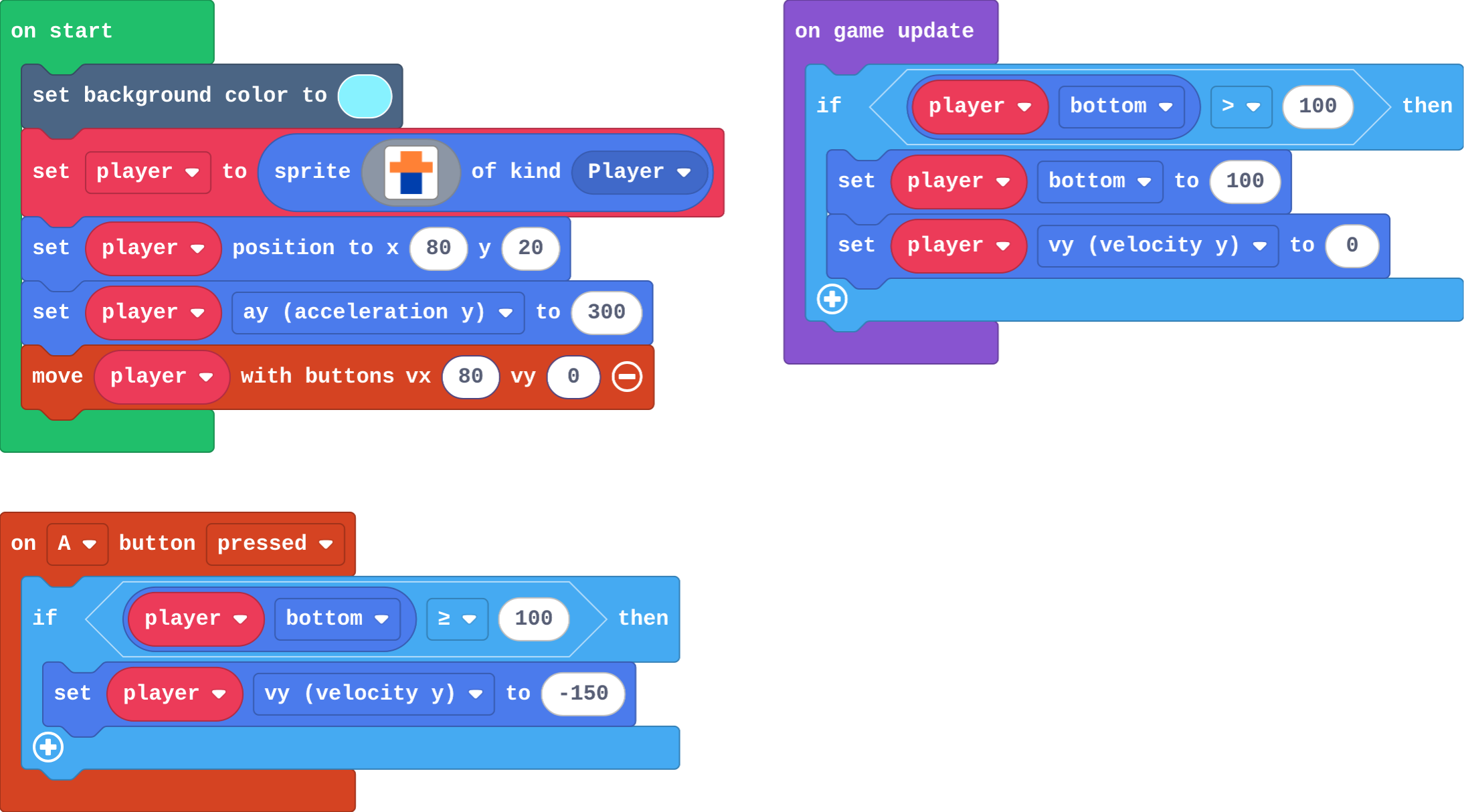
Show as code
scene.setBackgroundColor(9)
let player = sprites.create(img`
    . 4 4 .
    4 4 4 4
    . 8 8 .
    . 8 8 .
    `, SpriteKind.Player)
player.setPosition(80, 20)
player.ay = 300
controller.moveSprite(player, 80, 0)
game.onUpdate(function () {
    if (player.bottom > 100) {
        player.bottom = 100
        player.vy = 0
    }
})
controller.A.onEvent(ControllerButtonEvent.Pressed, function () {
    if (player.bottom >= 100) {
        player.vy = -150
    }
})
Modify › Moon jump
Open task: any program that does what the step asks.
Make
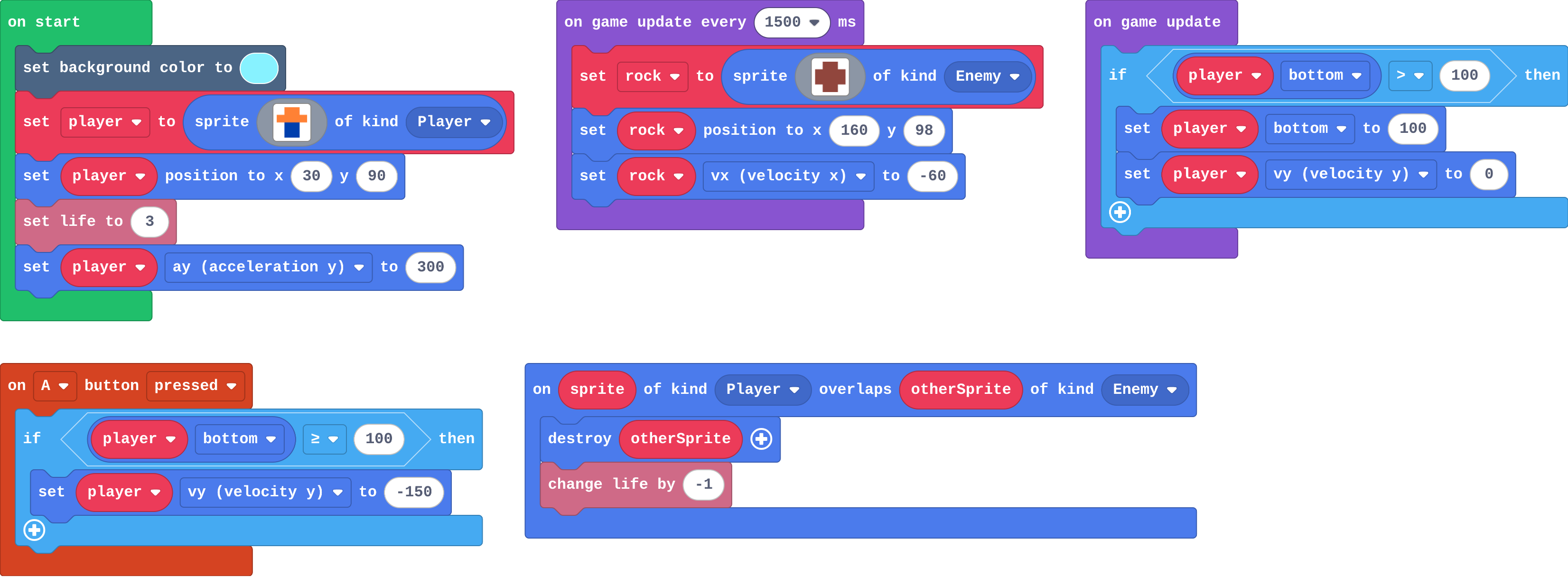
Show as code
let rock: Sprite = null
scene.setBackgroundColor(9)
let player = sprites.create(img`
    . 4 4 .
    4 4 4 4
    . 8 8 .
    . 8 8 .
    `, SpriteKind.Player)
player.setPosition(30, 90)
info.setLife(3)
player.ay = 300
game.onUpdate(function () {
    if (player.bottom > 100) {
        player.bottom = 100
        player.vy = 0
    }
})
controller.A.onEvent(ControllerButtonEvent.Pressed, function () {
    if (player.bottom >= 100) {
        player.vy = -150
    }
})
game.onUpdateInterval(1500, function () {
    rock = sprites.create(img`
        . e e .
        e e e e
        e e e e
        . e e .
        `, SpriteKind.Enemy)
    rock.setPosition(160, 98)
    rock.vx = -60
})
sprites.onOverlap(SpriteKind.Player, SpriteKind.Enemy, function (sprite, otherSprite) {
    otherSprite.destroy()
    info.changeLifeBy(-1)
})
Change a kangaroo
Open task: any program that does what the step asks.
Stretch and support
Stretch: Add a coin in the air that is only reachable with a jump, worth a point.
Support: Give students the jumper (floor and jump done) as their Make starter, so they add only the rocks and the lives.
Exit ticket
Why does a jump need an if that checks the player is on the ground?
A jump only sets vy upwards. Without the check, every press of A jumps again, even in mid-air, so the player can fly.
What each step is for
- Investigate: A jump belongs inside an if: the press only counts when the player is standing on the floor, which the floor if makes true.
- Modify: The if around the jump uses the same edge as the floor; changing how a jump feels is two numbers.
- Mix it up: Gravity adds ay to vy every second.
Where it leads
Next unit: levels, so the runner can get harder. Skillmaps: Jungle Jump Platformer and Monster Truck Racer (arcade.makecode.com/skillmaps) are platformers built with tilemaps, the engine's version of this floor.