---
marp: true
theme: default
html: true
---

# Jump from the ground

Arcade advanced skills · Platforms

<!-- Speaker note: Students fix a jump that works in mid-air by putting it inside an if that checks the player is on the floor, then build a runner game. About 45 minutes (Predict and Run 7 min · Investigate 10 min · Modify 8 min · Mix it up 3 min · Make 13 min · Kangaroo 4 min). -->

---

## Today

**We are learning to** put the jump inside an if that asks whether the player is on the floor, so it only works from the ground.

- I can make a jump that only works from the ground.
- I can explain why a jump needs that check.
- I can build a runner with gravity, a floor, a jump and obstacles.

<!-- Speaker note: Before class: A **jump** sets vy to a negative number (up). On its own, it works on every press, even in mid-air, so a player can climb the sky. The fix is an **if** around the jump: *if player bottom ≥ 100* (the floor's height). The floor if from last lesson puts the bottom back at exactly 100 every frame the player sinks, so standing means bottom is 100. In real platformers, tilemaps give a ready-made "is on a wall" test; this is the same idea by hand. Teacher: Mix it up: gravity, from last lesson. -->

---

## Why it matters

> In every platformer you can only jump when your feet are on something. Without that one rule, the player could climb the sky.

<!-- Speaker note: Last lesson the ball could be thrown up and came back down to a floor. Now the player jumps with **A**. A jump sets **vy** to a negative number. But where must the player be for a jump to make sense? -->

---

<span style="background:#dbeafe; color:#1a1a1a; border:1.5px solid #3b82f6; padding:6px 18px; border-radius:8px; font-size:1em; font-weight:500;">💬 Discussion</span>

## Predict

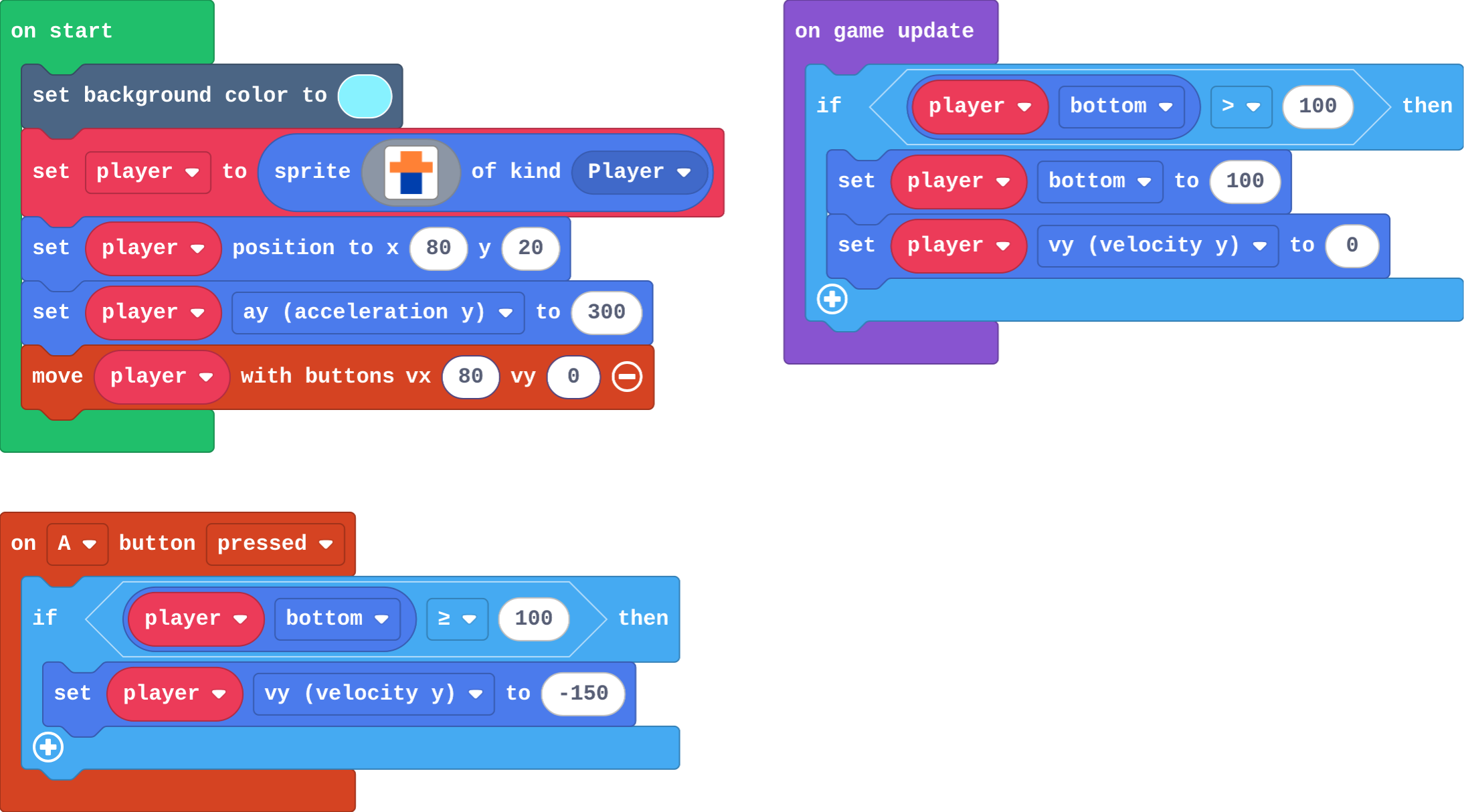
![h:360](https://studio.learningwaypoints.com/tutorials/_pictures/makecode/code/2a50a788a823.png?v=e8c933e575867e1c)

**You press A three times, quickly, one press after another. What does the player do?**

- Jumps three times, landing between each
- Jumps once; the other presses do nothing
- Jumps higher and higher, and can fly off the top of the screen
- Falls through the floor

<!-- Speaker note: What happens: Each press sets vy to -150 again, even in mid-air, so the player keeps rising. Nothing checks whether the player is on the ground. Take two or three predictions before anyone runs it. -->

<!-- Speaker note: Teacher: let students find the flying in the Run. -->

<style scoped>pre, marp-pre { font-size: 0.5em; line-height: 1.25; } section { font-size: 27px; }</style>

---

<span style="background:#dcfce7; color:#1a1a1a; border:1.5px solid #22c55e; padding:6px 18px; border-radius:8px; font-size:1em; font-weight:500;">✅ Check</span>

## What happened?

* Each press sets vy to -150 again, even in mid-air, so the player keeps rising. Nothing checks whether the player is on the ground.

<!-- Speaker note: Reveal after running. Ask who predicted it, and what made them think so. -->

---

<span style="background:#fef3c7; color:#1a1a1a; border:1.5px solid #f59e0b; padding:6px 18px; border-radius:8px; font-size:1em; font-weight:500;">✍️ Activity</span>

## Run it

Open the lesson at this step and try it together.

[studio.learningwaypoints.com/tutorials/code/arcade-advanced/arcade-jump/?full=step-2#step-2](https://studio.learningwaypoints.com/tutorials/code/arcade-advanced/arcade-jump/?full=step-2#step-2)

<!-- Speaker note: Press **A** (space) once and watch. Then press it again and again, quickly. Students should be able to say: I pressed A again and again and compared what happened with my prediction. -->

---

<span style="background:#dbeafe; color:#1a1a1a; border:1.5px solid #3b82f6; padding:6px 18px; border-radius:8px; font-size:1em; font-weight:500;">💬 Discussion</span>

## Investigate

![h:360](https://studio.learningwaypoints.com/tutorials/_pictures/makecode/code/9da73ac66de2.png?v=386f517c5cf7360c)

<!-- Speaker note: This version has the fix. Try to fly with it. What this step is for: A jump belongs inside an if: the press only counts when the player is standing on the floor, which the floor if makes true. -->

<!-- Speaker note: Teacher: the trace shows the if saying no anywhere above the floor. -->

---

<span style="background:#dcfce7; color:#1a1a1a; border:1.5px solid #22c55e; padding:6px 18px; border-radius:8px; font-size:1em; font-weight:500;">✅ Check</span>

## Leo's jump

**Leo's player flies off the top when he presses A again and again. Why?**

- Nothing checks the player is on the ground, so every press jumps again, even in mid-air
- ay should be negative
- The floor pushes him up
- -150 is too big a number

* Answer: Nothing checks the player is on the ground, so every press jumps again, even in mid-air

<!-- Speaker note: A jump only sets vy to -150. Leo's A event does that on every press, wherever the player is, so each press in the air starts a new jump higher up. -->

<style scoped>pre, marp-pre { font-size: 0.5em; line-height: 1.25; } section { font-size: 25px; }</style>

---

<span style="background:#dcfce7; color:#1a1a1a; border:1.5px solid #22c55e; padding:6px 18px; border-radius:8px; font-size:1em; font-weight:500;">✅ Check</span>

## When does A jump?

**This version jumps only if player bottom ≥ 100. Fill in what a press of A does.**

| player bottom when A is pressed | A does |
|---|---|
| 100 (on the floor) | ? |
| 70 (rising) | ? |
| 95 (falling, nearly down) | ? |

* Answer: jumps, nothing, nothing

<!-- Speaker note: The floor puts the bottom at exactly 100. Anywhere above that, the player is in the air, so the if says no. -->

<style scoped>pre, marp-pre { font-size: 0.5em; line-height: 1.25; } section { font-size: 27px; }</style>

---

<span style="background:#dcfce7; color:#1a1a1a; border:1.5px solid #22c55e; padding:6px 18px; border-radius:8px; font-size:1em; font-weight:500;">✅ Check</span>

## Why 100?

**Why is the floor's bottom exactly 100 when the player is standing?**

- 100 is the bottom of the screen
- The jump sets it
- The floor if sets it back to 100 every frame the player sinks below it
- Gravity stops at 100

* Answer: The floor if sets it back to 100 every frame the player sinks below it

<!-- Speaker note: Every frame, if the bottom has gone past 100, the floor if puts it back at 100: so standing means bottom is 100. -->

<style scoped>pre, marp-pre { font-size: 0.5em; line-height: 1.25; } section { font-size: 27px; }</style>

---

<span style="background:#fef3c7; color:#1a1a1a; border:1.5px solid #f59e0b; padding:6px 18px; border-radius:8px; font-size:1em; font-weight:500;">✍️ Activity</span>

## Feet on the floor <span style="font-size:.6em;color:#64748b">(3 min)</span>

Students jump on the spot. Ask: can you jump again while you are in the air?

<!-- Speaker note: Your legs need the floor. The if is the game's version of that. -->

---

<span style="background:#fef3c7; color:#1a1a1a; border:1.5px solid #f59e0b; padding:6px 18px; border-radius:8px; font-size:1em; font-weight:500;">✍️ Activity</span>

## Modify


- **No flying:** This is Leo's game. Fix it: **A** only jumps when the player is **on the ground**.
- **Moon jump:** Change the jump speed and the gravity. Pick the pair you like best.

[Open this step](https://studio.learningwaypoints.com/tutorials/code/arcade-advanced/arcade-jump/?full=step-4#step-4)

<!-- Speaker note: What this step is for: The if around the jump uses the same edge as the floor; changing how a jump feels is two numbers. Hints, in order: Drag an if into the on A pressed block, around set vy. / The question: player bottom ≥ 100 (from Logic, with bottom from Sprites). / Make the jump weaker or stronger: a smaller or bigger negative vy. / Then change ay: try 100 for the Moon, 600 for a heavy planet. For students who need more support: Give students the jumper (floor and jump done) as their Make starter, so they add only the rocks and the lives. For early finishers: Add a coin in the air that is only reachable with a jump, worth a point. The hard part, on purpose: Where the check belongs: around the jump, in the A event. Ask where the player must be for a jump to make sense. When students get stuck: The player can fly by pressing A again and again. Ask: Where must the player be for a jump to make sense? Fix: Put an if around set vy in the A event: only when bottom ≥ 100. / The jump never works now. Ask: Is the question ≥ 100, or > 100? Fix: Standing means bottom is exactly 100, so use ≥. / The rocks float in mid-air, or pass under the player. Ask: What y do the rocks start at? Fix: Near the floor: about 98, so they sit on y 100. -->

<!-- Speaker note: Teacher: the fix is two blocks: an if and its question. -->

---

<span style="background:#dbeafe; color:#1a1a1a; border:1.5px solid #3b82f6; padding:6px 18px; border-radius:8px; font-size:1em; font-weight:500;">💬 Discussion</span>

## Investigate: Mix it up

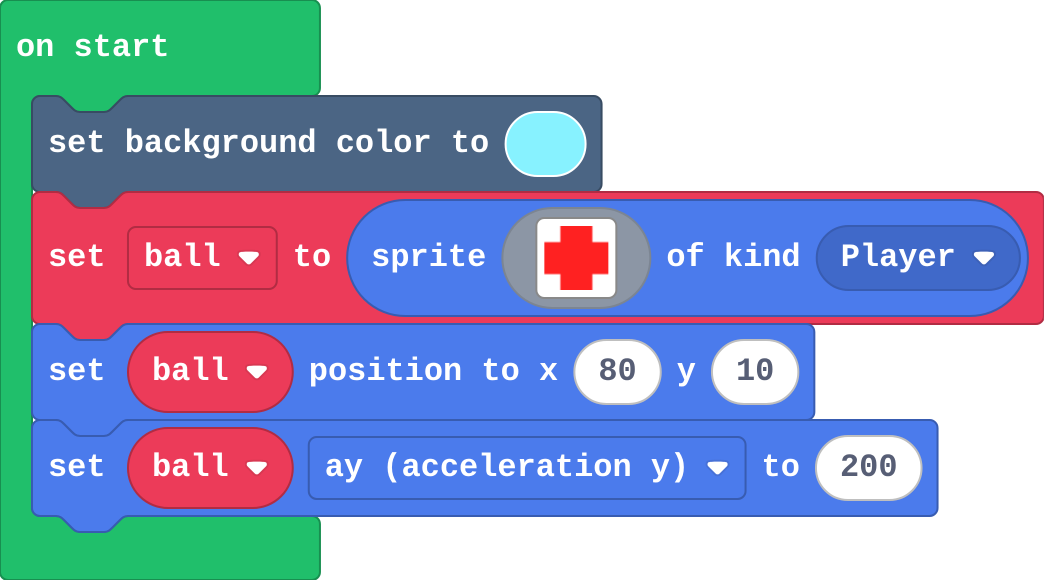
![h:290](https://studio.learningwaypoints.com/tutorials/_pictures/makecode/code/5347e4966529.png?v=b86f9c9522b8e2a4)

<!-- Speaker note: What this step is for: Gravity adds ay to vy every second. -->

---

<span style="background:#dcfce7; color:#1a1a1a; border:1.5px solid #22c55e; padding:6px 18px; border-radius:8px; font-size:1em; font-weight:500;">✅ Check</span>

## Mix it up

**A sprite starts still with ay 200. What is its vy after 1.5 seconds?**

* Answer: 300

<!-- Speaker note: Gravity adds 200 every second: 1.5 × 200 = 300. What this step is for: Gravity adds ay to vy every second. -->

---

<span style="background:#fef3c7; color:#1a1a1a; border:1.5px solid #f59e0b; padding:6px 18px; border-radius:8px; font-size:1em; font-weight:500;">✍️ Activity</span>

## Make

Make a **runner**. The player stays on the left; the world comes to them:

- the player has **gravity** and stands on a **floor** at y 100,
- **A** jumps, but only from the ground,
- a **rock** slides in from the right every 1.5 seconds,
- a hit costs a **life** (three lives, then game over).

[Open this step](https://studio.learningwaypoints.com/tutorials/code/arcade-advanced/arcade-jump/?full=step-6#step-6)

<!-- Speaker note: Hints, in order: Gravity, a floor in on game update and a jump from the ground: the same blocks as your fixed jumper. / A timer (on game update every 1500 ms) makes a rock at x 160 near the floor, with a negative vx so it slides left. / A Player–Enemy overlap: destroy the rock and change life by -1. -->

<!-- Speaker note: Teacher: the runner reuses the fixed jumper; the new parts are the timer and the overlap. -->

---

<span style="background:#fef3c7; color:#1a1a1a; border:1.5px solid #f59e0b; padding:6px 18px; border-radius:8px; font-size:1em; font-weight:500;">✍️ Activity</span>

## Change a kangaroo

This kangaroo hops across a field, but only from the ground. Make it a moon kangaroo: weaker gravity and a gentler jump. Can it still only jump from the ground?

[Open this step](https://studio.learningwaypoints.com/tutorials/code/arcade-advanced/arcade-jump/?full=step-7#step-7)

---

<span style="background:#fef3c7; color:#1a1a1a; border:1.5px solid #f59e0b; padding:6px 18px; border-radius:8px; font-size:1em; font-weight:500;">✍️ Activity</span>

## Runner race <span style="font-size:.6em;color:#64748b">(4 min)</span>

Play the next pair's runner. How many rocks can you jump before you lose?

---

<span style="background:#dcfce7; color:#1a1a1a; border:1.5px solid #22c55e; padding:6px 18px; border-radius:8px; font-size:1em; font-weight:500;">✅ Check</span>

## Exit ticket

**Why does a jump need an if that checks the player is on the ground?**

* A jump only sets vy upwards. Without the check, every press of A jumps again, even in mid-air, so the player can fly.

<!-- Speaker note: Students answer on paper or a mini whiteboard before the reveal. Anyone who cannot answer needs the main idea again next lesson. Where this leads: Next unit: levels, so the runner can get harder. Skillmaps: Jungle Jump Platformer and Monster Truck Racer (arcade.makecode.com/skillmaps) are platformers built with tilemaps, the engine's version of this floor. -->