True or false
Students use a true or false variable to remember whether a shield is on, see that it stays true until a block sets it back, and build a power pellet.
Classroom resources
Load these into Waypoints Prepare: choose Load URL and paste the copied address, or download the file and import it. In Prepare, the worksheet's Teacher edition shows the answers; the student copy hides them.
Students will be able to
- I can use a true or false variable to remember whether a power-up is on.
- I can set it back to false at the right moment.
- I can build a power-up from a variable, an event and a rule.
Timing
Predict and Run 7 min · Investigate 10 min · Modify 8 min · Mix it up 3 min · Make 12 min · Door 5 min
Before class
A variable can hold true or false (Logic). A power-up is three parts: a variable that remembers it (shield), an event that changes it (catching a star sets it to true) and a rule that uses it (if shield in the rock overlap).
The misconception: a true or false variable stays as it is until a block changes it, so a shield set once lasts for ever. Modify fixes it the simplest way (break after one smash); next lesson makes it run out with a countdown.
Running the lesson
- Predict and Run: the shield never ends. Ask: is this fair? What would make it fair?
- Investigate: the match separates yes-or-no from how many.
- Modify: one smash needs set shield to false inside the if.
- Mix it up: lists from last lesson.
- Make: ask students to name the variable, the event and the rule before they start.
In class
On the slides at these points. Students can do the whole lesson on their own; these are for the room. In the deck, the Run, Modify and Make slides have the live playground in them (the tutorial link is the backup), and the notes above are in each slide's speaker notes.
- Hands up (investigate, 3 min)
A student is the shield: hand up means true. Call "star" (hand up) and "rock" several times. When does the hand come down?
Never, unless someone says so. That is the missing block.
- Power-up cards (end, 4 min)
Draw a card for a power-up of your own: its variable, its event and its rule.
The hard part (on purpose)
Setting it back. When a power-up never ends, ask which block sets it to false.
When students get stuck
| What you will see | A question to ask | The fix |
|---|---|---|
| The shield never switches on. | Where is shield set to true, and does that event ever run? | Inside the Player–Food overlap; check the star is made as Food. |
| The shield is on from the start. | What is shield set to in on start? | false. |
| Hunting lasts for ever. | Which block sets hunting back to false? | Add set hunting to false inside if hunting, in the ghost overlap. |
Answers to the checks
- Predict: You catch one star. How long does the shield last?
For the rest of the game. Catching the star sets shield to true, and no block ever sets it back to false. - Shield on, shield off: Fill in what happens when a rock hits the ship.
2, 0, 3, 5, 0, 0
The if asks shield every time a rock hits. True: 5 points and no life lost. False: lose a life. - True or false, or a number?: Which needs true or false, and which needs a number?
Is the shield on? → true or false; How many lives are left? → a number; Has the player found the key? → true or false; How many shots are left? → a number
A yes-or-no question needs true or false. How many needs a number. - Tom's shield: Tom's shield smashes every rock for the rest of the game after one star. What is missing?
A block that sets shield back to false
A true or false variable stays as it is until a block changes it. Nothing sets shield back to false, so it stays true. - Mix it up: colours is 9, 4, 2, 7 and level is 2. What number does colours[level] give?
2
Places start at 0: place 0 is 9, place 1 is 4, place 2 is 2.
Solutions
One possible solution for each task. Other correct programs are fine.
Modify › One smash
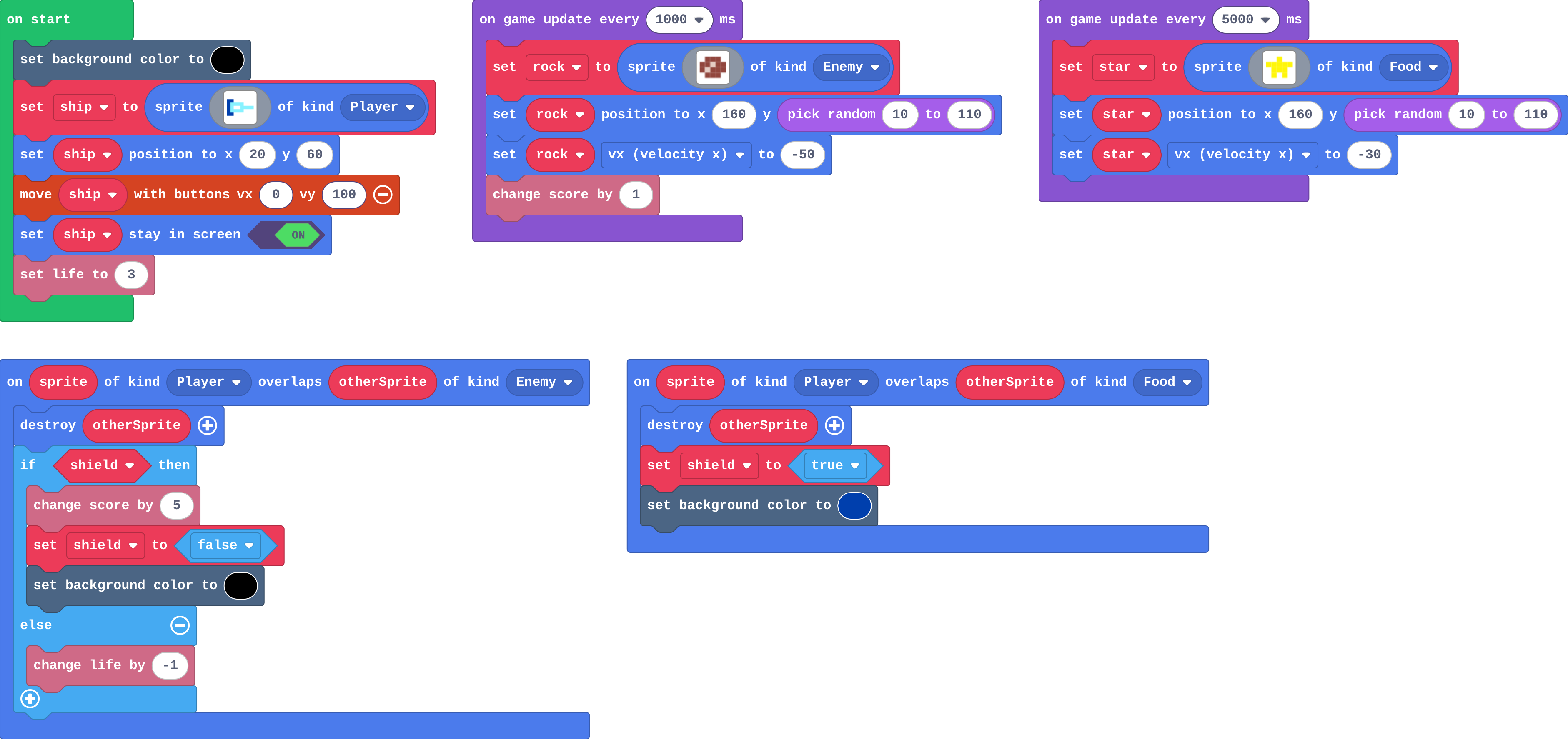
Show as code
let rock: Sprite = null
let star: Sprite = null
let shield = false
sprites.onOverlap(SpriteKind.Player, SpriteKind.Enemy, function (sprite, otherSprite) {
    otherSprite.destroy()
    if (shield) {
        info.changeScoreBy(5)
        shield = false
        scene.setBackgroundColor(15)
    } else {
        info.changeLifeBy(-1)
    }
})
sprites.onOverlap(SpriteKind.Player, SpriteKind.Food, function (sprite, otherSprite) {
    otherSprite.destroy()
    shield = true
    scene.setBackgroundColor(8)
})
scene.setBackgroundColor(15)
let ship = sprites.create(img`
    8 8 . . . . . .
    8 9 9 9 9 . . .
    8 9 1 1 9 9 9 9
    8 9 9 9 9 . . .
    8 8 . . . . . .
    `, SpriteKind.Player)
ship.setPosition(20, 60)
controller.moveSprite(ship, 0, 100)
ship.setStayInScreen(true)
info.setLife(3)
game.onUpdateInterval(1000, function () {
    rock = sprites.create(img`
        . e e e .
        e e d e e
        e d e e e
        . e e e .
        `, SpriteKind.Enemy)
    rock.setPosition(160, randint(10, 110))
    rock.vx = -50
    info.changeScoreBy(1)
})
game.onUpdateInterval(5000, function () {
    star = sprites.create(img`
        . . 5 . .
        5 5 5 5 5
        . 5 5 5 .
        . 5 . 5 .
        `, SpriteKind.Food)
    star.setPosition(160, randint(10, 110))
    star.vx = -30
})
Modify › Bonus star
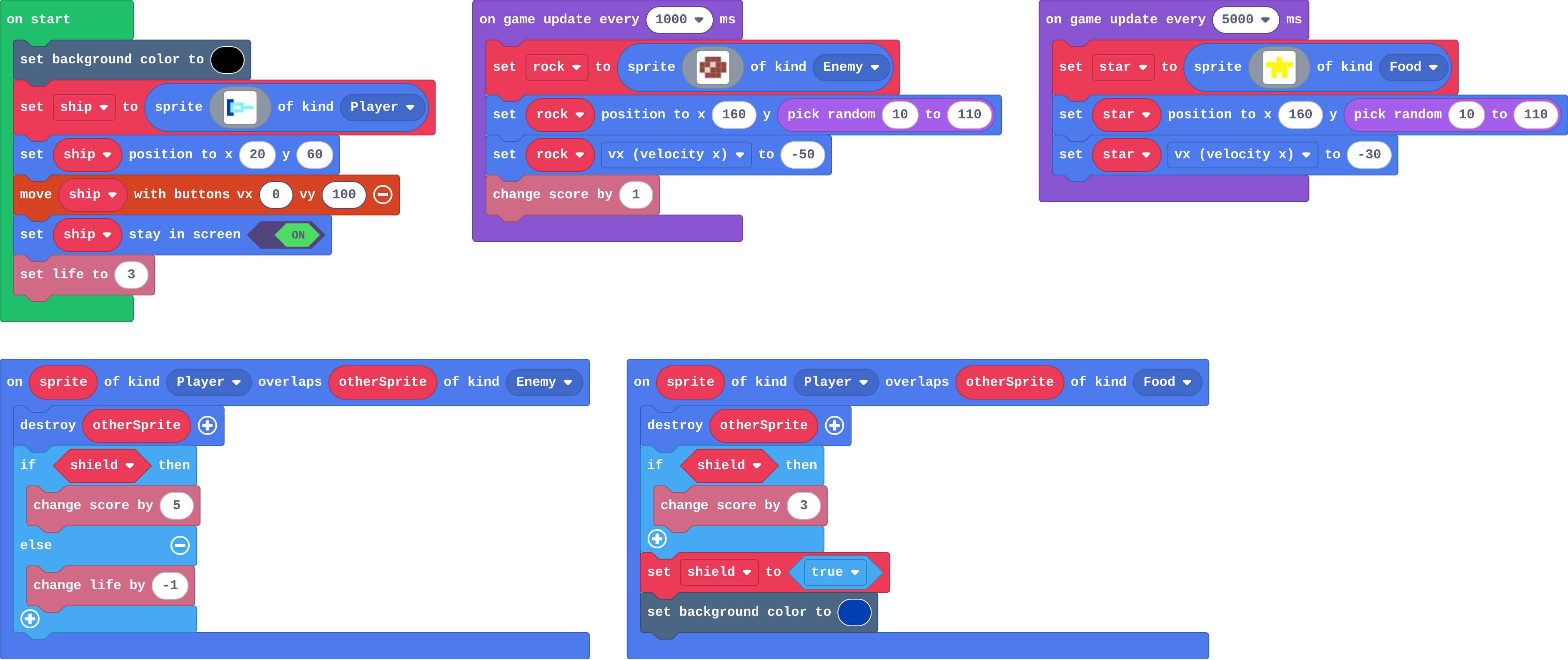
Show as code
let rock: Sprite = null
let star: Sprite = null
let shield = false
sprites.onOverlap(SpriteKind.Player, SpriteKind.Enemy, function (sprite, otherSprite) {
    otherSprite.destroy()
    if (shield) {
        info.changeScoreBy(5)
    } else {
        info.changeLifeBy(-1)
    }
})
sprites.onOverlap(SpriteKind.Player, SpriteKind.Food, function (sprite, otherSprite) {
    otherSprite.destroy()
    if (shield) {
        info.changeScoreBy(3)
    }
    shield = true
    scene.setBackgroundColor(8)
})
scene.setBackgroundColor(15)
let ship = sprites.create(img`
    8 8 . . . . . .
    8 9 9 9 9 . . .
    8 9 1 1 9 9 9 9
    8 9 9 9 9 . . .
    8 8 . . . . . .
    `, SpriteKind.Player)
ship.setPosition(20, 60)
controller.moveSprite(ship, 0, 100)
ship.setStayInScreen(true)
info.setLife(3)
game.onUpdateInterval(1000, function () {
    rock = sprites.create(img`
        . e e e .
        e e d e e
        e d e e e
        . e e e .
        `, SpriteKind.Enemy)
    rock.setPosition(160, randint(10, 110))
    rock.vx = -50
    info.changeScoreBy(1)
})
game.onUpdateInterval(5000, function () {
    star = sprites.create(img`
        . . 5 . .
        5 5 5 5 5
        . 5 5 5 .
        . 5 . 5 .
        `, SpriteKind.Food)
    star.setPosition(160, randint(10, 110))
    star.vx = -30
})
Make
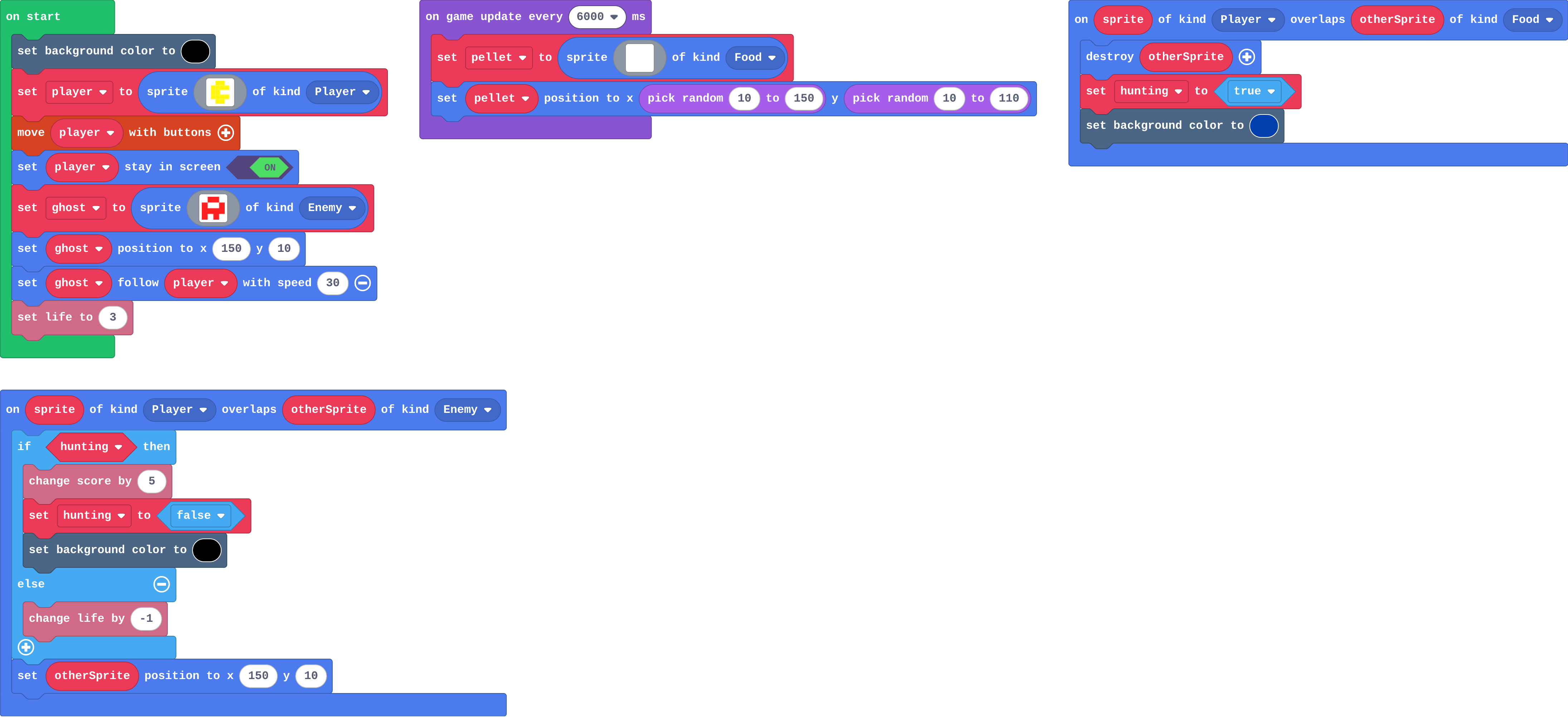
Show as code
let pellet: Sprite = null
let hunting = false
scene.setBackgroundColor(15)
let player = sprites.create(img`
    . 5 5 .
    5 5 5 5
    5 5 . .
    5 5 5 5
    . 5 5 .
    `, SpriteKind.Player)
controller.moveSprite(player)
player.setStayInScreen(true)
let ghost = sprites.create(img`
    . 2 2 .
    2 1 1 2
    2 2 2 2
    2 . 2 .
    `, SpriteKind.Enemy)
ghost.setPosition(150, 10)
ghost.follow(player, 30)
info.setLife(3)
game.onUpdateInterval(6000, function () {
    pellet = sprites.create(img`
        . 1 .
        1 1 1
        . 1 .
        `, SpriteKind.Food)
    pellet.setPosition(randint(10, 150), randint(10, 110))
})
sprites.onOverlap(SpriteKind.Player, SpriteKind.Food, function (sprite, otherSprite) {
    otherSprite.destroy()
    hunting = true
    scene.setBackgroundColor(8)
})
sprites.onOverlap(SpriteKind.Player, SpriteKind.Enemy, function (sprite, otherSprite) {
    if (hunting) {
        info.changeScoreBy(5)
        hunting = false
        scene.setBackgroundColor(15)
    } else {
        info.changeLifeBy(-1)
    }
    otherSprite.setPosition(150, 10)
})
Change a key and a door
Open task: any program that does what the step asks.
Stretch and support
Stretch: Two pellets in a row: count the ghosts eaten while hunting, and give 5, then 10.
Support: Give students the hunting variable and the pellet overlap, so they write only the if in the ghost overlap.
Exit ticket
Name the three parts of a power-up, using the shield as the example.
A variable that remembers it (shield), an event that changes it (catching a star sets it to true), and a rule that uses it (if shield, a rock costs no life).
What each step is for
- Investigate: A true or false variable remembers whether something is on; an event sets it, an if asks it, and it stays as it is until a block sets it back.
- Modify: Setting the variable back to false ends the power-up; any rule can ask the same variable.
- Mix it up: A list holds what changes per level, looked up with the level as the place, counted from 0.
Where it leads
Next: run out, a number that counts down so a power-up lasts a set time. Skillmap: Save the Galaxy (arcade.makecode.com/skillmaps) adds power-ups to a shooter.