---
marp: true
theme: default
html: true
---

# True or false

Arcade advanced skills · Power-ups

<!-- Speaker note: Students use a true or false variable to remember whether a shield is on, see that it stays true until a block sets it back, and build a power pellet. About 45 minutes (Predict and Run 7 min · Investigate 10 min · Modify 8 min · Mix it up 3 min · Make 12 min · Door 5 min). -->

---

## Today

**We are learning to** a variable that holds true or false remembers whether a power-up is on, so an overlap can ask about it.

- I can use a true or false variable to remember whether a power-up is on.
- I can set it back to false at the right moment.
- I can build a power-up from a variable, an event and a rule.

<!-- Speaker note: Before class: A variable can hold **true** or **false** (Logic). A power-up is three parts: a **variable** that remembers it (`shield`), an **event** that changes it (catching a star sets it to true) and a **rule** that uses it (*if shield* in the rock overlap). The misconception: a true or false variable stays as it is until a block changes it, so a shield set once lasts for ever. Modify fixes it the simplest way (break after one smash); next lesson makes it run out with a countdown. Teacher: Mix it up: lists from last lesson. -->

---

## Why it matters

> A mushroom in Mario, a power pellet in Pac-Man, a shield in a space shooter: each one is a variable that is true for a while.

<!-- Speaker note: A variable can hold **true** or **false** (in **Logic**). In this game `shield` starts **false**. Catching a yellow **star** sets it to **true**. When a rock hits, **if shield** asks whether it is true right now: true smashes the rock for 5 points, false costs a life. -->

---

<span style="background:#dbeafe; color:#1a1a1a; border:1.5px solid #3b82f6; padding:6px 18px; border-radius:8px; font-size:1em; font-weight:500;">💬 Discussion</span>

## Predict

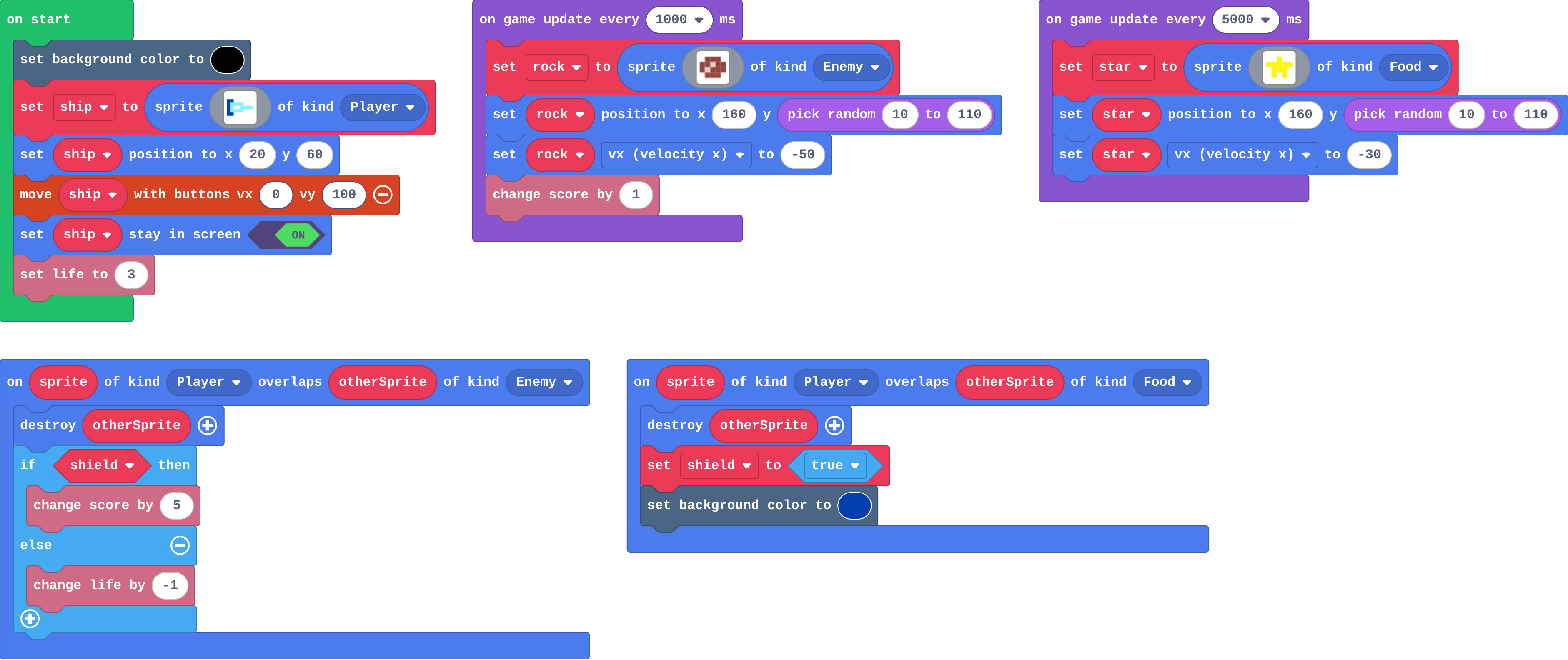
![h:360](https://studio.learningwaypoints.com/tutorials/_pictures/makecode/code/346709292274.png?v=47f4aa848d3e1a4f)

**You catch one star. How long does the shield last?**

- 5 seconds
- Until the next rock hits you
- For the rest of the game
- One frame

<!-- Speaker note: What happens: For the rest of the game. Catching the star sets shield to true, and no block ever sets it back to false. Take two or three predictions before anyone runs it. -->

<!-- Speaker note: Teacher: the shield never ends. Ask: is this fair? What would make it fair? -->

---

<span style="background:#dcfce7; color:#1a1a1a; border:1.5px solid #22c55e; padding:6px 18px; border-radius:8px; font-size:1em; font-weight:500;">✅ Check</span>

## What happened?

* For the rest of the game. Catching the star sets shield to true, and no block ever sets it back to false.

<!-- Speaker note: Reveal after running. Ask who predicted it, and what made them think so. -->

---

<span style="background:#fef3c7; color:#1a1a1a; border:1.5px solid #f59e0b; padding:6px 18px; border-radius:8px; font-size:1em; font-weight:500;">✍️ Activity</span>

## Run it

Open the lesson at this step and try it together.

[studio.learningwaypoints.com/tutorials/code/arcade-advanced/arcade-flag/?full=step-2#step-2](https://studio.learningwaypoints.com/tutorials/code/arcade-advanced/arcade-flag/?full=step-2#step-2)

<!-- Speaker note: Catch a star (one floats past every 5 seconds), then fly into the rocks. Is this power-up fair? Students should be able to say: I caught a star and saw how long the shield lasted. -->

---

<span style="background:#dbeafe; color:#1a1a1a; border:1.5px solid #3b82f6; padding:6px 18px; border-radius:8px; font-size:1em; font-weight:500;">💬 Discussion</span>

## Investigate

![h:360](https://studio.learningwaypoints.com/tutorials/_pictures/makecode/code/346709292274.png?v=47f4aa848d3e1a4f)

<!-- Speaker note: What this step is for: A true or false variable remembers whether something is on; an event sets it, an if asks it, and it stays as it is until a block sets it back. -->

<!-- Speaker note: Teacher: the match separates yes-or-no from how many. -->

---

<span style="background:#dcfce7; color:#1a1a1a; border:1.5px solid #22c55e; padding:6px 18px; border-radius:8px; font-size:1em; font-weight:500;">✅ Check</span>

## Shield on, shield off

**Fill in what happens when a rock hits the ship.**

| shield | lives before | lives after | score change |
|---|---|---|---|
| false | 3 | ? | ? |
| true | 3 | ? | ? |
| false | 1 | ? | ? |

* Answer: 2, 0, 3, 5, 0, 0

<!-- Speaker note: The if asks shield every time a rock hits. True: 5 points and no life lost. False: lose a life. -->

---

<span style="background:#dcfce7; color:#1a1a1a; border:1.5px solid #22c55e; padding:6px 18px; border-radius:8px; font-size:1em; font-weight:500;">✅ Check</span>

## True or false, or a number?

**Which needs true or false, and which needs a number?**

Groups: true or false · a number

Is the shield on? · How many lives are left? · Has the player found the key? · How many shots are left?

* Answer: Is the shield on? → true or false; How many lives are left? → a number; Has the player found the key? → true or false; How many shots are left? → a number

<!-- Speaker note: A yes-or-no question needs true or false. How many needs a number. -->

---

<span style="background:#dcfce7; color:#1a1a1a; border:1.5px solid #22c55e; padding:6px 18px; border-radius:8px; font-size:1em; font-weight:500;">✅ Check</span>

## Tom's shield

**Tom's shield smashes every rock for the rest of the game after one star. What is missing?**

- An if in on start
- A block that sets shield back to false
- Another set shield to true
- A second star

* Answer: A block that sets shield back to false

<!-- Speaker note: A true or false variable stays as it is until a block changes it. Nothing sets shield back to false, so it stays true. -->

---

<span style="background:#fef3c7; color:#1a1a1a; border:1.5px solid #f59e0b; padding:6px 18px; border-radius:8px; font-size:1em; font-weight:500;">✍️ Activity</span>

## Hands up <span style="font-size:.6em;color:#64748b">(3 min)</span>

A student is the shield: hand up means true. Call "star" (hand up) and "rock" several times. When does the hand come down?

<!-- Speaker note: Never, unless someone says so. That is the missing block. -->

---

<span style="background:#fef3c7; color:#1a1a1a; border:1.5px solid #f59e0b; padding:6px 18px; border-radius:8px; font-size:1em; font-weight:500;">✍️ Activity</span>

## Modify


- **One smash:** Make the shield **break** after it smashes one rock.
- **Bonus star:** If the shield is **already on**, a star is worth 3 points.

[Open this step](https://studio.learningwaypoints.com/tutorials/code/arcade-advanced/arcade-flag/?full=step-4#step-4)

<!-- Speaker note: What this step is for: Setting the variable back to false ends the power-up; any rule can ask the same variable. Hints, in order: The shield should break when it smashes a rock: inside if shield, after the points. / set shield to false, and set the background back to 15 (black). / In the star overlap, before shield is set to true: if shield, change score by 3. For students who need more support: Give students the hunting variable and the pellet overlap, so they write only the if in the ghost overlap. For early finishers: Two pellets in a row: count the ghosts eaten while hunting, and give 5, then 10. The hard part, on purpose: Setting it back. When a power-up never ends, ask which block sets it to false. When students get stuck: The shield never switches on. Ask: Where is shield set to true, and does that event ever run? Fix: Inside the Player–Food overlap; check the star is made as Food. / The shield is on from the start. Ask: What is shield set to in on start? Fix: false. / Hunting lasts for ever. Ask: Which block sets hunting back to false? Fix: Add set hunting to false inside if hunting, in the ghost overlap. -->

<!-- Speaker note: Teacher: one smash needs set shield to false inside the if. -->

---

<span style="background:#dcfce7; color:#1a1a1a; border:1.5px solid #22c55e; padding:6px 18px; border-radius:8px; font-size:1em; font-weight:500;">✅ Check</span>

## Mix it up

**colours is 9, 4, 2, 7 and level is 2. What number does colours[level] give?**

* Answer: 2

<!-- Speaker note: Places start at 0: place 0 is 9, place 1 is 4, place 2 is 2. What this step is for: A list holds what changes per level, looked up with the level as the place, counted from 0. -->

---

<span style="background:#fef3c7; color:#1a1a1a; border:1.5px solid #f59e0b; padding:6px 18px; border-radius:8px; font-size:1em; font-weight:500;">✍️ Activity</span>

## Make

A ghost chases you. A **power pellet** appears every 6 seconds. Make it a power-up:

- a variable `hunting` is **false** at the start,
- catching a pellet sets it to **true** (show it with a background colour),
- touching the ghost while hunting scores 5 and sets hunting back to **false**; otherwise it costs a life.

[Open this step](https://studio.learningwaypoints.com/tutorials/code/arcade-advanced/arcade-flag/?full=step-6#step-6)

<!-- Speaker note: Hints, in order: A new variable, hunting, set to false in on start. / The pellet overlap: destroy the pellet, set hunting to true, and change the background. / The ghost overlap: if hunting, score 5, set hunting to false and put the background back; else lose a life. Either way, send the ghost to the corner. -->

<!-- Speaker note: Teacher: ask students to name the variable, the event and the rule before they start. -->

<style scoped>pre, marp-pre { font-size: 0.5em; line-height: 1.25; } section { font-size: 28px; }</style>

---

<span style="background:#fef3c7; color:#1a1a1a; border:1.5px solid #f59e0b; padding:6px 18px; border-radius:8px; font-size:1em; font-weight:500;">✍️ Activity</span>

## Change a key and a door

Find the key, then reach the door. Right now the door opens with no key. Use `hasKey` so the door only opens if you have the key, and if you don't, splash "Locked!" and move the explorer back a step (or the splash comes back every frame).

[Open this step](https://studio.learningwaypoints.com/tutorials/code/arcade-advanced/arcade-flag/?full=step-7#step-7)

---

<span style="background:#fef3c7; color:#1a1a1a; border:1.5px solid #f59e0b; padding:6px 18px; border-radius:8px; font-size:1em; font-weight:500;">✍️ Activity</span>

## Power-up cards <span style="font-size:.6em;color:#64748b">(4 min)</span>

Draw a card for a power-up of your own: its variable, its event and its rule.

---

<span style="background:#dcfce7; color:#1a1a1a; border:1.5px solid #22c55e; padding:6px 18px; border-radius:8px; font-size:1em; font-weight:500;">✅ Check</span>

## Exit ticket

**Name the three parts of a power-up, using the shield as the example.**

* A variable that remembers it (shield), an event that changes it (catching a star sets it to true), and a rule that uses it (if shield, a rock costs no life).

<!-- Speaker note: Students answer on paper or a mini whiteboard before the reveal. Anyone who cannot answer needs the main idea again next lesson. Where this leads: Next: run out, a number that counts down so a power-up lasts a set time. Skillmap: Save the Galaxy (arcade.makecode.com/skillmaps) adds power-ups to a shooter. -->