Your site reference
Alt text, headings, labels, a whole page and relative paths: what a page needs before it goes online.
Print a cheat sheet (the whole course or one unit, with a picture of what each command draws)
Forms
<form>
  fields
  <button>Send</button>
</form>
Example
<form>
  <label for="town">Town</label>
  <input id="town" type="text">
  <button>Go</button>
</form>
Holds the fields and the button that sends them. On its own, a form sends nowhere: code behind it does the work.

id: form
<label for="name">Name</label>
<input id="name" type="text">
Example
<label for="age">Age</label>
<input id="age" type="number">
An input is a box to type in. Its label says what to type; for and id must match, so clicking the label puts the cursor in the box.

id: label-and-input
<select id="house">
  <option>Owls</option>
  <option>Hawks</option>
</select>
Example
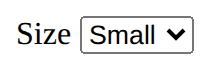
<label for="size">Size</label>
<select id="size">
  <option>Small</option>
  <option>Large</option>
</select>
A drop-down list: one option to choose.
id: select-drop-down
A page for everyone, online
<img src="trophy.svg" alt="A gold trophy">
Says what a picture shows, for anyone who can't see it (screen readers read it aloud). Use alt="" for a picture that is only decoration.
id: alt-text
<h1>Page title</h1>
<h2>A part of the page</h2>
<h3>A part of that part</h3>
Headings are the page's outline: one h1, then h2 for each part, h3 inside those. Never pick a level for its size; set the size with CSS.
id: heading-outline
<!DOCTYPE html>
<html lang="en">
<head>
  <meta charset="utf-8">
  <meta name="viewport" content="width=device-width, initial-scale=1">
  <title>My page</title>
</head>
<body>
  the page
</body>
</html>
What a page file needs around its content: the language, the text encoding, a phone-friendly width and a title for the tab. The Download button adds it for you.
id: whole-page
<img src="trophy.svg" alt="…">
<link rel="stylesheet" href="style.css">
A file name with no folder means "beside this page"; images/trophy.svg means "in the images folder beside this page". Never a path from your own computer (C:/Users/…).
id: relative-path