Stop before you crash
Students read the robot's distance sensor inside forever and stop before an obstacle, then build a parking robot that slows down as things get closer.
Classroom resources
Load these into Waypoints Prepare: choose Load URL and paste the copied address, or download the file and import it. In Prepare, the worksheet's Teacher edition shows the answers; the student copy hides them.
Students will be able to
- I can read the robot's distance sensor as a number in centimetres.
- I can make the robot stop when something is closer than a distance I choose.
- I can explain why the sensor must be read again and again.
Timing
Predict and Run 8 min · Investigate 10 min · Modify 8 min · Make 12 min · Real robot 7 min (optional)
Before class
The robot's distance sensor (ultrasonic) times an echo and reports how far away the nearest object is, in centimetres, up to 40. With nothing in range it reports 40. In blocks this is robot obstacle distance (cm), in the Robot drawer. The idea is the same as the micro:bit sensors lessons: a sensor is a number the world keeps changing, so the program must read it again in forever to follow it. Here the stakes are visible: read it once and the robot crashes.
Every program starts with a block that picks the robot (Elecfreaks Cutebot here). Schools with another supported robot (DFRobot Maqueen, Yahboom Tiny:bit and others in the robot extension) change only that block; everything else is the same. robot motor tank sets the left and right wheel speeds (−100 to 100).
The simulator has one arena: a looping line and some boxes. Students drag the boxes and the robot with the mouse. The robot does not stop instantly: it slows over a short distance, like a car, which is why the stop distance is 15 cm, not 1.
Running the lesson
- Predict: most say it stops before the box. A few pick 'crashes because it checks once': ask them to hold that thought for Mia's robot.
- Run: students must drag a box into the robot's path first. If the robot drives off, drag it back and face it at a box.
- Investigate: Mia's robot is the run-once mistake from micro:bit Foundations, in a place where it matters. Ask: when did Mia's program check the distance?
- Modify: 25 cm leaves a bigger gap. Ask why a real car's parking sensor starts beeping much farther away.
- Make: three answers from one number, so if / else if / else, checked in order. The order matters: 'less than 30' first would catch 5 cm too, and the robot would never stop.
- Real robot (optional): this is where tuning happens. Expect different stop distances on carpet and desks.
The hard part (on purpose)
The robot only knows the distance when the program reads it, many times a second. Ask where the sensor is read and how often.
When students get stuck
| What you will see | A question to ask | The fix |
|---|---|---|
| The robot drives straight off without stopping. | Is there a box in front of it? Can you see the blue beam touch the box? | Drag a box into its path, or turn the robot to face one. |
| The robot never moves. | Is robot motor tank there, and are both numbers above 0? | Add robot motor tank 50 50 (in on start for the Predict program, or inside the else for the parking robot). |
| The parking robot never stops. | Which question does your if ask first? | Ask about the closest distance (less than 10) first: the first true question wins. |
| The real robot stops in a different place from the simulator. | What is different about the real floor and batteries? | Normal: real robots coast and their sensors are noisy. Change the numbers until it works on your floor. |
Answers to the checks
- Predict: A box is in front of the robot. What happens when the program runs?
It drives forward and stops a little before the box. forever reads the distance again and again, so the moment it drops below 15 cm, the robot stops. - What does it read?: With nothing in front of the robot, what does obstacle distance give?
40, the farthest the sensor can measure
The sensor can measure up to 40 cm. With nothing in range, the robot reports 40, so 'distance < 15' is false and it keeps driving. - Why 15?: Why stop at 15 cm instead of 1 cm?
The robot keeps rolling a little after it is told to stop, so it needs room
Like a car, the robot slows down over a short distance after it is told to stop. Stopping early leaves room. Faster robots need more room. - Mia's robot: Mia's robot crashes into every box. Which part is wrong?
The if is not inside forever, so the distance is checked once, at the very start
Without forever, the if runs once, before the robot has moved. The box is far away then, so the robot never checks again and drives straight into it.
Solutions
One possible solution for each task. Other correct programs are fine.
Modify › Stop farther away
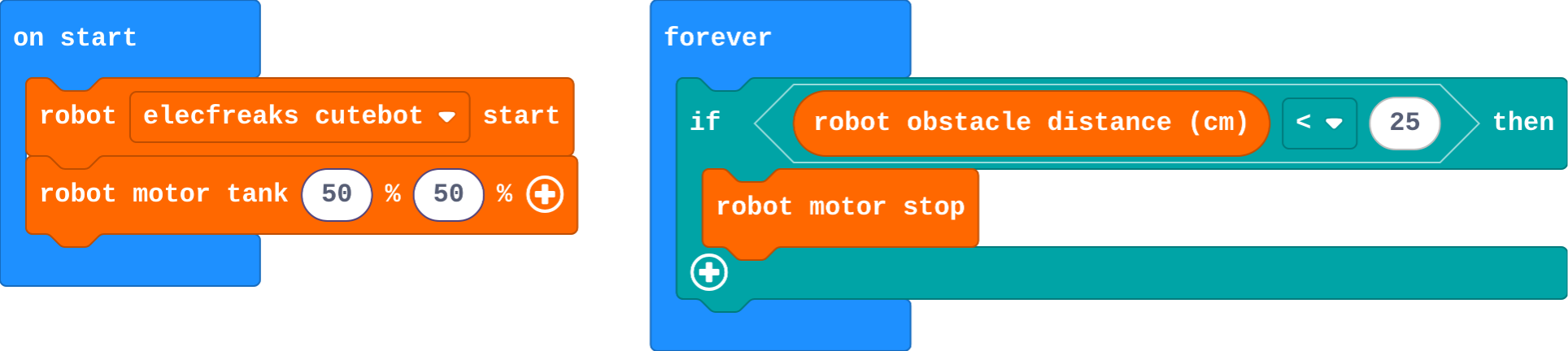
Show as code
robot.elecfreaksCuteBot.start()
robot.motorTank(50, 50)
basic.forever(function () {
    if (robot.obstacleDistance() < 25) {
        robot.motorStop()
    }
})
Modify › Stop sign
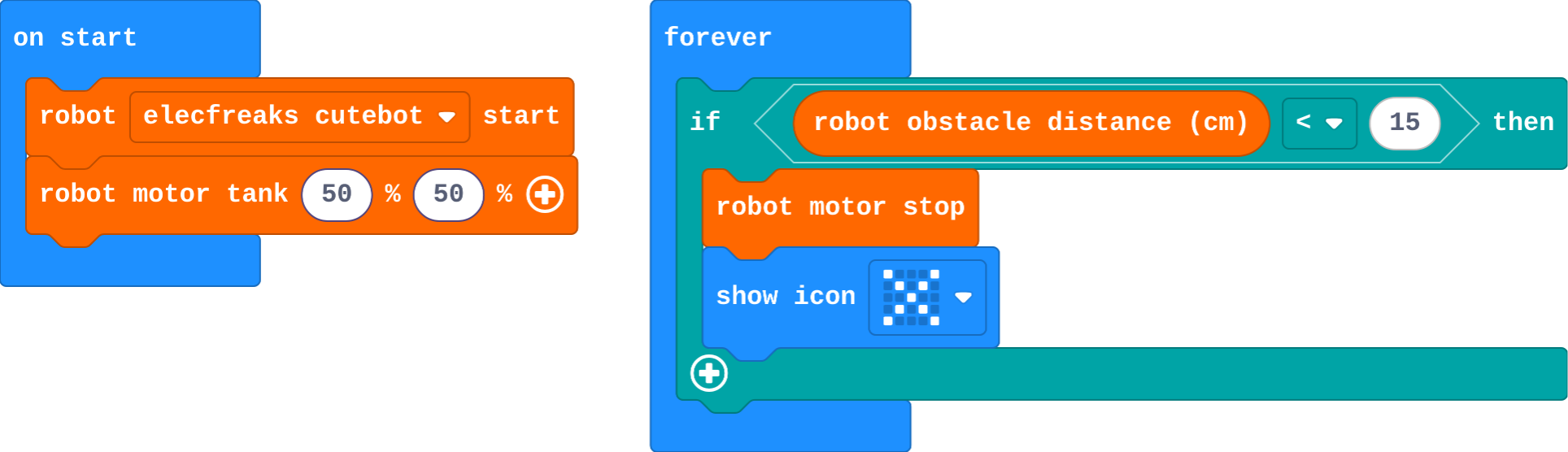
Show as code
robot.elecfreaksCuteBot.start()
robot.motorTank(50, 50)
basic.forever(function () {
    if (robot.obstacleDistance() < 15) {
        robot.motorStop()
        basic.showIcon(IconNames.No)
    }
})
Make
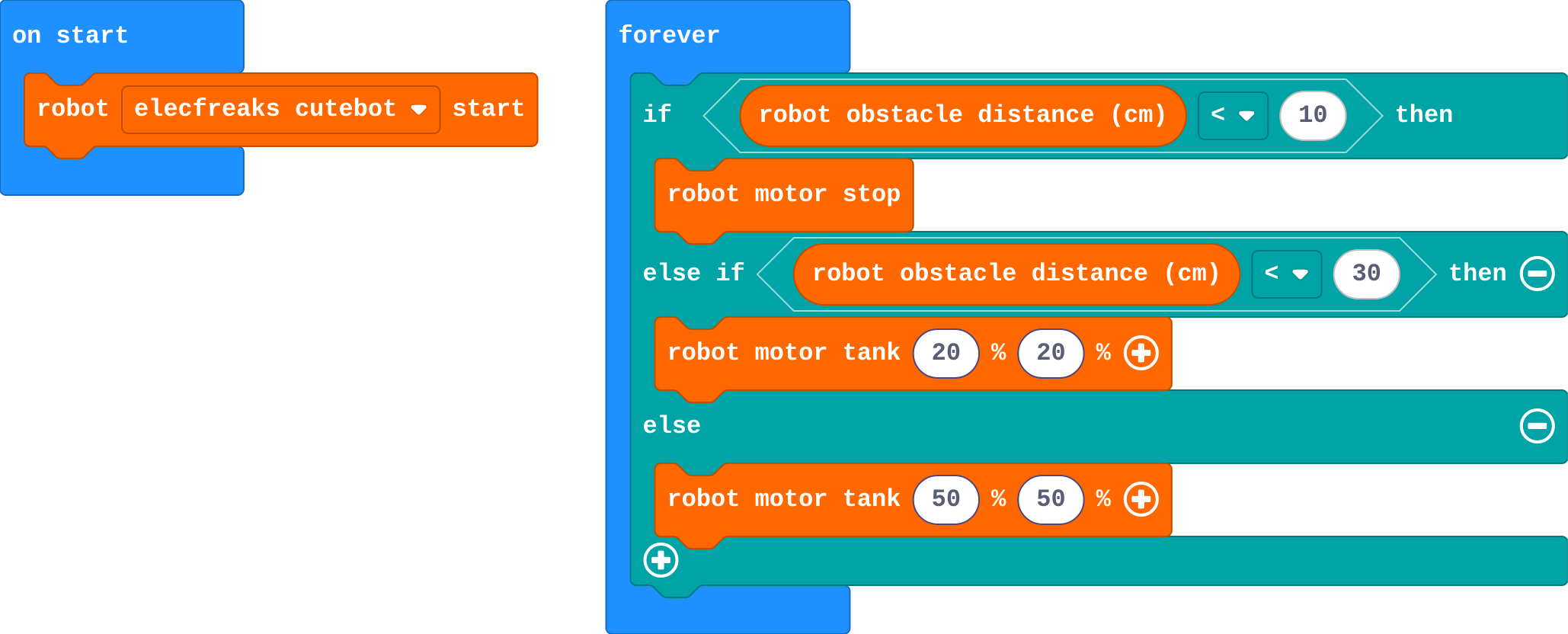
Show as code
robot.elecfreaksCuteBot.start()
basic.forever(function () {
    if (robot.obstacleDistance() < 10) {
        robot.motorStop()
    } else if (robot.obstacleDistance() < 30) {
        robot.motorTank(20, 20)
    } else {
        robot.motorTank(50, 50)
    }
})
Stretch and support
Stretch: Make a 'nervous' robot: when something comes closer than 10 cm, it reverses (robot motor tank −30 −30) for half a second, then stops.
Support: Give the parking robot's if / else if / else blocks with the numbers filled in, and ask students to drag in the right motor block for each part.
Exit ticket
Why does Mia's robot crash when the if is not inside forever?
It checks the distance once, at the start, when the box is still far away. It never checks again, so it never stops.
What each step is for
- Investigate: The robot only knows how far away something is when the program reads the sensor. Reading it in forever, many times a second, lets it react in time.
- Modify: The number in the question decides how close the robot gets, and anything can happen when the question is true.
Where it leads
Next: instead of stopping, turn away and keep exploring, like a robot vacuum. Real-world links for discussion: parking sensors, automatic doors, warehouse robots that slow down near people.