Showcase
The performance challenge. Students build a robot show in three milestones (a moves library, three cued phrases, then a finale and a safety stop), combining functions, radio cues, music and decisions.
Classroom resources
Load these into Waypoints Prepare: choose Load URL and paste the copied address, or download the file and import it. In Prepare, the worksheet's Teacher edition shows the answers; the student copy hides them.
Students will be able to
- I can build a library of moves as functions.
- I can cue each move from a phrase of music over radio.
- I can add a finale and a safety stop to a show.
Timing
Predict, Run, Investigate 12 min · Milestone 1 12 min · Milestone 2 15 min · Milestone 3 18 min · Real robot 3 min (optional)
Before class
This is the performance strand's challenge, using lesson 2 (moves as functions), lesson 7 (radio numbers become moves) and lesson 8 (phrases send cues, then play until done). A show has three layers that change independently: moves (functions with lights), cues (phrase functions on the conductor) and the dancer's choice of move for each cue (on radio received).
The milestones fade the help: Milestone 1 names the moves and gives their steps, Milestone 2 gives an outline, Milestone 3 gives goals only. Each starter is the previous milestone's solution, so a student who is stuck can still move on. Showcase and Patrol and alert together mark the course Challenge complete.
In the simulator, two micro:bits and two robots appear; the conductor's own robot does not dance. A dancer finishes its current move before it obeys the stop cue (radio events wait their turn), so short moves make the stop feel quicker. The logo needs a micro:bit V2 (it shows in the simulator); with V1 micro:bits, use shake for the stop.
Running the lesson
- Predict and Run: point out that each move sets its own lights first.
- Investigate: the three layers are the lesson's big idea. Write Move / Cue / Choice as three columns on the board.
- Milestone 1: two functions, each ending with a stop. Testing a new move by calling it from a branch is a real debugging habit.
- Milestone 2: phraseB and phraseC are copies of phraseA with new notes and cues.
- Milestone 3: let students design the finale. The check needs cue 4, a logo stop (cue 0) and at least five colour changes across the show.
- Real robot (optional): a whole-class performance with one conductor.
The hard part (on purpose)
Keeping moves, cues and choices as separate layers. When a move never happens, ask which cue calls it and whether that branch checks the right number.
When students get stuck
| What you will see | A question to ask | The fix |
|---|---|---|
| A move never happens. | Is the function called from a branch, and does that branch check the right cue? | Match the cue number in the phrase to the branch, and call the move there. |
| Moves happen all at once. | Do the phrases play until done? | Use play … until done in every phrase. |
| The stop does nothing. | Which number does the logo send, and is there a branch (or else) for it? | Send 0 from the logo; add an else at the end of on radio received that stops and turns the lights off. |
Answers to the checks
- Predict: You press A+B on the first micro:bit. What does the second robot do?
It wiggles twice (pink) as the first phrase starts, then spins (blue) when the second phrase starts. Each move sets its own lights at its start. - Three layers: Which layer of the show does each part belong to?
wiggle: turn right, turn left, stop, with pink lights → Move; phraseB: send 2, then play F F E E D D C until done → Cue; if receivedNumber = 2, call spin → Dancer's choice; spin: turn for 1.2 seconds, stop, with blue lights → Move - Slower wiggles: The director wants every wiggle in the show to be slower. Where is the one place to change?
Inside the wiggle function
Every call runs the same wiggle function, so changing its times once changes every wiggle in the show.
Solutions
One possible solution for each task. Other correct programs are fine.
Milestone 1: a moves library
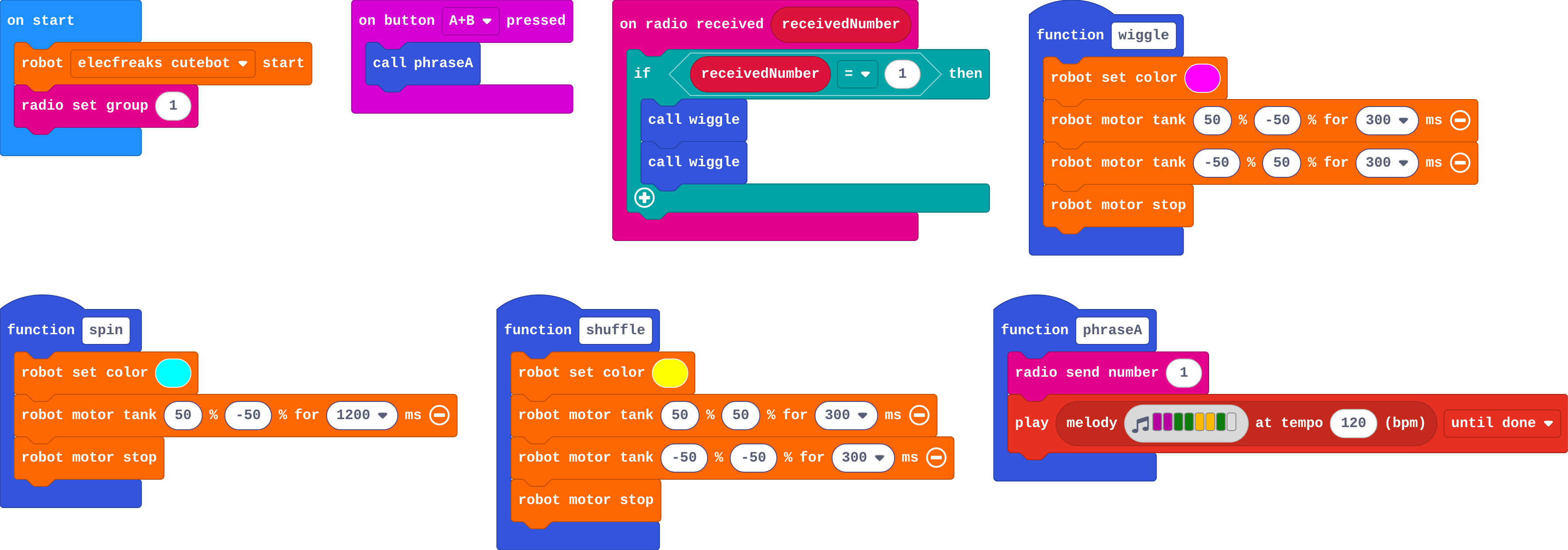
Show as code
function wiggle () {
    robot.setColor(0xff00ff)
    robot.motorTank(50, -50, 300)
    robot.motorTank(-50, 50, 300)
    robot.motorStop()
}
function spin () {
    robot.setColor(0x00ffff)
    robot.motorTank(50, -50, 1200)
    robot.motorStop()
}
function shuffle () {
    robot.setColor(0xffff00)
    robot.motorTank(50, 50, 300)
    robot.motorTank(-50, -50, 300)
    robot.motorStop()
}
function phraseA () {
    radio.sendNumber(1)
    music.play(music.stringPlayable("C C G G A A G - ", 120), music.PlaybackMode.UntilDone)
}
input.onButtonPressed(Button.AB, function () {
    phraseA()
})
radio.onReceivedNumber(function (receivedNumber) {
    if (receivedNumber == 1) {
        wiggle()
        wiggle()
    }
})
robot.elecfreaksCuteBot.start()
radio.setGroup(1)
Milestone 2: cue the show
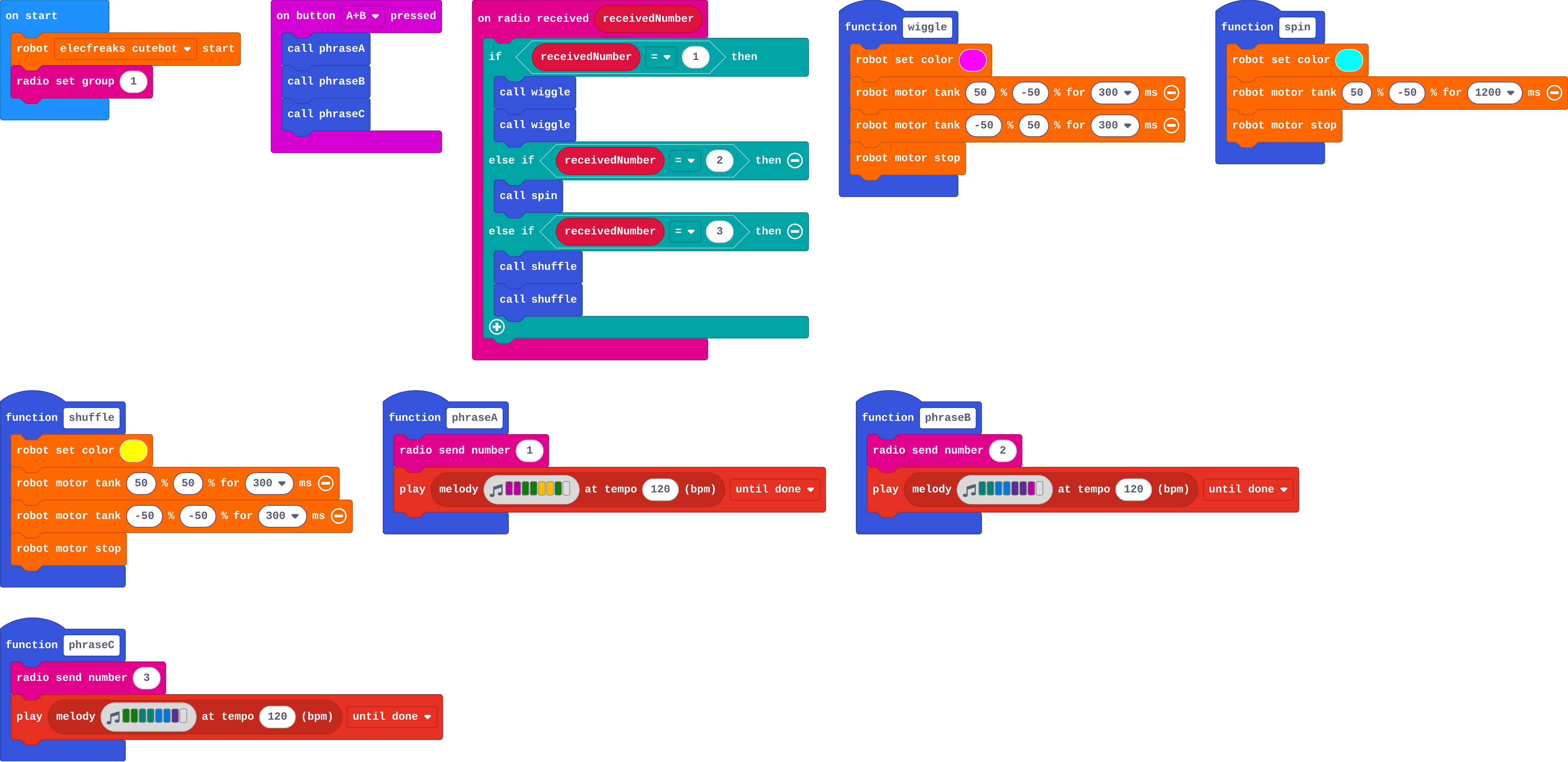
Show as code
function wiggle () {
    robot.setColor(0xff00ff)
    robot.motorTank(50, -50, 300)
    robot.motorTank(-50, 50, 300)
    robot.motorStop()
}
function spin () {
    robot.setColor(0x00ffff)
    robot.motorTank(50, -50, 1200)
    robot.motorStop()
}
function shuffle () {
    robot.setColor(0xffff00)
    robot.motorTank(50, 50, 300)
    robot.motorTank(-50, -50, 300)
    robot.motorStop()
}
function phraseA () {
    radio.sendNumber(1)
    music.play(music.stringPlayable("C C G G A A G - ", 120), music.PlaybackMode.UntilDone)
}
function phraseB () {
    radio.sendNumber(2)
    music.play(music.stringPlayable("F F E E D D C - ", 120), music.PlaybackMode.UntilDone)
}
function phraseC () {
    radio.sendNumber(3)
    music.play(music.stringPlayable("G G F F E E D - ", 120), music.PlaybackMode.UntilDone)
}
input.onButtonPressed(Button.AB, function () {
    phraseA()
    phraseB()
    phraseC()
})
radio.onReceivedNumber(function (receivedNumber) {
    if (receivedNumber == 1) {
        wiggle()
        wiggle()
    } else if (receivedNumber == 2) {
        spin()
    } else if (receivedNumber == 3) {
        shuffle()
        shuffle()
    }
})
robot.elecfreaksCuteBot.start()
radio.setGroup(1)
Milestone 3: finale and safety stop
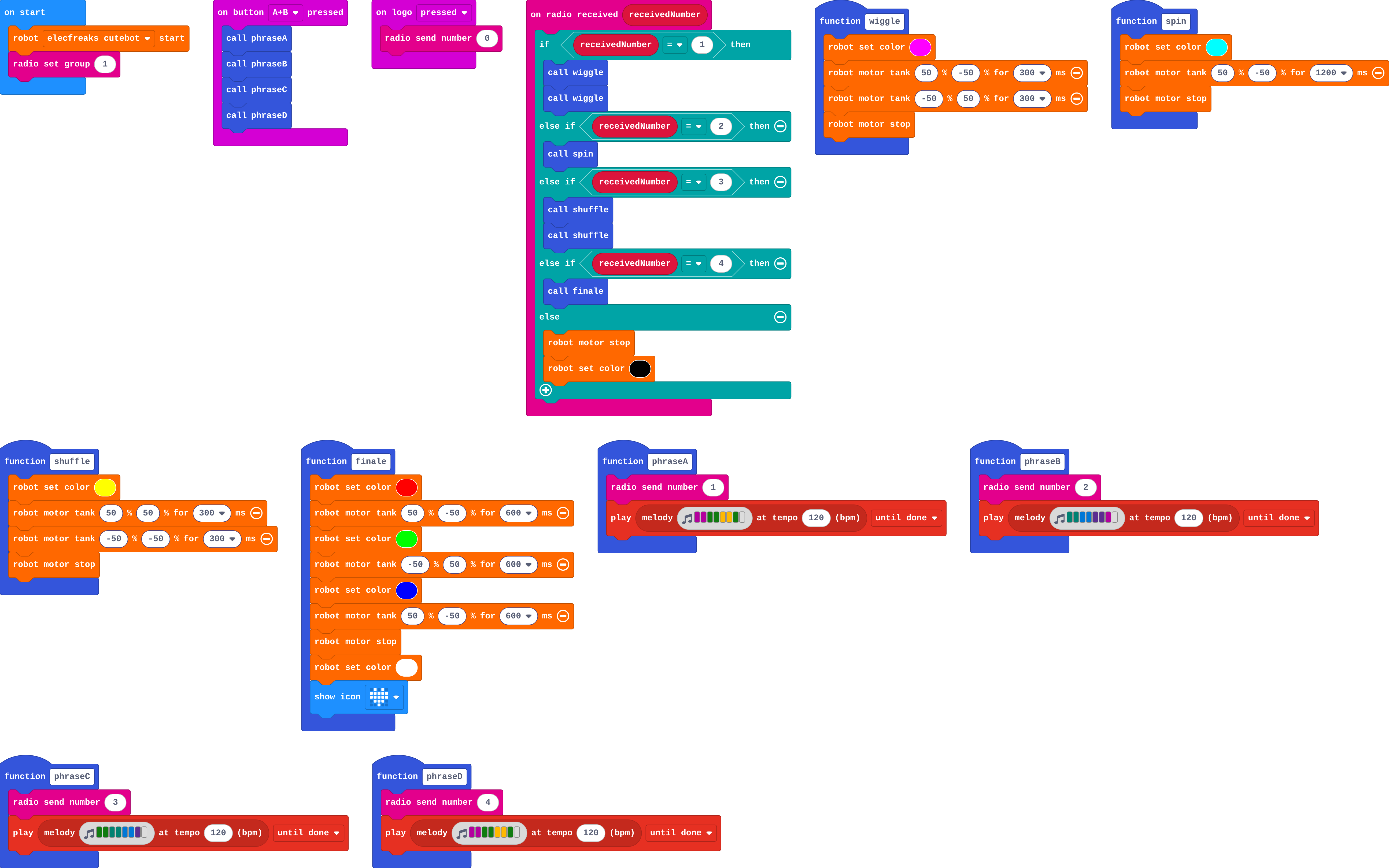
Show as code
function wiggle () {
    robot.setColor(0xff00ff)
    robot.motorTank(50, -50, 300)
    robot.motorTank(-50, 50, 300)
    robot.motorStop()
}
function spin () {
    robot.setColor(0x00ffff)
    robot.motorTank(50, -50, 1200)
    robot.motorStop()
}
function shuffle () {
    robot.setColor(0xffff00)
    robot.motorTank(50, 50, 300)
    robot.motorTank(-50, -50, 300)
    robot.motorStop()
}
function finale () {
    robot.setColor(0xff0000)
    robot.motorTank(50, -50, 600)
    robot.setColor(0x00ff00)
    robot.motorTank(-50, 50, 600)
    robot.setColor(0x0000ff)
    robot.motorTank(50, -50, 600)
    robot.motorStop()
    robot.setColor(0xffffff)
    basic.showIcon(IconNames.Heart)
}
function phraseA () {
    radio.sendNumber(1)
    music.play(music.stringPlayable("C C G G A A G - ", 120), music.PlaybackMode.UntilDone)
}
function phraseB () {
    radio.sendNumber(2)
    music.play(music.stringPlayable("F F E E D D C - ", 120), music.PlaybackMode.UntilDone)
}
function phraseC () {
    radio.sendNumber(3)
    music.play(music.stringPlayable("G G F F E E D - ", 120), music.PlaybackMode.UntilDone)
}
function phraseD () {
    radio.sendNumber(4)
    music.play(music.stringPlayable("C C G G A A G - ", 120), music.PlaybackMode.UntilDone)
}
input.onButtonPressed(Button.AB, function () {
    phraseA()
    phraseB()
    phraseC()
    phraseD()
})
input.onLogoEvent(TouchButtonEvent.Pressed, function () {
    radio.sendNumber(0)
})
radio.onReceivedNumber(function (receivedNumber) {
    if (receivedNumber == 1) {
        wiggle()
        wiggle()
    } else if (receivedNumber == 2) {
        spin()
    } else if (receivedNumber == 3) {
        shuffle()
        shuffle()
    } else if (receivedNumber == 4) {
        finale()
    } else {
        robot.motorStop()
        robot.setColor(0x000000)
    }
})
robot.elecfreaksCuteBot.start()
radio.setGroup(1)
Stretch and support
Stretch: Two parts: give dancers a role variable (lead or chorus) so the same cue makes different robots do different moves.
Support: Pair students: one writes the moves library, the other the phrases, then they agree the cue numbers.
Exit ticket
In your show, what is a cue, and where does the robot decide what a cue means?
A cue is the number a phrase sends by radio as it starts. The dancer decides what it means in on radio received, by choosing a move for each number.
What each step is for
- Investigate: A show has three layers: moves (functions), cues (phrases that send a number, then play until done), and the dancer's choice of move for each cue. Each layer can change without touching the others.
- Milestone 1: a moves library: A move library is a set of functions, each a short move with its own lights that ends with a stop.
- Milestone 2: cue the show: Each phrase is a cue; the dancer needs one branch per cue.
- Milestone 3: finale and safety stop: Combining functions, cues and decisions into a whole show is the course's ideas working together.
Where it leads
Real-world links: theme-park animatronics, drone light shows, stage lighting desks with cue lists. For a class performance, assign each group a section of a longer tune.