Sensors are numbers
Students read light, temperature and tilt as numbers, and see that a sensor read in forever follows the world while one read in on start gives a single moment.
Classroom resources
Load these into Waypoints Prepare: choose Load URL and paste the copied address, or download the file and import it. In Prepare, the worksheet's Teacher edition shows the answers; the student copy hides them.
Students will be able to
- I can read a sensor and show its number.
- I can say what the light, temperature and tilt numbers mean.
- I can make a sensor reading update by itself.
Timing
Predict and Run 8 min · Investigate 10 min · Modify 8 min · Mix it up 3 min · Make 7 min · Light meter 4 min
Before class
A sensor gives the program a number that the world keeps changing. In the simulator the controls appear only once a program uses a sensor: the light slider (sun), the temperature slider (thermometer), and tilt by moving the mouse over the micro:bit. The key idea is the forever loop from lesson 2: a sensor read in forever is read again and again; in on start, once.
Running the lesson
- Predict: ask whether the number will follow the light. The key is that forever reads it again each time. Ask the 'same number over and over' group what forever does each time round.
- Run: drag the light slider from dark to bright. The number lags a little because it scrolls.
- Investigate: Sam's thermometer is lesson 2's on start mistake again, in a new place. Ask the class which lesson it reminds them of.
- Modify: Read on request shows that an event decides when a sensor is read.
- Mix it up: a quick trace of set and change from last lesson.
- Make: temperature, C, pause: three blocks in forever.
In class
On the slides at these points. Students can do the whole lesson on their own; these are for the room. In the deck, the Run, Modify and Make slides have the live playground in them (the tutorial link is the backup), and the notes above are in each slide's speaker notes.
- Read the room (investigate, 4 min)
One student reads a thermometer (or looks out of the window) and calls out what they see, again and again. A second student calls out only once, at the start.
Who still knows what the room is like after five minutes? That is forever against on start.
The hard part (on purpose)
A sensor is read once in on start and many times in forever. When the number never changes, ask where the sensor block is.
When students get stuck
| What you will see | A question to ask | The fix |
|---|---|---|
| The number never changes. | Is the sensor block in on start or in forever? | Move it into forever (or a button event) so it is read again. |
| The simulator has no slider. | Has the program got a sensor block in it, and is it running? | The slider appears only after a sensor block is used. Restart the simulator if needed. |
| The temperature seems too high on a real micro:bit. | Where is the sensor? | It is in the processor, which warms up as it works. It reads a little above the room. |
Answers to the checks
- Predict: What will the micro:bit show?
A number that changes with the light. forever reads the light level again each time round, so the number follows the slider. - What do they measure?: Match each sensor with what its number means.
light level → A. how bright it is, from 0 (dark) to 255 (bright); temperature → C. how warm it is, in degrees Celsius; acceleration x → B. how far it tilts left (below 0) or right (above 0) - How bright?: Drag the light slider all the way up. What is the biggest number the light level can be?
255
Light level runs from 0 (dark) to 255 (as bright as it can measure). - Sam's thermometer: Sam's program shows the temperature. He drags the temperature slider, but the number never changes. Why?
The block is in on start, so it reads the temperature once
on start runs once, so Sam's program reads the temperature at the very start and never again. In forever, it would read it again each time round. - Mix it up: A changes points by 2 and B sets it to 0. Fill in points after each press.
2, 4, 0, 2
Each A adds 2 to whatever points is now. B throws the value away and puts 0 there.
Solutions
One possible solution for each task. Other correct programs are fine.
Modify › Swap the sensor
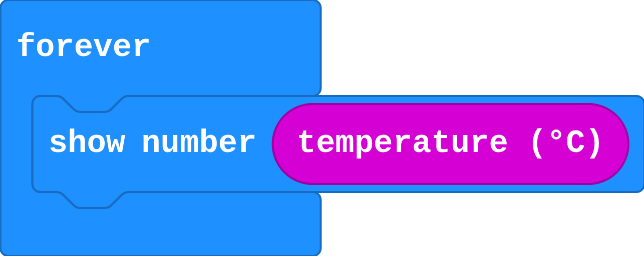
Show as code
basic.forever(function () {
    basic.showNumber(input.temperature())
})
Modify › Read on request
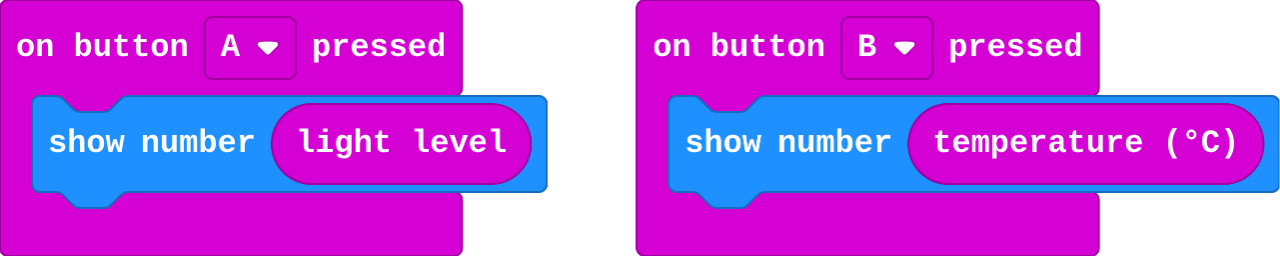
Show as code
input.onButtonPressed(Button.A, function () {
    basic.showNumber(input.lightLevel())
})
input.onButtonPressed(Button.B, function () {
    basic.showNumber(input.temperature())
})
Make
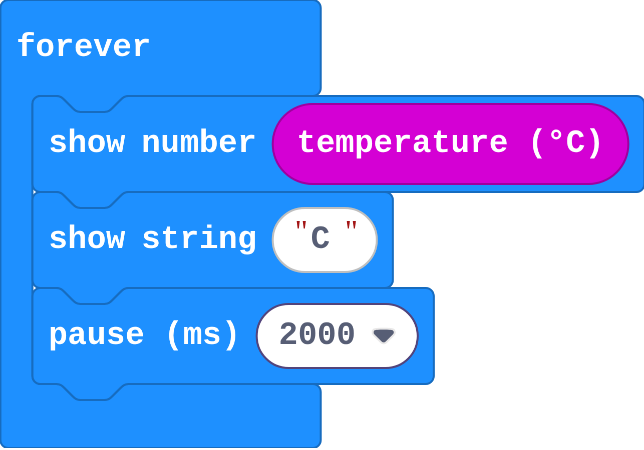
Show as code
basic.forever(function () {
    basic.showNumber(input.temperature())
    basic.showString("C")
    basic.pause(2000)
})
Change a light meter
Open task: any program that does what the step asks.
Stretch and support
Stretch: Show tilt as a number with acceleration x, then make A show tilt left and right and B show tilt forward and back (acceleration y).
Support: Give students the thermometer's forever block with show number already in it, and ask them to add the C and the pause.
Exit ticket
Why does reading the temperature in on start not work for a thermometer?
on start reads it once, at the start. A thermometer must read it again and again, in forever.
What each step is for
- Investigate: A sensor is a number the world keeps changing. Reading it once gives one moment; reading it in forever follows it.
- Modify: Any sensor block fits wherever a number fits, and an event decides when it is read.
- Mix it up: change adds to what is there; set throws it away.
Where it leads
Next unit: the micro:bit decides what to do using these numbers (if it is dark, light up). Class ideas: measure the brightest and darkest spots in the room with real micro:bits; record the temperature by a window every lesson for a week.