If
Students use an if block to make the micro:bit decide, and see that a false if does nothing, so turning something off needs its own question.
Classroom resources
Load these into Waypoints Prepare: choose Load URL and paste the copied address, or download the file and import it. In Prepare, the worksheet's Teacher edition shows the answers; the student copy hides them.
Students will be able to
- I can use an if block to make the micro:bit decide.
- I can say what an if does when its question is false.
- I can choose < or > so the question is true when I want it to be.
Timing
Predict and Run 8 min · Investigate 12 min · Modify 8 min · Mix it up 3 min · Make 10 min · Fridge alarm 4 min
Before class
An if block asks a yes-or-no question (a condition), such as light level < 50. When the answer is yes (true), it runs the blocks inside; when no (false), it skips them and does nothing. That second half surprises students: in the Predict, the lights come on in the dark and stay on, because nothing tells them to go off. The fix is a second if with the opposite question. The comparison block is in Logic: < less than, > greater than, ≥ greater than or equal to. Next lesson, else does the same job more neatly.
Running the lesson
- Predict: most students expect the lights to go off when it is bright. Let them be surprised.
- Run: drag dark, then bright. Ask: which block would turn the lights off? (None.)
- Investigate: the fix is a second if asking the opposite question. Zoe's night light is the classic mix-up of < and >: read it aloud as 'if the light is less than 50'.
- Modify: changing the switch point means changing both questions, or there is a gap where neither is true.
- Mix it up: sensors in on start against forever, from last lesson.
- Make: two ifs, two drawings. Leave the middle (10 to 30) showing whatever was last: that is fine for now.
In class
On the slides at these points. Students can do the whole lesson on their own; these are for the room. In the deck, the Run, Modify and Make slides have the live playground in them (the tutorial link is the backup), and the notes above are in each slide's speaker notes.
- Stand up if (investigate, 3 min)
The teacher reads a question ("if you are wearing blue"). Students for whom it is true stand up. Then the teacher reads a question that is false for everyone.
When the question is false, nobody does anything: nobody sits down unless a question tells them to.
The hard part (on purpose)
An if does nothing when false, so turning something off needs its own question. Ask them to read the question aloud for a dark room and a bright one.
When students get stuck
| What you will see | A question to ask | The fix |
|---|---|---|
| The lights never come on. | Read your question aloud: is it true when it is dark? | Check the < and >: a night light needs light level < 50. |
| The lights flicker when the slider is near 50. | Which questions are true at exactly 50? | Use < 50 for one and ≥ 50 for the other, so exactly one is true. |
| The if block will not snap in. | Is it inside forever, and is the comparison inside the if's slot? | Drag the comparison from Logic into the hexagon slot of the if. |
Answers to the checks
- Predict: The light level starts high. You drag it down to 20, then back up to 200. What happens?
The lights come on in the dark and stay on. The if only does something when it is dark; when it is bright again, it does nothing, so nothing turns the lights off. - Why do they stay on?: Why do the lights stay on when it gets bright again?
When the question is false, the if does nothing, so nothing turns the lights off
When it is bright, 'light level < 50' is false, so the if skips its blocks. Nothing in the program turns the lights off. - Zoe's night light: Zoe's night light is on in the daytime and off at night. Which part is wrong?
The < and > are the wrong way round
'light level > 50' is true when it is bright, so Zoe's lights come on in daylight. For a night light, the lights go on when the level is less than (<) 50. - Mix it up: Thermometer 1 (above) reads the temperature in on start. Thermometer 2 (below) reads it in forever. You drag the temperature slider. Which one follows it?
Thermometer 2, in forever
on start reads the temperature once, at the start. forever reads it again each time round, so its number follows the slider.
Solutions
One possible solution for each task. Other correct programs are fine.
Modify › Switch earlier
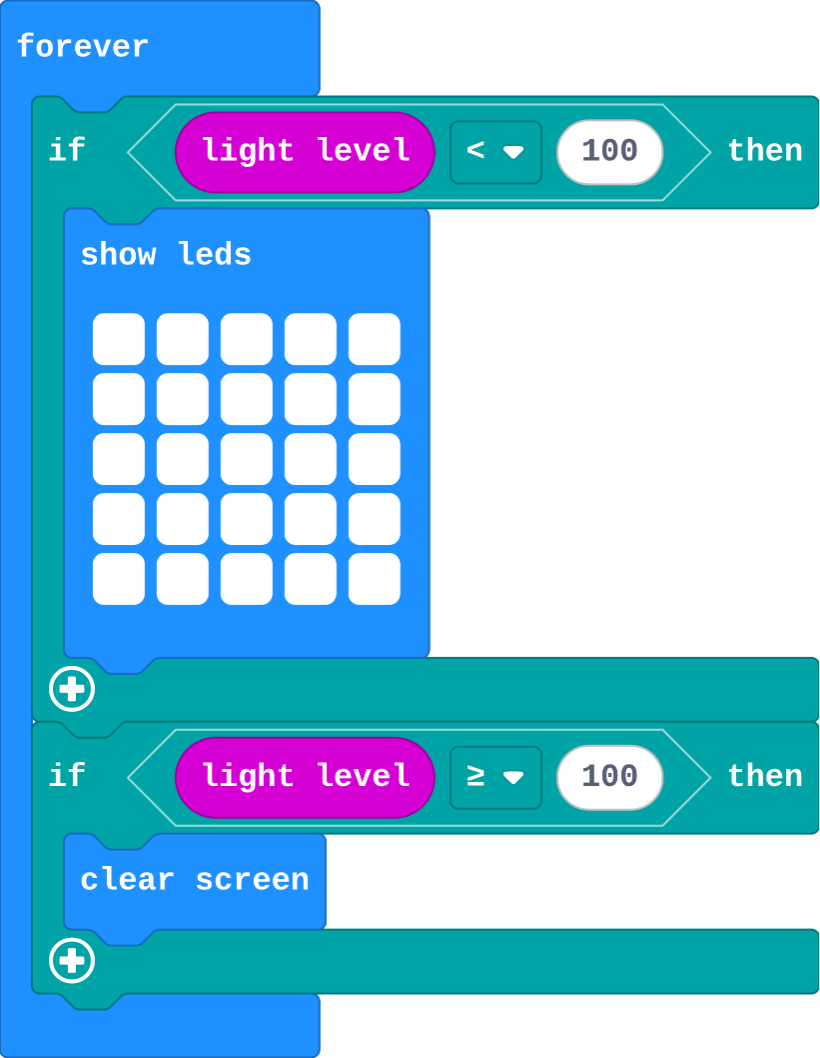
Show as code
basic.forever(function () {
    if (input.lightLevel() < 100) {
        basic.showLeds(`
            # # # # #
            # # # # #
            # # # # #
            # # # # #
            # # # # #
            `)
    }
    if (input.lightLevel() >= 100) {
        basic.clearScreen()
    }
})
Modify › Too hot
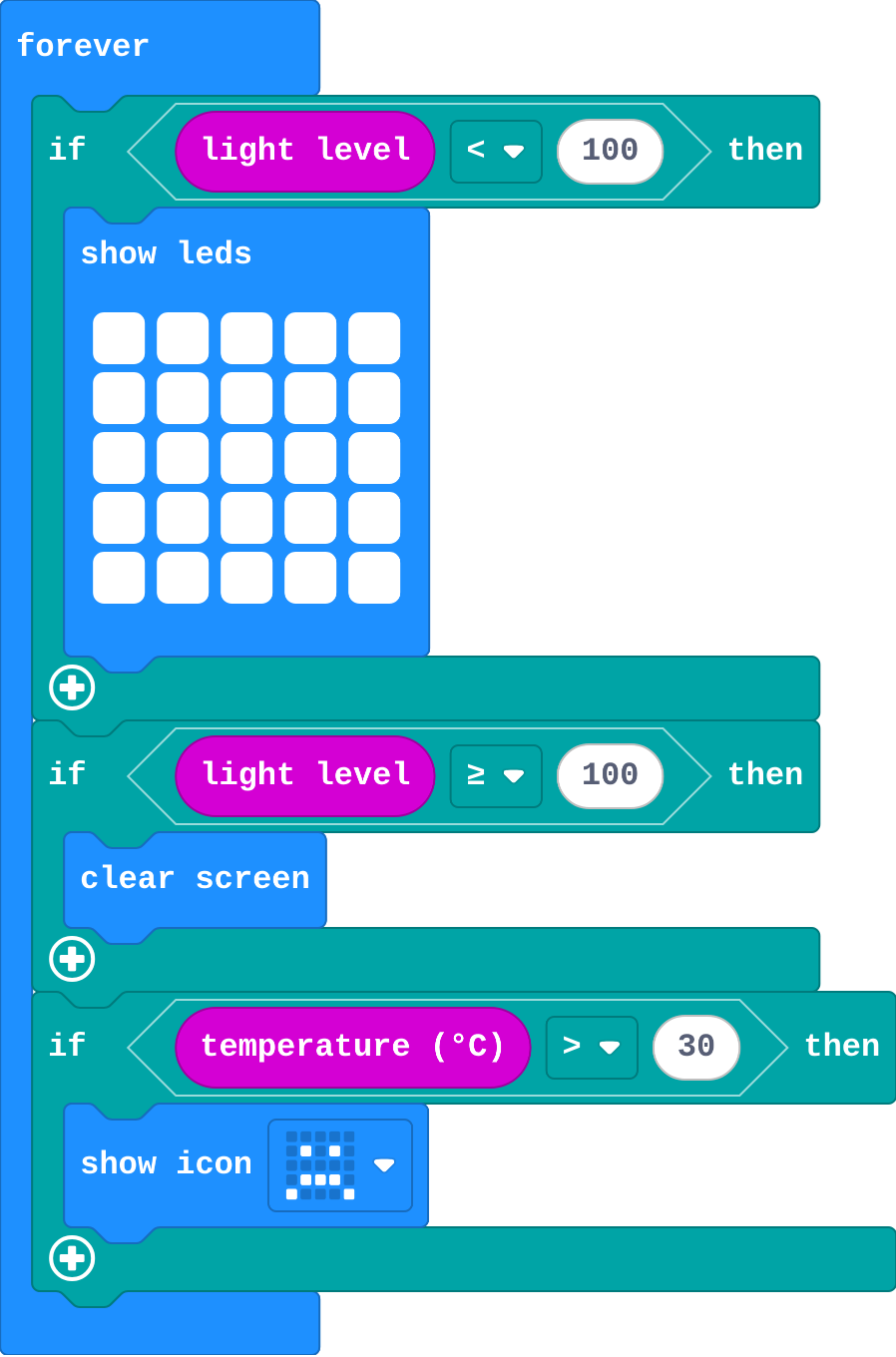
Show as code
basic.forever(function () {
    if (input.lightLevel() < 100) {
        basic.showLeds(`
            # # # # #
            # # # # #
            # # # # #
            # # # # #
            # # # # #
            `)
    }
    if (input.lightLevel() >= 100) {
        basic.clearScreen()
    }
    if (input.temperature() > 30) {
        basic.showIcon(IconNames.Sad)
    }
})
Make
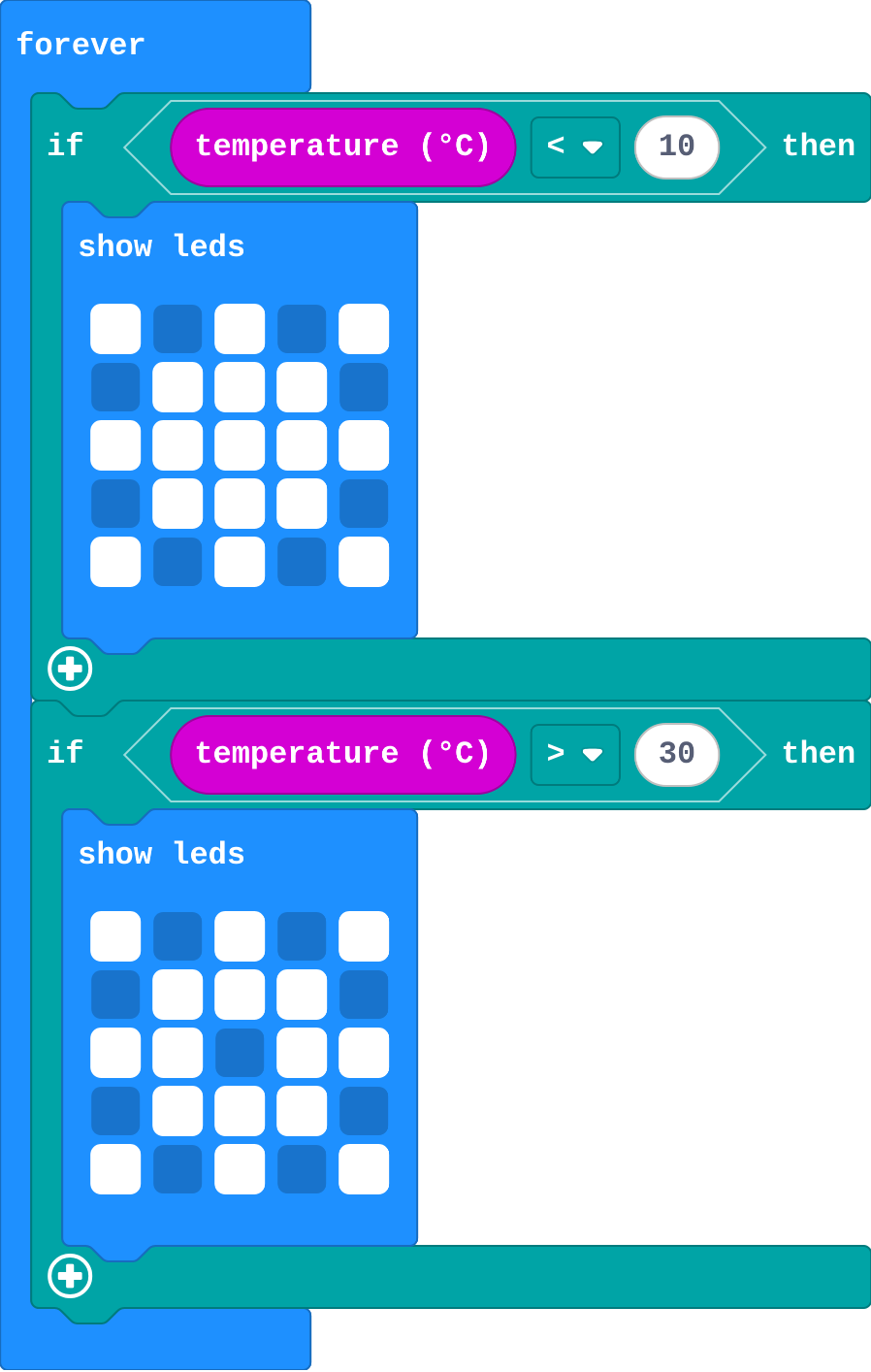
Show as code
basic.forever(function () {
    if (input.temperature() < 10) {
        basic.showLeds(`
            # . # . #
            . # # # .
            # # # # #
            . # # # .
            # . # . #
            `)
    }
    if (input.temperature() > 30) {
        basic.showLeds(`
            # . # . #
            . # # # .
            # # . # #
            . # # # .
            # . # . #
            `)
    }
})
Change a fridge alarm
Open task: any program that does what the step asks.
Stretch and support
Stretch: Make the night light dim gradually: one row lit when it is a bit dark, three rows darker, all five in the dark (three ifs).
Support: Give students the second if already in place with an empty question, and ask them to choose the comparison.
Exit ticket
A night light uses only 'if light level < 50, show lights'. Why do the lights stay on in the morning?
When it is bright the question is false, so the if does nothing. Nothing in the program turns the lights off.
What each step is for
- Investigate: An if runs its blocks only while its question is true. When it is false, nothing happens, so turning something off needs its own question.
- Modify: The number in the question decides where the switch happens, and any sensor can be asked about.
- Mix it up: A sensor read once gives one moment; a sensor read in forever follows the world.
Where it leads
Next lesson: else, which turns two ifs into one block with no gap. Class ideas: a classroom 'too noisy' light with the sound level (micro:bit V2); a plant monitor on a windowsill with a real micro:bit.