---
marp: true
theme: default
html: true
---

# If

micro:bit Foundations · Decide

<!-- Speaker note: Students use an if block to make the micro:bit decide, and see that a false if does nothing, so turning something off needs its own question. About 45 minutes (Predict and Run 8 min · Investigate 12 min · Modify 8 min · Mix it up 3 min · Make 10 min · Fridge alarm 4 min). -->

---

## Today

**We are learning to** make the micro:bit decide what to do, using a sensor and an if block.

- I can use an if block to make the micro:bit decide.
- I can say what an if does when its question is false.
- I can choose &lt; or &gt; so the question is true when I want it to be.

<!-- Speaker note: Before class: An **if** block asks a yes-or-no question (a **condition**), such as *light level < 50*. When the answer is yes (**true**), it runs the blocks inside; when no (**false**), it skips them and does nothing. That second half surprises students: in the Predict, the lights come on in the dark and **stay on**, because nothing tells them to go off. The fix is a second if with the opposite question. The comparison block is in **Logic**: `<` less than, `>` greater than, `≥` greater than or equal to. Next lesson, **else** does the same job more neatly. Teacher: Mix it up: sensors in on start against forever, from last lesson. -->

---

## Why it matters

> Street lights switch on when it gets dark, and a fridge beeps when its door is left open. Each one asks a yes-or-no question about a number, again and again.

<!-- Speaker note: Last lesson the micro:bit read sensors and showed numbers. Now it will **decide**. An **if** block (in **Logic**) asks a yes-or-no question, such as *is the light level less than 50?* If the answer is yes (**true**), it runs the blocks inside. If no (**false**), it skips them. -->

---

<span style="background:#dbeafe; color:#1a1a1a; border:1.5px solid #3b82f6; padding:6px 18px; border-radius:8px; font-size:1em; font-weight:500;">💬 Discussion</span>

## Predict

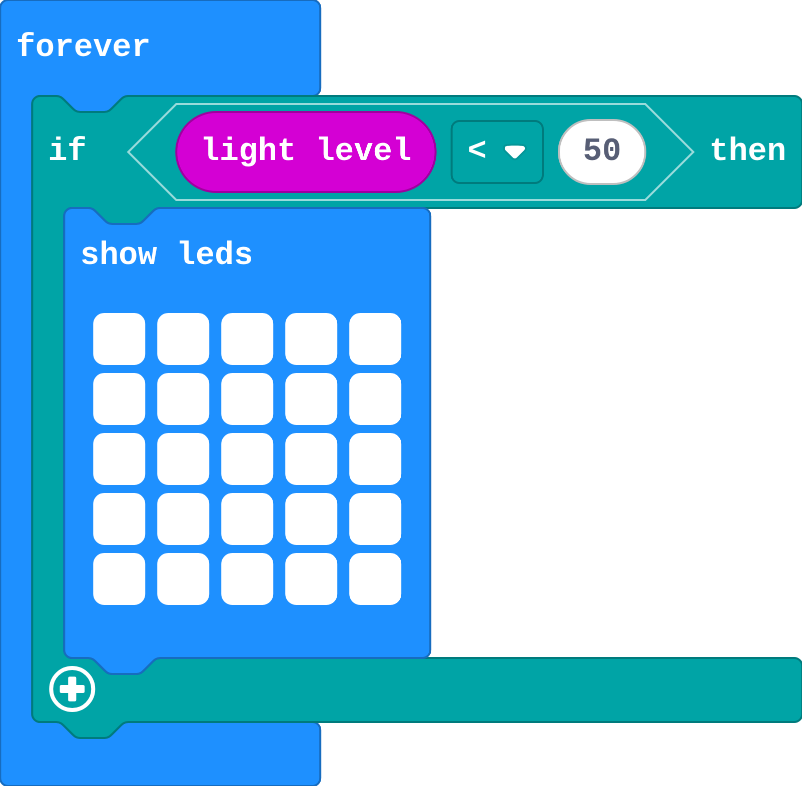
![h:360](https://studio.learningwaypoints.com/tutorials/_pictures/makecode/code/1f3e7c43f108.png?v=4b6833858851d206)

**The light level starts high. You drag it down to 20, then back up to 200. What happens?**

- The lights come on in the dark, then go off when it is bright
- The lights flash on and off
- The lights come on in the dark, and stay on when it is bright again
- Nothing ever lights up

<!-- Speaker note: What happens: The lights come on in the dark and stay on. The if only does something when it is dark; when it is bright again, it does nothing, so nothing turns the lights off. Take two or three predictions before anyone runs it. -->

<!-- Speaker note: Teacher: most students expect the lights to go off when it is bright. Let them be surprised. -->

<style scoped>pre, marp-pre { font-size: 0.5em; line-height: 1.25; } section { font-size: 25px; }</style>

---

<span style="background:#dcfce7; color:#1a1a1a; border:1.5px solid #22c55e; padding:6px 18px; border-radius:8px; font-size:1em; font-weight:500;">✅ Check</span>

## What happened?

* The lights come on in the dark and stay on. The if only does something when it is dark; when it is bright again, it does nothing, so nothing turns the lights off.

<!-- Speaker note: Reveal after running. Ask who predicted it, and what made them think so. -->

---

<span style="background:#fef3c7; color:#1a1a1a; border:1.5px solid #f59e0b; padding:6px 18px; border-radius:8px; font-size:1em; font-weight:500;">✍️ Activity</span>

## Run it

Open the lesson at this step and try it together.

[studio.learningwaypoints.com/tutorials/code/microbit/microbit-if/?full=step-2#step-2](https://studio.learningwaypoints.com/tutorials/code/microbit/microbit-if/?full=step-2#step-2)

<!-- Speaker note: Drag the light slider down to dark, then back up to bright. Students should be able to say: I dragged the light down and back up, and compared what happened with my prediction. -->

<!-- Speaker note: Teacher: drag dark, then bright. Ask: which block would turn the lights off? (None.) -->

---

<span style="background:#dbeafe; color:#1a1a1a; border:1.5px solid #3b82f6; padding:6px 18px; border-radius:8px; font-size:1em; font-weight:500;">💬 Discussion</span>

## Investigate

![h:360](https://studio.learningwaypoints.com/tutorials/_pictures/makecode/code/1f3e7c43f108.png?v=4b6833858851d206)

<!-- Speaker note: What this step is for: An if runs its blocks only while its question is true. When it is false, nothing happens, so turning something off needs its own question. -->

<!-- Speaker note: Teacher: the fix is a second if asking the opposite question. Zoe's night light is the classic mix-up of < and >: read it aloud as 'if the light is less than 50'. -->

---

<span style="background:#dcfce7; color:#1a1a1a; border:1.5px solid #22c55e; padding:6px 18px; border-radius:8px; font-size:1em; font-weight:500;">✅ Check</span>

## Why do they stay on?

**Why do the lights stay on when it gets bright again?**

- The light sensor stops working
- When the question is false, the if does nothing, so nothing turns the lights off
- The lights need a pause to go off
- forever only runs once

* Answer: When the question is false, the if does nothing, so nothing turns the lights off

<!-- Speaker note: When it is bright, 'light level < 50' is false, so the if skips its blocks. Nothing in the program turns the lights off. -->

<style scoped>pre, marp-pre { font-size: 0.5em; line-height: 1.25; } section { font-size: 27px; }</style>

---

<span style="background:#dcfce7; color:#1a1a1a; border:1.5px solid #22c55e; padding:6px 18px; border-radius:8px; font-size:1em; font-weight:500;">✅ Check</span>

## Zoe's night light

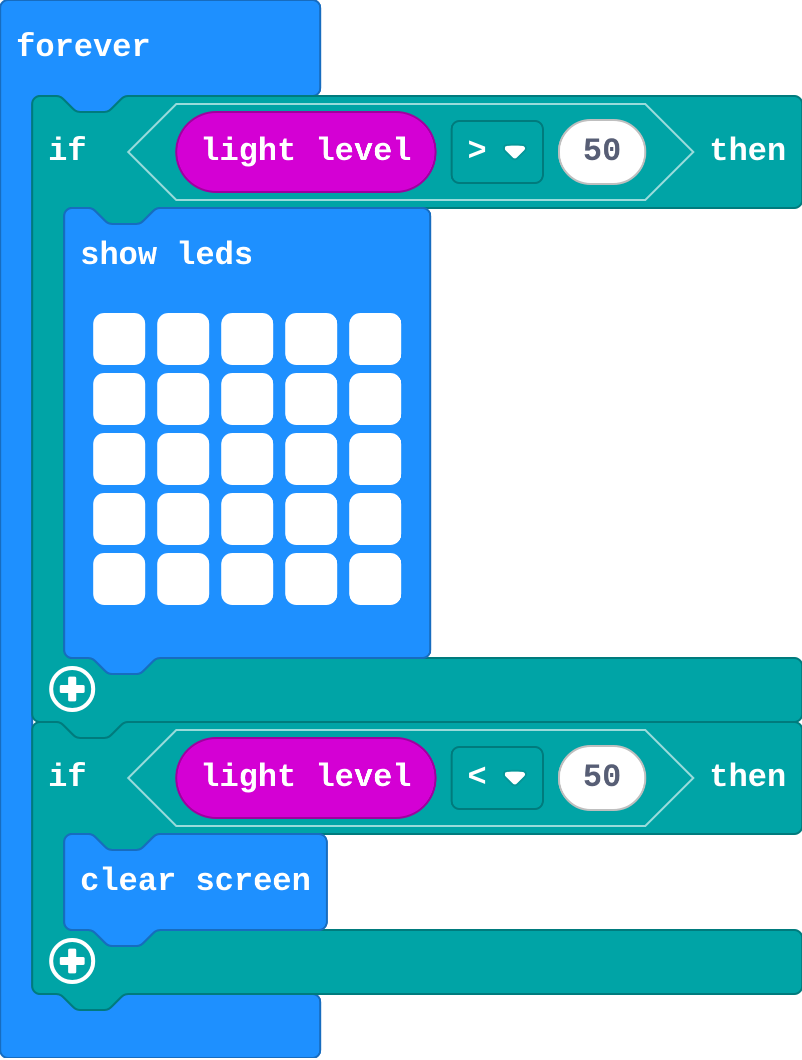
Zoe's program:

![h:360](https://studio.learningwaypoints.com/tutorials/_pictures/makecode/code/26c462301905.png?v=fe9207976e79bba6)

**Zoe's night light is on in the daytime and off at night. Which part is wrong?**

- It needs to be in on start
- clear screen and show leds are swapped
- 50 is too small
- The &lt; and &gt; are the wrong way round

* Answer: The &lt; and &gt; are the wrong way round

<!-- Speaker note: 'light level > 50' is true when it is bright, so Zoe's lights come on in daylight. For a night light, the lights go on when the level is less than (<) 50. -->

<style scoped>pre, marp-pre { font-size: 0.5em; line-height: 1.25; } section { font-size: 24px; }</style>

---

<span style="background:#fef3c7; color:#1a1a1a; border:1.5px solid #f59e0b; padding:6px 18px; border-radius:8px; font-size:1em; font-weight:500;">✍️ Activity</span>

## Stand up if <span style="font-size:.6em;color:#64748b">(3 min)</span>

The teacher reads a question ("if you are wearing blue"). Students for whom it is true stand up. Then the teacher reads a question that is false for everyone.

<!-- Speaker note: When the question is false, nobody does anything: nobody sits down unless a question tells them to. -->

---

<span style="background:#fef3c7; color:#1a1a1a; border:1.5px solid #f59e0b; padding:6px 18px; border-radius:8px; font-size:1em; font-weight:500;">✍️ Activity</span>

## Modify


- **Switch earlier:** Make the night light come on when the light level is below **100**. Change both questions.
- **Too hot:** Add a third **if**: when the temperature is above 30, show a sad face.

[Open this step](https://studio.learningwaypoints.com/tutorials/code/microbit/microbit-if/?full=step-4#step-4)

<!-- Speaker note: What this step is for: The number in the question decides where the switch happens, and any sensor can be asked about. Hints, in order: Click 50 in each question and type 100. / Drag in a third if from Logic. / temperature is in Input. Use > and 30. For students who need more support: Give students the second if already in place with an empty question, and ask them to choose the comparison. For early finishers: Make the night light dim gradually: one row lit when it is a bit dark, three rows darker, all five in the dark (three ifs). The hard part, on purpose: An if does nothing when false, so turning something off needs its own question. Ask them to read the question aloud for a dark room and a bright one. When students get stuck: The lights never come on. Ask: Read your question aloud: is it true when it is dark? Fix: Check the < and >: a night light needs light level < 50. / The lights flicker when the slider is near 50. Ask: Which questions are true at exactly 50? Fix: Use < 50 for one and ≥ 50 for the other, so exactly one is true. / The if block will not snap in. Ask: Is it inside forever, and is the comparison inside the if's slot? Fix: Drag the comparison from Logic into the hexagon slot of the if. -->

<!-- Speaker note: Teacher: changing the switch point means changing both questions, or there is a gap where neither is true. -->

---

<span style="background:#dbeafe; color:#1a1a1a; border:1.5px solid #3b82f6; padding:6px 18px; border-radius:8px; font-size:1em; font-weight:500;">💬 Discussion</span>

## Investigate: Mix it up

![h:128](https://studio.learningwaypoints.com/tutorials/_pictures/makecode/code/7eb0d60bd9c6.png?v=57cb97115d035648)

<!-- Speaker note: Thermometer 1 is above. Thermometer 2: What this step is for: A sensor read once gives one moment; a sensor read in forever follows the world. -->

---

<span style="background:#dcfce7; color:#1a1a1a; border:1.5px solid #22c55e; padding:6px 18px; border-radius:8px; font-size:1em; font-weight:500;">✅ Check</span>

## Mix it up

**Thermometer 1 (above) reads the temperature in on start. Thermometer 2 (below) reads it in forever. You drag the temperature slider. Which one follows it?**

- Thermometer 1, in on start
- Neither: sensors only change on a real micro:bit
- Thermometer 2, in forever
- Both

* Answer: Thermometer 2, in forever

<!-- Speaker note: on start reads the temperature once, at the start. forever reads it again each time round, so its number follows the slider. What this step is for: A sensor read once gives one moment; a sensor read in forever follows the world. -->

<style scoped>pre, marp-pre { font-size: 0.5em; line-height: 1.25; } section { font-size: 27px; }</style>

---

<span style="background:#fef3c7; color:#1a1a1a; border:1.5px solid #f59e0b; padding:6px 18px; border-radius:8px; font-size:1em; font-weight:500;">✍️ Activity</span>

## Make

Make a **weather warning**. Draw your own pictures:

- Below **10** degrees: a snowflake (or anything that means cold).
- Above **30** degrees: a sun (or anything that means hot).

Test it by dragging the temperature slider.

[Open this step](https://studio.learningwaypoints.com/tutorials/code/microbit/microbit-if/?full=step-6#step-6)

<!-- Speaker note: Hints, in order: You need two if blocks inside forever, one for cold and one for hot. / Cold: temperature < 10. Hot: temperature > 30. -->

<!-- Speaker note: Teacher: two ifs, two drawings. Leave the middle (10 to 30) showing whatever was last: that is fine for now. -->

---

<span style="background:#fef3c7; color:#1a1a1a; border:1.5px solid #f59e0b; padding:6px 18px; border-radius:8px; font-size:1em; font-weight:500;">✍️ Activity</span>

## Change a fridge alarm

A fridge should stay at 5 degrees or less. This alarm flashes a cross when it gets warmer. Make it also flash when the fridge is **too cold** (below 0), with a different picture.

[Open this step](https://studio.learningwaypoints.com/tutorials/code/microbit/microbit-if/?full=step-7#step-7)

---

<span style="background:#dcfce7; color:#1a1a1a; border:1.5px solid #22c55e; padding:6px 18px; border-radius:8px; font-size:1em; font-weight:500;">✅ Check</span>

## Exit ticket

**A night light uses only 'if light level &lt; 50, show lights'. Why do the lights stay on in the morning?**

* When it is bright the question is false, so the if does nothing. Nothing in the program turns the lights off.

<!-- Speaker note: Students answer on paper or a mini whiteboard before the reveal. Anyone who cannot answer needs the main idea again next lesson. Where this leads: Next lesson: else, which turns two ifs into one block with no gap. Class ideas: a classroom 'too noisy' light with the sound level (micro:bit V2); a plant monitor on a windowsill with a real micro:bit. -->