Which message?
Students use receivedNumber to do something different for each radio message, and send words with send string.
Classroom resources
Load these into Waypoints Prepare: choose Load URL and paste the copied address, or download the file and import it. In Prepare, the worksheet's Teacher edition shows the answers; the student copy hides them.
Students will be able to
- I can make the receiver do something different for each number that arrives.
- I can send a word by radio and show it.
- I can agree a code of numbers with a partner.
Timing
Predict and Run 7 min · Investigate 10 min · Modify 8 min · Mix it up 3 min · Make 9 min · Doorbell 3 min
Before class
on radio received runs for every number that arrives, and receivedNumber (drag it out of the block) holds which number it was. One receiver block with if … else if handles every message; a second on radio received block greys out. send string and on radio received receivedString do the same for words. Each number is a code both micro:bits agree on: 1 means left, 2 means right.
Running the lesson
- Predict: some students expect the number 2 to show. Ask what the receiver does with receivedNumber.
- Run: A and B on one, watch the other.
- Investigate: the 5 in the trace shows that a number with no question does nothing. Max's second block is this lesson's misconception.
- Modify: a third number, then a word with send string.
- Mix it up: groups again, from last lesson.
- Make: three agreed numbers, three pictures.
In class
On the slides at these points. Students can do the whole lesson on their own; these are for the room. In the deck, the Run, Modify and Make slides have the live playground in them (the tutorial link is the backup), and the notes above are in each slide's speaker notes.
- Agree a code (investigate, 4 min)
Pairs agree what 1, 2 and 3 mean (left, right, stop). One holds up fingers silently; the other acts it out.
A number only means something if both sides agree what it means.
- Ride along (end, 3 min)
One partner is the rider, the other the back light. The rider sends a signal; the back light calls out what it shows.
The hard part (on purpose)
One receiver for every message. Ask what receivedNumber holds when B is pressed.
When students get stuck
| What you will see | A question to ask | The fix |
|---|---|---|
| The receiver shows the same picture for every number. | Where do you check which number arrived? | Use if receivedNumber = 1 … else if receivedNumber = 2 inside on radio received. |
| receivedNumber cannot be found in Variables. | Where does receivedNumber come from? | Drag it out of the on radio received block itself. |
| A word is sent but nothing shows. | Which on radio received block is it, number or string? | Words arrive in on radio received receivedString. |
Answers to the checks
- Predict: You press B on the first micro:bit. What does the second micro:bit show?
A sad face. B sends 2. On the second micro:bit receivedNumber is 2, so the first question is false and the else if part runs. - Trace the messages: What does the receiver show for each number that arrives?
heart, sad face, nothing
1 and 2 each have a question. 5 makes both questions false, and there is no else, so nothing happens. - Max's second block: Max wants 1 to show a heart and 2 a sad face. He drags in a second on radio received block for 2, and it greys out. What should he do?
Use one on radio received, with if receivedNumber = 1 … else if receivedNumber = 2
Every number arrives in the same on radio received block. receivedNumber says which one came, and if … else if picks what to do. - In Python: The receiver in Python. Match each line with what it does.
def on_received_number(receivedNumber): → B. runs for every number that arrives; if receivedNumber == 1: → A. checks whether the number was 1; elif receivedNumber == 2: → C. otherwise, checks whether it was 2 - Mix it up: Three micro:bits run this program. The first and second are in group 1; the third is in group 2. You press A on the first. Which show the heart?
Only the second
The first one sends and never hears itself. The second is in the same group, so it hears. The third is in group 2, so it hears nothing.
Solutions
One possible solution for each task. Other correct programs are fine.
Modify › A third message
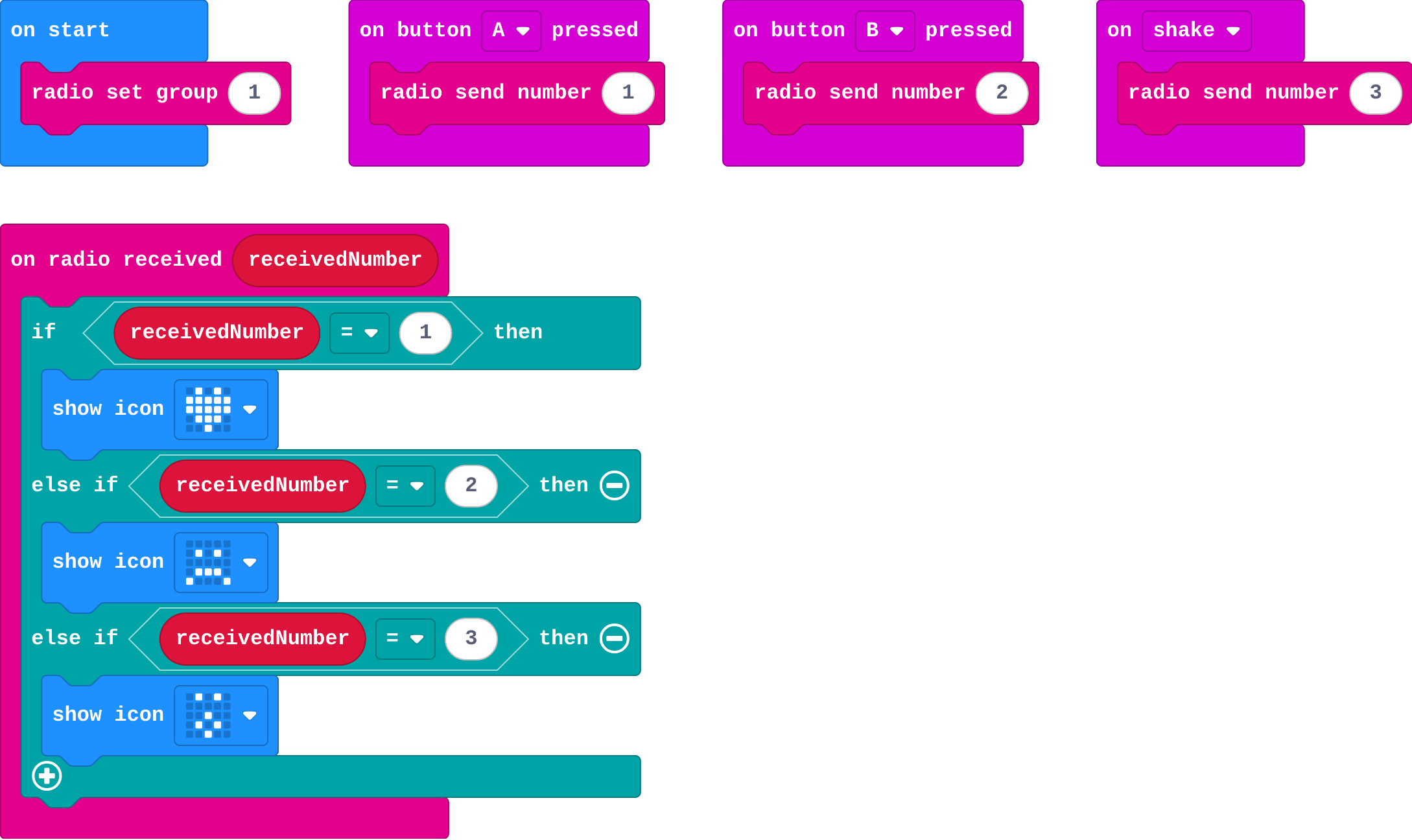
Show as code
radio.setGroup(1)
input.onButtonPressed(Button.A, function () {
    radio.sendNumber(1)
})
input.onButtonPressed(Button.B, function () {
    radio.sendNumber(2)
})
input.onGesture(Gesture.Shake, function () {
    radio.sendNumber(3)
})
radio.onReceivedNumber(function (receivedNumber) {
    if (receivedNumber == 1) {
        basic.showIcon(IconNames.Heart)
    } else if (receivedNumber == 2) {
        basic.showIcon(IconNames.Sad)
    } else if (receivedNumber == 3) {
        basic.showIcon(IconNames.Surprised)
    }
})
Modify › Send a word
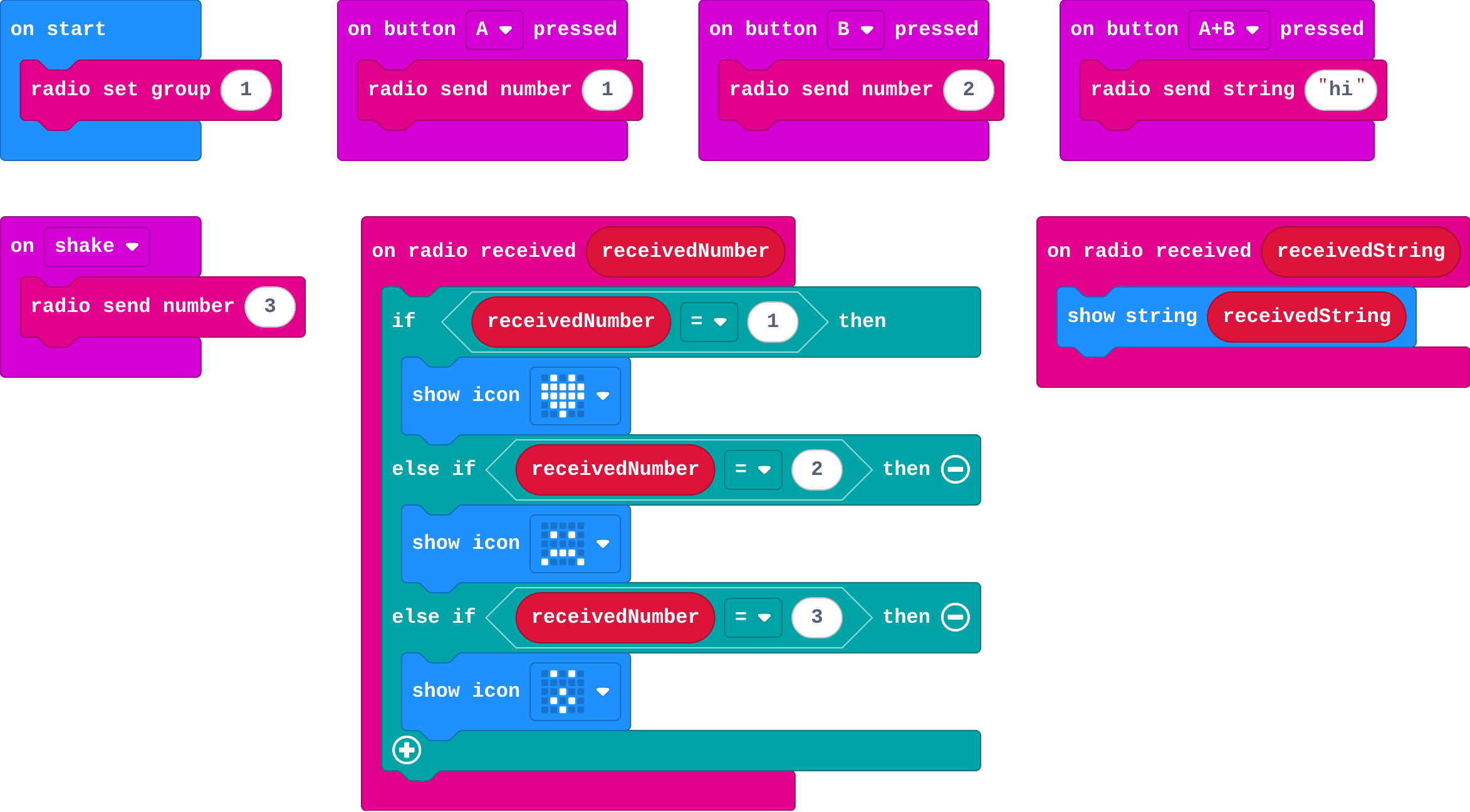
Show as code
radio.setGroup(1)
input.onButtonPressed(Button.A, function () {
    radio.sendNumber(1)
})
input.onButtonPressed(Button.B, function () {
    radio.sendNumber(2)
})
input.onGesture(Gesture.Shake, function () {
    radio.sendNumber(3)
})
input.onButtonPressed(Button.AB, function () {
    radio.sendString("hi")
})
radio.onReceivedNumber(function (receivedNumber) {
    if (receivedNumber == 1) {
        basic.showIcon(IconNames.Heart)
    } else if (receivedNumber == 2) {
        basic.showIcon(IconNames.Sad)
    } else if (receivedNumber == 3) {
        basic.showIcon(IconNames.Surprised)
    }
})
radio.onReceivedString(function (receivedString) {
    basic.showString(receivedString)
})
Make
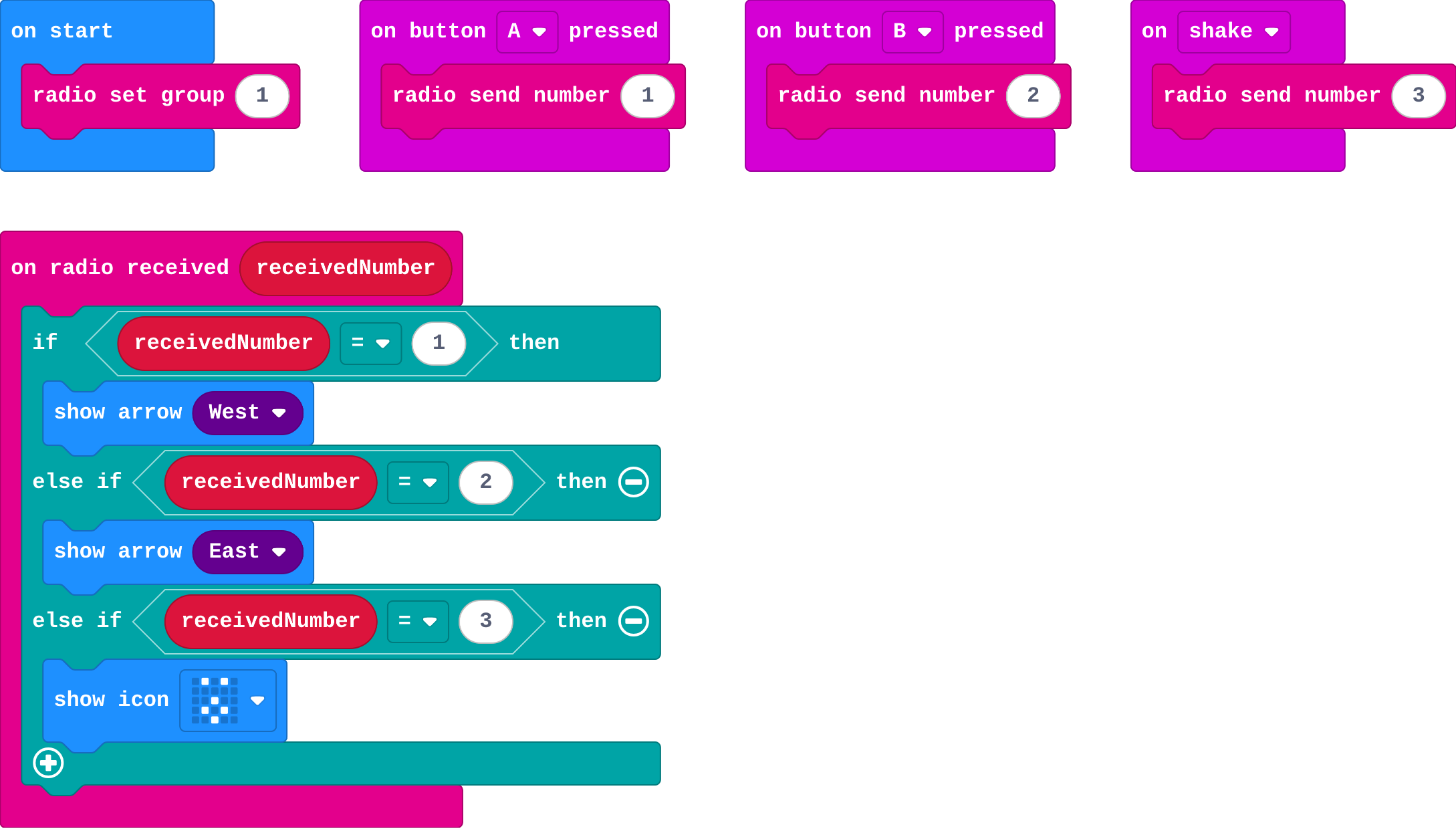
Show as code
radio.setGroup(1)
input.onButtonPressed(Button.A, function () {
    radio.sendNumber(1)
})
input.onButtonPressed(Button.B, function () {
    radio.sendNumber(2)
})
input.onGesture(Gesture.Shake, function () {
    radio.sendNumber(3)
})
radio.onReceivedNumber(function (receivedNumber) {
    if (receivedNumber == 1) {
        basic.showArrow(ArrowNames.West)
    } else if (receivedNumber == 2) {
        basic.showArrow(ArrowNames.East)
    } else if (receivedNumber == 3) {
        basic.showIcon(IconNames.Surprised)
    }
})
Change a doorbell
Open task: any program that does what the step asks.
Stretch and support
Stretch: Make a two-way chat: each micro:bit sends 1 for 'yes' and 2 for 'no', and shows a tick or cross when the other answers.
Support: Give students the receiver with if … else if already built, and ask them to add the senders.
Exit ticket
A receiver checks if receivedNumber = 1 and else if receivedNumber = 2. What happens when 3 arrives?
Nothing. Both questions are false and there is no else.
What each step is for
- Investigate: One on radio received runs for every message, and receivedNumber says which one arrived, so if and else if can do something different for each.
- Modify: Each new message is one more agreed number and one more question. Words travel the same way with send string.
- Mix it up: A message reaches every other micro:bit in the same group, and no others.
Where it leads
Next lesson: a list both micro:bits share turns the numbers into words. Class idea: a quiz buzzer where A and B are two answers.