---
marp: true
theme: default
html: true
---

# Which message?

micro:bit: talk and play · Talk

<!-- Speaker note: Students use receivedNumber to do something different for each radio message, and send words with send string. About 40 minutes (Predict and Run 7 min · Investigate 10 min · Modify 8 min · Mix it up 3 min · Make 9 min · Doorbell 3 min). -->

---

## Today

**We are learning to** use the number that arrives by radio to do something different for each message, and send words as well as numbers.

- I can make the receiver do something different for each number that arrives.
- I can send a word by radio and show it.
- I can agree a code of numbers with a partner.

<!-- Speaker note: Before class: **on radio received** runs for **every** number that arrives, and **receivedNumber** (drag it out of the block) holds which number it was. One receiver block with **if … else if** handles every message; a second on radio received block greys out. **send string** and **on radio received receivedString** do the same for words. Each number is a code both micro:bits agree on: 1 means left, 2 means right. Teacher: Mix it up: groups again, from last lesson. -->

---

## Why it matters

> A garage door opener has one receiver but two buttons: open and close. The receiver reads which code arrived and acts on it.

<!-- Speaker note: Last lesson every message did the same thing: a heart. But **on radio received** also tells you **what** arrived. **receivedNumber** holds the number that was sent, so the receiver can ask about it with **if**. -->

---

<span style="background:#dbeafe; color:#1a1a1a; border:1.5px solid #3b82f6; padding:6px 18px; border-radius:8px; font-size:1em; font-weight:500;">💬 Discussion</span>

## Predict

![h:356](https://studio.learningwaypoints.com/tutorials/_pictures/makecode/code/b2ec24c13148.png?v=772ce4b675b81a7f)

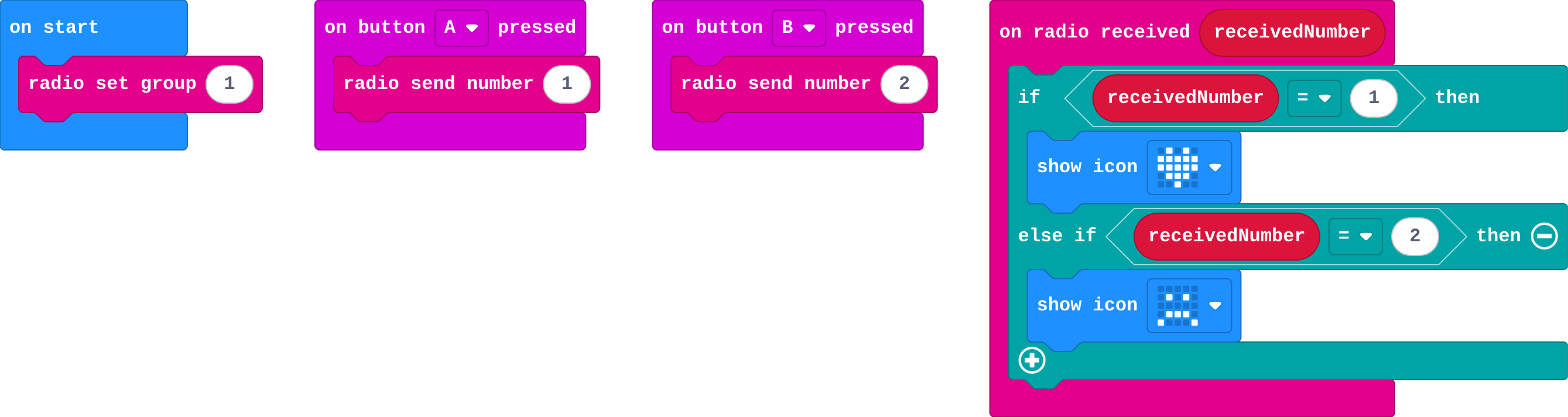
**You press B on the first micro:bit. What does the second micro:bit show?**

- A heart, then a sad face
- A sad face
- The number 2
- A heart

<!-- Speaker note: What happens: A sad face. B sends 2. On the second micro:bit receivedNumber is 2, so the first question is false and the else if part runs. Take two or three predictions before anyone runs it. -->

<!-- Speaker note: Teacher: some students expect the number 2 to show. Ask what the receiver does with receivedNumber. -->

---

<span style="background:#dcfce7; color:#1a1a1a; border:1.5px solid #22c55e; padding:6px 18px; border-radius:8px; font-size:1em; font-weight:500;">✅ Check</span>

## What happened?

* A sad face. B sends 2. On the second micro:bit receivedNumber is 2, so the first question is false and the else if part runs.

<!-- Speaker note: Reveal after running. Ask who predicted it, and what made them think so. -->

---

<span style="background:#fef3c7; color:#1a1a1a; border:1.5px solid #f59e0b; padding:6px 18px; border-radius:8px; font-size:1em; font-weight:500;">✍️ Activity</span>

## Run it

Open the lesson at this step and try it together.

[studio.learningwaypoints.com/tutorials/code/microbit-play/microbit-which/?full=step-2#step-2](https://studio.learningwaypoints.com/tutorials/code/microbit-play/microbit-which/?full=step-2#step-2)

<!-- Speaker note: Press **A**, then **B**, on one micro:bit. Watch the other. Students should be able to say: I pressed A and B on one micro:bit and compared what the other showed with my prediction. -->

<!-- Speaker note: Teacher: A and B on one, watch the other. -->

---

<span style="background:#dbeafe; color:#1a1a1a; border:1.5px solid #3b82f6; padding:6px 18px; border-radius:8px; font-size:1em; font-weight:500;">💬 Discussion</span>

## Investigate

![h:356](https://studio.learningwaypoints.com/tutorials/_pictures/makecode/code/b2ec24c13148.png?v=772ce4b675b81a7f)

<!-- Speaker note: What this step is for: One on radio received runs for every message, and receivedNumber says which one arrived, so if and else if can do something different for each. -->

<!-- Speaker note: Teacher: the 5 in the trace shows that a number with no question does nothing. Max's second block is this lesson's misconception. -->

---

<span style="background:#dcfce7; color:#1a1a1a; border:1.5px solid #22c55e; padding:6px 18px; border-radius:8px; font-size:1em; font-weight:500;">✅ Check</span>

## Trace the messages

**What does the receiver show for each number that arrives?**

| receivedNumber | shows |
|---|---|
| 1 | ? |
| 2 | ? |
| 5 | ? |

* Answer: heart, sad face, nothing

<!-- Speaker note: 1 and 2 each have a question. 5 makes both questions false, and there is no else, so nothing happens. -->

---

<span style="background:#dcfce7; color:#1a1a1a; border:1.5px solid #22c55e; padding:6px 18px; border-radius:8px; font-size:1em; font-weight:500;">✅ Check</span>

## Max's second block

**Max wants 1 to show a heart and 2 a sad face. He drags in a second on radio received block for 2, and it greys out. What should he do?**

- Put the second block in forever
- Send 2 twice
- Use one on radio received, with if receivedNumber = 1 … else if receivedNumber = 2
- Use a different group for 2

* Answer: Use one on radio received, with if receivedNumber = 1 … else if receivedNumber = 2

<!-- Speaker note: Every number arrives in the same on radio received block. receivedNumber says which one came, and if … else if picks what to do. -->

<style scoped>pre, marp-pre { font-size: 0.5em; line-height: 1.25; } section { font-size: 24px; }</style>

---

<span style="background:#dcfce7; color:#1a1a1a; border:1.5px solid #22c55e; padding:6px 18px; border-radius:8px; font-size:1em; font-weight:500;">✅ Check</span>

## In Python

```python
def on_received_number(receivedNumber):
    if receivedNumber == 1:
        basic.show_icon(IconNames.HEART)
    elif receivedNumber == 2:
        basic.show_icon(IconNames.SAD)
radio.on_received_number(on_received_number)
```

`elif` is Python's short way to write *else if*.

**The receiver in Python. Match each line with what it does.**

| | |
|---|---|
| `def on_received_number(receivedNumber):` | A. runs for every number that arrives |
| `if receivedNumber == 1:` | B. checks whether the number was 1 |
| `elif receivedNumber == 2:` | C. otherwise, checks whether it was 2 |

* Answer: def on_received_number(receivedNumber): → A. runs for every number that arrives; if receivedNumber == 1: → B. checks whether the number was 1; elif receivedNumber == 2: → C. otherwise, checks whether it was 2

<!-- Speaker note:  -->

<style scoped>pre, marp-pre { font-size: 0.5em; line-height: 1.25; } section { font-size: 17px; }</style>

---

<span style="background:#fef3c7; color:#1a1a1a; border:1.5px solid #f59e0b; padding:6px 18px; border-radius:8px; font-size:1em; font-weight:500;">✍️ Activity</span>

## Agree a code <span style="font-size:.6em;color:#64748b">(4 min)</span>

Pairs agree what 1, 2 and 3 mean (left, right, stop). One holds up fingers silently; the other acts it out.

<!-- Speaker note: A number only means something if both sides agree what it means. -->

---

<span style="background:#fef3c7; color:#1a1a1a; border:1.5px solid #f59e0b; padding:6px 18px; border-radius:8px; font-size:1em; font-weight:500;">✍️ Activity</span>

## Modify


- **A third message:** Make a **shake** send 3, and the receiver show a surprised face when 3 arrives.
- **Send a word:** **send string** sends a word, and **on radio received receivedString** holds the word that arrived. Make **A+B** send *hi*, and the receiver show it.

[Open this step](https://studio.learningwaypoints.com/tutorials/code/microbit-play/microbit-which/?full=step-4#step-4)

<!-- Speaker note: What this step is for: Each new message is one more agreed number and one more question. Words travel the same way with send string. Hints, in order: Drag in on shake with radio send number 3. / Click + on the receiver's if to add another else if: receivedNumber = 3. / radio send string is in Radio. Put it in on button A+B pressed, with hi. / Drag in on radio received receivedString, with show string receivedString. For students who need more support: Give students the receiver with if … else if already built, and ask them to add the senders. For early finishers: Make a two-way chat: each micro:bit sends 1 for 'yes' and 2 for 'no', and shows a tick or cross when the other answers. The hard part, on purpose: One receiver for every message. Ask what receivedNumber holds when B is pressed. When students get stuck: The receiver shows the same picture for every number. Ask: Where do you check which number arrived? Fix: Use if receivedNumber = 1 … else if receivedNumber = 2 inside on radio received. / receivedNumber cannot be found in Variables. Ask: Where does receivedNumber come from? Fix: Drag it out of the on radio received block itself. / A word is sent but nothing shows. Ask: Which on radio received block is it, number or string? Fix: Words arrive in on radio received receivedString. -->

<!-- Speaker note: Teacher: a third number, then a word with send string. -->

---

<span style="background:#dbeafe; color:#1a1a1a; border:1.5px solid #3b82f6; padding:6px 18px; border-radius:8px; font-size:1em; font-weight:500;">💬 Discussion</span>

## Investigate: Mix it up

![h:246](https://studio.learningwaypoints.com/tutorials/_pictures/makecode/code/737ef21acef2.png?v=4469acfc4ba74015)

<!-- Speaker note: Last lesson's program, on three micro:bits. What this step is for: A message reaches every other micro:bit in the same group, and no others. -->

---

<span style="background:#dcfce7; color:#1a1a1a; border:1.5px solid #22c55e; padding:6px 18px; border-radius:8px; font-size:1em; font-weight:500;">✅ Check</span>

## Mix it up

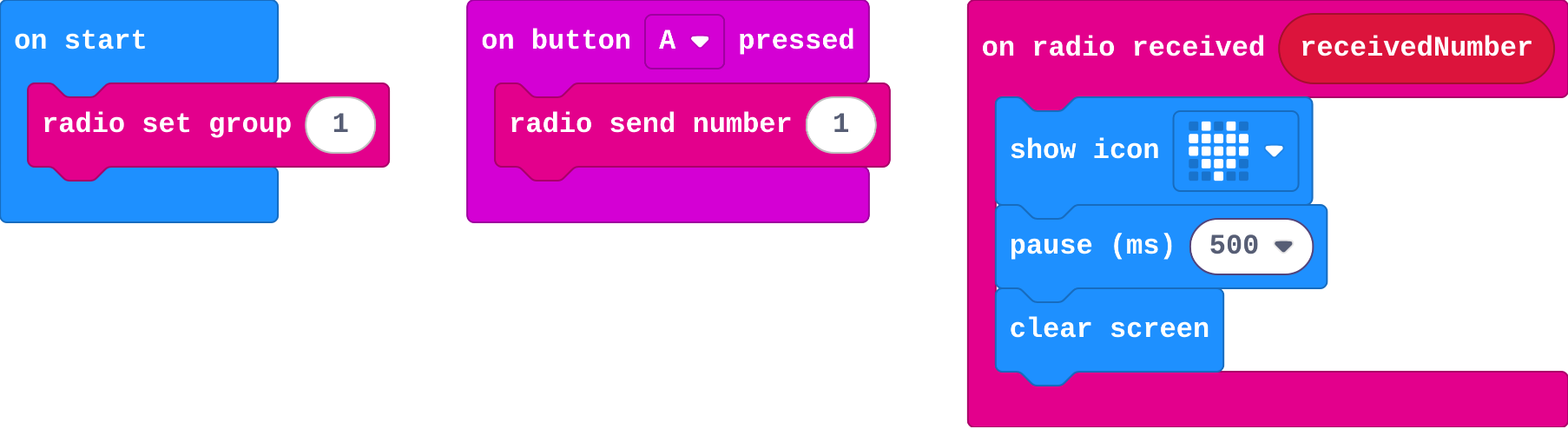
**Three micro:bits run this program. The first and second are in group 1; the third is in group 2. You press A on the first. Which show the heart?**

- All three
- Only the second
- Only the first
- The second and the third

* Answer: Only the second

<!-- Speaker note: The first one sends and never hears itself. The second is in the same group, so it hears. The third is in group 2, so it hears nothing. What this step is for: A message reaches every other micro:bit in the same group, and no others. -->

<style scoped>pre, marp-pre { font-size: 0.5em; line-height: 1.25; } section { font-size: 27px; }</style>

---

<span style="background:#fef3c7; color:#1a1a1a; border:1.5px solid #f59e0b; padding:6px 18px; border-radius:8px; font-size:1em; font-weight:500;">✍️ Activity</span>

## Make

Make **bike signals by radio**: the rider presses buttons on one micro:bit, and the one on the back of the bike shows the signal.

- **A** sends 1: left arrow.
- **B** sends 2: right arrow.
- **Shake** sends 3: a stop picture.

[Open this step](https://studio.learningwaypoints.com/tutorials/code/microbit-play/microbit-which/?full=step-6#step-6)

<!-- Speaker note: Hints, in order: Three senders: A sends 1, B sends 2, shake sends 3. / One on radio received, with if receivedNumber = 1 … else if = 2 … else if = 3. -->

<!-- Speaker note: Teacher: three agreed numbers, three pictures. -->

---

<span style="background:#fef3c7; color:#1a1a1a; border:1.5px solid #f59e0b; padding:6px 18px; border-radius:8px; font-size:1em; font-weight:500;">✍️ Activity</span>

## Change a doorbell

This doorbell sends a **word** instead of a number. Make it send your name, then make **B** send a different message, such as "come in".

[Open this step](https://studio.learningwaypoints.com/tutorials/code/microbit-play/microbit-which/?full=step-7#step-7)

---

<span style="background:#fef3c7; color:#1a1a1a; border:1.5px solid #f59e0b; padding:6px 18px; border-radius:8px; font-size:1em; font-weight:500;">✍️ Activity</span>

## Ride along <span style="font-size:.6em;color:#64748b">(3 min)</span>

One partner is the rider, the other the back light. The rider sends a signal; the back light calls out what it shows.

---

<span style="background:#dcfce7; color:#1a1a1a; border:1.5px solid #22c55e; padding:6px 18px; border-radius:8px; font-size:1em; font-weight:500;">✅ Check</span>

## Exit ticket

**A receiver checks if receivedNumber = 1 and else if receivedNumber = 2. What happens when 3 arrives?**

* Nothing. Both questions are false and there is no else.

<!-- Speaker note: Students answer on paper or a mini whiteboard before the reveal. Anyone who cannot answer needs the main idea again next lesson. Where this leads: Next lesson: a list both micro:bits share turns the numbers into words. Class idea: a quiz buzzer where A and B are two answers. -->