A model drives a micro:bit
Students send their model's labels from the board to a micro:bit over USB, program the micro:bit to act on each label and reply, then pass labels on by radio to a sorting flap.
Classroom resources
Load these into Waypoints Prepare: choose Load URL and paste the copied address, or download the file and import it. In Prepare, the worksheet's Teacher edition shows the answers; the student copy hides them.
Students will be able to
- I can program a micro:bit to act on lines of text it receives over USB.
- I can explain why the sender and receiver must agree on every word.
- I can handle a label my program doesn't expect.
Timing
Predict and Run 8 min · Send labels 8 min · Investigate 8 min · Modify 10 min · Over radio 6 min (typical) · Make 10 min
Before class
The idea: the model sends only a word. The receiving program gives it meaning, so both sides must agree on the exact words (capital letters included), and the program needs a sensible action for anything else.
How it works: the board (in Chrome or Edge) connects to the micro:bit with Web Serial at 115200 baud, MakeCode's default. When students click a test photo, the board sends its predicted label as a line of text; with the webcam, it sends a label once it has held above 80% confidence for a moment and differs from the last one sent. Lines the micro:bit sends back (serial write value gives bin:1) appear on the board.
Hardware: a micro:bit and USB cable per pair; for Make, a second micro:bit and a small servo on P0. The MakeCode simulator cannot receive serial, so the board steps need real micro:bits. The hardware steps are marked typical, so students without hardware can still complete the lesson.
Before class: check that Chrome or Edge on student devices lists the micro:bit after Connect a micro:bit. Assign each pair a radio group.
Running the lesson
- Predict: many say Nothing. Ask: which lines reach else?
- Send labels: students click photos first (reliable), then try the webcam.
- Investigate: Ben's sorter is the exact-text bug. Ask students to read both sides aloud.
- Modify: the reply is how a real sorter reports what it did.
- Make: test the flap angles without the model first by sending from the board's photos.
The hard part (on purpose)
Seeing that the model sends only a word. When the micro:bit does nothing, ask whether the board shows the label leaving and the word matches exactly.
When students get stuck
| What you will see | A question to ask | The fix |
|---|---|---|
| Connect a micro:bit lists nothing. | Is the micro:bit plugged in with a data cable, and are you in Chrome or Edge? | Try another cable (some only charge) and use Chrome or Edge. |
| The board says the micro:bit is busy. | Is MakeCode connected to it in another tab? | Disconnect it in MakeCode or close that tab, then connect again. |
| Labels are sent but nothing happens. | Does your program check for exactly the words your model sends? | Match the class names exactly, capital letters included. |
Answers to the checks
- Predict: Your model has a Neither class. The board sends "Neither" to a micro:bit running this program. What does it show?
L. The program checks only for "Paper"; else catches every other line, including "Neither". - Send labels: Connect your micro:bit and send at least three labels.
- What is sent: What travels down the USB cable when the board sends a label?
A line of text, such as Paper
Only the label, as text, ending with a new line. The micro:bit never sees the photo or the model. - Ben's sorter: Ben's model has classes Paper and Plastic. His micro:bit never shows anything. Why?
He checks for "paper" and "plastic", but the board sends "Paper" and "Plastic"
Text has to match exactly, capital letters included. Both sides must agree on every word. - Unsure labels: Why does the webcam wait for a label to hold for a moment above 80% before sending it?
So a model that flickers between two labels doesn't make the micro:bit jump back and forth
When the model is unsure, its top label changes many times a second. Acting on every change would make a sorter jitter.
Solutions
One possible solution for each task. Other correct programs are fine.
Modify › Neither
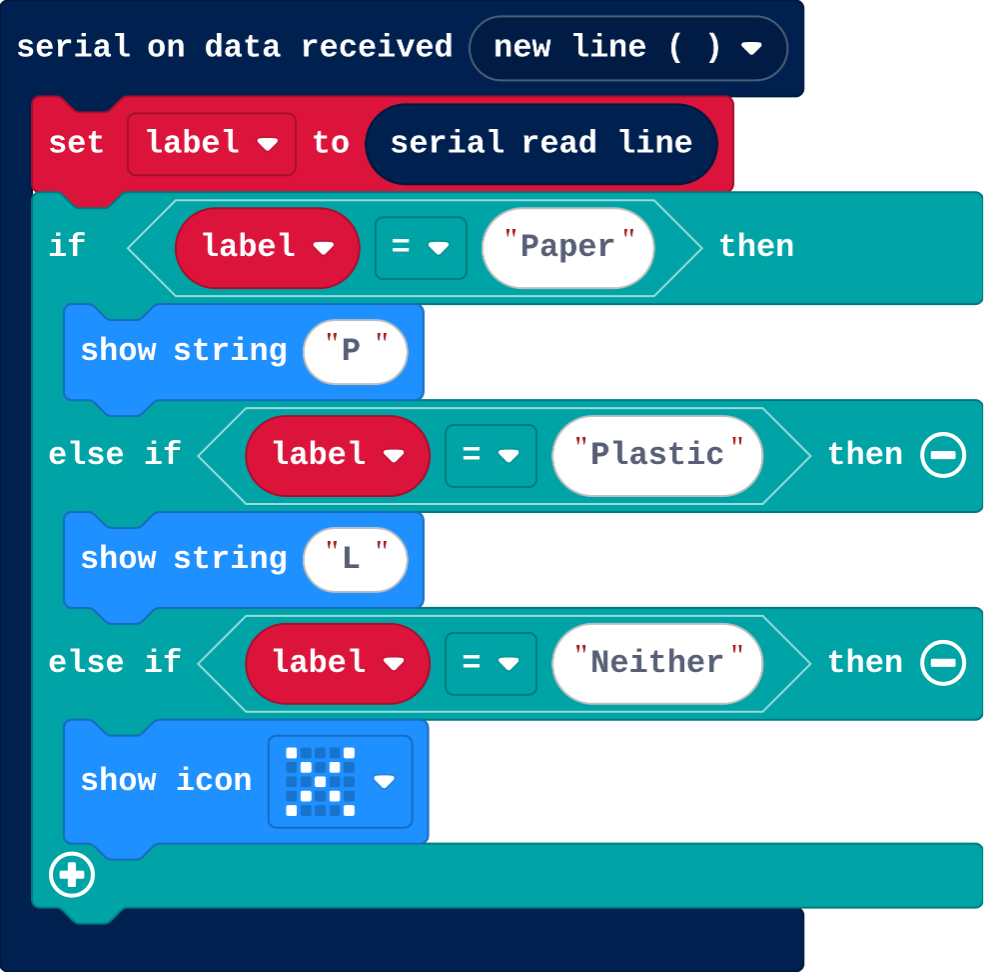
Show as code
serial.onDataReceived(serial.delimiters(Delimiters.NewLine), function () {
    label = serial.readLine()
    if (label == "Paper") {
        basic.showString("P")
    } else if (label == "Plastic") {
        basic.showString("L")
    } else if (label == "Neither") {
        basic.showIcon(IconNames.No)
    }
})
let label = ""
Modify › Reply
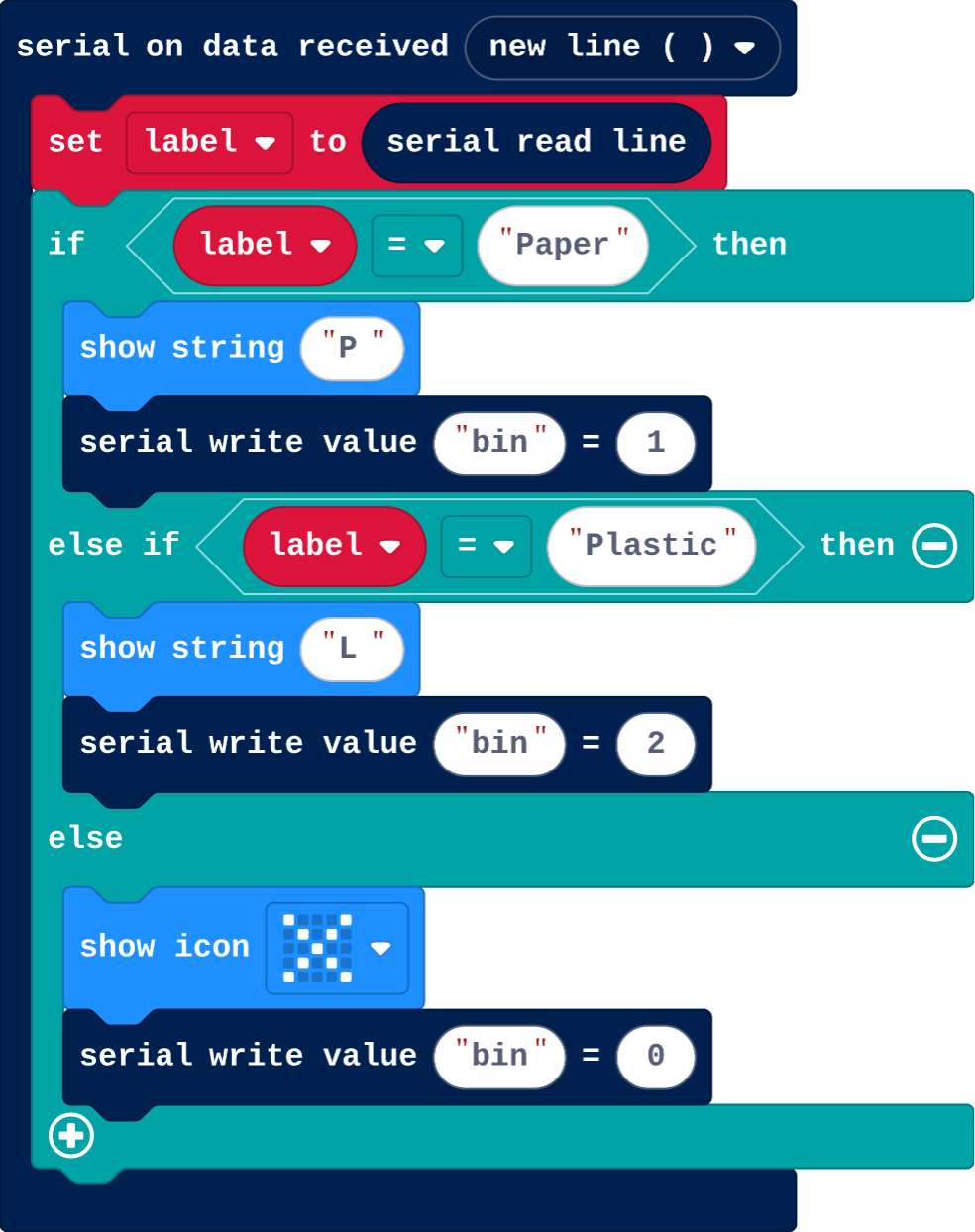
Show as code
serial.onDataReceived(serial.delimiters(Delimiters.NewLine), function () {
    label = serial.readLine()
    if (label == "Paper") {
        basic.showString("P")
        serial.writeValue("bin", 1)
    } else if (label == "Plastic") {
        basic.showString("L")
        serial.writeValue("bin", 2)
    } else {
        basic.showIcon(IconNames.No)
        serial.writeValue("bin", 0)
    }
})
let label = ""
Over radio
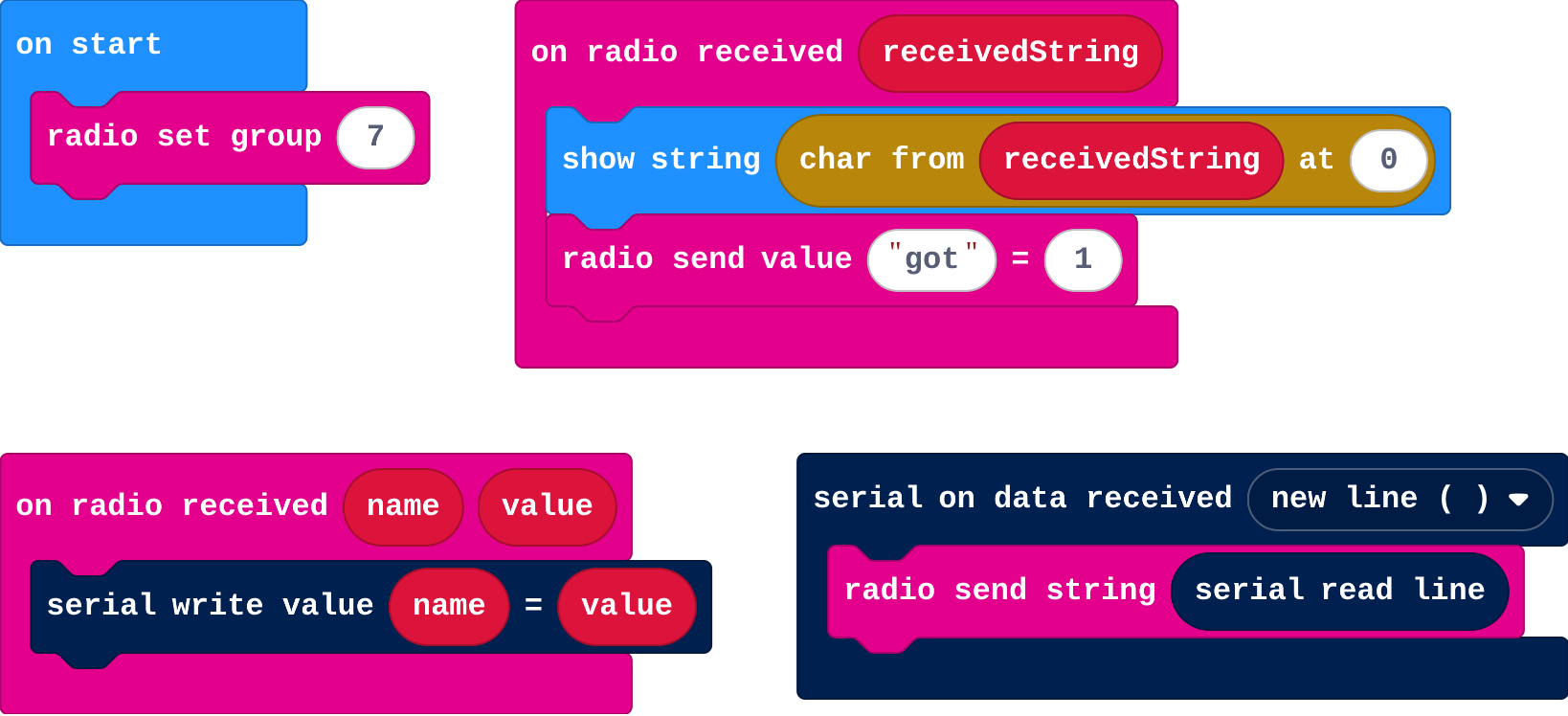
Show as code
serial.onDataReceived(serial.delimiters(Delimiters.NewLine), function () {
    radio.sendString(serial.readLine())
})
radio.onReceivedValue(function (name, value) {
    serial.writeValue(name, value)
})
radio.onReceivedString(function (receivedString) {
    basic.showString(receivedString.charAt(0))
    radio.sendValue("got", 1)
})
radio.setGroup(7)
Make a sorting flap
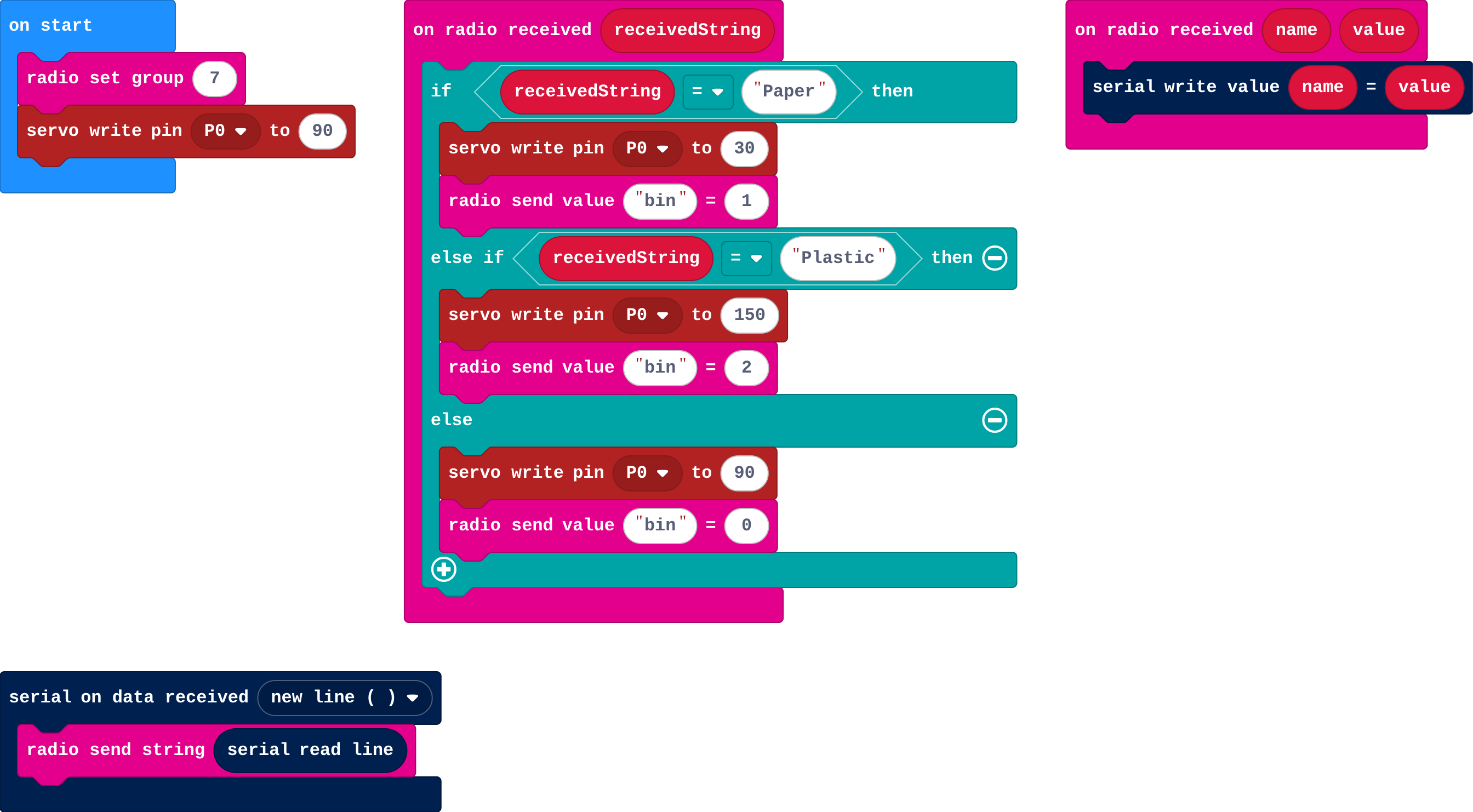
Show as code
serial.onDataReceived(serial.delimiters(Delimiters.NewLine), function () {
    radio.sendString(serial.readLine())
})
radio.onReceivedValue(function (name, value) {
    serial.writeValue(name, value)
})
radio.onReceivedString(function (receivedString) {
    if (receivedString == "Paper") {
        pins.servoWritePin(AnalogPin.P0, 30)
        radio.sendValue("bin", 1)
    } else if (receivedString == "Plastic") {
        pins.servoWritePin(AnalogPin.P0, 150)
        radio.sendValue("bin", 2)
    } else {
        pins.servoWritePin(AnalogPin.P0, 90)
        radio.sendValue("bin", 0)
    }
})
radio.setGroup(7)
pins.servoWritePin(AnalogPin.P0, 90)
Stretch and support
Stretch: Count how many items go in each bin and show the totals when button A is pressed.
Support: Give the reply branch complete; students add the Neither branch only.
Exit ticket
The model sends "Glass", a class the micro:bit's program doesn't check for. What should the program do?
Something safe: an else branch that leaves the flap in the middle (or stops), so an unexpected label never causes a wrong action.
What each step is for
- Send labels: Watching each label leave the board and the micro:bit's display change makes the message concrete: a word, nothing more.
- Investigate: The model sends only a word; the receiving program gives it meaning, so both sides must agree on the exact words, and the program must handle words it doesn't expect.
- Modify: Giving every label its own branch, and replying, makes the two sides agree.
- Over radio: A micro:bit on the cable can pass each label on by radio, so the build that acts on it can be anywhere in the room.
Where it leads
Next: AI on the micro:bit, a model trained on movements that runs on the micro:bit itself. Later, AI robots: a robot driven by a model, where a wrong or unsure label becomes a wrong move.