Space dodger
Students build a complete dodging game in three milestones, using a timer, random positions, velocity, overlaps, lives, score and the high score.
Classroom resources
Load these into Waypoints Prepare: choose Load URL and paste the copied address, or download the file and import it. In Prepare, the worksheet's Teacher edition shows the answers; the student copy hides them.
Students will be able to
- I can make sprites appear on a timer and move them with velocity.
- I can make a hit cost exactly one life by destroying what was hit.
- I can combine timers, overlaps, lives and score into a game, and use the high score.
Timing
Predict, Run, Investigate 12 min · Milestone 1 10 min · Milestone 2 12 min · Milestone 3 15 min · Road crossing 10 min
Before class
This lesson uses everything from the course, with only two new blocks: auto destroy (the set flag block in Sprites removes a sprite once it leaves the screen) and high score (in Info: the best score so far in this browser, shown on the game over screen by itself). The game: a timer (on game update every 1000 ms) makes a rock at the right edge, and a negative vx carries it left; an overlap event between Player and Enemy destroys the rock and takes a life; a second timer adds 1 to the score every second. The milestones fade the help: Milestone 1 gives nearly all the code, Milestone 2 an outline, Milestone 3 only goals. Play it yourself first. The core is Milestones 1 and 2; Milestone 3 and the road crossing finish the lesson for most students.
Running the lesson
- Predict and Run: every rock comes down the middle, so the game is easy (or impossible if you sit still). Ask what one change would make it a real game.
- Investigate: the match is the whole game in four blocks. The reaction-time sum shows why speed matters. The 'where do rocks go' question sets up auto destroy.
- Leo's game revisits the Score and lives lesson: an overlap runs every frame while the sprites touch, so a rock that is not destroyed eats every life at once.
- Milestone 1: two blocks. Auto destroy changes nothing you can see, so explain it as tidying up: the console only has so much memory.
- Milestone 2: read the overlap aloud: 'when the ship touches a rock, remove that rock and lose a life'. otherSprite is the rock.
- Milestone 3: goals only. A second timer is fine; several timers can run at once. The high score lives in the browser, so it survives the restart button.
- Road crossing: the same building blocks on their side. Good for students who finish early, or as a homework remix.
In class
On the slides at these points. Students can do the whole lesson on their own; these are for the room. In the deck, the Run, Modify and Make slides have the live playground in them (the tutorial link is the backup), and the notes above are in each slide's speaker notes.
- Plan the milestones (investigate, 4 min)
On the board, list what the finished game needs: random rocks, lives, a hit, a score, a high score. Next to each, write the block or event that does it.
This list is the plan for the three milestones.
- High-score board (end, 4 min)
Write your high score on the board. Swap games and suggest one change that makes the next pair's game fairer or harder.
The hard part (on purpose)
Combining a timer, velocity and overlaps in one game. Point them to the milestone they're on and ask them to get that part playing first.
When students get stuck
| What you will see | A question to ask | The fix |
|---|---|---|
| All lives vanish at the first hit. | What happens to the rock after it touches the ship? | Destroy otherSprite inside the overlap event, so it touches only once. |
| Rocks pass through the ship and nothing happens. | Which kinds does the overlap event name, and which kinds are the ship and the rock? | The ship must be a Player and the rock an Enemy, matching the event. |
| All rocks still come along one line. | Where is pick random? | It must be in the y of set position, inside the timer, so each rock gets a new number. |
| The score goes up very fast. | Which block is the score in? | Use on game update every 1000 ms, not on game update (which runs every frame). |
Answers to the checks
- Predict: Where do the rocks fly across the screen?
All along the same line. Every rock starts at (160, 60), so they all come through the middle, where the ship starts. - Who does what: Match each block with its job in the game.
on game update every 1000 ms → D. makes a new rock every second; set rock position to (160, 60) → C. starts each rock at the right edge; set rock vx to -50 → A. moves each rock left, every frame; move ship with buttons, vx 0, vy 100 → B. lets the ship move up and down only
The timer makes the rocks, the position says where each starts, and velocity keeps it moving. The ship's 0 across means left and right do nothing. - How long to react?: A rock starts at x 160 and moves 50 pixels left every second. The ship is at x 20. How many seconds does the rock take to reach the ship?
2.8
The rock travels 160 - 20 = 140 pixels at 50 pixels a second: 140 / 50 = 2.8 seconds. A bigger speed gives the player less time. - Where do the rocks go?: Ava plays for a minute. A rock goes past the ship and off the left edge. What happens to it?
It keeps flying left forever, off the screen, and the game keeps track of it
Nothing destroys it, so it keeps moving off the screen. After a few minutes there are hundreds of rocks nobody can see. Milestone 1 fixes this. - Leo's game: Leo adds an overlap event for Player and Enemy that takes away a life, but forgets to destroy the rock. He starts with 3 lives. A rock touches his ship. What happens?
He loses all 3 lives almost at once and the game ends
The overlap event runs every frame while the rock still touches the ship, about 30 times a second, so 3 lives go in a tenth of a second. Destroy the rock in the event.
Solutions
One possible solution for each task. Other correct programs are fine.
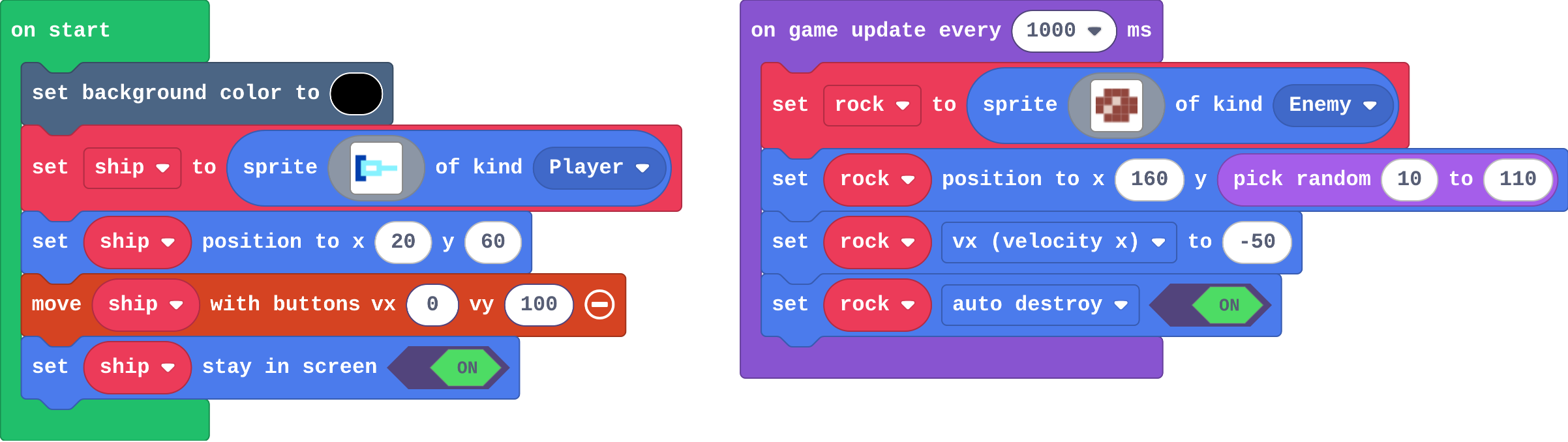
Milestone 1: rocks from anywhere
Show as code
let rock: Sprite = null
scene.setBackgroundColor(15)
let ship = sprites.create(img`
    8 8 . . . . . .
    8 9 9 9 9 . . .
    8 9 1 1 9 9 9 9
    8 9 9 9 9 . . .
    8 8 . . . . . .
    `, SpriteKind.Player)
ship.setPosition(20, 60)
controller.moveSprite(ship, 0, 100)
ship.setStayInScreen(true)
game.onUpdateInterval(1000, function () {
    rock = sprites.create(img`
        . e e e .
        e e d e e
        e d e e e
        . e e e .
        `, SpriteKind.Enemy)
    rock.setPosition(160, randint(10, 110))
    rock.vx = -50
    rock.setFlag(SpriteFlag.AutoDestroy, true)
})
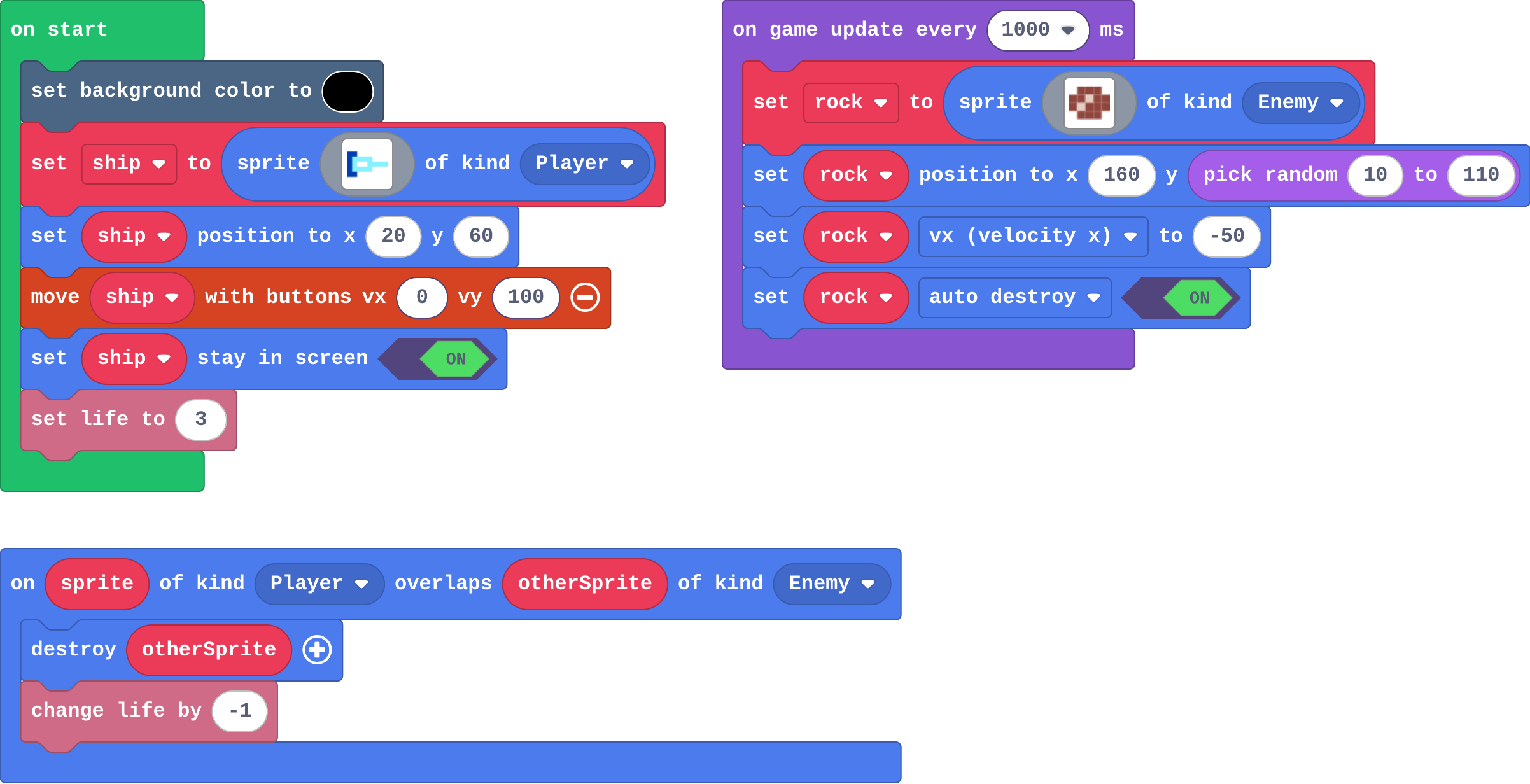
Milestone 2: lives and a hit
Show as code
sprites.onOverlap(SpriteKind.Player, SpriteKind.Enemy, function (sprite, otherSprite) {
    otherSprite.destroy()
    info.changeLifeBy(-1)
})
let rock: Sprite = null
scene.setBackgroundColor(15)
let ship = sprites.create(img`
    8 8 . . . . . .
    8 9 9 9 9 . . .
    8 9 1 1 9 9 9 9
    8 9 9 9 9 . . .
    8 8 . . . . . .
    `, SpriteKind.Player)
ship.setPosition(20, 60)
controller.moveSprite(ship, 0, 100)
ship.setStayInScreen(true)
info.setLife(3)
game.onUpdateInterval(1000, function () {
    rock = sprites.create(img`
        . e e e .
        e e d e e
        e d e e e
        . e e e .
        `, SpriteKind.Enemy)
    rock.setPosition(160, randint(10, 110))
    rock.vx = -50
    rock.setFlag(SpriteFlag.AutoDestroy, true)
})
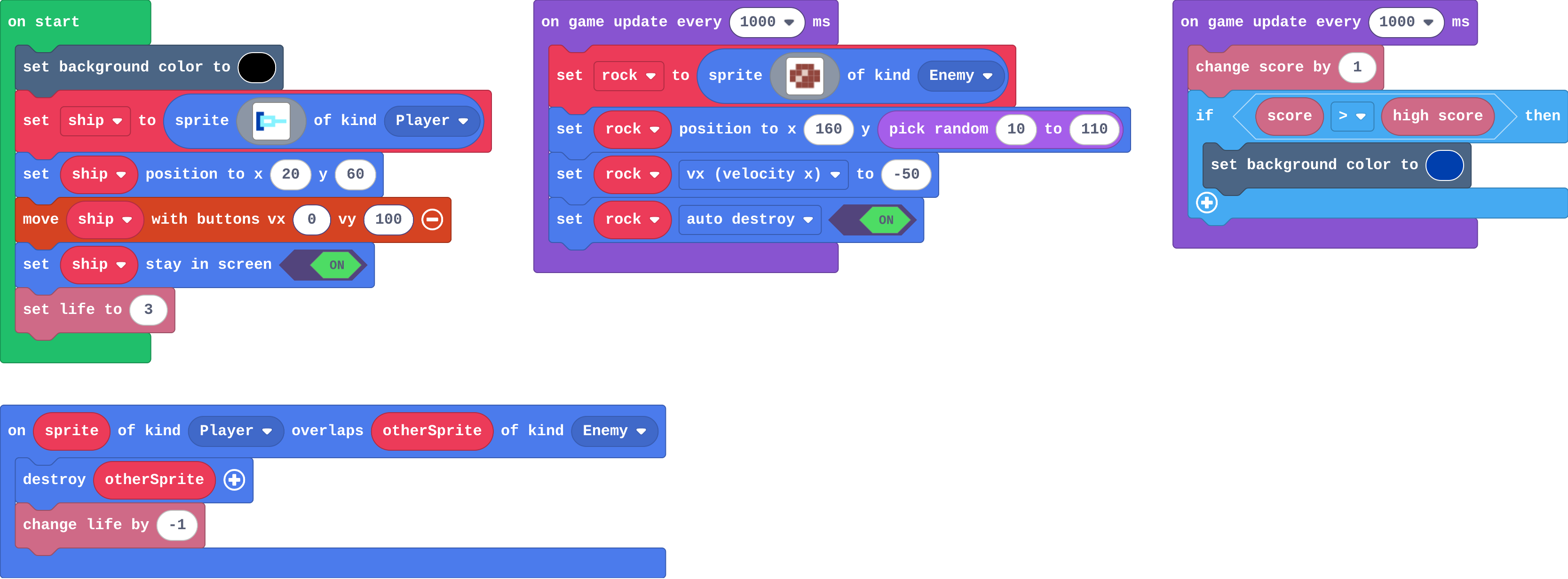
Milestone 3: score and high score
Show as code
sprites.onOverlap(SpriteKind.Player, SpriteKind.Enemy, function (sprite, otherSprite) {
    otherSprite.destroy()
    info.changeLifeBy(-1)
})
let rock: Sprite = null
scene.setBackgroundColor(15)
let ship = sprites.create(img`
    8 8 . . . . . .
    8 9 9 9 9 . . .
    8 9 1 1 9 9 9 9
    8 9 9 9 9 . . .
    8 8 . . . . . .
    `, SpriteKind.Player)
ship.setPosition(20, 60)
controller.moveSprite(ship, 0, 100)
ship.setStayInScreen(true)
info.setLife(3)
game.onUpdateInterval(1000, function () {
    rock = sprites.create(img`
        . e e e .
        e e d e e
        e d e e e
        . e e e .
        `, SpriteKind.Enemy)
    rock.setPosition(160, randint(10, 110))
    rock.vx = -50
    rock.setFlag(SpriteFlag.AutoDestroy, true)
})
game.onUpdateInterval(1000, function () {
    info.changeScoreBy(1)
    if (info.score() > info.highScore()) {
        scene.setBackgroundColor(8)
    }
})
Change a road crossing
Open task: any program that does what the step asks.
Stretch and support
Stretch: Make the rocks faster as the score grows: set rock vx to 0 - (50 + score), so a long game gets harder by itself.
Support: Pair students for Milestone 3: one reads the goals aloud while the other builds. A student who finishes Milestone 2 has a complete, playable game.
Exit ticket
Why must the rock be destroyed inside the overlap event?
The overlap event runs every frame the two sprites touch. Destroying the rock makes it touch once, so a hit costs one life, not all of them.
What each step is for
- Investigate: A timer makes a new sprite every second, and velocity carries it across: the engine moves every rock, and the blocks only decide where it starts and how fast it goes.
- Milestone 1: rocks from anywhere: One random number turns a predictable pattern into a game, and auto destroy lets the engine clean up what the player can no longer see.
- Milestone 2: lives and a hit: A hit is an overlap event between two kinds; destroying the rock is what makes it count once.
- Milestone 3: score and high score: A score for time survived is a second timer, and the high score is a value the engine keeps between games, so a player can see they improved.
Where it leads
Course complete. Next: Arcade advanced skills (functions, gravity, levels and power-ups). For more practice building whole games, MakeCode's Beginner Skillmap (arcade.makecode.com/skillmaps) uses the same blocks. Class ideas: a class high-score board on the whiteboard; swap games with a partner and suggest one change that makes it fairer or harder.