Drive with gestures
Students drive a robot with hand gestures recognised by their own Teachable Machine model; each label becomes a mode the robot acts on until the next label.
Classroom resources
Load these into Waypoints Prepare: choose Load URL and paste the copied address, or download the file and import it. In Prepare, the worksheet's Teacher edition shows the answers; the student copy hides them.
Students will be able to
- I can turn labels from a model into moves on a robot.
- I can explain why the robot keeps doing the last thing it was told.
- I can make the robot do something safe with a word it doesn't know.
Timing
Predict and Run 8 min · Drive with your model 15 min (typical) · Investigate 8 min · Modify 10 min · Make 10 min
Before class
The idea: the model only names a gesture (Forward, Left…). The board sends that word to a bridge micro:bit on the computer, which passes it on by radio to the robot. The robot's on radio received string remembers the word as its mode, and forever acts on the mode until a new word arrives. So when the hand leaves the camera, the robot keeps going: the problem the next lesson fixes.
Prerequisites: Robotics challenges (modes, radio remote) and micro:bit and the computer (training in Teachable Machine, serial, the radio bridge). The bridge program is printed in the lesson.
Without robots: the simulator's buttons stand in for the model (A Left, B Right, A+B Forward, logo Stop), and with radio it shows two robots, each driven by the other micro:bit. The model step is typical.
With robots: per pair, a robot with its micro:bit, a second micro:bit as the bridge on a data cable, Chrome or Edge, and a webcam. Give each pair its own radio group. Gestures are hands only; photos stay in the browser, and Upload my model shares the model, not the photos.
Running the lesson
- Predict: many say it stops. Ask: what does forever do when no new message arrives?
- Run: watch the other robot, as in Remote control.
- Drive with your model: insist on class names that match exactly; Mia's robot is the reason.
- Investigate: the else as a safe default is the seed of the next lesson.
The hard part (on purpose)
Keeping the class names, the words sent and the robot's checks identical. When the robot ignores a gesture, ask them to read the label the board sends and the word the robot checks for.
When students get stuck
| What you will see | A question to ask | The fix |
|---|---|---|
| The robot doesn't move when the webcam shows a gesture. | Does the board show the label being sent? Are the bridge and robot in the same group? | Connect the bridge on the board; match the radio groups. |
| The robot stops whatever gesture is shown. | Do your class names match the words in the robot's ifs exactly? | Rename the classes (Forward, Left, Right, Stop), export and paste the new link. |
| The robot jerks between moves. | Does the model flicker between two gestures? | Add more varied photos of the confused gestures, or hold each gesture still. |
Answers to the checks
- Predict: The model sends Forward. Then your hand leaves the camera and the board sends nothing more. What does the robot do?
It keeps driving forward. on radio received string only sets the mode; forever keeps acting on the last mode until a new label arrives. - Drive with your model: Drive the robot with your gestures: send Forward and Stop at least once each.
- Who decides: Where is it decided that Left means turn left slowly?
In the robot's program
The model sends the word Left. The robot's if turns that word into wheel speeds. - Mia's robot: Mia named her class forward (small f). She shows the Forward sign. What does her robot do?
Stops: forward matches no branch, so else runs
Words must match exactly. Here the else is a safe default: a word the robot doesn't know makes it stop. - Mode and forever: Why does on radio received string only set the mode, while forever drives the motors?
Messages arrive at any time; forever keeps driving between them and checks the mode every time round
As in Robotics challenges: the handler remembers the latest command, and forever acts on it continuously.
Solutions
One possible solution for each task. Other correct programs are fine.
Modify › Back
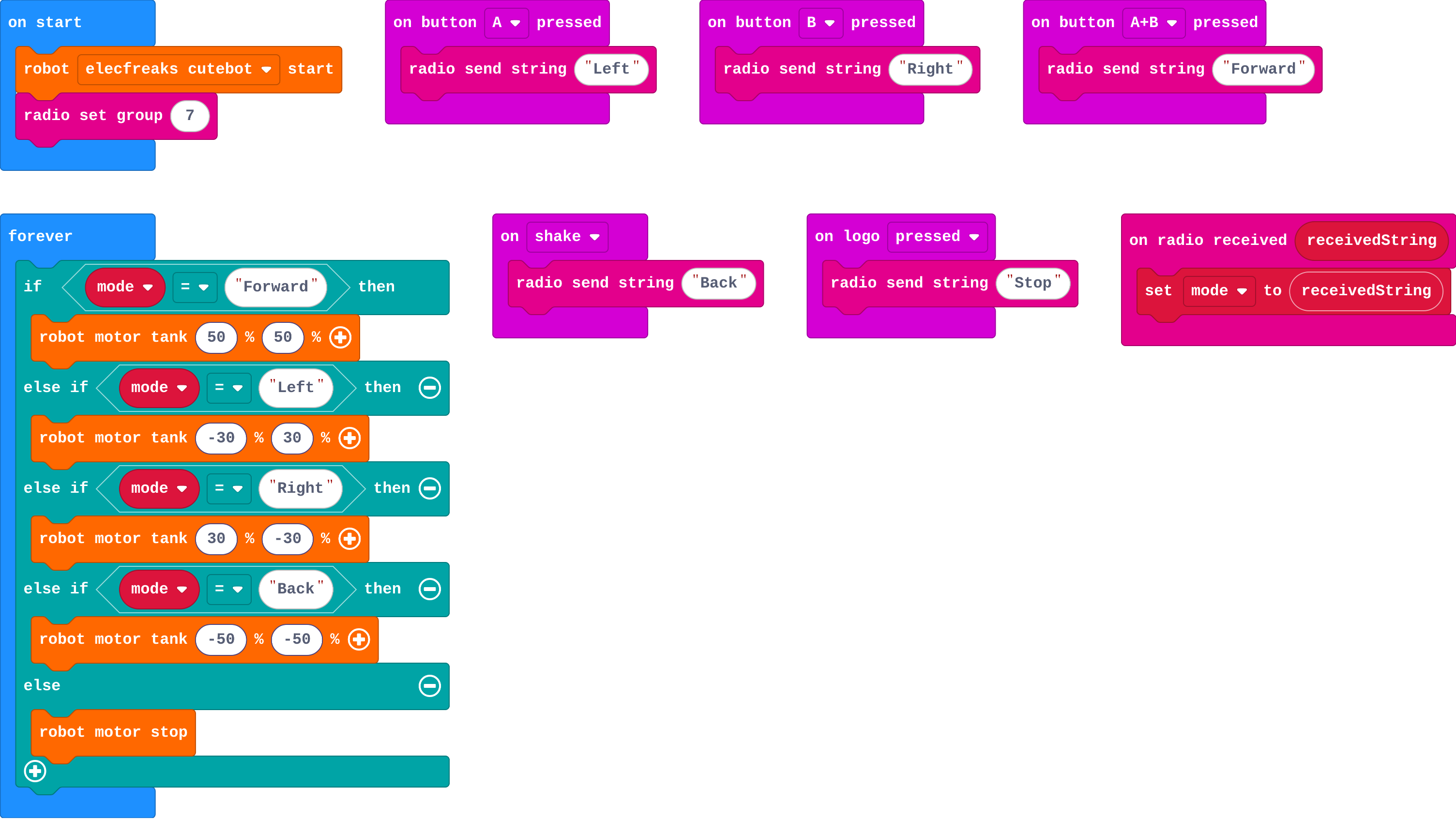
Show as code
radio.onReceivedString(function (receivedString) {
    mode = receivedString
})
basic.forever(function () {
    if (mode == "Forward") {
        robot.motorTank(50, 50)
    } else if (mode == "Left") {
        robot.motorTank(-30, 30)
    } else if (mode == "Right") {
        robot.motorTank(30, -30)
    } else if (mode == "Back") {
        robot.motorTank(-50, -50)
    } else {
        robot.motorStop()
    }
})
input.onButtonPressed(Button.A, function () {
    radio.sendString("Left")
})
input.onButtonPressed(Button.B, function () {
    radio.sendString("Right")
})
input.onButtonPressed(Button.AB, function () {
    radio.sendString("Forward")
})
input.onLogoEvent(TouchButtonEvent.Pressed, function () {
    radio.sendString("Stop")
})
input.onGesture(Gesture.Shake, function () {
    radio.sendString("Back")
})
let mode = ""
robot.elecfreaksCuteBot.start()
radio.setGroup(7)
Modify › Show what it heard
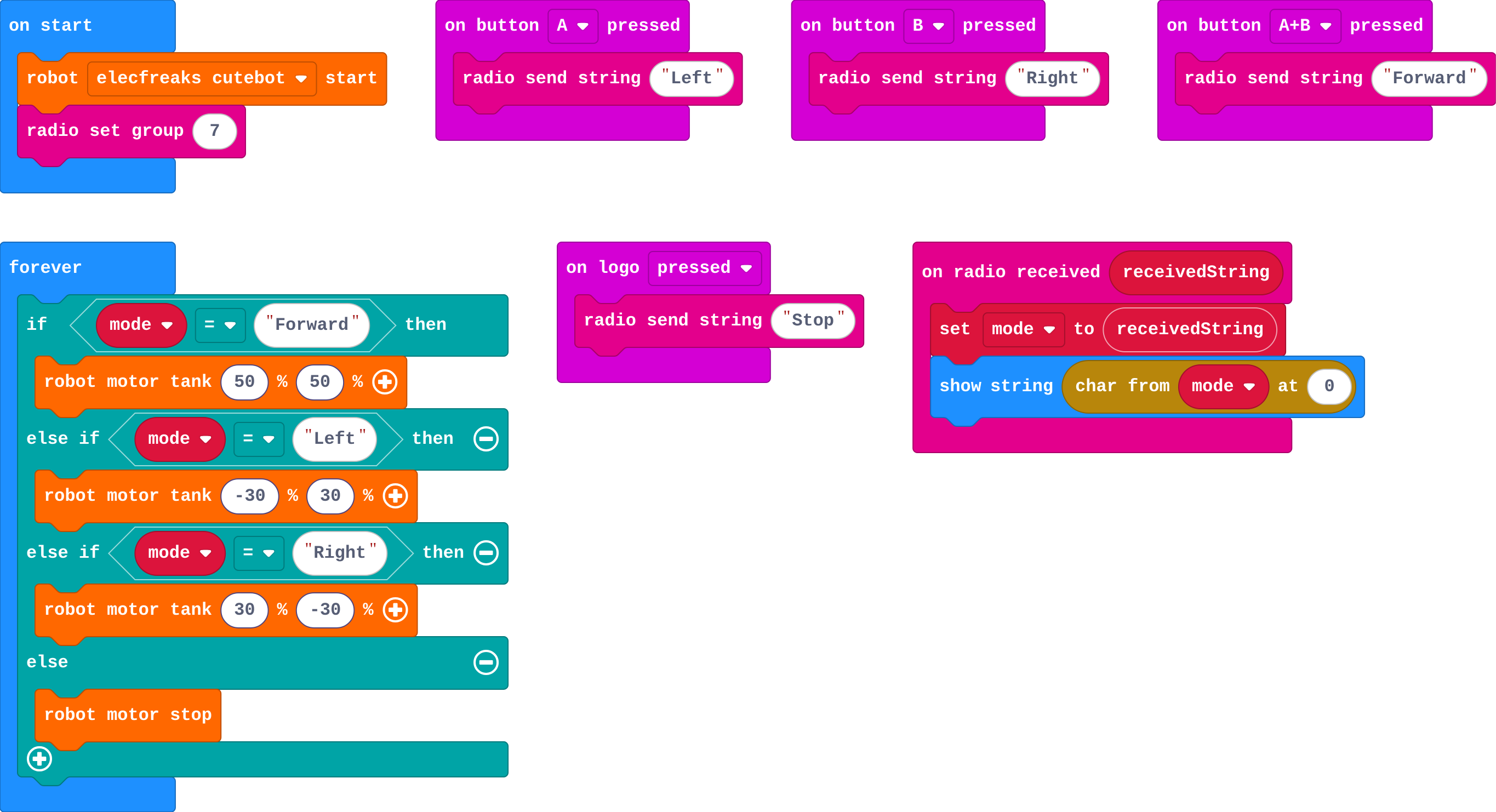
Show as code
radio.onReceivedString(function (receivedString) {
    mode = receivedString
    basic.showString(mode.charAt(0))
})
basic.forever(function () {
    if (mode == "Forward") {
        robot.motorTank(50, 50)
    } else if (mode == "Left") {
        robot.motorTank(-30, 30)
    } else if (mode == "Right") {
        robot.motorTank(30, -30)
    } else {
        robot.motorStop()
    }
})
input.onButtonPressed(Button.A, function () {
    radio.sendString("Left")
})
input.onButtonPressed(Button.B, function () {
    radio.sendString("Right")
})
input.onButtonPressed(Button.AB, function () {
    radio.sendString("Forward")
})
input.onLogoEvent(TouchButtonEvent.Pressed, function () {
    radio.sendString("Stop")
})
let mode = ""
robot.elecfreaksCuteBot.start()
radio.setGroup(7)
Make
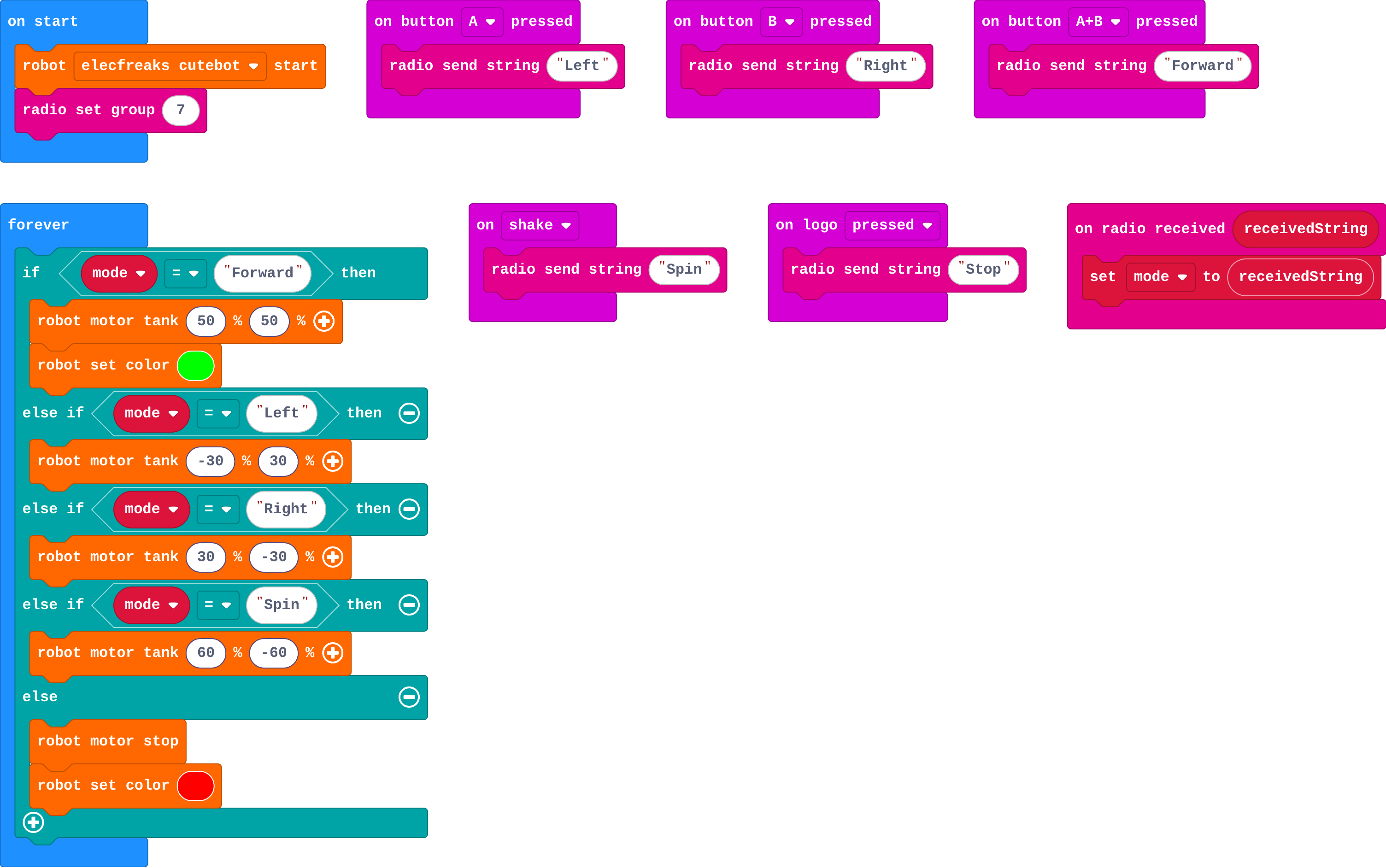
Show as code
radio.onReceivedString(function (receivedString) {
    mode = receivedString
})
basic.forever(function () {
    if (mode == "Forward") {
        robot.motorTank(50, 50)
        robot.setColor(0x00ff00)
    } else if (mode == "Left") {
        robot.motorTank(-30, 30)
    } else if (mode == "Right") {
        robot.motorTank(30, -30)
    } else if (mode == "Spin") {
        robot.motorTank(60, -60)
    } else {
        robot.motorStop()
        robot.setColor(0xff0000)
    }
})
input.onButtonPressed(Button.A, function () {
    radio.sendString("Left")
})
input.onButtonPressed(Button.B, function () {
    radio.sendString("Right")
})
input.onButtonPressed(Button.AB, function () {
    radio.sendString("Forward")
})
input.onGesture(Gesture.Shake, function () {
    radio.sendString("Spin")
})
input.onLogoEvent(TouchButtonEvent.Pressed, function () {
    radio.sendString("Stop")
})
let mode = ""
robot.elecfreaksCuteBot.start()
radio.setGroup(7)
Stretch and support
Stretch: Add a gesture that plays a horn (robot play tone) without changing the mode.
Support: Run the lesson with the simulator buttons only; demonstrate the model drive at the front.
Exit ticket
The model sends Left, then nothing. What does the robot do, and why?
It keeps turning left: the radio handler set the mode to Left, and forever keeps acting on the mode until a new label arrives.
What each step is for
- Drive with your model: With a real model, each gesture becomes a word on the robot's radio, and the robot behaves exactly as it did with the buttons.
- Investigate: The model only names a gesture; the robot's program decides what each name does and keeps doing it, so the label is a mode.
- Modify: A new gesture needs a new class in the model and a new branch on the robot; showing the mode helps you see what the robot heard.
Where it leads
Next: the same robot driven by a model on a wrist micro:bit (CreateAI), with no camera or computer. Real world: gesture-controlled wheelchairs and drones.