Delivery robot
Students build a sign-driven delivery robot in three milestones; its distance sensor overrules the model, it reports back through the bridge, and it counts deliveries.
Classroom resources
Load these into Waypoints Prepare: choose Load URL and paste the copied address, or download the file and import it. In Prepare, the worksheet's Teacher edition shows the answers; the student copy hides them.
Students will be able to
- I can make a robot's own sensor overrule a model's label.
- I can send a robot's readings back to the computer through a bridge.
- I can explain why a safety check goes first in an if, else if chain.
Timing
Predict, Run and Investigate 12 min · Milestone 1 10 min · Milestone 2 15 min · Full system 8 min (typical) · Milestone 3 12 min
Before class
The challenge: everything from AI robots plus Robotics challenges. The robot starts as the careful sign robot (Go twice, Unsure and silence stop it). The milestones add no new blocks:
- The sensor wins:
if obstacle distance < 15 → stopgoes first in forever. The model only knows what the camera sees on the sign; the sensor knows what is in front of the robot. Jo's robot (the check last) is the mistake to watch for. - Report back: a second forever sends
disttwice a second;blocked 1andblocked 0go once each, using a variable (the same "send once" idea as Patrol and alert). The bridge turns them into lines such asdist:23, which the board shows as values. - Deliveries: a Stop that arrives while going is a delivery; count it, send it back, show it.
Without robots: every milestone works in the simulator (buttons stand in for the model; drag a box to block). The full-system step is typical.
Running the lesson
- Predict: most expect it to stop. Ask: which line looks at the box?
- Investigate: Jo's robot is the order mistake; trace the if, else if aloud with mode = Go.
- Milestone 2: check blocked is sent once, not every loop; the board's message list shows it.
- Milestone 3: let teams choose their delivery story and signs.
The hard part (on purpose)
Putting the sensor check first so it overrules the model. When the robot pushes boxes, ask which question in the chain is asked first.
When students get stuck
| What you will see | A question to ask | The fix |
|---|---|---|
| The robot still pushes boxes. | Where is the distance check in the if, else if chain? | Make it the first if; turn the Go branch into else if. |
| blocked arrives over and over. | What stops it being sent again next time round forever? | Send only if blocked is false, then set blocked to true. |
| No values arrive on the board. | Is the bridge connected, in the same radio group, running the bridge program? | Connect the bridge and match the groups. |
Answers to the checks
- Predict: The model reads Go (twice), and the robot sets off. A box is in its way. What happens?
It drives into the box. The model only reads the sign; nothing in this program looks at what is in front of the robot. - Model or sensor: Which part should decide each of these?
Which way the sign says to go → The model (camera on the sign); Whether a box is right in front of the robot → The robot's own sensor; Whether it's safe to keep driving forward this moment → The robot's own sensor; Whether the delivery stop has been reached (the Stop sign) → The model (camera on the sign) - Jo's robot: Jo checks the distance in the last else if, after Go, Left and Right. Her robot still drives into boxes on Go. Why?
When the mode is Go, the Go branch runs first and the distance check is never reached
An if, else if chain runs only the first branch that matches. A check that must always win goes first. - Try the full system: Drive with your signs while the robot reports back: get Go sent, and at least 10 replies from the robot.
Solutions
One possible solution for each task. Other correct programs are fine.
Milestone 1: the sensor wins
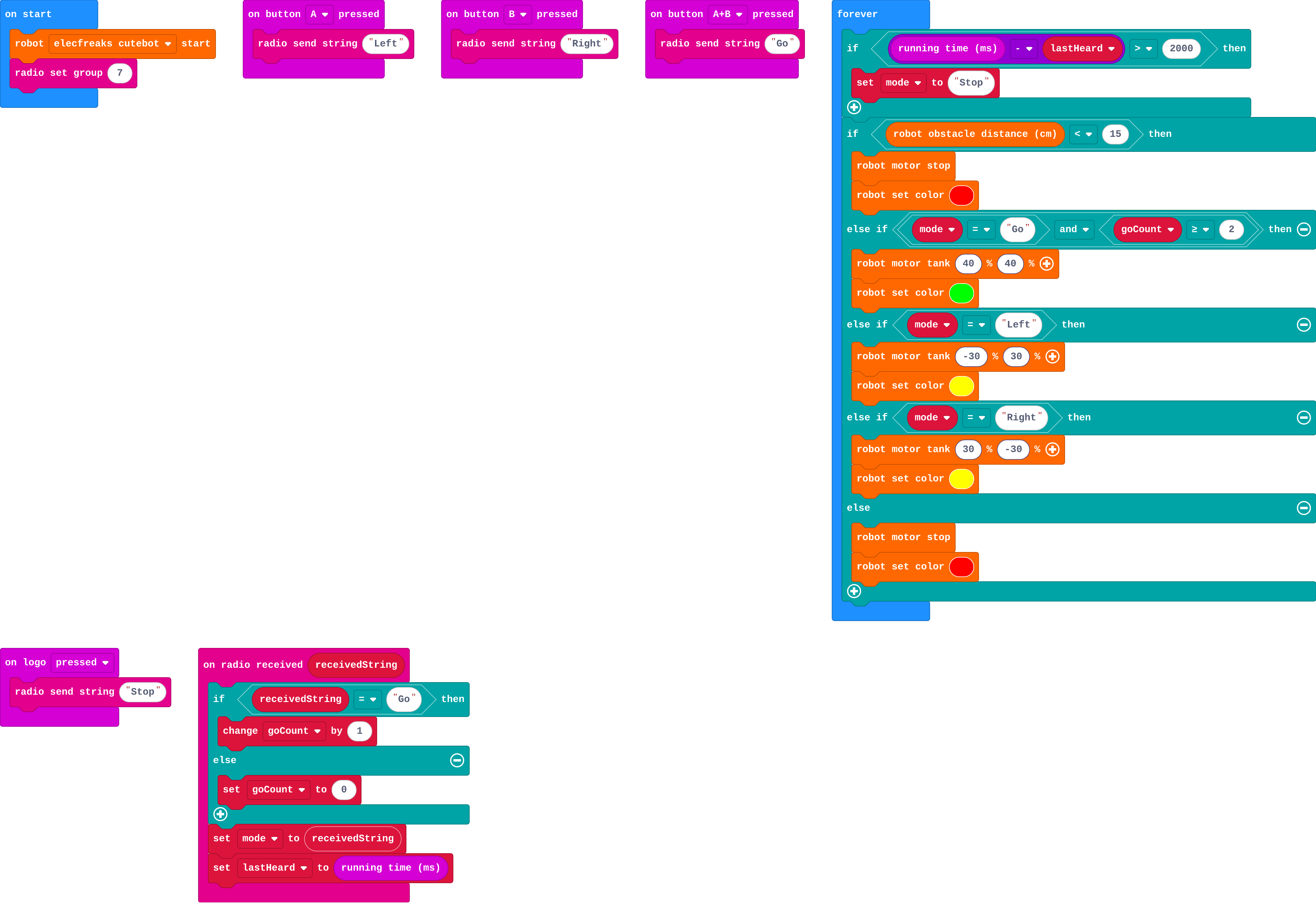
Show as code
radio.onReceivedString(function (receivedString) {
    if (receivedString == "Go") {
        goCount += 1
    } else {
        goCount = 0
    }
    mode = receivedString
    lastHeard = input.runningTime()
})
basic.forever(function () {
    if (input.runningTime() - lastHeard > 2000) {
        mode = "Stop"
    }
    if (robot.obstacleDistance() < 15) {
        robot.motorStop()
        robot.setColor(0xff0000)
    } else if (mode == "Go" && goCount >= 2) {
        robot.motorTank(40, 40)
        robot.setColor(0x00ff00)
    } else if (mode == "Left") {
        robot.motorTank(-30, 30)
        robot.setColor(0xffff00)
    } else if (mode == "Right") {
        robot.motorTank(30, -30)
        robot.setColor(0xffff00)
    } else {
        robot.motorStop()
        robot.setColor(0xff0000)
    }
})
input.onButtonPressed(Button.A, function () {
    radio.sendString("Left")
})
input.onButtonPressed(Button.B, function () {
    radio.sendString("Right")
})
input.onButtonPressed(Button.AB, function () {
    radio.sendString("Go")
})
input.onLogoEvent(TouchButtonEvent.Pressed, function () {
    radio.sendString("Stop")
})
let goCount = 0
let lastHeard = 0
let mode = ""
robot.elecfreaksCuteBot.start()
radio.setGroup(7)
Milestone 2: report back
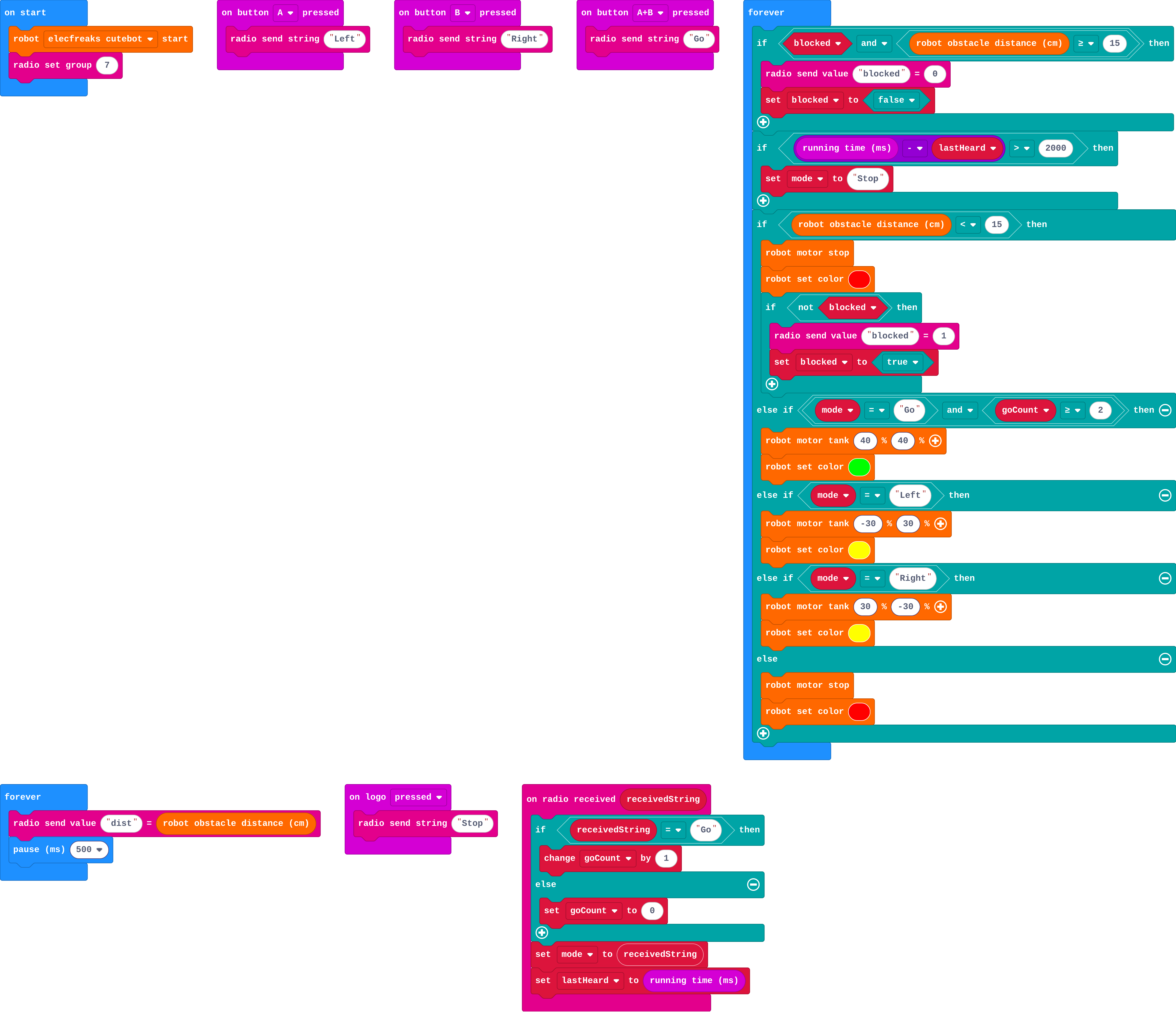
Show as code
radio.onReceivedString(function (receivedString) {
    if (receivedString == "Go") {
        goCount += 1
    } else {
        goCount = 0
    }
    mode = receivedString
    lastHeard = input.runningTime()
})
basic.forever(function () {
    if (blocked && robot.obstacleDistance() >= 15) {
        radio.sendValue("blocked", 0)
        blocked = false
    }
    if (input.runningTime() - lastHeard > 2000) {
        mode = "Stop"
    }
    if (robot.obstacleDistance() < 15) {
        robot.motorStop()
        robot.setColor(0xff0000)
        if (!(blocked)) {
            radio.sendValue("blocked", 1)
            blocked = true
        }
    } else if (mode == "Go" && goCount >= 2) {
        robot.motorTank(40, 40)
        robot.setColor(0x00ff00)
    } else if (mode == "Left") {
        robot.motorTank(-30, 30)
        robot.setColor(0xffff00)
    } else if (mode == "Right") {
        robot.motorTank(30, -30)
        robot.setColor(0xffff00)
    } else {
        robot.motorStop()
        robot.setColor(0xff0000)
    }
})
basic.forever(function () {
    radio.sendValue("dist", robot.obstacleDistance())
    basic.pause(500)
})
input.onButtonPressed(Button.A, function () {
    radio.sendString("Left")
})
input.onButtonPressed(Button.B, function () {
    radio.sendString("Right")
})
input.onButtonPressed(Button.AB, function () {
    radio.sendString("Go")
})
input.onLogoEvent(TouchButtonEvent.Pressed, function () {
    radio.sendString("Stop")
})
let blocked = false
let goCount = 0
let lastHeard = 0
let mode = ""
robot.elecfreaksCuteBot.start()
radio.setGroup(7)
Milestone 3: deliveries
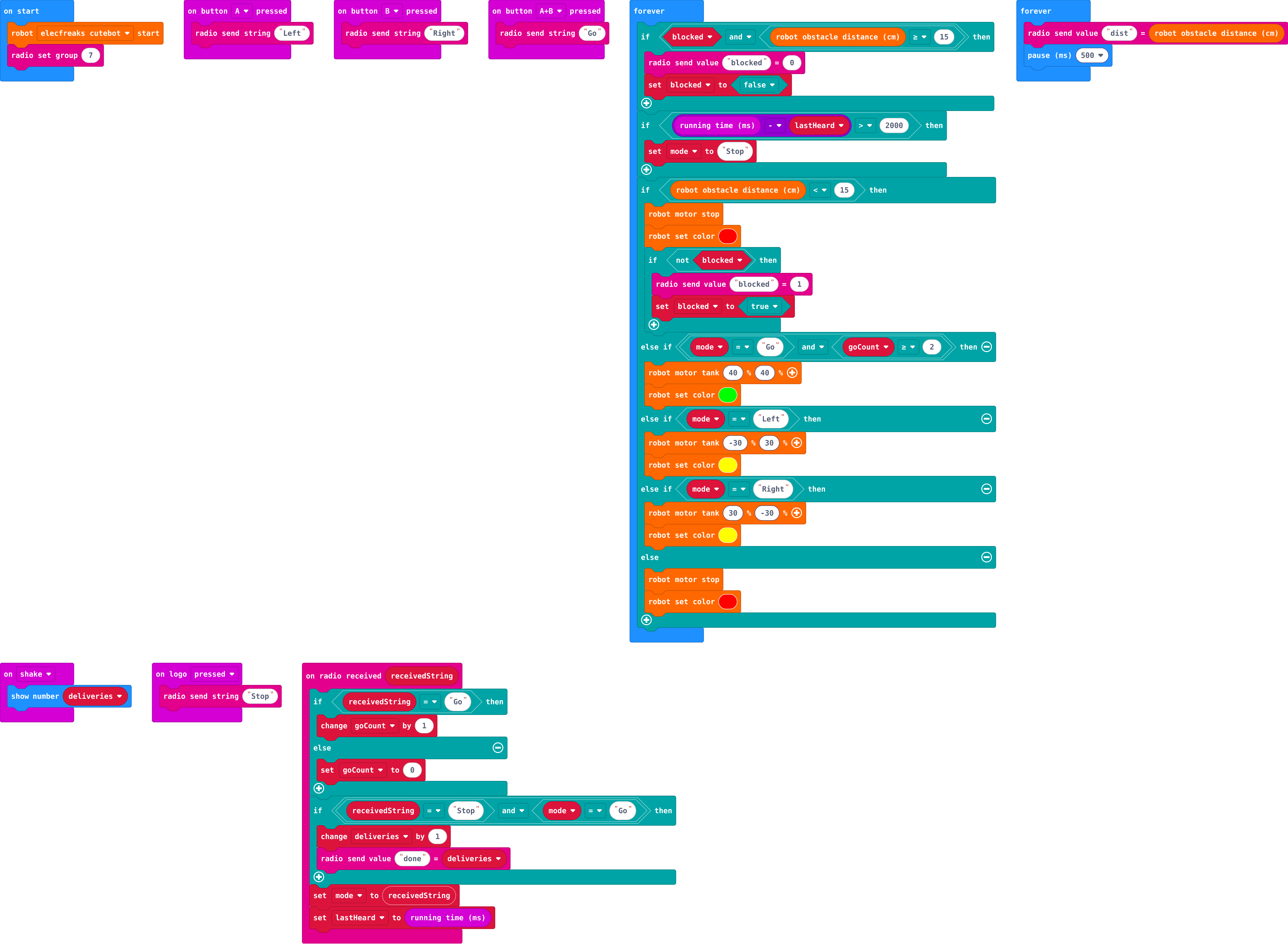
Show as code
radio.onReceivedString(function (receivedString) {
    if (receivedString == "Go") {
        goCount += 1
    } else {
        goCount = 0
    }
    if (receivedString == "Stop" && mode == "Go") {
        deliveries += 1
        radio.sendValue("done", deliveries)
    }
    mode = receivedString
    lastHeard = input.runningTime()
})
input.onGesture(Gesture.Shake, function () {
    basic.showNumber(deliveries)
})
basic.forever(function () {
    if (blocked && robot.obstacleDistance() >= 15) {
        radio.sendValue("blocked", 0)
        blocked = false
    }
    if (input.runningTime() - lastHeard > 2000) {
        mode = "Stop"
    }
    if (robot.obstacleDistance() < 15) {
        robot.motorStop()
        robot.setColor(0xff0000)
        if (!(blocked)) {
            radio.sendValue("blocked", 1)
            blocked = true
        }
    } else if (mode == "Go" && goCount >= 2) {
        robot.motorTank(40, 40)
        robot.setColor(0x00ff00)
    } else if (mode == "Left") {
        robot.motorTank(-30, 30)
        robot.setColor(0xffff00)
    } else if (mode == "Right") {
        robot.motorTank(30, -30)
        robot.setColor(0xffff00)
    } else {
        robot.motorStop()
        robot.setColor(0xff0000)
    }
})
basic.forever(function () {
    radio.sendValue("dist", robot.obstacleDistance())
    basic.pause(500)
})
input.onButtonPressed(Button.A, function () {
    radio.sendString("Left")
})
input.onButtonPressed(Button.B, function () {
    radio.sendString("Right")
})
input.onButtonPressed(Button.AB, function () {
    radio.sendString("Go")
})
input.onLogoEvent(TouchButtonEvent.Pressed, function () {
    radio.sendString("Stop")
})
let deliveries = 0
let blocked = false
let goCount = 0
let lastHeard = 0
let mode = ""
robot.elecfreaksCuteBot.start()
radio.setGroup(7)
Stretch and support
Stretch: Make the robot slow down (motor tank 20) between 15 and 30 cm, and stop under 15.
Support: Give milestone 1's if complete; students write the reports in milestone 2.
Exit ticket
Why does the distance check go before the Go branch?
An if, else if chain runs only the first match; the safety check must win whatever the model says, so it goes first.
What each step is for
- Investigate: The model knows only what the camera sees; the robot's sensor knows what is in front of it. The sensor must win, so its check comes first.
- Milestone 1: the sensor wins: A safety check that overrules everything else goes first in forever.
- Milestone 2: report back: The robot can send its own readings back through the bridge, so the person at the computer sees what the robot senses, not only what the model saw.
- Milestone 3: deliveries: A finished system counts what it has done and tells people, so they can trust it without watching it.
Where it leads
Where this leads: real robots fuse a camera model with many sensors (distance, bump, line), and safety checks always win. The Python pathway's Machine learning with Gradio trains models in code.