Python console reference
Text, lists, dictionaries and files in the console, with what each command does.
Print a cheat sheet (the whole course or one unit, with a picture of what each command draws)
Code structure
for i in range(4):
    pass
Example
for i in range(5):
    forward(15)
    penup()
    forward(10)
    pendown()
Repeat the indented lines this many times.

id: for-loop
while True:
    pass
Example
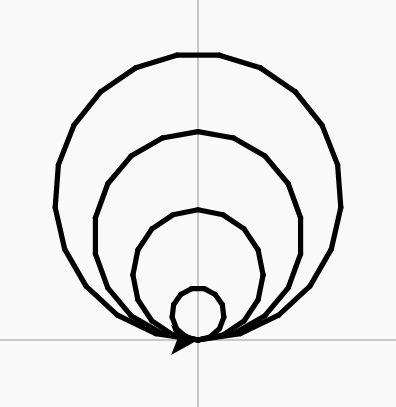
r = 10
while r < 60:
    circle(r)
    r = r + 15
Repeat the indented lines for as long as the condition is true.
id: while-loop
name = input("What is your name? ")
print("Hello, " + name)
Example
name = input("What is your name? ")
print("Hello, " + name)
Ask a question, store the typed answer, and use it in a reply.

id: ask-and-reply
text = input("How many? ")
if text.isdigit():
    number = int(text)
    pass
else:
    print("Please type a number.")
Example
text = input("How many tickets? ")
if text.isdigit():
    print("That will be $" + str(int(text) * 12) + ".")
else:
    print("Please type a number.")
Check typed text with isdigit before turning it into a number.

id: check-then-convert
total = 0
while total < 10:
    total += int(input("Add: "))
Example
total = 0
while total < 10:
    total += int(input("Add: "))
    print("Total: " + str(total))
print("Done")
Start the total at 0 once, then add to it on every pass.
id: running-total
while True:
    choice = input("1 add, 2 quit: ")
    if choice == "1":
        pass
    elif choice == "2":
        break
    else:
        print("Please choose 1 or 2.")
Example
total = 0
while True:
    choice = input("1 add $5, 2 pay: ")
    if choice == "1":
        total += 5
    elif choice == "2":
        break
    else:
        print("Please choose 1 or 2.")
print("Pay $" + str(total))
A menu that keeps showing until a break runs.
id: menu-loop
if x > 0:
    pass
else:
    pass
Example
for x in [-90, -30, 30, 90]:
    penup()
    goto(x, 0)
    if x > 0:
        dot(30, "red")
    else:
        dot(30, "blue")
hideturtle()
Do one thing or the other, depending on a condition.

id: if-else
for i in range(8):
    if i % 2 == 0:
        pass
    else:
        pass
Example
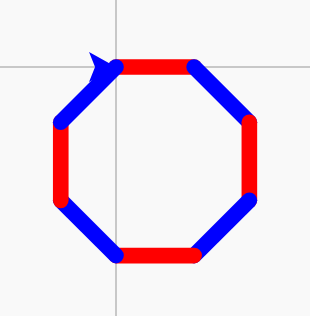
for i in range(8):
    if i % 2 == 0:
        pencolor("red")
    else:
        pencolor("blue")
    pensize(6)
    forward(30)
    right(45)
i % 2 == 0 is true on every second pass.
id: every-other
size = 50
Example
length = 120
forward(length)
left(90)
forward(length / 2)
Give a value a name, so you can reuse and change it.

id: variable
sides = 5
for i in range(sides):
    forward(60)
    right(360 / sides)
Example
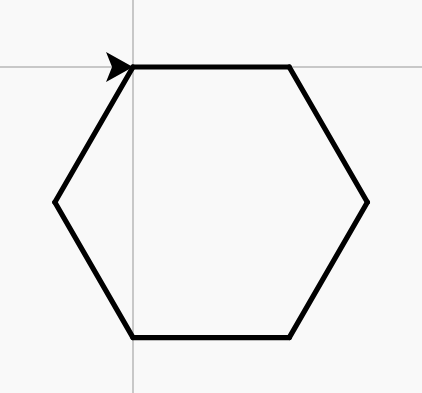
sides = 6
for i in range(sides):
    forward(60)
    right(360 / sides)
Name the number of sides once; the turn is worked out from it.
id: named-turn
for i in range(20):
    forward(i * 5)
    right(90)
Example
for i in range(30):
    forward(i * 5)
    right(90)
Use the counter i to make each pass different.

id: counter-step
size = 5
for i in range(20):
    forward(size)
    right(90)
    size = size + 5
Example
size = 5
for i in range(30):
    forward(size)
    right(90)
    size = size + 5
Change a value every pass: read the old one, store a new one.

id: grow-value
colours = ["red", "blue", "green"]
Keep many values in order under one name. The first item is place 0.
id: list
for c in colours:
    pass
Example
pensize(6)
for c in ["red", "blue", "green"]:
    pencolor(c)
    forward(40)
Work through a list, one item at a time.

id: for-each-item
def shape():
    pass

shape()
Example
def zigzag():
    left(45)
    forward(30)
    right(90)
    forward(30)
    left(45)

zigzag()
zigzag()
zigzag()
Name a group of steps, then run it by calling its name.

id: def-function
print("Hello")
Show text or a value in the output box.
id: print
import random

n = random.randint(1, 10)
Pick a random whole number between two values.
id: random-number
Text in and out
name = input("What is your name? ")
Show a question in the console, wait for an answer, and store what was typed. It is always text.
id: input
"Hello, " + name
Join pieces of text into one with +. Spaces only appear where they are inside the quotes.
id: join-text
str(score)
Turn a number into text, so it can be joined: "Score: " + str(score).
id: str
int(text)
Turn text made of digits, such as "12", into a whole number you can calculate with.
id: int
text.isdigit()
True if the text is all digits (0 to 9) and not empty, so int() will work on it.
id: isdigit
total += 1
Add to a variable: total += 5 is short for total = total + 5.
id: add-to
break
Leave the loop straight away; the program carries on after it.
id: break
Objects
star = Turtle()
star.shape("circle")
star.forward(50)
Make another turtle with its own name. Put the name and a dot in front of a command to give it to that turtle.
id: new-turtle
star = {"speed": 5, "points": 1}
Values stored under names (keys). One dictionary can hold everything about one thing.
id: dictionary
star["speed"]
The value stored under that key. The key goes in quotes. Assign to it to change it: star["speed"] = 8.
id: dictionary-value
class Star:
    def __init__(self, x):
        self.speed = 5

s = Star(100)
A new kind of object. __init__ runs when one is made; self.name = value stores a value in that object.
id: class
    def move(self):
        self.turtle.forward(self.speed)
A function inside a class. Call it on one object: star.move(). self is that object.
id: method
Text and collections
command = command.strip().lower()
strip() removes spaces at the ends; lower() and upper() change the capitals. Each gives back new text.
id: strip-and-lower
words = command.split()
Cut text into a list of words at the spaces: "go north".split() is ["go", "north"].
id: split
if item in bag:
    pass
True if the item is in the list (or the key is in the dictionary, or the letters are in the text).
id: in
", ".join(bag)
Join a list of texts into one, with the text in quotes between each: "lamp, key".
id: join
bag.remove("lamp")
Take an item out of a list. It stops with a ValueError if the item is not there, so check with in first.
id: remove-from-a-list
items.sort()
Put a list in order (A to Z, or smallest first). It changes the list itself.
id: sort
try:
    n = int(text)
except ValueError:
    print("That is not a number.")
Run lines that might fail. If the named error happens, the except lines run instead of the program stopping.
id: try-and-except
Files
with open("save.txt", "w") as f:
    f.write(text)
"w" makes the file, or empties it first if it is already there, then writes. with closes the file at the end.
id: write-a-file
with open("save.txt") as f:
    text = f.read()
Opens the file to read and gives you all of it as one piece of text.
id: read-a-file
import json

with open("game.json", "w") as f:
    json.dump(game, f)
Writes a dictionary or list to a file as JSON text.
id: save-with-json
import json

with open("game.json") as f:
    game = json.load(f)
Reads JSON text back into the dictionary or list that was saved.
id: load-with-json
try:
    with open("save.txt") as f:
        text = f.read()
except FileNotFoundError:
    print("There is no save yet.")
The first time, there is no file: catch FileNotFoundError instead of stopping.
id: a-missing-file