Pocket pet
Students build a pocket pet in three milestones, using forever, events, a variable, ranges with else if, and a random pick from a list.
Classroom resources
Load these into Waypoints Prepare: choose Load URL and paste the copied address, or download the file and import it. In Prepare, the worksheet's Teacher edition shows the answers; the student copy hides them.
Students will be able to
- I can make a number change by itself as time passes.
- I can turn one number into one of several pictures with else if.
- I can put the ideas of the course together into a small game.
Timing
Predict, Run, Investigate 12 min · Milestone 1 10 min · Milestone 2 12 min · Milestone 3 12 min · Make it yours 9 min
Before class
This challenge uses every lesson in the course and adds nothing new. The pet is a variable, hunger, that forever makes go up (pause, then change by 1); A brings it down (with an if so it never goes below 0); if … else if … else turns the number into a face; and a shake picks a trick from a list at random. The milestones fade the help: Milestone 1 gives nearly all the code, Milestone 2 an outline, Milestone 3 only a goal. Build it yourself first; it takes about ten minutes.
Running the lesson
- Predict and Run: the pause sets the pet's speed of life. Ask what would make it get hungry faster. Count it out together: 3, 6, 9 seconds.
- Investigate: three looks back: an if that guards a number, ranges, and a list with its length.
- Milestone 1: if hunger never changes, the change block is outside forever.
- Milestone 2: the order of the questions matters, as in The first true question wins.
- Milestone 3: the trick uses pick random 0 to length − 1, from Pick from a list.
- Make it yours: the sleeping pet needs an if around the change in forever.
In class
On the slides at these points. Students can do the whole lesson on their own; these are for the room. In the deck, the Run, Modify and Make slides have the live playground in them (the tutorial link is the backup), and the notes above are in each slide's speaker notes.
- Whose job is it? (investigate, 4 min)
Four corners of the room: forever, A, face, shake. The teacher reads a job ("gets hungrier", "picks a trick", "eats"); students go to the corner that does it.
This is the plan for the milestones: each job has one home.
- Pet show (end, 4 min)
Leave your pet running and visit another table. Can you keep their pet happy for a minute?
The hard part (on purpose)
Putting it all in the right blocks. Ask which block each job belongs in: time, button, face or shake.
When students get stuck
| What you will see | A question to ask | The fix |
|---|---|---|
| hunger never changes. | Is the change block inside forever? | Drag change hunger by 1 inside forever, after the pause. |
| The pet is always sad, or always happy. | Read the questions from the top with hunger at 4. Which is true first? | Ask < 3 first, then < 6, then else. |
| hunger goes below 0. | What does A do when hunger is already 0? | Only change hunger by -1 if hunger > 0. |
Answers to the checks
- Predict: Nobody presses anything. About what number shows 10 seconds after the pet starts?
3. forever waits 3 seconds, then adds 1 to hunger and shows it, again and again: 1 after 3 seconds, 2 after 6, 3 after 9. - Feeding: A feeds the pet: if hunger > 0, change hunger by -1. Why is the if there?
So hunger never goes below 0
Without the if, feeding a full pet makes hunger -1, -2, -3. The if only takes 1 away while there is some hunger to take. - Faces: The face is chosen by if hunger < 3 … else if hunger < 6 … else. What does each hunger show?
happy, asleep, sad
The questions are asked from the top and the first true one wins. 4 is not less than 3, but it is less than 6. - Tricks: A shake picks a trick with get value at (pick random 0 to length of tricks − 1). You add a fourth trick. What else must change?
Nothing: length of tricks grows with the list
length of tricks is now 4, so pick random already reaches the new trick.
Solutions
One possible solution for each task. Other correct programs are fine.
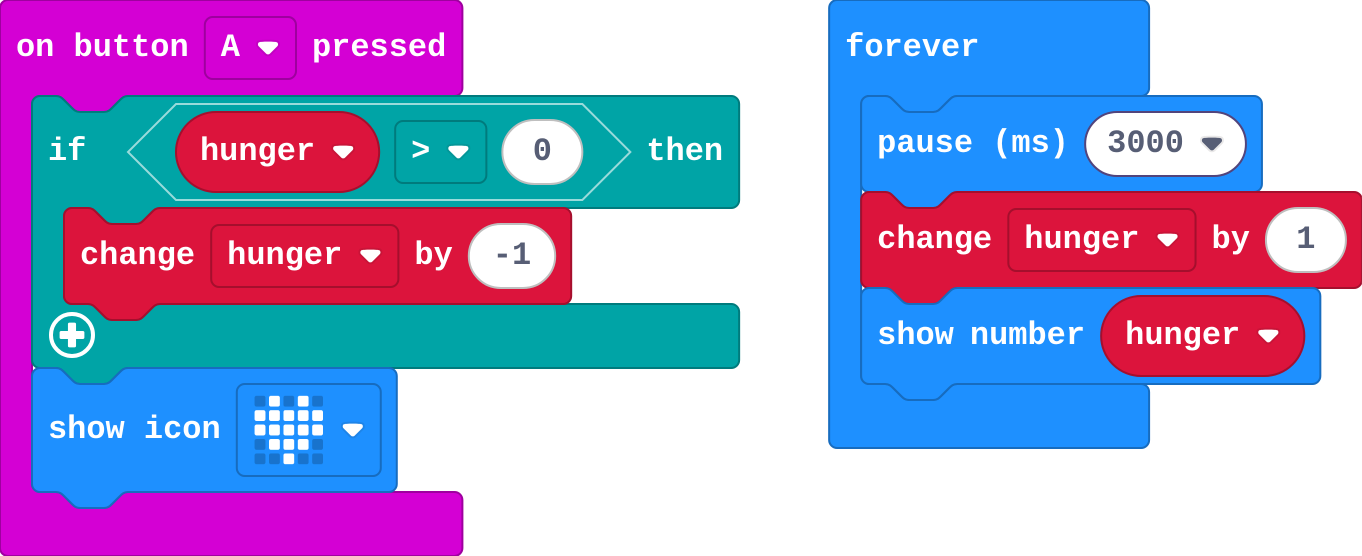
Milestone 1: hungry over time
Show as code
let hunger = 0
input.onButtonPressed(Button.A, function () {
    if (hunger > 0) {
        hunger += -1
    }
    basic.showIcon(IconNames.Heart)
})
basic.forever(function () {
    basic.pause(3000)
    hunger += 1
    basic.showNumber(hunger)
})
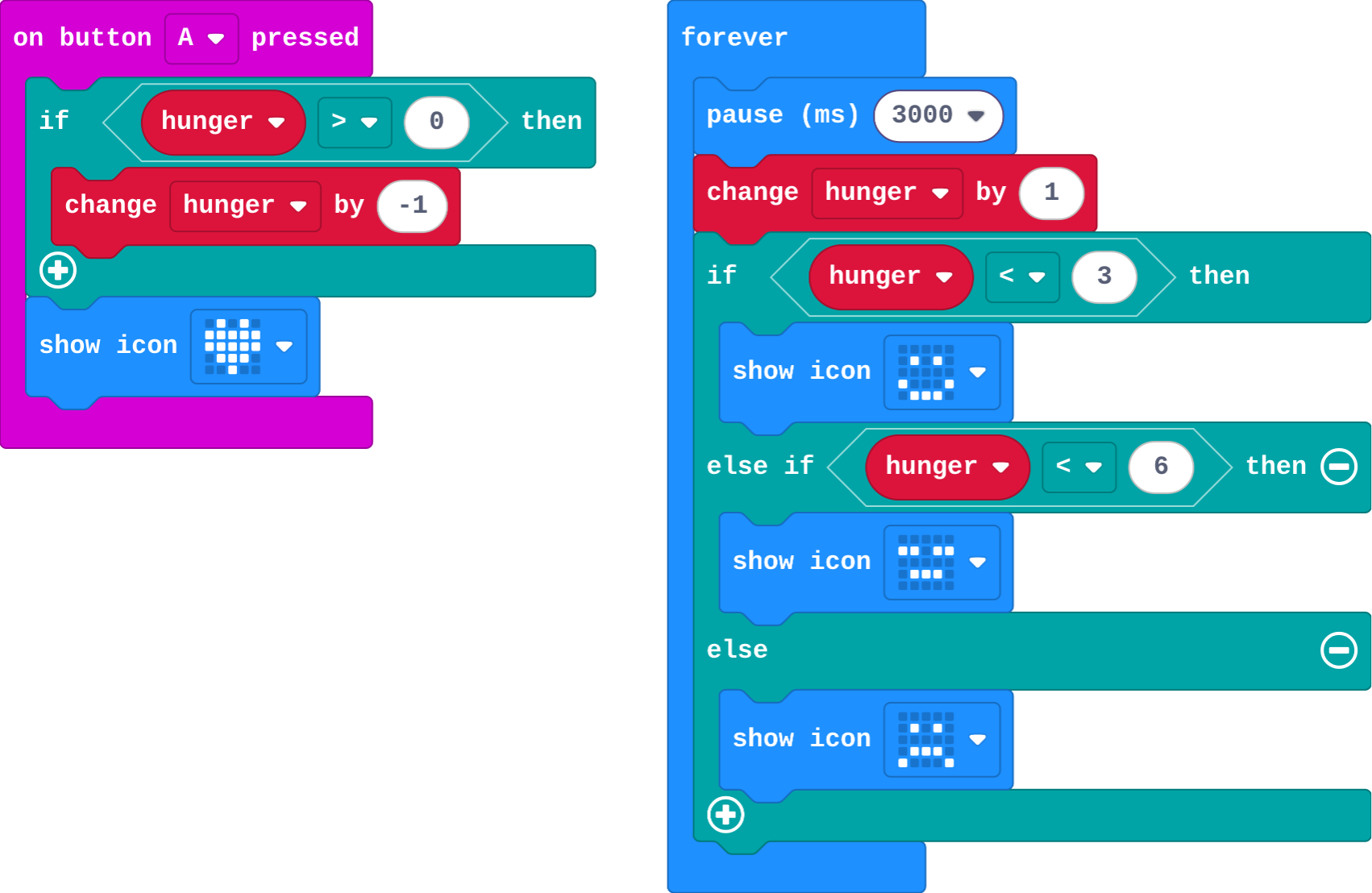
Milestone 2: a face for each feeling
Show as code
let hunger = 0
input.onButtonPressed(Button.A, function () {
    if (hunger > 0) {
        hunger += -1
    }
    basic.showIcon(IconNames.Heart)
})
basic.forever(function () {
    basic.pause(3000)
    hunger += 1
    if (hunger < 3) {
        basic.showIcon(IconNames.Happy)
    } else if (hunger < 6) {
        basic.showIcon(IconNames.Asleep)
    } else {
        basic.showIcon(IconNames.Sad)
    }
})
Milestone 3: tricks

Show as code
let tricks = ["SPIN", "JUMP", "WAVE"]
let hunger = 0
input.onButtonPressed(Button.A, function () {
    if (hunger > 0) {
        hunger += -1
    }
    basic.showIcon(IconNames.Heart)
})
input.onGesture(Gesture.Shake, function () {
    basic.showString(tricks[randint(0, tricks.length - 1)])
})
basic.forever(function () {
    basic.pause(3000)
    hunger += 1
    if (hunger < 3) {
        basic.showIcon(IconNames.Happy)
    } else if (hunger < 6) {
        basic.showIcon(IconNames.Asleep)
    } else {
        basic.showIcon(IconNames.Sad)
    }
})
Make it yours
Open task: any program that does what the step asks.
Stretch and support
Stretch: Add a second need, bored, with its own number, its own button and its own face rule. Which need wins when both are high?
Support: Pair students for Milestone 3: one reads the goal aloud while the other builds.
Exit ticket
Your pet has: if hunger < 6 tired, else if hunger < 3 happy, else sad. What does it show when hunger is 1, and why?
Tired. 1 is less than 6, so the first question is true and the rest are skipped. Ask < 3 first.
What each step is for
- Investigate: A pet is a variable that forever changes by itself, events that change it back, and decisions that turn the number into a face.
- Milestone 1: hungry over time: Time is just forever with a pause: each time round, the number changes by itself.
- Milestone 2: a face for each feeling: Ranges turn one number into one of three faces: the first true question wins.
- Milestone 3: tricks: Combining a list, a random place and an event shows whether a student can put the course's ideas together.
Where it leads
Course complete. Next: micro:bit: talk and play, where functions name jobs and radio connects micro:bits. With real micro:bits: keep the pet in a pocket for a lesson and see if it survives.