Again and again
Students move pictures from on start into forever so they repeat, and use pause to set how long each frame stays.
Classroom resources
Load these into Waypoints Prepare: choose Load URL and paste the copied address, or download the file and import it. In Prepare, the worksheet's Teacher edition shows the answers; the student copy hides them.
Students will be able to
- I can use forever to repeat blocks.
- I can say what pause does inside a loop.
- I can build an animation from pictures and pauses.
Timing
Predict and Run 8 min · Investigate 10 min · Modify 8 min · Make 10 min · Shop sign 4 min
Before class
A program has two places to put blocks. on start runs its blocks once. forever runs its blocks again and again: a loop. Most surprises in this lesson come from which of the two a block is in. Try the Make yourself: three pictures in forever, one drawn with show leds.
Running the lesson
- Predict: most students choose 'beating over and over'. Ask: which block are the hearts inside?
- Run: the small heart stays. Last lesson's rule still holds: on start runs once.
- Investigate: students fix Ada's program in the editor; the check ticks by itself. Take a vote on the pause question before anyone adds a pause.
- Modify: then pause. 1000 ms is one second.
- Make: small changes between frames look like movement. Let students show each other.
In class
On the slides at these points. Students can do the whole lesson on their own; these are for the room. In the deck, the Run, Modify and Make slides have the live playground in them (the tutorial link is the backup), and the notes above are in each slide's speaker notes.
- Be the loop (investigate, 4 min)
Three students hold picture cards in a row. A fourth walks along them, showing each card in turn, and goes back to the start after the last one.
Add a pause: the walker stops at one card and counts to three. The loop carries on afterwards.
The hard part (on purpose)
on start runs once and forever repeats. When the heart doesn't beat, ask which block the pictures are inside.
When students get stuck
| What you will see | A question to ask | The fix |
|---|---|---|
| The heart does not beat after the fix. | Which block are your hearts inside? | Drag them inside forever, not under it. The block should hug them. |
| The animation flickers too fast to see. | How long does each picture stay? | Add a pause between pictures, such as 500. |
| A student thinks the program stopped after a pause. | Watch for two more seconds. What comes after the pause? | pause waits, then forever carries on from where it was. |
Answers to the checks
- Predict: Ada wants a beating heart. Her hearts are in on start, and forever is empty. What will she see?
The big heart, then the small heart, which stays. Blocks in on start run once. forever repeats, but there is nothing inside it to repeat. - How often?: How many times does forever run the blocks inside it?
Again and again, until the micro:bit is switched off
forever starts again from its first block as soon as it reaches the last one. That is a loop. - Add a pause: Ada adds pause 1000 after the small heart, inside forever. What happens?
The small heart stays for one second, then the big heart comes back
pause only waits. The small heart stays on for 1000 ms, then forever carries on from the top with the big heart.
Solutions
One possible solution for each task. Other correct programs are fine.
Modify › Draw your own picture
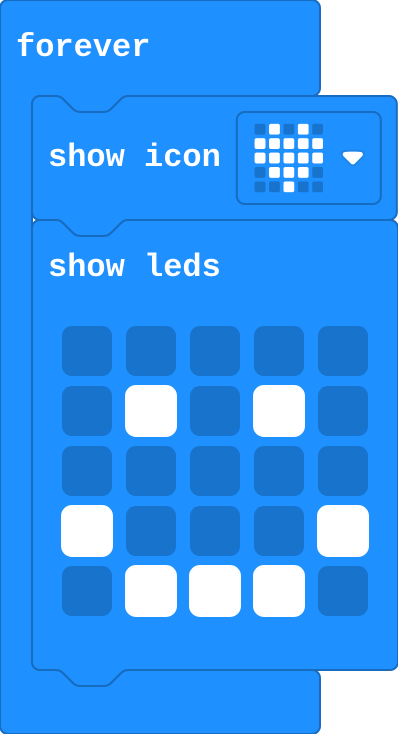
Show as code
basic.forever(function () {
    basic.showIcon(IconNames.Heart)
    basic.showLeds(`
        . . . . .
        . # . # .
        . . . . .
        # . . . #
        . # # # .
        `)
})
Modify › Slow the beat
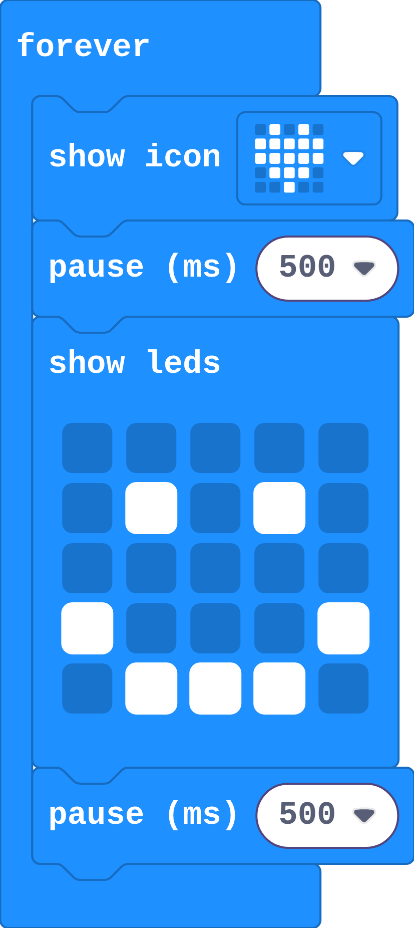
Show as code
basic.forever(function () {
    basic.showIcon(IconNames.Heart)
    basic.pause(500)
    basic.showLeds(`
        . . . . .
        . # . # .
        . . . . .
        # . . . #
        . # # # .
        `)
    basic.pause(500)
})
Make
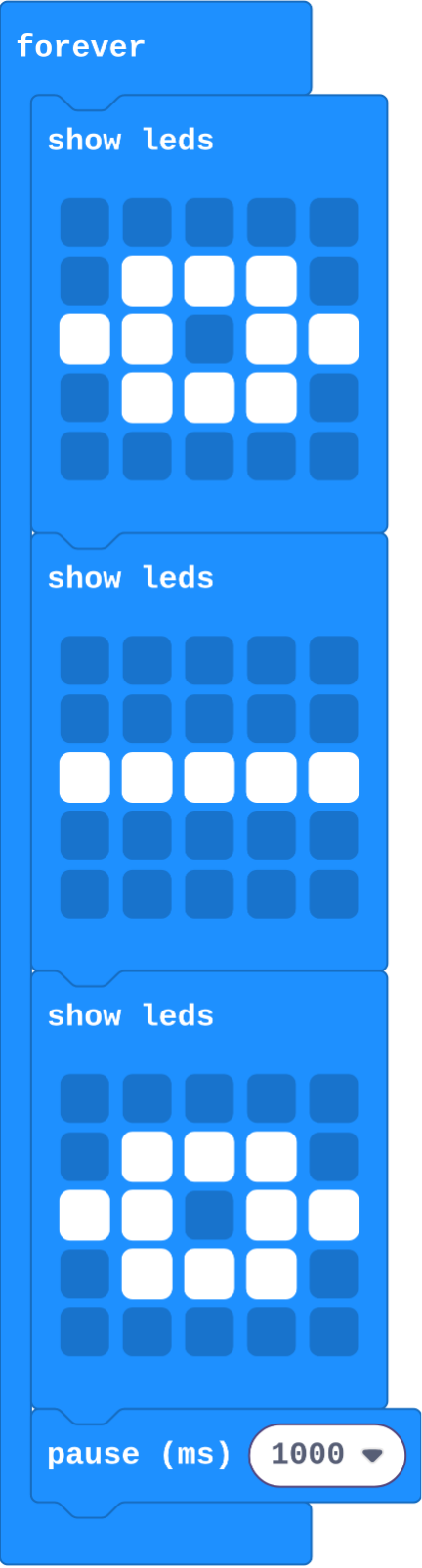
Show as code
basic.forever(function () {
    basic.showLeds(`
        . . . . .
        . # # # .
        # # . # #
        . # # # .
        . . . . .
        `)
    basic.showLeds(`
        . . . . .
        . . . . .
        # # # # #
        . . . . .
        . . . . .
        `)
    basic.showLeds(`
        . . . . .
        . # # # .
        # # . # #
        . # # # .
        . . . . .
        `)
    basic.pause(1000)
})
Run a shop sign
Open task: any program that does what the step asks.
Stretch and support
Stretch: Make an animation with five or more frames that tells a tiny story, such as a seed growing into a flower.
Support: Give students two show leds blocks already in forever, and ask them only to draw the pictures and add a pause.
Exit ticket
Your animation has three pictures inside forever. What happens if you move them into on start?
They play once, and the last picture stays on.
What each step is for
- Investigate: Blocks inside forever run again and again: when the last one finishes, forever starts again from the top. pause holds a picture, then the loop carries on.
- Modify: Every frame of an animation is one block in the loop, and pause sets how long each frame stays.
Where it leads
Next lesson adds buttons, so the micro:bit waits for a press before it shows something. Class idea: each table designs one frame and the class joins them into one animation.