If and else
Students use if … else to choose between two things, and see that exactly one part runs each time: the else runs only when the question is false.
Classroom resources
Load these into Waypoints Prepare: choose Load URL and paste the copied address, or download the file and import it. In Prepare, the worksheet's Teacher edition shows the answers; the student copy hides them.
Students will be able to
- I can use if … else to choose between two things.
- I can say when the else part runs.
- I can turn two ifs into one if … else.
Timing
Predict and Run 8 min · Investigate 10 min · Modify 8 min · Mix it up 3 min · Make 8 min · Desk lamp 3 min
Before class
Click the + at the bottom of an if block to add else (otherwise). If the question is true, the first part runs; if false, the else part runs. Exactly one of the two runs each time, so if … else has no gap (like two ifs that miss a value) and no overlap. else if (more questions in a row) is the next lesson.
Running the lesson
- Predict: some students think both parts run, one after the other. Ask: what does 'otherwise' mean? Ask the 'both' group to read the block aloud with 'otherwise' in place of else.
- Run: dark then bright. The lights go off now, because the else part clears them.
- Investigate: the trace pins down the edge: 50 is not less than 50. Kim's flicker is the belief that else always runs too.
- Modify: rebuilding the night light shows what else replaces: the opposite question.
- Mix it up: an if with no else, from last lesson, inside a counter.
- Make: one if … else, one question.
In class
On the slides at these points. Students can do the whole lesson on their own; these are for the room. In the deck, the Run, Modify and Make slides have the live playground in them (the tutorial link is the backup), and the notes above are in each slide's speaker notes.
- Two doors (investigate, 3 min)
Two signs on two doors: 'true' and 'else'. The teacher reads a question about each student in turn; they walk through exactly one door.
Nobody can go through both doors, and nobody stays behind.
- Test the edge (end, 3 min)
Show your bike light to the next pair. Drag the light slider through 50.
The hard part (on purpose)
Believing both parts run. Ask them to say the block aloud with 'otherwise' in place of else.
When students get stuck
| What you will see | A question to ask | The fix |
|---|---|---|
| There is no else in the if block. | Where is the + on the if block? | Click the + at the bottom of the if. It adds an else part. |
| The lights stay on in the day. | Which part clears the screen, and when does it run? | Put clear screen (or the small square) in the else part. |
| Two ifs and an else, and the picture flickers. | How many questions do you need for two choices? | One question and an else. Delete the second if. |
Answers to the checks
- Predict: The light level is 20 (dark). Which parts of the if … else run, each time round forever?
Only the first part. 20 is less than 50, so the question is true and the lights come on. The else part runs only when the question is false. - Trace the light: For each light level, what does the night light do?
lights on, clears the screen, clears the screen, lights on
Below 50 the question is true, so the first part runs. 50 and above, it is false, so the else part runs. 50 is not less than 50. - Kim's flicker: Kim thinks that in the dark her night light turns the lights on and then the else part clears them straight away, so it flickers. Is she right?
No: each time round, only one part runs
if … else runs exactly one of its two parts. In the dark the question is true, so only the first part runs, every time round. - When does else run?: When does the else part run?
Only when the question is false
else means otherwise: it runs when the question is false, and only then. - Mix it up: Each press of A adds 1 to count, shows it, and shows a diamond (the prize) if count is 5. What shows straight after the 6th press?
6
After the 6th press count is 6, which is shown. 6 is not 5, so the if does nothing: no diamond.
Solutions
One possible solution for each task. Other correct programs are fine.
Modify › One if, not two
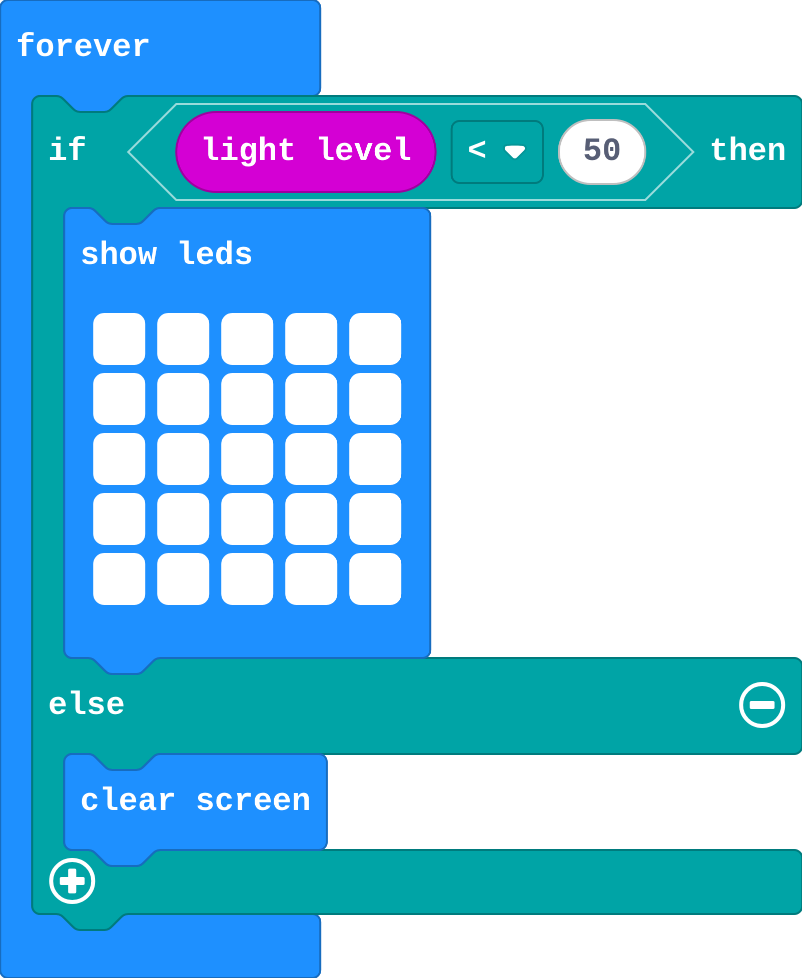
Show as code
basic.forever(function () {
    if (input.lightLevel() < 50) {
        basic.showLeds(`
            # # # # #
            # # # # #
            # # # # #
            # # # # #
            # # # # #
            `)
    } else {
        basic.clearScreen()
    }
})
Modify › A dim glow
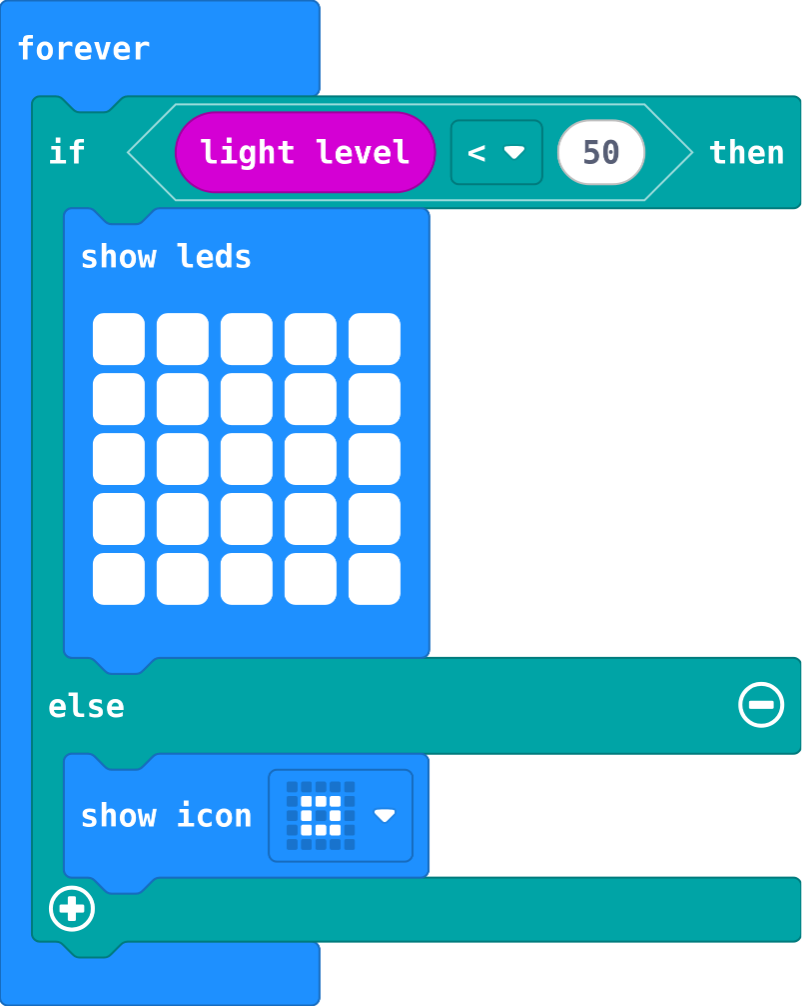
Show as code
basic.forever(function () {
    if (input.lightLevel() < 50) {
        basic.showLeds(`
            # # # # #
            # # # # #
            # # # # #
            # # # # #
            # # # # #
            `)
    } else {
        basic.showIcon(IconNames.SmallSquare)
    }
})
Make
Show as code
basic.forever(function () {
    if (input.lightLevel() < 50) {
        basic.showLeds(`
            # # # # #
            # # # # #
            # # # # #
            # # # # #
            # # # # #
            `)
    } else {
        basic.showIcon(IconNames.SmallSquare)
    }
})
Change a desk lamp
Open task: any program that does what the step asks.
Stretch and support
Stretch: Make the bike light flash in the dark (show, pause, clear, pause) and glow steadily in the day.
Support: Give students the if … else already in forever with the question filled in, and ask them only to fill each part.
Exit ticket
In an if … else, when does the else part run?
Only when the question is false. Exactly one of the two parts runs each time.
What each step is for
- Investigate: else runs exactly when the question is false, so one if … else covers both cases with no gap and no overlap.
- Modify: else replaces the opposite question: one if … else does the job of two ifs.
- Mix it up: An if with no else does nothing when its question is false.
Where it leads
Next lesson: else if, for three or more choices, where the order of the questions matters.