One key to lock and unlock
Students lock and unlock numbers with XOR and a shared key, and meet the weakness of sending the same locked message every time.
Classroom resources
Load these into Waypoints Prepare: choose Load URL and paste the copied address, or download the file and import it. In Prepare, the worksheet's Teacher edition shows the answers; the student copy hides them.
Students will be able to
- I can lock a number with XOR and a shared key and unlock it with the same key.
- I can explain why a wrong key gives a wrong answer without an error.
- I can say why sending the same locked message each time is a weakness.
Timing
Predict and Run 8 min · Investigate 10 min · Modify 8 min · Make 15 min
Before class
The idea: XOR gives a 1 where two bits differ and a 0 where they match. Doing it twice with the same key returns the original, so one key and one operation work in both directions. This is a shared-key (symmetric) cipher.
Bits: the lesson text shows 7 ^ 5 in bits. If students have not met binary, treat the working as a table to read, not something to learn: the check answers can be found by following the pattern.
Two honest limits: (1) XOR with a short key repeated is breakable; real systems use long keys and better methods. (2) The same message gives the same locked number every time, which the last Make task shows. Both are why the next lessons matter.
Running the lesson
- Investigate: let students do the bit working on paper first.
- Modify: wrong keys. Ask: does the receiver know something is wrong?
The hard part (on purpose)
XOR undoes itself with the same key, and a wrong key gives a wrong answer, not an error. Ask them to compare the keys on both micro:bits first.
When students get stuck
| What you will see | A question to ask | The fix |
|---|---|---|
| The receiver shows a different number. | Are the keys the same on both micro:bits? | Make both keys equal; check B was pressed the same number of times on each. |
| ^ looks odd in the blocks. | Which block is it? | The ^ block is in Math (Advanced), with the other bit operations. |
Answers to the checks
- Predict: A is pressed. The radio carries a number. What does the receiving micro:bit show?
7. The radio carried 7 ^ 5 = 2. The receiver computes 2 ^ 5 = 7, the original number. - Locking a number: What number does the radio carry when the sender encrypts 6 with key 3? (6 is 110 in bits and 3 is 011.)
5
110 XOR 011 = 101, which is 5. - A wrong key: The sender encrypted 6 with key 3, so the radio carries 5. A receiver wrongly uses key 4. What does it show?
1
5 ^ 4 = 101 ^ 100 = 001 = 1. The receiver gets a wrong number and no warning. Nothing in XOR tells you the key was wrong. - Why it works both ways: Why does the receiver use the very same operation the sender used?
Because XOR undoes itself when you repeat it with the same key
(message ^ key) ^ key = message. The key cancels itself. - The same number again: Press A three times. The radio carries the same number each time. Why might that be a problem for a door keypad?
Anyone who hears the number once has a number that works every time
The locked PIN is the same every time. A listener doesn't need the key to repeat it. You will fix this in the Challenge–response lesson.
Solutions
One possible solution for each task. Other correct programs are fine.
Modify
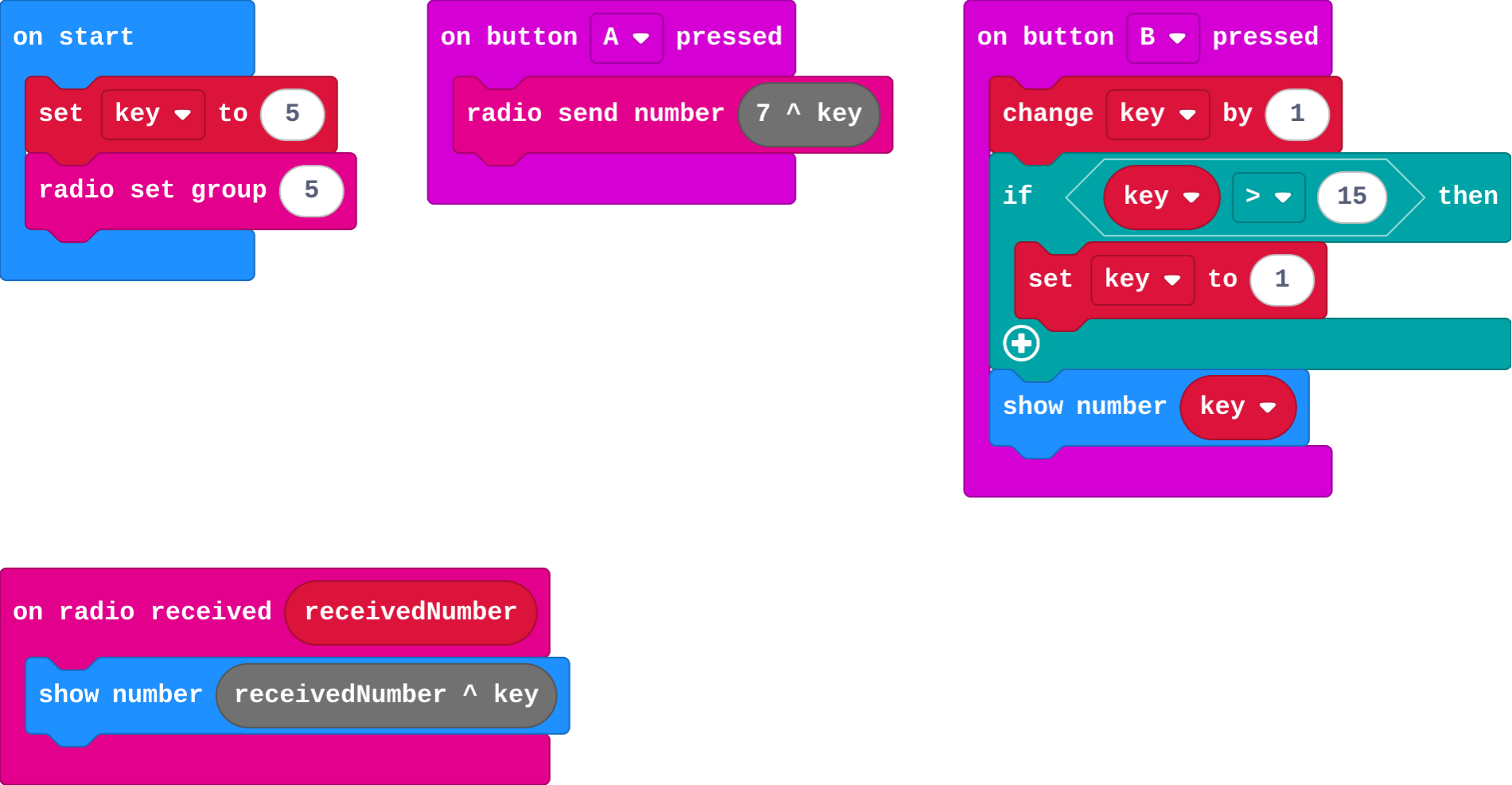
Show as code
let key = 5
radio.setGroup(5)
input.onButtonPressed(Button.A, function () {
    radio.sendNumber(7 ^ key)
})
input.onButtonPressed(Button.B, function () {
    key += 1
    if (key > 15) {
        key = 1
    }
    basic.showNumber(key)
})
radio.onReceivedNumber(function (receivedNumber) {
    basic.showNumber(receivedNumber ^ key)
})
Make › The PIN
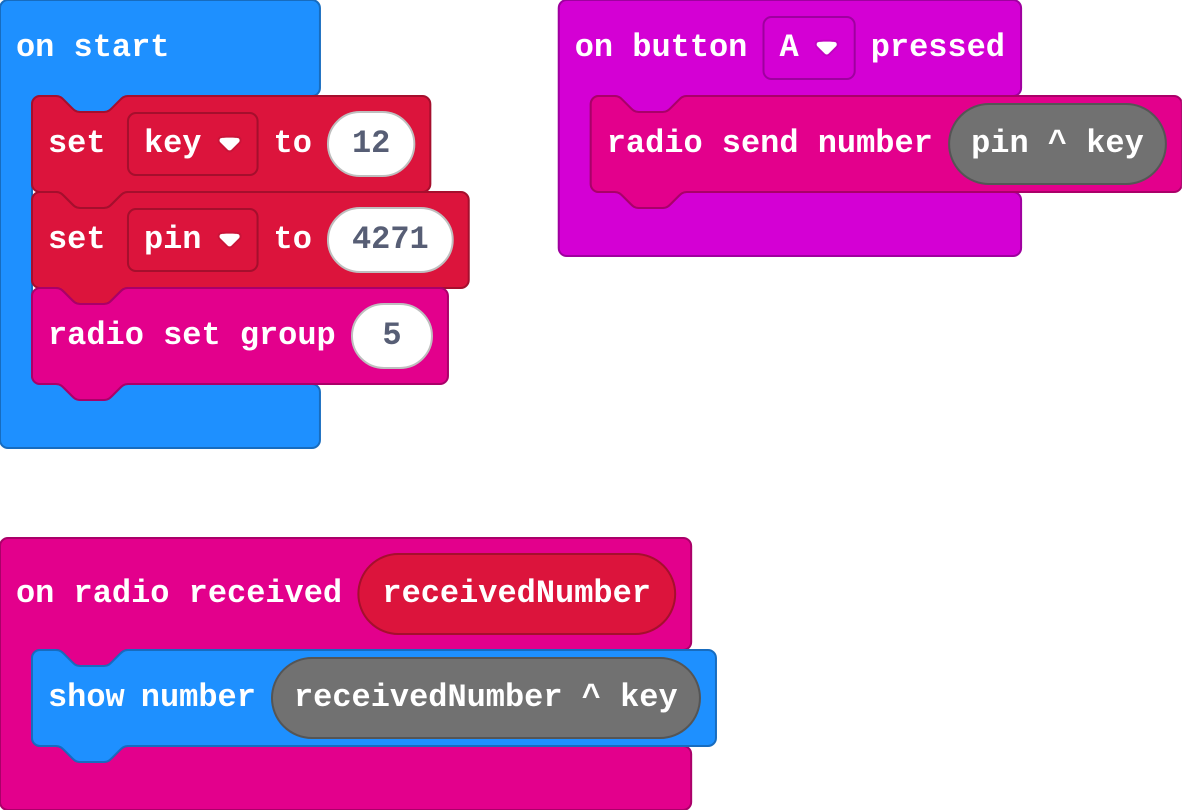
Show as code
let key = 12
let pin = 4271
radio.setGroup(5)
input.onButtonPressed(Button.A, function () {
    radio.sendNumber(pin ^ key)
})
radio.onReceivedNumber(function (receivedNumber) {
    basic.showNumber(receivedNumber ^ key)
})
Make › The same number again
Open task: any program that does what the step asks.
Stretch and support
Stretch: Lock each digit of the PIN separately, using a different key digit for each.
Support: Give the sending half complete.
Exit ticket
Why does the receiver use the same key and the same operation as the sender?
XOR with the same key undoes itself: (message ^ key) ^ key = message.
What each step is for
- Investigate: XOR with a key scrambles a number, and XOR with the same key unscrambles it. A wrong key gives a wrong answer, not an error.
- Modify: Both micro:bits must hold the same key. Change one and they stop understanding each other.
Where it leads
Next: both ends need the same key. How do they agree it without sending it?