A wrist remote
Students drive the robot from a wrist micro:bit running a CreateAI movement model, so the model runs on the remote and the robot's program is unchanged.
Classroom resources
Load these into Waypoints Prepare: choose Load URL and paste the copied address, or download the file and import it. In Prepare, the worksheet's Teacher edition shows the answers; the student copy hides them.
Students will be able to
- I can turn a micro:bit model's actions into radio commands.
- I can explain why the robot's program doesn't change when the model does.
- I can make the remote send a safe command when the model is unsure.
Timing
Predict and Run 8 min · On your wrist 12 min (typical) · Investigate 8 min · Modify 8 min · Make 10 min
Before class
The idea: the robot only ever receives words (Forward, Left, Right, Stop). Any model that sends those words can drive it. Here the model runs on a wrist micro:bit (trained in CreateAI, needing a V2): on ML … start sends a word by radio. No computer, camera or bridge is needed once both micro:bits are programmed.
In the simulator: the lesson's editor has the robot blocks and the Machine Learning blocks with practice actions; one program holds both parts and the ML panel picks the action (walking for forward, waving for left, clapping for right, still for stop). Open it full screen so the panel and the robots show. This has not yet been tried in the live editor: check before class.
With hardware: students reuse their CreateAI skills from micro:bit and the computer: train four tilt actions with the micro:bit on the wrist (a strap or band and a battery pack), Edit in MakeCode, add radio send string and set group, and download to the V2. Every pair needs its own radio group.
Running the lesson
- Predict: some say the robot needs the ML blocks. Ask: what does the robot receive?
- Run: choose actions in the ML panel and watch the other robot.
- Investigate: unknown sending nothing is the safety gap; holding a tilt sends once, which sets up the watchdog lesson.
- Make: Spin needs a branch on both sides: the remote's word and the robot's move.
The hard part (on purpose)
Two programs on two micro:bits that must agree on the radio group and the words. Ask them to read both sides aloud before changing either.
When students get stuck
| What you will see | A question to ask | The fix |
|---|---|---|
| The robot doesn't respond to the wrist. | Same radio group on both? Do the words match exactly? | Match the group and the words (capitals included). |
| No ML panel in the simulator. | Is the editor full screen and the simulator running? | Open full screen and restart the simulator. |
| The real wrist model mixes up left and right. | How different are the left and right samples? Did you train both hands? | Add samples of each tilt, held the same way you'll use it. |
Answers to the checks
- Predict: You swap the webcam model for this wrist remote. What has to change in the robot's part of the program?
Nothing. The robot only ever sees the words Forward, Left, Right and Stop. It doesn't matter whether a webcam model or a wrist model sent them. - Unknown: The wrist model isn't sure of any action (unknown). What does this program send?
Nothing, so the robot keeps doing whatever it was doing
There is no on ML unknown start, so nothing is sent and the robot keeps its last mode. Sending Stop for unknown is the safe choice. - Holding a tilt: You hold your hand tipped forward for ten seconds. How many times does the wrist send Forward?
Once, when the action starts
on ML start runs when the estimated action changes, so one Forward. If the radio message is lost, the robot never hears it: the next lesson's watchdog and repeated labels deal with that. - Which model where: Webcam model on the computer, or wrist model on the micro:bit: which suits each?
Reading printed signs held up to the robot's route → Webcam model; Steering with no laptop nearby, outside → Wrist model; Recognising what an object looks like → Webcam model; Nothing about you is seen or sent anywhere → Wrist model
Solutions
One possible solution for each task. Other correct programs are fine.
Modify › Unsure means stop
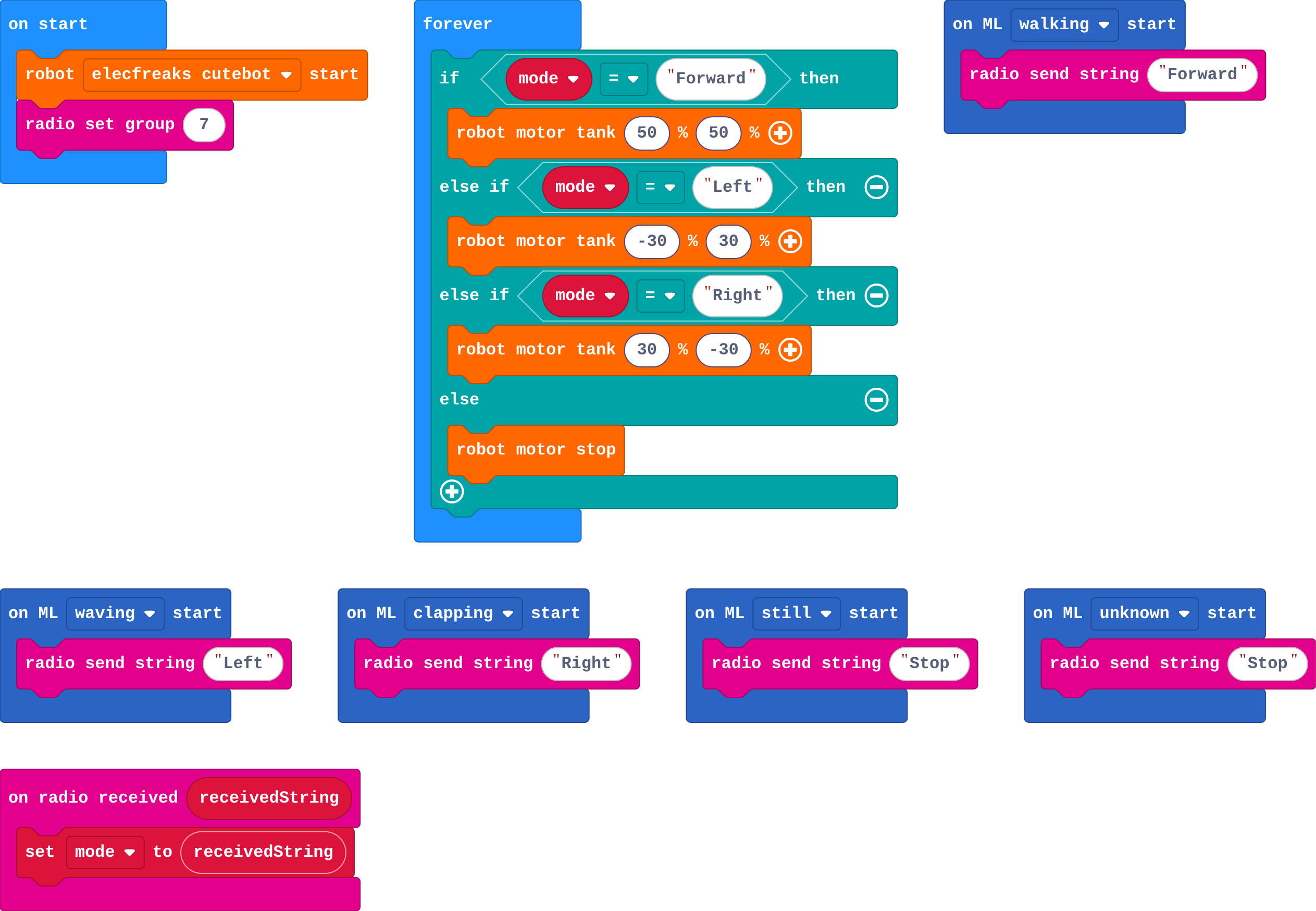
Show as code
ml.onStart(ml.event.Walking, function () {
    radio.sendString("Forward")
})
ml.onStart(ml.event.Waving, function () {
    radio.sendString("Left")
})
ml.onStart(ml.event.Clapping, function () {
    radio.sendString("Right")
})
ml.onStart(ml.event.Still, function () {
    radio.sendString("Stop")
})
ml.onStart(ml.event.Unknown, function () {
    radio.sendString("Stop")
})
radio.onReceivedString(function (receivedString) {
    mode = receivedString
})
basic.forever(function () {
    if (mode == "Forward") {
        robot.motorTank(50, 50)
    } else if (mode == "Left") {
        robot.motorTank(-30, 30)
    } else if (mode == "Right") {
        robot.motorTank(30, -30)
    } else {
        robot.motorStop()
    }
})
let mode = ""
robot.elecfreaksCuteBot.start()
radio.setGroup(7)
Modify › Show what you sent
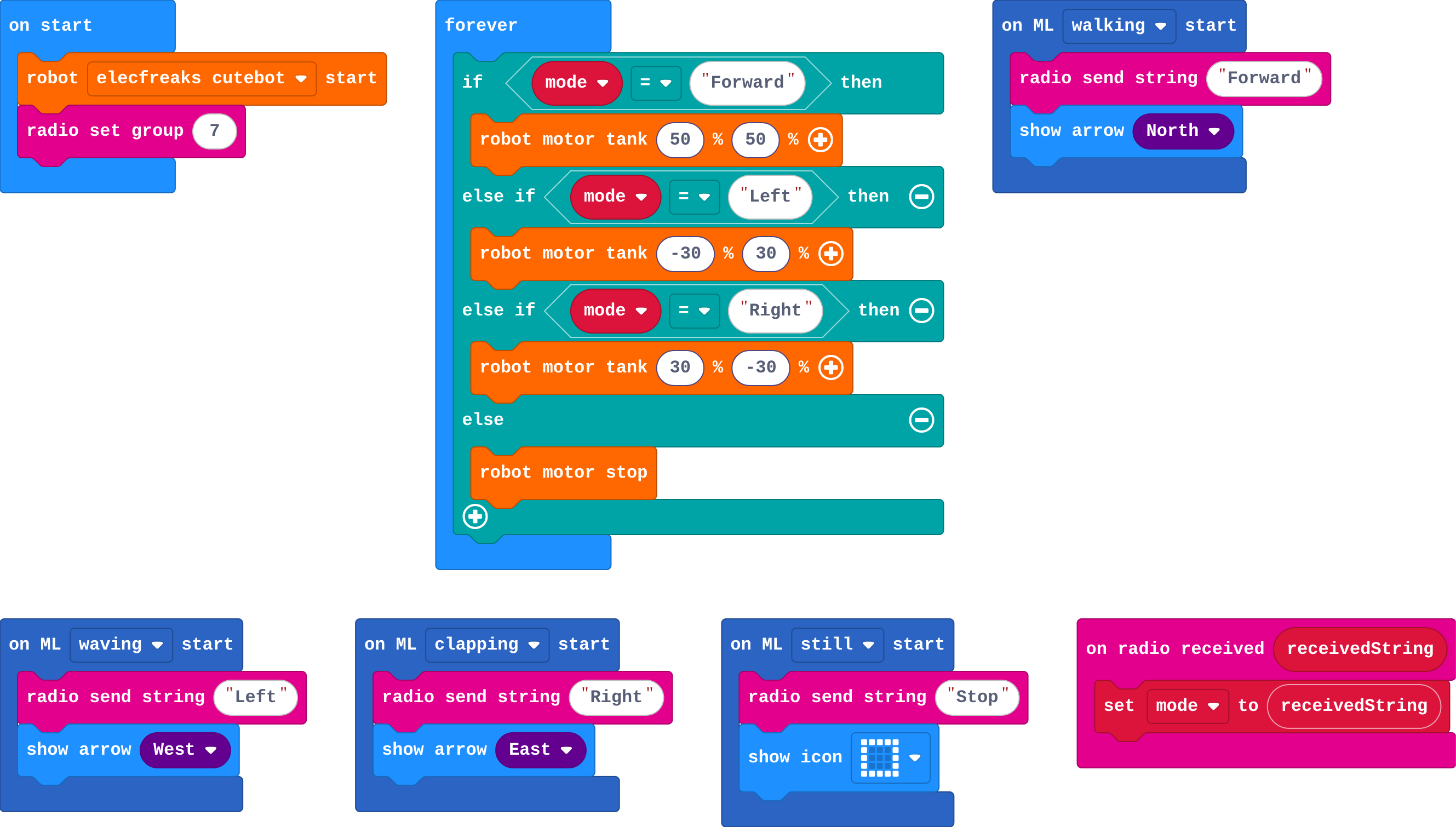
Show as code
ml.onStart(ml.event.Walking, function () {
    radio.sendString("Forward")
    basic.showArrow(ArrowNames.North)
})
ml.onStart(ml.event.Waving, function () {
    radio.sendString("Left")
    basic.showArrow(ArrowNames.West)
})
ml.onStart(ml.event.Clapping, function () {
    radio.sendString("Right")
    basic.showArrow(ArrowNames.East)
})
ml.onStart(ml.event.Still, function () {
    radio.sendString("Stop")
    basic.showIcon(IconNames.Square)
})
radio.onReceivedString(function (receivedString) {
    mode = receivedString
})
basic.forever(function () {
    if (mode == "Forward") {
        robot.motorTank(50, 50)
    } else if (mode == "Left") {
        robot.motorTank(-30, 30)
    } else if (mode == "Right") {
        robot.motorTank(30, -30)
    } else {
        robot.motorStop()
    }
})
let mode = ""
robot.elecfreaksCuteBot.start()
radio.setGroup(7)
Make
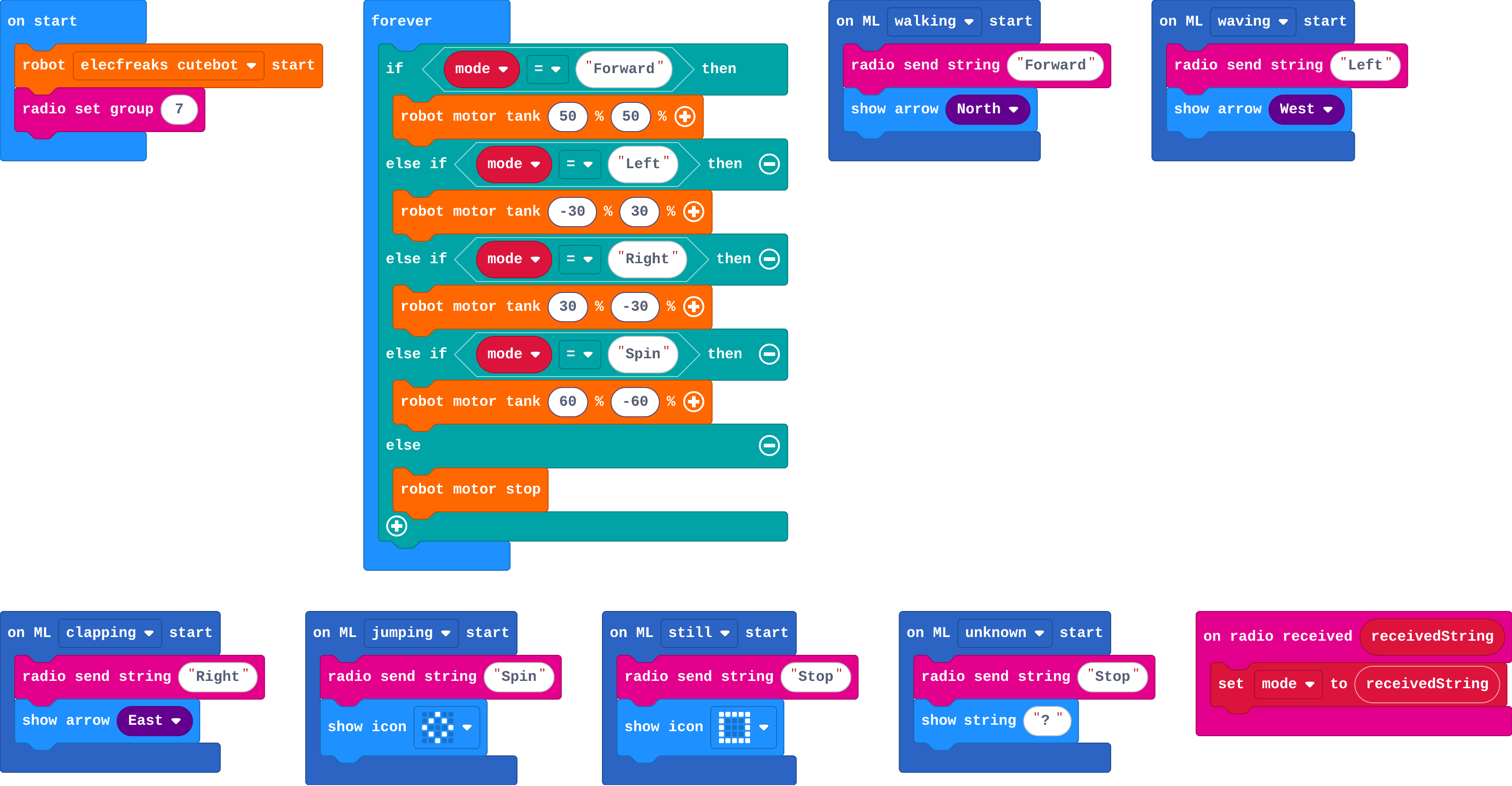
Show as code
ml.onStart(ml.event.Walking, function () {
    radio.sendString("Forward")
    basic.showArrow(ArrowNames.North)
})
ml.onStart(ml.event.Waving, function () {
    radio.sendString("Left")
    basic.showArrow(ArrowNames.West)
})
ml.onStart(ml.event.Clapping, function () {
    radio.sendString("Right")
    basic.showArrow(ArrowNames.East)
})
ml.onStart(ml.event.Jumping, function () {
    radio.sendString("Spin")
    basic.showIcon(IconNames.Diamond)
})
ml.onStart(ml.event.Still, function () {
    radio.sendString("Stop")
    basic.showIcon(IconNames.Square)
})
ml.onStart(ml.event.Unknown, function () {
    radio.sendString("Stop")
    basic.showString("?")
})
radio.onReceivedString(function (receivedString) {
    mode = receivedString
})
basic.forever(function () {
    if (mode == "Forward") {
        robot.motorTank(50, 50)
    } else if (mode == "Left") {
        robot.motorTank(-30, 30)
    } else if (mode == "Right") {
        robot.motorTank(30, -30)
    } else if (mode == "Spin") {
        robot.motorTank(60, -60)
    } else {
        robot.motorStop()
    }
})
let mode = ""
robot.elecfreaksCuteBot.start()
radio.setGroup(7)
Stretch and support
Stretch: Use certainty (%) for forward to set the speed: a small tilt drives slowly, a big tilt drives fast.
Support: Give the robot part complete (it is unchanged); students write only the wrist part.
Exit ticket
Why didn't the robot's program change when the webcam model was replaced by a wrist model?
The robot only receives words. As long as the new model sends the same words, the robot doesn't care where they came from.
What each step is for
- On your wrist: With a real model on a real wrist, the whole system runs on two micro:bits and batteries: the model's decision travels as a word, as before.
- Investigate: The model now runs on the remote: no camera, no computer, but the same rules apply: words must match, an unsure model needs a safe word, and the robot keeps its last mode.
- Modify: The remote's job is choosing words; showing what it sent and sending Stop for unknown make it honest and safe.
Where it leads
Next: what the robot should do when the model is unsure or goes quiet. Real world: wearable controllers for drones and assistive devices.