---
marp: true
theme: default
html: true
---

# Tripwire

Robotics challenges · Final challenge: Showcase and Patrol

<!-- Speaker note: An optional challenge for students who finish early. Two robots work as a team; one stands still as a tripwire and, armed with a true/false variable, cues the patrolling robot once per pass; the patrol robot does a trick through its mode, then carries on. About 50 minutes (Predict, Run, Investigate 12 min · Milestone 1 12 min · Milestone 2 13 min · Milestone 3 13 min). -->

---

## Today

**We are learning to** two robots work together. One stands still as a tripwire and, when the other passes, cues it to do a trick.

- I can turn a sensor into a one-shot trigger with a true/false variable.
- I can make one robot cue another by radio.
- I can design two devices that work together as a system.

<!-- Speaker note: Before class: Optional: the high ceiling of the course, not needed for Challenge complete. It is based on a common sensor pattern: one device notices, another acts. The tripwire is a robot that has been switched (A+B) to watch instead of drive; its distance sensor sees the other robot (the simulator treats robots as obstacles). Students drag the tripwire robot beside the line, facing it. Two ideas from earlier come back: **fire once** (armed, like alerted in lesson 9) and **handlers set the mode, forever does the job** (lessons 6 and 11). The trick is a wiggle so the robot finishes facing along the line and can find it again; a full spin may leave it off the line. Real ultrasonic sensors give false readings near zero, so a real tripwire often checks a range (for example 5 to 20 cm). Teacher: Milestone 1: arm with A, fire once, disarm. Teacher: Milestone 2: the trick lives in forever, chosen by mode. Teacher: Milestone 3: re-arming after a pause makes it work lap after lap. -->

---

## Why it matters

> Factories put sensors beside conveyor belts: when a box passes, the next machine is told to act. Shops use beams at the door to tell a speaker to chime. One device notices, another acts.

<!-- Speaker note: An optional challenge: two robots working as a **team**. One robot stands beside the track as a **tripwire**: its distance sensor watches the line. The other robot **patrols**. When the patrol robot passes in front of the tripwire, the tripwire sends a cue by radio, and the patrol robot does a **trick**. Both robots run the same program. Press **A+B** on a micro:bit to make its robot the tripwire, then **drag** that robot beside the line, facing it. The simulator's distance sensor sees other robots as well as boxes. -->

---

<span style="background:#dbeafe; color:#1a1a1a; border:1.5px solid #3b82f6; padding:6px 18px; border-radius:8px; font-size:1em; font-weight:500;">💬 Discussion</span>

## Predict

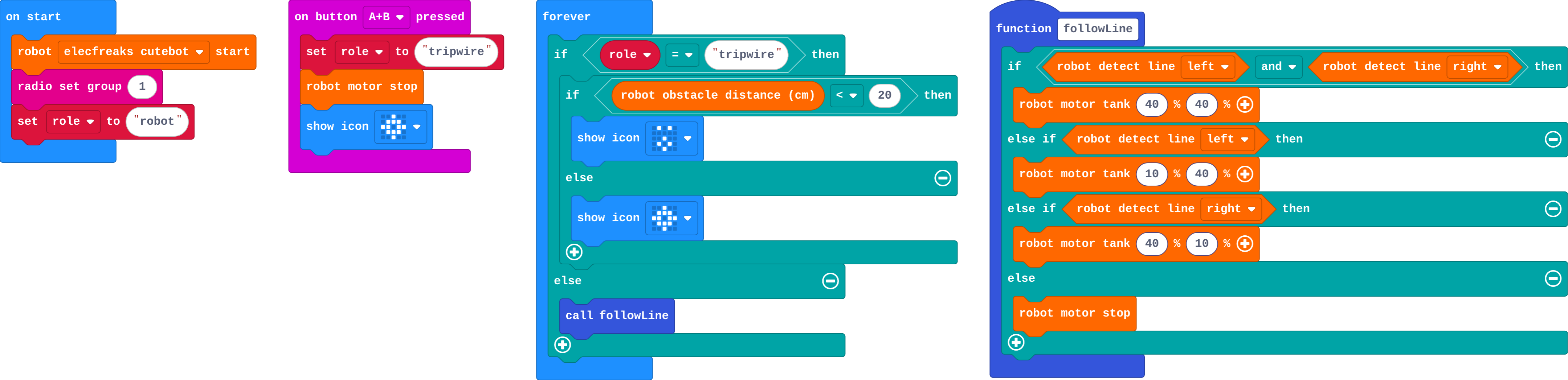
![h:360](https://studio.learningwaypoints.com/tutorials/_pictures/makecode/code/5c479cb17e1e.png?v=6a962cd9ea95a3c7)

**The second robot is the tripwire, beside the line and facing it. What does the tripwire's micro:bit show as the first robot passes?**

- A surprised face that stays for ever
- A surprised face while the robot is in front, then the target again
- The first robot stops at the tripwire
- Nothing: a tripwire cannot see robots

<!-- Speaker note: What happens: A surprised face while the patrol robot is closer than 20 cm, then the target again once it has passed. The tripwire checks again every time round. Take two or three predictions before anyone runs it. -->

<!-- Speaker note: Teacher: placing the tripwire is fiddly. Show it once on the projector. -->

<style scoped>pre, marp-pre { font-size: 0.5em; line-height: 1.25; } section { font-size: 27px; }</style>

---

<span style="background:#dcfce7; color:#1a1a1a; border:1.5px solid #22c55e; padding:6px 18px; border-radius:8px; font-size:1em; font-weight:500;">✅ Check</span>

## What happened?

* A surprised face while the patrol robot is closer than 20 cm, then the target again once it has passed. The tripwire checks again every time round.

<!-- Speaker note: Reveal after running. Ask who predicted it, and what made them think so. -->

---

<span style="background:#fef3c7; color:#1a1a1a; border:1.5px solid #f59e0b; padding:6px 18px; border-radius:8px; font-size:1em; font-weight:500;">✍️ Activity</span>

## Run it

Open the lesson at this step and try it together.

[studio.learningwaypoints.com/tutorials/code/robotics/robot-tripwire/?full=step-2#step-2](https://studio.learningwaypoints.com/tutorials/code/robotics/robot-tripwire/?full=step-2#step-2)

<!-- Speaker note: Press **A+B** on the second micro:bit. Drag its robot next to the line, pointing at it, about a hand's width away in the simulator. Watch its micro:bit as the first robot goes past. Students should be able to say: I made one robot the tripwire, put it beside the line, and watched it notice the other robot. -->

---

<span style="background:#dbeafe; color:#1a1a1a; border:1.5px solid #3b82f6; padding:6px 18px; border-radius:8px; font-size:1em; font-weight:500;">💬 Discussion</span>

## Investigate

![h:360](https://studio.learningwaypoints.com/tutorials/_pictures/makecode/code/5c479cb17e1e.png?v=6a962cd9ea95a3c7)

<!-- Speaker note: What this step is for: A tripwire must fire once per pass. Arming and disarming with a true/false variable gives one cue per pass; the robot that gets the cue does its trick in forever, not in the handler. -->

<!-- Speaker note: Teacher: Ivy's tripwire is lesson 9's repeat-alert slip; the second question is the mode rule from Patrol and alert. -->

---

<span style="background:#dcfce7; color:#1a1a1a; border:1.5px solid #22c55e; padding:6px 18px; border-radius:8px; font-size:1em; font-weight:500;">✅ Check</span>

## Ivy's tripwire

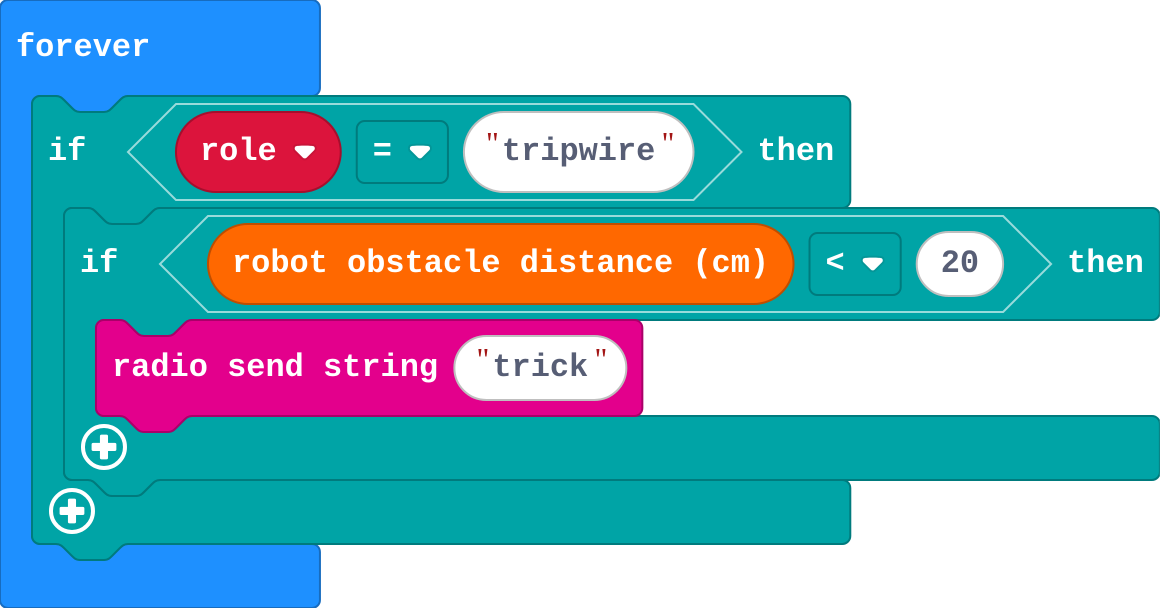
Ivy's tripwire, in forever:
![h:304](https://studio.learningwaypoints.com/tutorials/_pictures/makecode/code/527f6b004b01.png?v=84313606e7b2a36a)

**Ivy's tripwire sends 'trick' whenever something is closer than 20 cm. Her patrol robot starts its trick again and again as it passes. Why?**

- Tripwires only work once
- The robot is in front of the tripwire for many times round forever, so 'trick' is sent many times
- The trick is too long
- Her radio group is wrong

* Answer: The robot is in front of the tripwire for many times round forever, so 'trick' is sent many times

<!-- Speaker note: forever runs many times while the robot is passing, so the cue is sent many times. Like alerted in lesson 9, an armed variable lets the tripwire fire once, then wait. -->

<style scoped>pre, marp-pre { font-size: 0.5em; line-height: 1.25; } section { font-size: 20px; }</style>

---

<span style="background:#dcfce7; color:#1a1a1a; border:1.5px solid #22c55e; padding:6px 18px; border-radius:8px; font-size:1em; font-weight:500;">✅ Check</span>

## Who moves the motors?

**When the patrol robot hears 'trick', why should the handler only set mode to trick, instead of doing the moves itself?**

- The handler runs too late
- It saves battery
- Handlers cannot use motor blocks
- forever is calling followLine again and again, which would undo the trick's moves straight away

* Answer: forever is calling followLine again and again, which would undo the trick's moves straight away

<!-- Speaker note: Handlers and forever run side by side. forever keeps setting the motors for line following, so moves made in a handler are overwritten. Setting the mode lets forever do the trick itself, then go back to patrolling. -->

<style scoped>pre, marp-pre { font-size: 0.5em; line-height: 1.25; } section { font-size: 25px; }</style>

---

<span style="background:#fef3c7; color:#1a1a1a; border:1.5px solid #f59e0b; padding:6px 18px; border-radius:8px; font-size:1em; font-weight:500;">✍️ Activity</span>

## Milestone 1: arm and fire

Turn the tripwire into a one-shot trigger:

- Pressing **A** on the tripwire **arms** it (show a tick).
- When something passes while it is armed, it sends **"trick"**, **disarms** itself, and shows a cross.

[Open this step](https://studio.learningwaypoints.com/tutorials/code/robotics/robot-tripwire/?full=step-4#step-4)

<!-- Speaker note: What this step is for: Arm, fire once, disarm: a true/false variable turns a sensor into a one-shot trigger. Hints, in order: Make a variable armed. On button A: if role = tripwire, set armed to true and show a tick. / In the tripwire's part of forever: if armed and distance < 20, set armed to false, send the word trick, and show a cross. For students who need more support: Give Milestone 1 as a worked example to read; students build Milestones 2 and 3. For early finishers: Two tripwires at different places on the track, each sending a different word, and a different trick for each. The hard part, on purpose: Firing once per pass with arm and disarm, and the trick in forever. Ask when the tripwire is armed and where the trick's moves are. When students get stuck: The tripwire never fires. Ask: Is it armed? Is it facing the line, close enough? Fix: Press A on the tripwire; drag it nearer and point it at the line. / The trick is cut short or never shows. Ask: Where are the trick's moves: in the handler or in forever? Fix: Handler: set mode to trick. forever: if mode = trick, do it, then set mode to patrol. / After the trick the robot stops for good. Ask: Which way is it facing after the trick? Fix: Make the trick end facing the same way (a wiggle), or drag it back onto the line. -->

---

<span style="background:#fef3c7; color:#1a1a1a; border:1.5px solid #f59e0b; padding:6px 18px; border-radius:8px; font-size:1em; font-weight:500;">✍️ Activity</span>

## Milestone 2: the trick

Make the patrol robot do a **trick** when it is cued: lights on, a quick wiggle, lights off, then back to patrolling. Keep the trick short and finish facing the same way, so the robot can find the line again.

[Open this step](https://studio.learningwaypoints.com/tutorials/code/robotics/robot-tripwire/?full=step-5#step-5)

<!-- Speaker note: What this step is for: The handler changes the mode; forever does the trick, then goes back to patrolling. Hints, in order: Make a variable mode, set to patrol in on start. on radio received: if role = robot and the word is trick, set mode to trick. / In the robot's part of forever: if mode = trick, do the trick (lights and a wiggle), then set mode back to patrol; else follow the line. -->

---

<span style="background:#fef3c7; color:#1a1a1a; border:1.5px solid #f59e0b; padding:6px 18px; border-radius:8px; font-size:1em; font-weight:500;">✍️ Activity</span>

## Make: Milestone 3: a self-resetting tripwire

Make the team run by itself:

- The tripwire **counts** the passes and shows the count.
- It **re-arms itself** a few seconds after it fires, ready for the next lap.
- The trick plays a **sound** as well.

[Open this step](https://studio.learningwaypoints.com/tutorials/code/robotics/robot-tripwire/?full=step-6#step-6)

<!-- Speaker note: What this step is for: Two devices, each with its own job and memory, working together over radio: that is a small system. Hints, in order: After the tripwire fires: count the pass (a variable passes, change by 1), show it, pause 5 seconds, then arm again. / Add a sound to the trick with play tone … in background, so the robot keeps moving. -->

---

## On a real robot

With real robots, the tripwire can be a robot or just a micro:bit with an ultrasonic sensor. Place it a short distance from the track, facing across it. Real readings jump about, so you may need a range (for example between 5 and 20 cm) to ignore false readings near zero.

---

<span style="background:#dcfce7; color:#1a1a1a; border:1.5px solid #22c55e; padding:6px 18px; border-radius:8px; font-size:1em; font-weight:500;">✅ Check</span>

## Exit ticket

**Why does the tripwire need the armed variable?**

* The robot is in front of the sensor for many times round forever. Without armed the cue would be sent again and again; armed lets it fire once per pass.

<!-- Speaker note: Students answer on paper or a mini whiteboard before the reveal. Anyone who cannot answer needs the main idea again next lesson. Where this leads: Real-world links: conveyor-belt sensors, shop door chimes, lap timers at races, automatic doors. -->