---
marp: true
theme: default
html: true
---

# Report back

Robotics challenges · Talk

<!-- Speaker note: Students make a patrol robot that follows the line and sends a radio alert to a base station when it is blocked, using a true/false variable so it alerts once, then build a snake spotter. About 50 minutes (Predict and Run 10 min · Investigate 10 min · Modify 12 min · Make 15 min · Real robot 3 min (optional)). -->

---

## Today

**We are learning to** a patrol robot sends an alert to a base station when its way is blocked, once, using a variable to remember it has already told.

- I can make a robot send a radio message when its sensor detects something.
- I can use a true/false variable so a message is sent once, not every time round.
- I can give one program two roles (robot and base) with a variable.

<!-- Speaker note: Before class: This is the assistance strand: lesson 5's line following plus lesson 7's radio, in the other direction. The robot works on its own and **reports back**. Two new ideas: - **Send once.** forever runs many times a second, so an alert inside it would be sent again every time round while the box is there (Noah's patrol). A **true/false** variable, **alerted**, remembers that the robot has already told; it goes back to false when the way is clear. Students met true/false variables in the Foundations challenge (no cheating in the reaction timer). - **Roles.** Because the simulator runs the same program on both micro:bits, a **role** variable decides what each one does: every micro:bit starts as a robot; A+B makes it the base, which stops and listens. Messages are words (**send string**, **on radio received receivedString**). On real hardware the base can be a bare micro:bit (untested whether the robot start block errors without a robot; if so, give the base a copy without it). Teacher: Real robot (optional): range and walls matter; discuss what a real inspection robot should do out of range. -->

---

## Why it matters

> Inspection robots patrol pipelines, warehouses and bush tracks on their own. They only call a person when they find something: a leak, a spill, a fallen tree.

<!-- Speaker note: So far a person told the robot what to do. Now the robot does its job on its own and **reports back**. It follows the line (lesson 5); when something blocks it, it stops and sends **"blocked"** by radio to a **base station**. Both micro:bits run the same program, so each one has a **role**. Every micro:bit starts as a **robot**. Pressing **A+B** makes it the **base**: it stops driving and listens for alerts. A true/false variable, `alerted`, remembers whether the robot has already told the base. **if not alerted** asks the opposite question: **not** (in **Logic**) turns true into false and false into true, so it runs only while `alerted` is still false. -->

---

<span style="background:#dbeafe; color:#1a1a1a; border:1.5px solid #3b82f6; padding:6px 18px; border-radius:8px; font-size:1em; font-weight:500;">💬 Discussion</span>

## Predict

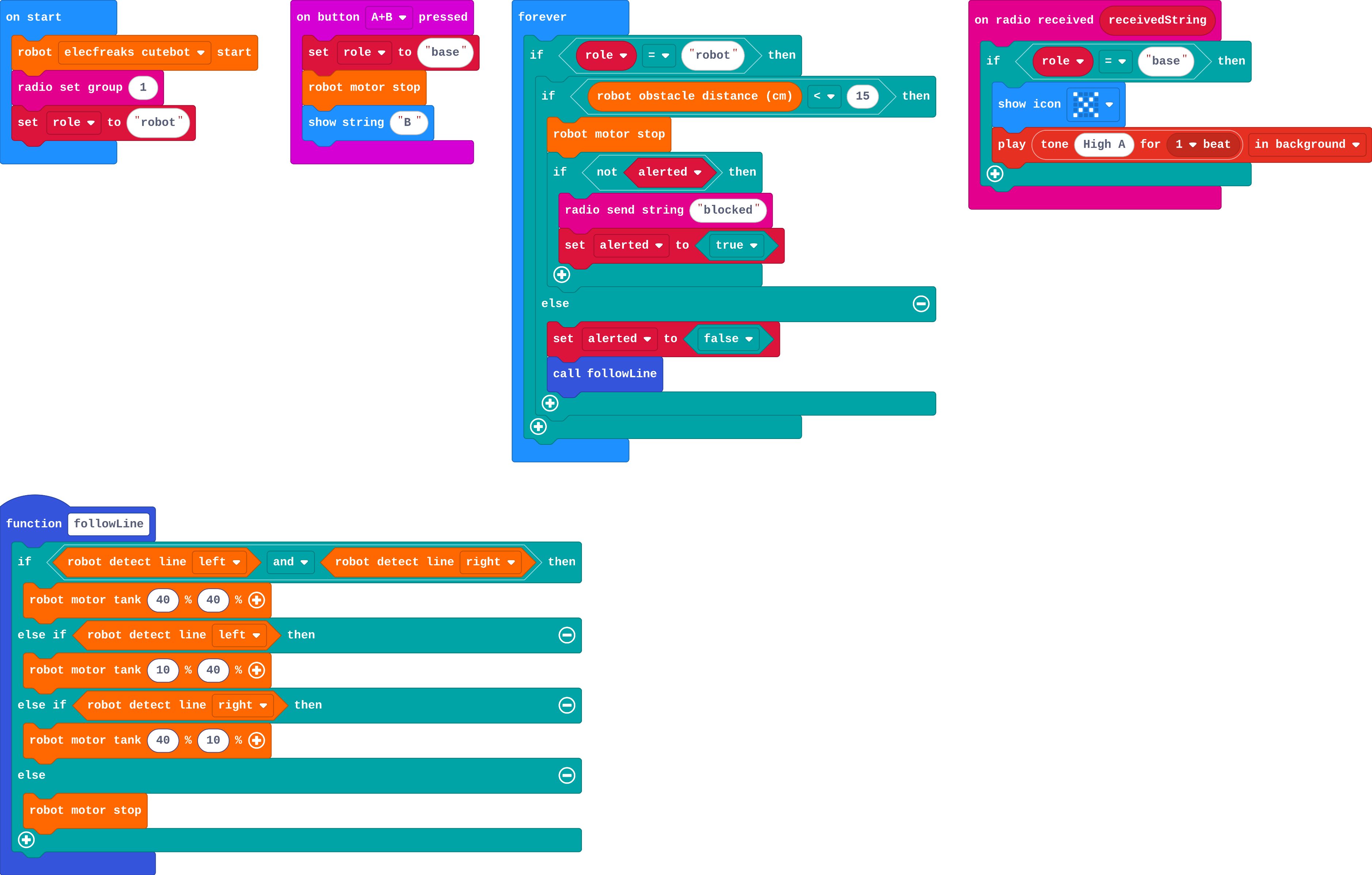
![h:360](https://studio.learningwaypoints.com/tutorials/_pictures/makecode/code/224a8f796768.png?v=e6ff7ac0d5244c9f)

**Press A+B on the second micro:bit (the base). Then drag a box onto the line in front of the first robot. What does the base do?**

- Nothing: the base cannot hear the robot
- Its own robot drives to help
- Shows an X and beeps again and again while the box is there
- Shows an X and beeps once

<!-- Speaker note: What happens: It shows an X and beeps once. The robot sends 'blocked' and sets alerted to true, so it does not send again until the way is clear. Take two or three predictions before anyone runs it. -->

<!-- Speaker note: Teacher: most expect one beep; some expect continuous beeping. Both are worth hearing before Noah's patrol. -->

---

<span style="background:#dcfce7; color:#1a1a1a; border:1.5px solid #22c55e; padding:6px 18px; border-radius:8px; font-size:1em; font-weight:500;">✅ Check</span>

## What happened?

* It shows an X and beeps once. The robot sends 'blocked' and sets alerted to true, so it does not send again until the way is clear.

<!-- Speaker note: Reveal after running. Ask who predicted it, and what made them think so. -->

---

<span style="background:#fef3c7; color:#1a1a1a; border:1.5px solid #f59e0b; padding:6px 18px; border-radius:8px; font-size:1em; font-weight:500;">✍️ Activity</span>

## Run it

Open the lesson at this step and try it together.

[studio.learningwaypoints.com/tutorials/code/robotics/robot-report/?full=step-2#step-2](https://studio.learningwaypoints.com/tutorials/code/robotics/robot-report/?full=step-2#step-2)

<!-- Speaker note: Press **A+B** on the second micro:bit: it shows **B** and its robot stops. Drag a box onto the line in front of the first robot. Then drag the box away and let it patrol on. Students should be able to say: I made one micro:bit the base, blocked the other robot with a box, and watched the base. -->

<!-- Speaker note: Teacher: press A+B on the second micro:bit first. Then block the first robot with a box on the line. -->

---

<span style="background:#dbeafe; color:#1a1a1a; border:1.5px solid #3b82f6; padding:6px 18px; border-radius:8px; font-size:1em; font-weight:500;">💬 Discussion</span>

## Investigate

![h:360](https://studio.learningwaypoints.com/tutorials/_pictures/makecode/code/224a8f796768.png?v=e6ff7ac0d5244c9f)

<!-- Speaker note: What this step is for: forever keeps checking, so an alert in forever would be sent again every time round. A true/false variable remembers that the robot has already told, so it tells once. -->

<!-- Speaker note: Teacher: trace alerted on the board: false → true (send) → stays true (no send) → false when clear. -->

---

<span style="background:#dcfce7; color:#1a1a1a; border:1.5px solid #22c55e; padding:6px 18px; border-radius:8px; font-size:1em; font-weight:500;">✅ Check</span>

## Tell once

**What is the variable alerted for?**

- It remembers that the robot has already sent 'blocked', so it only sends once until the way is clear
- It counts the alerts
- It stops the robot
- It chooses the radio group

* Answer: It remembers that the robot has already sent 'blocked', so it only sends once until the way is clear

<!-- Speaker note: alerted becomes true when the alert is sent. While the box stays, forever sees alerted is true and does not send again. When the way is clear, alerted goes back to false, ready for next time. -->

<style scoped>pre, marp-pre { font-size: 0.5em; line-height: 1.25; } section { font-size: 27px; }</style>

---

<span style="background:#dcfce7; color:#1a1a1a; border:1.5px solid #22c55e; padding:6px 18px; border-radius:8px; font-size:1em; font-weight:500;">✅ Check</span>

## Noah's patrol

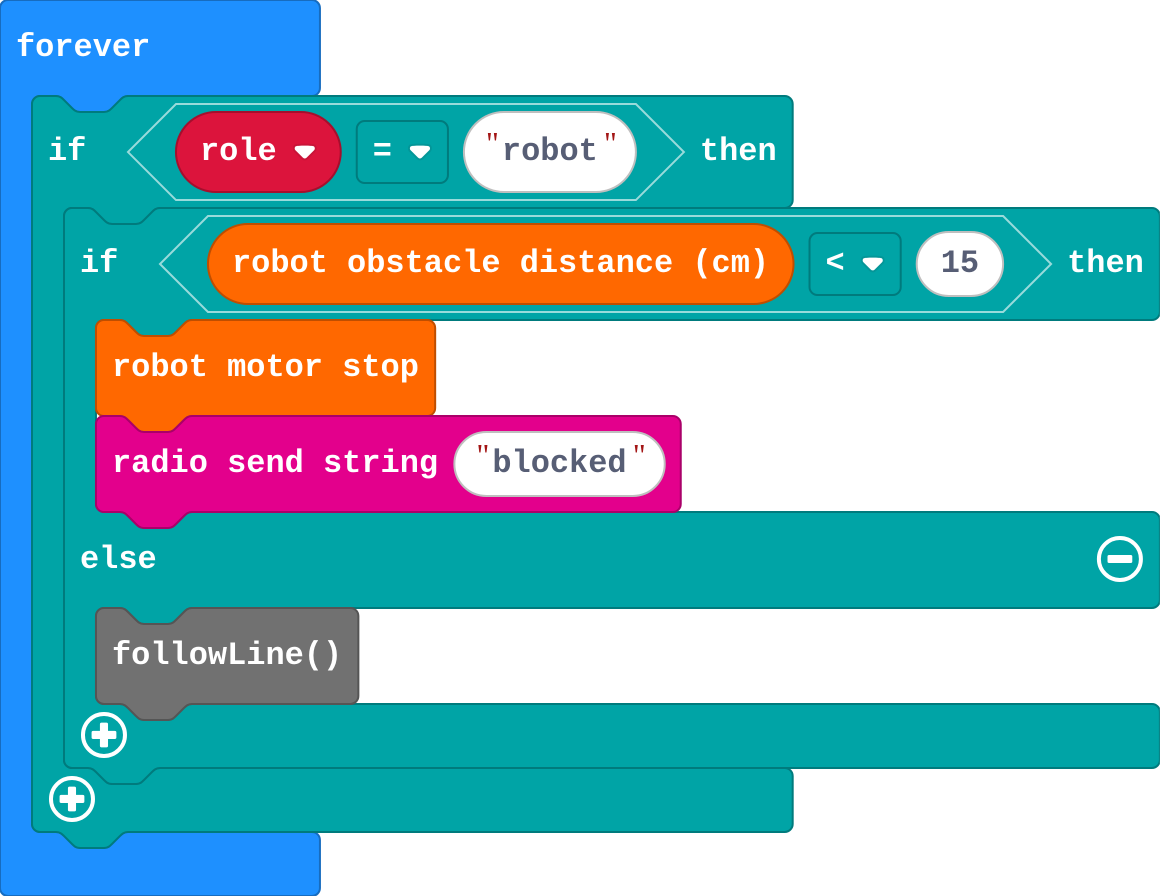
Noah's robot (the rest of his program is the same):
![h:360](https://studio.learningwaypoints.com/tutorials/_pictures/makecode/code/b2b096f80467.png?v=334a2d6171317c81)

**Noah's base beeps again and again, very fast, while the box is in front of his robot. Why?**

- His robot sends 'blocked' every time forever runs while the box is there, because nothing remembers it has already told
- The radio echoes
- His base is broken
- He needs a bigger distance

* Answer: His robot sends 'blocked' every time forever runs while the box is there, because nothing remembers it has already told

<!-- Speaker note: forever runs many times a second. While the box is close, Noah's if is true every time, so it sends every time. A variable like alerted lets it send once. -->

<style scoped>pre, marp-pre { font-size: 0.5em; line-height: 1.25; } section { font-size: 20px; }</style>

---

<span style="background:#fef3c7; color:#1a1a1a; border:1.5px solid #f59e0b; padding:6px 18px; border-radius:8px; font-size:1em; font-weight:500;">✍️ Activity</span>

## Modify


- **All clear:** A person at the base wants to know when the problem is fixed. When the way is clear again, the robot sends **"clear"** (once), and the base shows a **tick**.
- **Count the alerts:** Make the base **count** the alerts and show how many there have been, like a log of a shift's problems.

[Open this step](https://studio.learningwaypoints.com/tutorials/code/robotics/robot-report/?full=step-4#step-4)

<!-- Speaker note: What this step is for: The robot and the base agree on a few message words; each new word needs a sender and a meaning. Hints, in order: In the robot's else, before alerted is set to false: if alerted, send 'clear'. / On the base: if receivedString = 'clear', show a tick (icon Yes); else show the X and beep. / Make a variable alerts. On the base, when the message is not 'clear': change alerts by 1. / Then show number alerts instead of the X. For students who need more support: Give the base side complete; students add the robot's alert with the alerted variable. For early finishers: Two-way: the base sends 'go' with A, and a robot that has stopped waits for 'go' before it carries on (a mode variable from lesson 6). The hard part, on purpose: An alert in forever is sent every time round unless a flag remembers it. Ask what stops the robot sending again. When students get stuck: The base never reacts. Ask: Did you press A+B on the base? Is the box on the other robot's line? Fix: Make one micro:bit the base first, then block the other robot. / The base beeps again and again. Ask: What stops the robot sending every time round? Fix: Use alerted: send only if not alerted, then set alerted to true. / 'clear' is sent all the time. Ask: Is the send inside if alerted? Fix: Send clear only when alerted is true, then set it to false. -->

<!-- Speaker note: Teacher: 'clear' is sent once for the same reason: only when alerted was true. -->

---

<span style="background:#fef3c7; color:#1a1a1a; border:1.5px solid #f59e0b; padding:6px 18px; border-radius:8px; font-size:1em; font-weight:500;">✍️ Activity</span>

## Make

Make a **snake spotter** for a bush track. The robot patrols the line; when something is in the way it:

- stops, shows **red** lights and sends **"snake"** to the base
- waits two seconds, then **turns round** and patrols back

The base shows the **snake** picture and sounds an **alarm**.

[Open this step](https://studio.learningwaypoints.com/tutorials/code/robotics/robot-report/?full=step-5#step-5)

<!-- Speaker note: Hints, in order: In the robot's forever: if the distance is less than 15, stop, red lights, send 'snake', pause 2000, then turn round (motor tank 50 −50 for 1200 ms). Else follow the line. / On the base: if the message is 'snake', show icon snake and play an alarm. Once it has turned round, the box is behind it, so it sends once. -->

<!-- Speaker note: Teacher: the snake spotter turns round, so the box ends up behind it: it sends once without needing alerted. Ask why. -->

---

## On a real robot

With real micro:bits, one stays with a person as the base (press A+B on it) and the other goes in the robot. Things to notice:

- Use your own radio group, as in lesson 7.
- Radio has a range: a patrol robot that goes too far, or behind a wall, cannot be heard. Real inspection robots store their alerts and send them when they are back in range.
- A real sensor sees walls and people too: a patrol robot needs a clear track.

---

<span style="background:#dcfce7; color:#1a1a1a; border:1.5px solid #22c55e; padding:6px 18px; border-radius:8px; font-size:1em; font-weight:500;">✅ Check</span>

## Exit ticket

**Why does the robot need the alerted variable?**

* forever checks many times a second. Without alerted it would send the alert every time while the box is there; alerted remembers it has already sent, so it sends once.

<!-- Speaker note: Students answer on paper or a mini whiteboard before the reveal. Anyone who cannot answer needs the main idea again next lesson. Where this leads: Next: the challenge unit. Showcase (performance) and Patrol and alert (assistance) put the course together. Real-world links: pipeline and warehouse inspection robots, wildlife cameras that send an alert, smoke alarms that report to a phone. -->