---
marp: true
theme: default
html: true
---

# Moves as functions

Robotics challenges · Drive

<!-- Speaker note: Students name robot moves as functions (wiggle, spin) and build a dance routine by calling them in order, revisiting functions from micro:bit Foundations in a new setting. About 45 minutes (Predict and Run 7 min · Investigate 8 min · Modify 12 min · Make 15 min · Real robot 3 min (optional)). -->

---

## Today

**We are learning to** name each dance move as a function, then build a routine by calling them.

- I can make a function for a robot move and call it.
- I can build a routine from calls in order.
- I can explain why making a function alone does not move the robot.

<!-- Speaker note: Before class: A **function** is a named group of blocks that runs when it is **called**. Students met functions in micro:bit Foundations (flashHeart); here each function is a **move**: a few motor blocks that end with **robot motor stop**. A routine is then a list of calls, which is easy to read and easy to change. The classic slip returns: making a function does nothing until something calls it (Leo's robot). Functions are in **Advanced › Functions** (Make a Function…, then a call block appears). Each move should end with robot motor stop, or the next move starts from a moving robot. MOVE Motor classes can build the same moves from the Kitronik blocks with pauses. Teacher: Real robot (optional): fix a move once and every call in the routine changes. -->

---

## Why it matters

> A dance crew learns named moves (the shuffle, the twirl), then a routine is just the names in order. Robot shows and drone light shows are built the same way.

<!-- Speaker note: In micro:bit Foundations you made **functions**: a named group of blocks that runs when you **call** it. A robot's moves are a good use for them: build each move once, give it a name, then a dance is just a list of names. You find functions in **Advanced › Functions**. -->

---

<span style="background:#dbeafe; color:#1a1a1a; border:1.5px solid #3b82f6; padding:6px 18px; border-radius:8px; font-size:1em; font-weight:500;">💬 Discussion</span>

## Predict

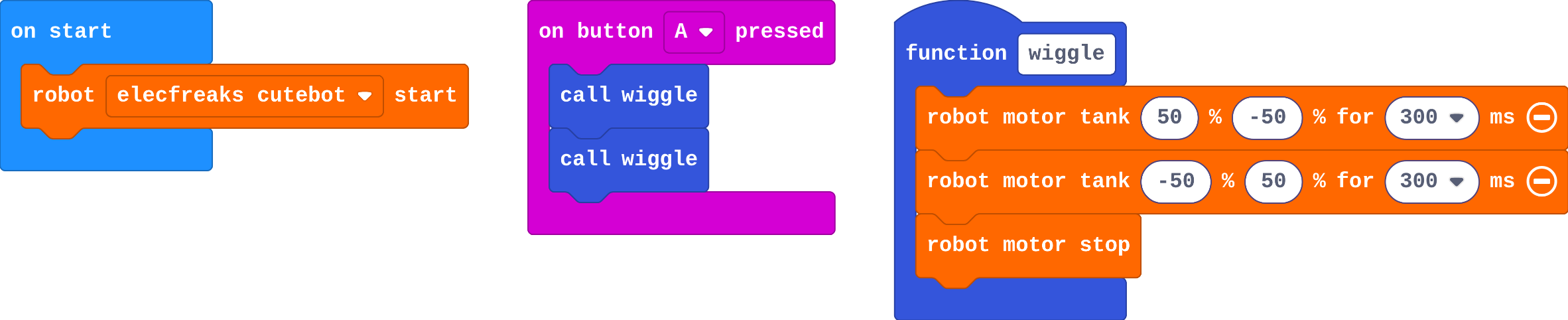
![h:241](https://studio.learningwaypoints.com/tutorials/_pictures/makecode/code/bc9bb5bc4189.png?v=6648d235760d499b)

**What happens when you press A?**

- The robot wiggles twice, then stops
- The robot wiggles once
- Nothing: making a function is not enough
- The robot wiggles forever

<!-- Speaker note: What happens: It wiggles twice, then stops. Button A calls wiggle two times, and each wiggle turns right, turns left, then stops. Take two or three predictions before anyone runs it. -->

<!-- Speaker note: Teacher: most say twice. A few say nothing (they confuse making with calling): good to hear before Leo's robot. -->

---

<span style="background:#dcfce7; color:#1a1a1a; border:1.5px solid #22c55e; padding:6px 18px; border-radius:8px; font-size:1em; font-weight:500;">✅ Check</span>

## What happened?

* It wiggles twice, then stops. Button A calls wiggle two times, and each wiggle turns right, turns left, then stops.

<!-- Speaker note: Reveal after running. Ask who predicted it, and what made them think so. -->

---

<span style="background:#fef3c7; color:#1a1a1a; border:1.5px solid #f59e0b; padding:6px 18px; border-radius:8px; font-size:1em; font-weight:500;">✍️ Activity</span>

## Run it

Open the lesson at this step and try it together.

[studio.learningwaypoints.com/tutorials/code/robotics/robot-dance/?full=step-2#step-2](https://studio.learningwaypoints.com/tutorials/code/robotics/robot-dance/?full=step-2#step-2)

<!-- Speaker note: Press **A** on the simulator's micro:bit. Press it again to dance again. Students should be able to say: I pressed A on the simulator and compared the dance with my prediction. -->

<!-- Speaker note: Teacher: press A on the simulator's micro:bit, not the keyboard. -->

---

<span style="background:#dbeafe; color:#1a1a1a; border:1.5px solid #3b82f6; padding:6px 18px; border-radius:8px; font-size:1em; font-weight:500;">💬 Discussion</span>

## Investigate

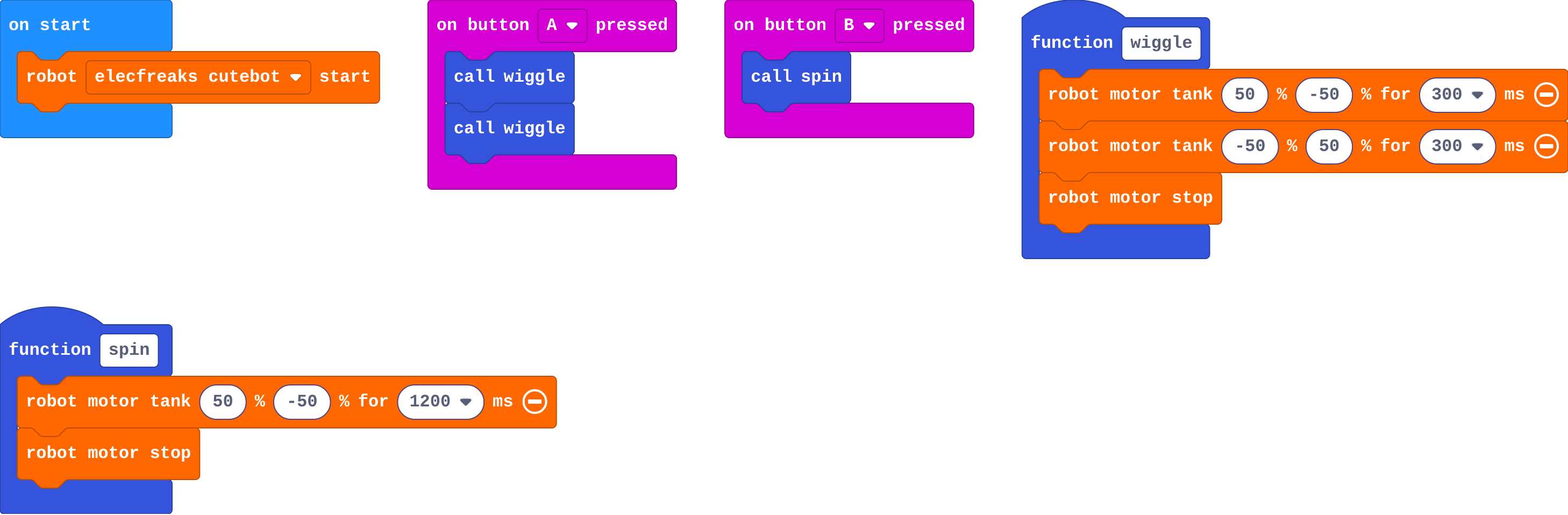
![h:360](https://studio.learningwaypoints.com/tutorials/_pictures/makecode/code/092c1e5dc3cc.png?v=ed118dc57b79c4e3)

<!-- Speaker note: This version has two moves: **wiggle** on A and **spin** on B. What this step is for: A function is a named move. Making it does nothing on its own; calling it runs the move, as often as you like. -->

<!-- Speaker note: Teacher: Leo's robot is the define-not-call slip from Foundations. Ask: where is spin called? -->

---

<span style="background:#dcfce7; color:#1a1a1a; border:1.5px solid #22c55e; padding:6px 18px; border-radius:8px; font-size:1em; font-weight:500;">✅ Check</span>

## Spin once

**This version has a second move, spin. How many times does each block inside spin run when you press B once?**

- Once
- Forever
- Twice
- None

* Answer: Once

<!-- Speaker note: B calls spin once, so its blocks run once: turn for 1.2 seconds, then stop. -->

---

<span style="background:#dcfce7; color:#1a1a1a; border:1.5px solid #22c55e; padding:6px 18px; border-radius:8px; font-size:1em; font-weight:500;">✅ Check</span>

## Leo's robot

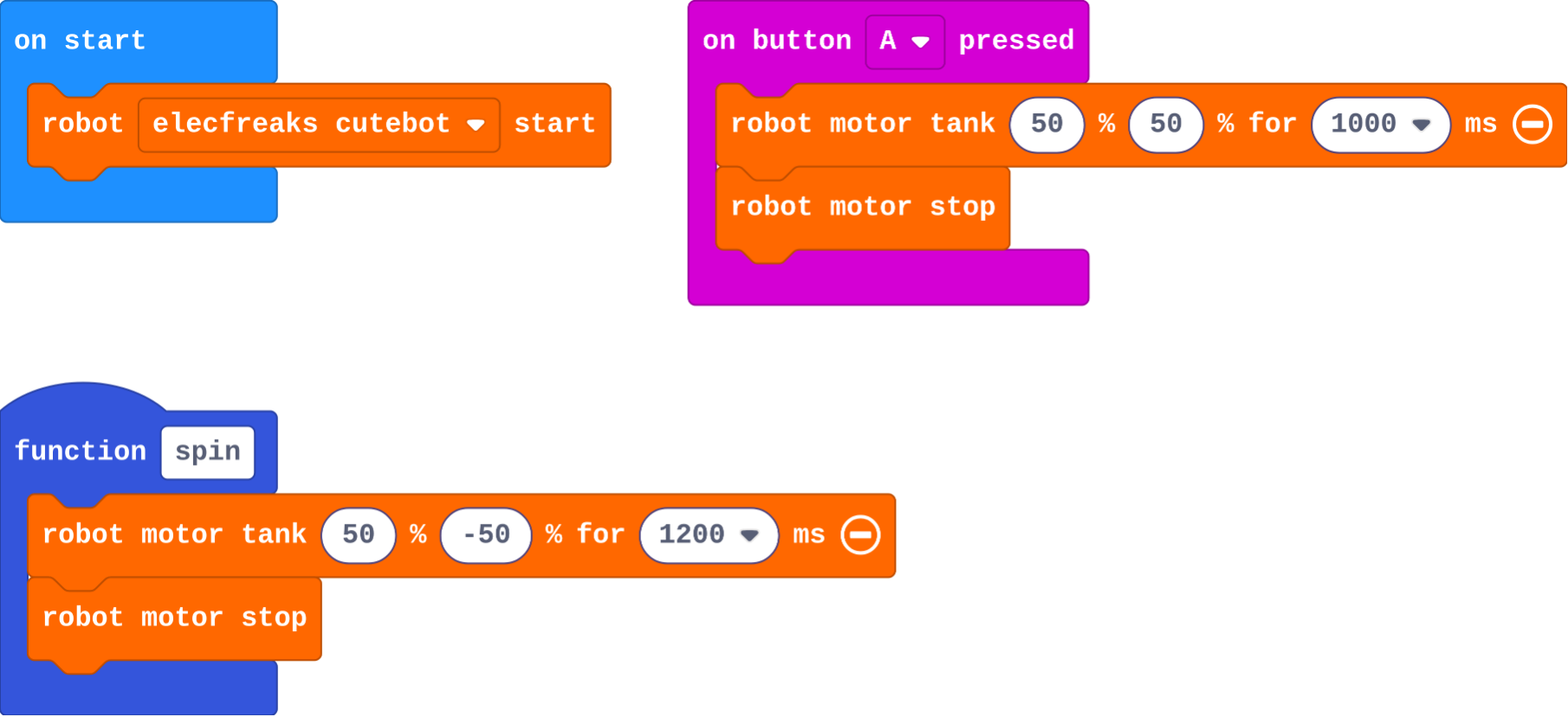
Leo's program:

![h:360](https://studio.learningwaypoints.com/tutorials/_pictures/makecode/code/16e1ec3fc519.png?v=7d8f101306b499aa)

**Leo made a spin function. When he presses A, his robot only drives forward. Why?**

- Nothing calls spin: button A has drive blocks instead of a call to spin
- Functions only work with button B
- His spin function is broken
- He needs a forever block

* Answer: Nothing calls spin: button A has drive blocks instead of a call to spin

<!-- Speaker note: Making a function only names the move. Its blocks run when something calls it, and nothing calls spin. Button A needs call spin. -->

<style scoped>pre, marp-pre { font-size: 0.5em; line-height: 1.25; } section { font-size: 21px; }</style>

---

<span style="background:#fef3c7; color:#1a1a1a; border:1.5px solid #f59e0b; padding:6px 18px; border-radius:8px; font-size:1em; font-weight:500;">✍️ Activity</span>

## Modify


- **A new move:** Make a second move: a function called **spin** that turns for 1200 ms, then stops. Make button **B** call it.
- **A routine:** Change button **A** so it dances **wiggle, spin, wiggle**.

[Open this step](https://studio.learningwaypoints.com/tutorials/code/robotics/robot-dance/?full=step-4#step-4)

<!-- Speaker note: What this step is for: Once a move has a name, a routine is just calls in order. Hints, in order: In Functions, click Make a Function and call it spin. / Inside it: robot motor tank 50 −50 for 1200 ms, then robot motor stop. Then put call spin inside on button B pressed. / Inside on button A pressed: call wiggle, call spin, call wiggle. For students who need more support: Give students the shuffle function made; they make one more move and the A+B routine. For early finishers: Add robot set color to each move so the lights change with the dance, or play a tone at the start of each move. The hard part, on purpose: Making a function doesn't move the robot; calling it does. When nothing happens, ask where the call block is. When students get stuck: Pressing the button does nothing. Ask: Is there a call block inside the button event? Fix: Drag call <your move> into on button … pressed. / The robot spins forever after the dance. Ask: Does every move end with robot motor stop? Fix: Add robot motor stop at the end of each function. / Moves blur into each other. Ask: What happens between moves? Fix: Add a short pause (basic pause 200 ms) at the end of a move for a beat between moves. -->

<!-- Speaker note: Teacher: the call blocks appear in Functions after the function is made. -->

---

<span style="background:#fef3c7; color:#1a1a1a; border:1.5px solid #f59e0b; padding:6px 18px; border-radius:8px; font-size:1em; font-weight:500;">✍️ Activity</span>

## Make

Make a **dance routine** for a robot show:

- make at least **two new moves**, each its own function
- on **A+B**, call your moves in order, with one move used **twice**

Name your moves so a reader can picture them, like **shuffle** or **twirl**.

[Open this step](https://studio.learningwaypoints.com/tutorials/code/robotics/robot-dance/?full=step-5#step-5)

<!-- Speaker note: Hints, in order: Make two new functions, each a short move that ends with robot motor stop. Ideas: a shuffle (forward then back), a twirl (spin the other way). / Use on button A+B pressed (change A to A+B). Call your moves in order, using one of them twice. -->

<!-- Speaker note: Teacher: encourage names that describe the move. The check needs three functions (wiggle plus two), A+B, and one move called twice. -->

---

## On a real robot

Real robots dance differently from the simulator: on a smooth desk they slide, on carpet they turn less. Tune each move's times on your floor. Because each move is a function, you fix it in **one place** and every call in the routine gets the fix. Later in the course, music and radio cues let several robots dance together.

---

<span style="background:#dcfce7; color:#1a1a1a; border:1.5px solid #22c55e; padding:6px 18px; border-radius:8px; font-size:1em; font-weight:500;">✅ Check</span>

## Exit ticket

**Why is a dance easier to change when each move is a function?**

* You change a move in one place, and every call to it in the routine changes too. The routine itself reads as a list of names.

<!-- Speaker note: Students answer on paper or a mini whiteboard before the reveal. Anyone who cannot answer needs the main idea again next lesson. Where this leads: Next unit: Sense. Later, lesson 8 uses radio so one micro:bit can cue several robots to dance together. Class idea: a short robot dance-off, with each group's routine read aloud as a list of move names first. -->