---
marp: true
theme: default
html: true
---

# Conductor and dancers

Robotics challenges · Talk

<!-- Speaker note: Students make a conductor micro:bit that plays a tune phrase by phrase and sends a radio cue as each phrase starts; robots dance the move for each cue, so the dance keeps in time with the music. About 50 minutes (Predict and Run 8 min · Investigate 10 min · Modify 12 min · Make 15 min · Real robot 5 min (optional)). -->

---

## Today

**We are learning to** one micro:bit plays a tune and sends a cue as each phrase starts; robots dance the move for each cue, in time.

- I can send a radio cue at the moment a phrase of music starts.
- I can make a robot do a different move for each cue it receives.
- I can explain why playing music until done keeps the cues in time.

<!-- Speaker note: Before class: This is the performance strand: lesson 2's dance moves (functions) plus lesson 7's radio. Each **phrase** is a function that **sends its cue, then plays its notes until done**. Because the music waits, the next phrase (and its cue) only starts when the last one ends, so cues arrive in time with the tune. Dancers decide what each cue means in **on radio received**. Lily's show is the key slip: **in background** starts the music and moves on at once, so all the cues are sent together. In the simulator, two micro:bits and two robots appear (radio); pressing A on one makes the **other** robot dance, because a micro:bit never hears its own messages. Students need sound on (or headphones, which are not always available: the moves still show the timing). Notes are written as letters with **-** for a rest, at 120 beats per minute. With real hardware, one bare micro:bit can conduct a whole class of robots in one group. Untested on real hardware: whether the robot start block errors on a micro:bit that is not in a robot (if so, the conductor's copy leaves it out). MOVE Motor classes can dance with Kitronik blocks in the same functions. Teacher: Real robot (optional): one conductor, many dancers, one radio group: a class performance. -->

---

## Why it matters

> In a drone light show, hundreds of drones move together. They do not watch each other: each one waits for a signal, then does its part of the show.

<!-- Speaker note: A **conductor** micro:bit plays a tune, one **phrase** at a time. As each phrase starts, it sends a **cue** by radio: 1 for the first phrase, 2 for the second. Every robot that hears a cue dances the move for it, so the robots keep in time with the music. **wiggle** and **spin** are the dance moves from lesson 2. In the simulator, press **A** on one micro:bit: it conducts, and the **other** robot dances. -->

---

<span style="background:#dbeafe; color:#1a1a1a; border:1.5px solid #3b82f6; padding:6px 18px; border-radius:8px; font-size:1em; font-weight:500;">💬 Discussion</span>

## Predict

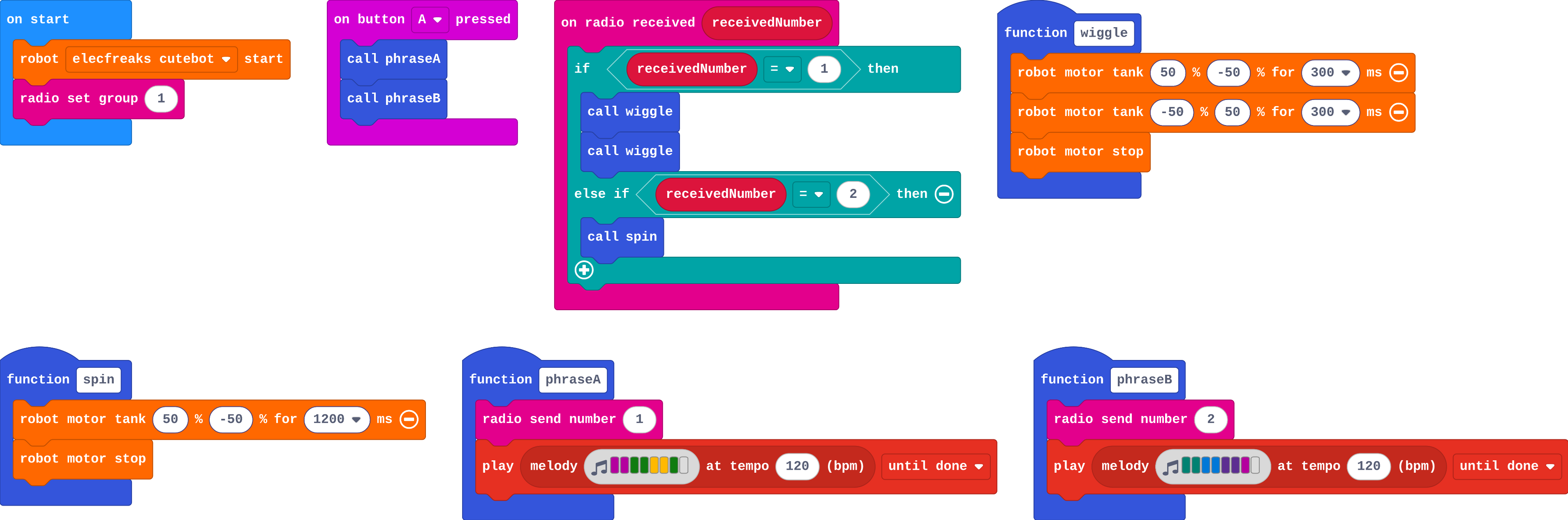
![h:360](https://studio.learningwaypoints.com/tutorials/_pictures/makecode/code/39ceebab12a6.png?v=81f7d89fc6dd595a)

**You press A on the first micro:bit. When does the second robot spin?**

- Never: only the first robot can hear the tune
- After the whole tune has finished
- When the second phrase of the tune starts
- Straight away, at the same time as the wiggles

<!-- Speaker note: What happens: When the second phrase starts. phraseA plays its music until done, and only then does phraseB send cue 2, so the spin starts with the second phrase. Take two or three predictions before anyone runs it. -->

<!-- Speaker note: Teacher: the key is that cue 2 waits for phrase A's music to end. -->

---

<span style="background:#dcfce7; color:#1a1a1a; border:1.5px solid #22c55e; padding:6px 18px; border-radius:8px; font-size:1em; font-weight:500;">✅ Check</span>

## What happened?

* When the second phrase starts. phraseA plays its music until done, and only then does phraseB send cue 2, so the spin starts with the second phrase.

<!-- Speaker note: Reveal after running. Ask who predicted it, and what made them think so. -->

---

<span style="background:#fef3c7; color:#1a1a1a; border:1.5px solid #f59e0b; padding:6px 18px; border-radius:8px; font-size:1em; font-weight:500;">✍️ Activity</span>

## Run it

Open the lesson at this step and try it together.

[studio.learningwaypoints.com/tutorials/code/robotics/robot-conductor/?full=step-2#step-2](https://studio.learningwaypoints.com/tutorials/code/robotics/robot-conductor/?full=step-2#step-2)

<!-- Speaker note: Press **A** on the first micro:bit. Listen to the tune (turn the sound on) and watch the second robot. Students should be able to say: I pressed A, listened to the tune and watched when each move started. -->

<!-- Speaker note: Teacher: sound on if possible. Watch the second robot, and notice the first one stays still. -->

---

<span style="background:#dbeafe; color:#1a1a1a; border:1.5px solid #3b82f6; padding:6px 18px; border-radius:8px; font-size:1em; font-weight:500;">💬 Discussion</span>

## Investigate

![h:360](https://studio.learningwaypoints.com/tutorials/_pictures/makecode/code/39ceebab12a6.png?v=81f7d89fc6dd595a)

<!-- Speaker note: What this step is for: A cue is sent at the moment a phrase starts, and the robot acts when it arrives. Playing each phrase until done is what spaces the cues out in time. -->

<!-- Speaker note: Teacher: Lily's show is the background-music slip. Ask: what does 'until done' make the program wait for? -->

---

<span style="background:#dcfce7; color:#1a1a1a; border:1.5px solid #22c55e; padding:6px 18px; border-radius:8px; font-size:1em; font-weight:500;">✅ Check</span>

## The quiet robot

**Why does the first robot (the conductor's) not dance?**

- Only one robot can dance at a time
- It is too busy playing music
- Its motors are switched off
- A micro:bit never hears its own radio messages, so it never receives the cues

* Answer: A micro:bit never hears its own radio messages, so it never receives the cues

<!-- Speaker note: The cues come from the first micro:bit, and a micro:bit never receives its own messages. Any other micro:bit in the group, and its robot, would dance. -->

<style scoped>pre, marp-pre { font-size: 0.5em; line-height: 1.25; } section { font-size: 27px; }</style>

---

<span style="background:#dcfce7; color:#1a1a1a; border:1.5px solid #22c55e; padding:6px 18px; border-radius:8px; font-size:1em; font-weight:500;">✅ Check</span>

## Lily's show

Lily's conductor:

![h:360](https://studio.learningwaypoints.com/tutorials/_pictures/makecode/code/6d97f01bb74f.png?v=2c675b7b77ef69a2)

**Lily changed the music to play in the background. Now her robot does all its moves at once, before the tune reaches phrase 2. Why?**

- Background music is faster
- The radio is too slow
- In the background, the program does not wait for the music, so cue 2 is sent straight after cue 1
- She needs a pause in on radio received

* Answer: In the background, the program does not wait for the music, so cue 2 is sent straight after cue 1

<!-- Speaker note: 'in background' starts the music and moves on at once. phraseB runs straight away and sends cue 2, so the robot gets both cues together. 'until done' waits for each phrase to finish. -->

<style scoped>pre, marp-pre { font-size: 0.5em; line-height: 1.25; } section { font-size: 21px; }</style>

---

<span style="background:#fef3c7; color:#1a1a1a; border:1.5px solid #f59e0b; padding:6px 18px; border-radius:8px; font-size:1em; font-weight:500;">✍️ Activity</span>

## Modify


- **Up above the world:** Twinkle's third phrase is **G G F F E E D -** ("up above the world so high"). Add it as **phraseC**, with cue **3** and a new move for the robot.
- **Light show:** Make the robot's lights change **colour** with each cue, like a stage show.

[Open this step](https://studio.learningwaypoints.com/tutorials/code/robotics/robot-conductor/?full=step-4#step-4)

<!-- Speaker note: What this step is for: Each new part of the show is a phrase with its own cue on the conductor, and a branch with its own move on the dancers. Hints, in order: Duplicate phraseB and rename it phraseC. It sends 3 and plays G G F F E E D -. / Call phraseC after phraseB on button A. Make a shuffle move (forward then back) and add else if receivedNumber = 3. / robot set color is in Robot. Put one at the top of each branch in on radio received, each a different colour. For students who need more support: Give phraseC complete; students add the dancer's branch and the new move. For early finishers: Give each robot its own part: robots with a role variable (lead or backup) do different moves for the same cue. The hard part, on purpose: Timing cues by playing each phrase until done. When moves happen at once, ask whether the music plays until done or in the background. When students get stuck: The robot does every move at once. Ask: Is the music playing until done or in the background? Fix: Use play … until done, so the next cue waits for the phrase to finish. / Nothing dances. Ask: Which micro:bit did you press A on, and which robot are you watching? Fix: Watch the other robot; check both use the same radio group. / A move runs on the wrong phrase. Ask: Does each phrase send its own number, and does the dancer check that number? Fix: Match the cue in each phrase to the branch in on radio received. -->

<!-- Speaker note: Teacher: phraseC is a copy of phraseB with new notes and cue 3; the dancer needs a branch for 3. -->

---

<span style="background:#fef3c7; color:#1a1a1a; border:1.5px solid #f59e0b; padding:6px 18px; border-radius:8px; font-size:1em; font-weight:500;">✍️ Activity</span>

## Make

Make your own **robot show** to a tune you know (or make one up):

- three **phrases**, each a function that sends a cue, then plays its notes until done
- **A+B** plays the whole tune
- each cue makes the robot do a **different** move

Ideas for notes: *Mary Had a Little Lamb* starts **E D C D E E E -**.

[Open this step](https://studio.learningwaypoints.com/tutorials/code/robotics/robot-conductor/?full=step-5#step-5)

<!-- Speaker note: Hints, in order: Make phrase functions for your tune, each starting with send number and its own cue. Call them in order on A+B. / Music notes: a letter for each note, - for a rest. Keep each phrase to about 8 notes. In on radio received, one branch per cue. -->

<!-- Speaker note: Teacher: let students choose any tune; keep phrases short (about 8 notes) so the moves fit. -->

---

## On a real robot

With real robots, one micro:bit (not in a robot) is the conductor and every robot in the same radio group dances. Things to notice:

- Every robot hears the cue at the same moment, so a whole class of robots can dance together.
- Real robots on different floors move different distances, so dancers drift apart over a long show. Short moves that end with a stop keep them together.
- A loud room drowns out a micro:bit speaker; a micro:bit plugged into a speaker helps.

---

<span style="background:#dcfce7; color:#1a1a1a; border:1.5px solid #22c55e; padding:6px 18px; border-radius:8px; font-size:1em; font-weight:500;">✅ Check</span>

## Exit ticket

**Why does each phrase play its music until done before the next phrase starts?**

* So the next cue is only sent when the music reaches the next phrase. The robots then move in time with the tune.

<!-- Speaker note: Students answer on paper or a mini whiteboard before the reveal. Anyone who cannot answer needs the main idea again next lesson. Where this leads: Next: the robot talks back, sending an alert to a base station. Real-world links: drone light shows, stage lighting cues, a conductor and an orchestra, synchronised swimming. -->