---
marp: true
theme: default
html: true
---

# Avoid and explore

Robotics challenges · Sense

<!-- Speaker note: Students use if … else inside forever so the robot turns away from close objects and keeps exploring, then add a random turn to make a robot vacuum. About 45 minutes (Predict and Run 8 min · Investigate 8 min · Modify 12 min · Make 12 min · Real robot 5 min (optional)). -->

---

## Today

**We are learning to** turn away when something is close, and keep exploring, choosing between two moves with if and else.

- I can use if … else in forever so the robot chooses between two moves.
- I can put a short routine (back up, then turn) in a branch.
- I can use a random choice so the robot does not always turn the same way.

<!-- Speaker note: Before class: This lesson builds on Stop before you crash: the same distance question, but the answer is now a **choice of two moves**. **if** the distance is less than 15, turn away; **else**, drive forward. Inside **forever**, the robot checks and chooses again every time round, so it explores without a plan, which is how simple robot vacuums cover a floor. In this simulator the distance sensor only sees **boxes and other robots**, not the arena's walls, so robots may bump a wall and slide along it. Say so up front; it is a good discussion of how a simulation differs from the real thing. A real sensor sees walls, but weakly at an angle. **pick random 0 to 1** (in Math, `randint` in code) gives 0 or 1. A second if … else inside the first picks the turn direction. Schools with MOVE Motor robots can use Kitronik's `measure distance` with the same logic on the real robot. Teacher: Real robot (optional): book walls work well. Soft objects are hard for ultrasonic sensors. -->

---

## Why it matters

> A robot vacuum never plans a route round your living room. It drives until it senses something, turns, and drives again, and in time it covers the whole floor.

<!-- Speaker note: Last lesson the robot stopped before a box. A robot that only stops is not much use for cleaning a floor. This time, when something is close, the robot **turns away** and keeps going: an **if … else** chooses between the two moves, again and again. -->

---

<span style="background:#dbeafe; color:#1a1a1a; border:1.5px solid #3b82f6; padding:6px 18px; border-radius:8px; font-size:1em; font-weight:500;">💬 Discussion</span>

## Predict

![h:312](https://studio.learningwaypoints.com/tutorials/_pictures/makecode/code/bd46dcb24f0c.png?v=2a73364e5c28d691)

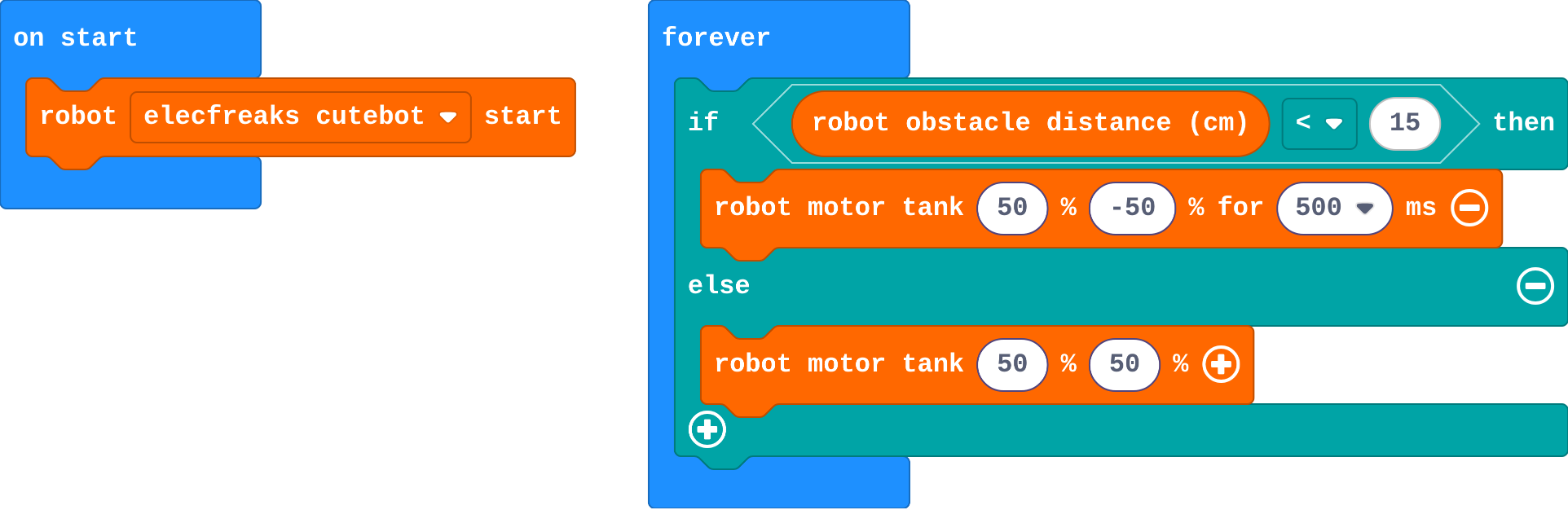
**The robot drives towards a box. What happens?**

- It spins round and round on the spot forever
- It crashes into the box
- It turns away from the box and keeps exploring
- It stops in front of the box

<!-- Speaker note: What happens: It turns away and keeps exploring. When the box is closer than 15 cm, it turns for half a second; once the way is clear, else drives it forward again. Take two or three predictions before anyone runs it. -->

<!-- Speaker note: Teacher: most predict it turns away. Ask what makes it drive forward again afterwards. -->

---

<span style="background:#dcfce7; color:#1a1a1a; border:1.5px solid #22c55e; padding:6px 18px; border-radius:8px; font-size:1em; font-weight:500;">✅ Check</span>

## What happened?

* It turns away and keeps exploring. When the box is closer than 15 cm, it turns for half a second; once the way is clear, else drives it forward again.

<!-- Speaker note: Reveal after running. Ask who predicted it, and what made them think so. -->

---

<span style="background:#fef3c7; color:#1a1a1a; border:1.5px solid #f59e0b; padding:6px 18px; border-radius:8px; font-size:1em; font-weight:500;">✍️ Activity</span>

## Run it

Open the lesson at this step and try it together.

[studio.learningwaypoints.com/tutorials/code/robotics/robot-avoid/?full=step-2#step-2](https://studio.learningwaypoints.com/tutorials/code/robotics/robot-avoid/?full=step-2#step-2)

<!-- Speaker note: Let the robot drive around for a while. Drag the boxes into its path. The arena has walls, but this simulator's sensor only sees **boxes and other robots**, so it may bump into a wall and slide along it. A real robot's sensor would see the wall too. Students should be able to say: I watched the robot meet a few boxes and compared what it did with my prediction. -->

<!-- Speaker note: Teacher: drag boxes into its path. Mention the walls before anyone asks. -->

---

<span style="background:#dbeafe; color:#1a1a1a; border:1.5px solid #3b82f6; padding:6px 18px; border-radius:8px; font-size:1em; font-weight:500;">💬 Discussion</span>

## Investigate

![h:312](https://studio.learningwaypoints.com/tutorials/_pictures/makecode/code/bd46dcb24f0c.png?v=2a73364e5c28d691)

<!-- Speaker note: What this step is for: Inside forever, if … else chooses one of two moves every time round. The robot never plans: it keeps checking and choosing. -->

<!-- Speaker note: Teacher: Zara's robot is the < and > mix-up from micro:bit Foundations; it is very visible here. -->

---

<span style="background:#dcfce7; color:#1a1a1a; border:1.5px solid #22c55e; padding:6px 18px; border-radius:8px; font-size:1em; font-weight:500;">✅ Check</span>

## Back to forward

**After turning away, how does the robot know to drive forward again?**

- The turn block tells it to
- It waits for a button press
- It remembers that it has turned
- forever runs the if again: the box is no longer close, so else drives forward

* Answer: forever runs the if again: the box is no longer close, so else drives forward

<!-- Speaker note: forever checks again straight after the turn. The way is clear now, so the question is false and else runs: drive forward. -->

<style scoped>pre, marp-pre { font-size: 0.5em; line-height: 1.25; } section { font-size: 25px; }</style>

---

<span style="background:#dcfce7; color:#1a1a1a; border:1.5px solid #22c55e; padding:6px 18px; border-radius:8px; font-size:1em; font-weight:500;">✅ Check</span>

## Zara's robot

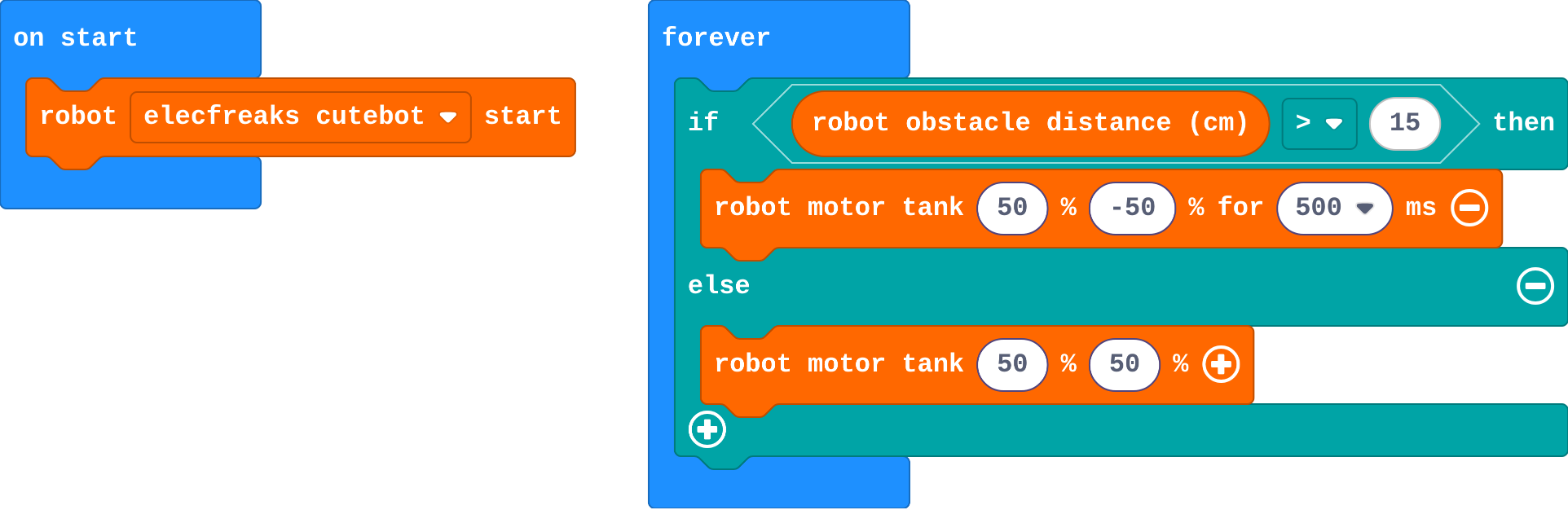
Zara's program:

![h:312](https://studio.learningwaypoints.com/tutorials/_pictures/makecode/code/14090948dfc4.png?v=4654ad662019d00e)

**Zara's robot spins on the spot in open space, and drives straight into boxes. Which part is wrong?**

- The speeds should be 100
- The &gt; should be &lt;: her robot turns when things are far away and drives when they are close
- She needs robot motor stop
- The turn is too short

* Answer: The &gt; should be &lt;: her robot turns when things are far away and drives when they are close

<!-- Speaker note: 'distance > 15' is true when nothing is near, so Zara's robot turns in open space. When a box is close, the question is false and else drives straight at it. -->

<style scoped>pre, marp-pre { font-size: 0.5em; line-height: 1.25; } section { font-size: 21px; }</style>

---

<span style="background:#fef3c7; color:#1a1a1a; border:1.5px solid #f59e0b; padding:6px 18px; border-radius:8px; font-size:1em; font-weight:500;">✍️ Activity</span>

## Modify


- **Back up first:** Real robot vacuums back up a little before they turn, so they do not scrape the furniture. Add that to the **if**.
- **Indicator lights:** Show **red** lights while the robot is turning away and **green** while it drives, like a warning light on a forklift.

[Open this step](https://studio.learningwaypoints.com/tutorials/code/robotics/robot-avoid/?full=step-4#step-4)

<!-- Speaker note: What this step is for: Each branch can hold a short routine, not just one move. Hints, in order: Inside the if, before the turn: robot motor tank −50 −50 for 300 ms. / robot set color is in Robot. Click the colour to choose one. / One at the top of the if (red), one at the top of the else (green). For students who need more support: Give the random if … else with its question already set; students put a turn in each branch. For early finishers: Count how many times the robot has turned away (a variable, change by 1) and show it on the micro:bit. The hard part, on purpose: if … else chooses a move every time round, with no plan. Ask them to read the question aloud and say when it is true. When students get stuck: The robot spins in the open and hits boxes. Ask: Read the question aloud: when is it true? Fix: Use < (less than): turn when the distance is small. / The robot gets stuck turning back and forth. Ask: Does it turn far enough to see past the box? Fix: Make the turn longer (700 ms), or back up first. / It always turns the same way. Ask: Where does the random choice go? Fix: Inside the first if: if pick random 0 to 1 = 0, turn right, else turn left. -->

<!-- Speaker note: Teacher: −50 −50 backs up. Colours: robot set color, click the swatch. -->

---

<span style="background:#fef3c7; color:#1a1a1a; border:1.5px solid #f59e0b; padding:6px 18px; border-radius:8px; font-size:1em; font-weight:500;">✍️ Activity</span>

## Make

A robot that always turns the same way can get stuck going round the same corner. Make a **robot vacuum** that turns a **random** way:

- when something is close: back up, then turn **left or right at random**
- otherwise: drive forward

**pick random 0 to 1** (in **Math**) gives 0 or 1, like a coin toss.

[Open this step](https://studio.learningwaypoints.com/tutorials/code/robotics/robot-avoid/?full=step-5#step-5)

<!-- Speaker note: Hints, in order: Put a second if … else inside the first if, after the back-up: one branch turns right, the other turns left. / Its question: pick random 0 to 1 (in Math) = 0. -->

<!-- Speaker note: Teacher: an if … else inside an if is new for some. Draw the decision as a tree on the board: close? then coin toss: left or right. -->

---

## On a real robot

On a real floor, try your vacuum in a box or a corner of the room built from books. Things to notice:

- A real sensor **sees walls**, and a robot that approaches a wall at an angle may get a weak echo: it can scrape along before it turns.
- Soft things (cushions, clothes) return weak echoes too. Real robot vacuums add bump sensors for the things their eyes miss.
- If it turns too little to get clear, make the turn longer.

---

<span style="background:#dcfce7; color:#1a1a1a; border:1.5px solid #22c55e; padding:6px 18px; border-radius:8px; font-size:1em; font-weight:500;">✅ Check</span>

## Exit ticket

**How does if … else inside forever let a robot explore a room without a plan?**

* Every time round, it checks the distance and chooses: turn away if something is close, else drive forward. Many small choices add up to exploring.

<!-- Speaker note: Students answer on paper or a mini whiteboard before the reveal. Anyone who cannot answer needs the main idea again next lesson. Where this leads: Next: follow a line instead of exploring at random. Real-world link: early robot vacuums worked like this; newer ones map the room. -->