---
marp: true
theme: default
html: true
---

# The first true question wins

micro:bit Foundations · Decide

<!-- Speaker note: Students add else if to ask more questions in a row, and see that the first true question wins, so the order of the questions sets the ranges. About 40 minutes (Predict and Run 8 min · Investigate 10 min · Modify 8 min · Mix it up 3 min · Make 8 min · Spirit level 3 min). -->

---

## Today

**We are learning to** add else if to ask more questions in a row, and see that the first true one wins, so their order sets the ranges.

- I can use else if to choose between three or more things.
- I can say which part runs when more than one question is true.
- I can order the questions so every range can be reached.

<!-- Speaker note: Before class: Click the **+** at the bottom of an if block to add **else if** (another question). The micro:bit asks the questions **from the top**; the **first true one** runs and the rest are **skipped**. **else** runs only when every question above it is false. That makes ranges simple: *temperature < 15*, then *else if temperature < 25* means 15 to 24, because anything under 15 was already caught. It also makes order matter: ask *> 0* before *> 500* and the second can never run. Tilt in the simulator: move the mouse over the micro:bit. Teacher: Mix it up: last lesson's bike light, read at two light levels. -->

---

## Why it matters

> A spirit level shows whether a shelf is flat, tilted left or tilted right. One reading, three possible answers, and exactly one of them shows.

<!-- Speaker note: **if … else** chooses between two things. For three or more, click the **+** on an if block again: it adds **else if**, another question. The micro:bit asks the questions **from the top**. Tilting left makes **acceleration x** go below 0; tilting right makes it go above 0. A small tilt gives a small number. -->

---

<span style="background:#dbeafe; color:#1a1a1a; border:1.5px solid #3b82f6; padding:6px 18px; border-radius:8px; font-size:1em; font-weight:500;">💬 Discussion</span>

## Predict

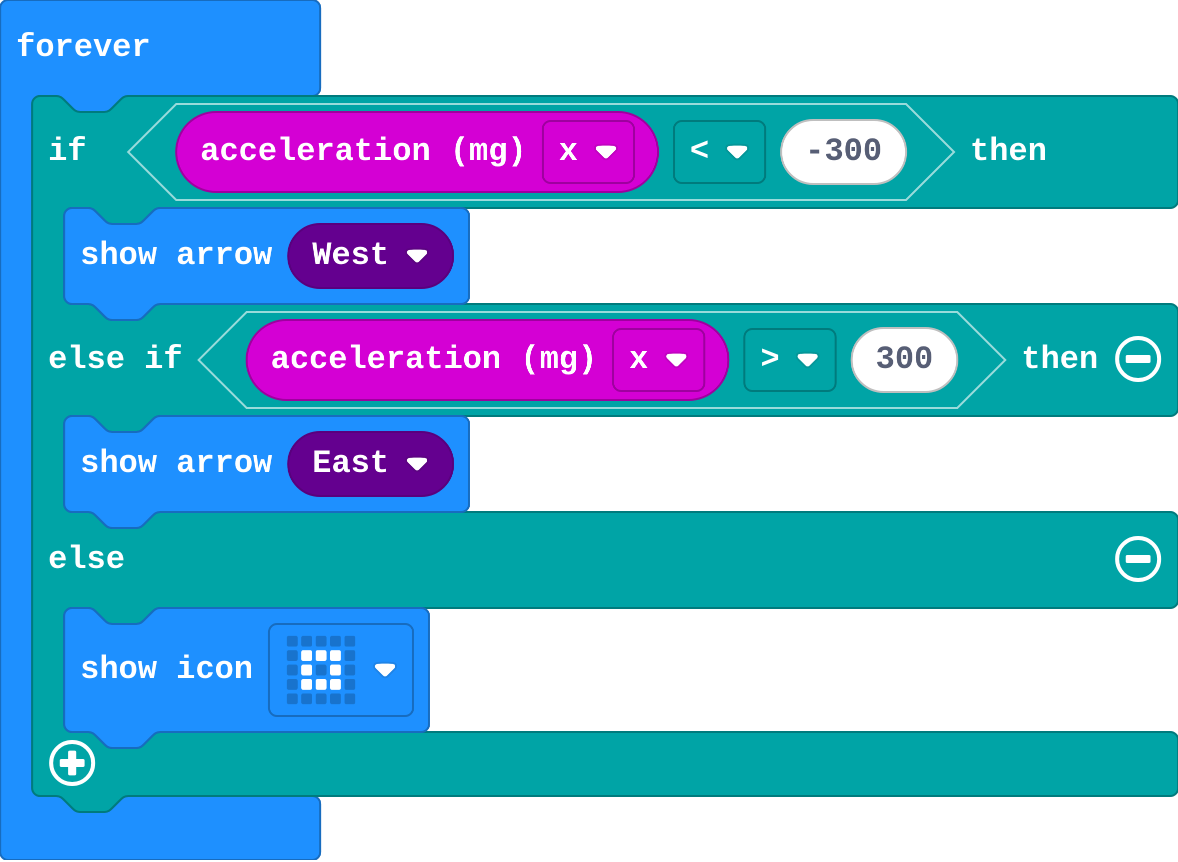
![h:360](https://studio.learningwaypoints.com/tutorials/_pictures/makecode/code/3e50420b71f4.png?v=50a4ea63ab42d2d6)

**You tilt the micro:bit a little to the left, just enough that acceleration x is -100. What shows?**

- An arrow pointing right
- Nothing
- An arrow pointing left
- The small square

<!-- Speaker note: What happens: The small square. -100 is not less than -300 and not more than 300, so neither question is true and the else part runs. Take two or three predictions before anyone runs it. -->

<!-- Speaker note: Teacher: -100 is the trap. It is negative, so many students pick the left arrow. Read the question aloud: is -100 less than -300? -->

---

<span style="background:#dcfce7; color:#1a1a1a; border:1.5px solid #22c55e; padding:6px 18px; border-radius:8px; font-size:1em; font-weight:500;">✅ Check</span>

## What happened?

* The small square. -100 is not less than -300 and not more than 300, so neither question is true and the else part runs.

<!-- Speaker note: Reveal after running. Ask who predicted it, and what made them think so. -->

---

<span style="background:#fef3c7; color:#1a1a1a; border:1.5px solid #f59e0b; padding:6px 18px; border-radius:8px; font-size:1em; font-weight:500;">✍️ Activity</span>

## Run it

Open the lesson at this step and try it together.

[studio.learningwaypoints.com/tutorials/code/microbit/microbit-ranges/?full=step-2#step-2](https://studio.learningwaypoints.com/tutorials/code/microbit/microbit-ranges/?full=step-2#step-2)

<!-- Speaker note: Move the mouse over the micro:bit to tilt it. Try a small tilt and a big tilt, left and right. Students should be able to say: I tilted the micro:bit a little and a lot, both ways, and compared what showed with my prediction. -->

<!-- Speaker note: Teacher: small tilts show the square. That middle zone is the else. -->

---

<span style="background:#dbeafe; color:#1a1a1a; border:1.5px solid #3b82f6; padding:6px 18px; border-radius:8px; font-size:1em; font-weight:500;">💬 Discussion</span>

## Investigate

![h:360](https://studio.learningwaypoints.com/tutorials/_pictures/makecode/code/3e50420b71f4.png?v=50a4ea63ab42d2d6)

<!-- Speaker note: What this step is for: The questions are asked from the top. The first true one runs and the rest are skipped; else runs only when none are true. So the order of the questions decides the ranges. -->

<!-- Speaker note: Teacher: the trace pins down the edges (300 is not more than 300). Leo's tilt is the order mistake: the bigger question must be asked first. -->

---

<span style="background:#dcfce7; color:#1a1a1a; border:1.5px solid #22c55e; padding:6px 18px; border-radius:8px; font-size:1em; font-weight:500;">✅ Check</span>

## Trace the tilt

**For each value of acceleration x, what shows?**

| acceleration x | shows |
|---|---|
| -500 | ? |
| 0 | ? |
| 400 | ? |
| 300 | ? |

* Answer: left arrow, small square, right arrow, small square

<!-- Speaker note: -500 is less than -300, so the first part runs. 0 and 300 fit neither question (300 is not more than 300), so else runs. 400 is more than 300. -->

<style scoped>pre, marp-pre { font-size: 0.5em; line-height: 1.25; } section { font-size: 26px; }</style>

---

<span style="background:#dcfce7; color:#1a1a1a; border:1.5px solid #22c55e; padding:6px 18px; border-radius:8px; font-size:1em; font-weight:500;">✅ Check</span>

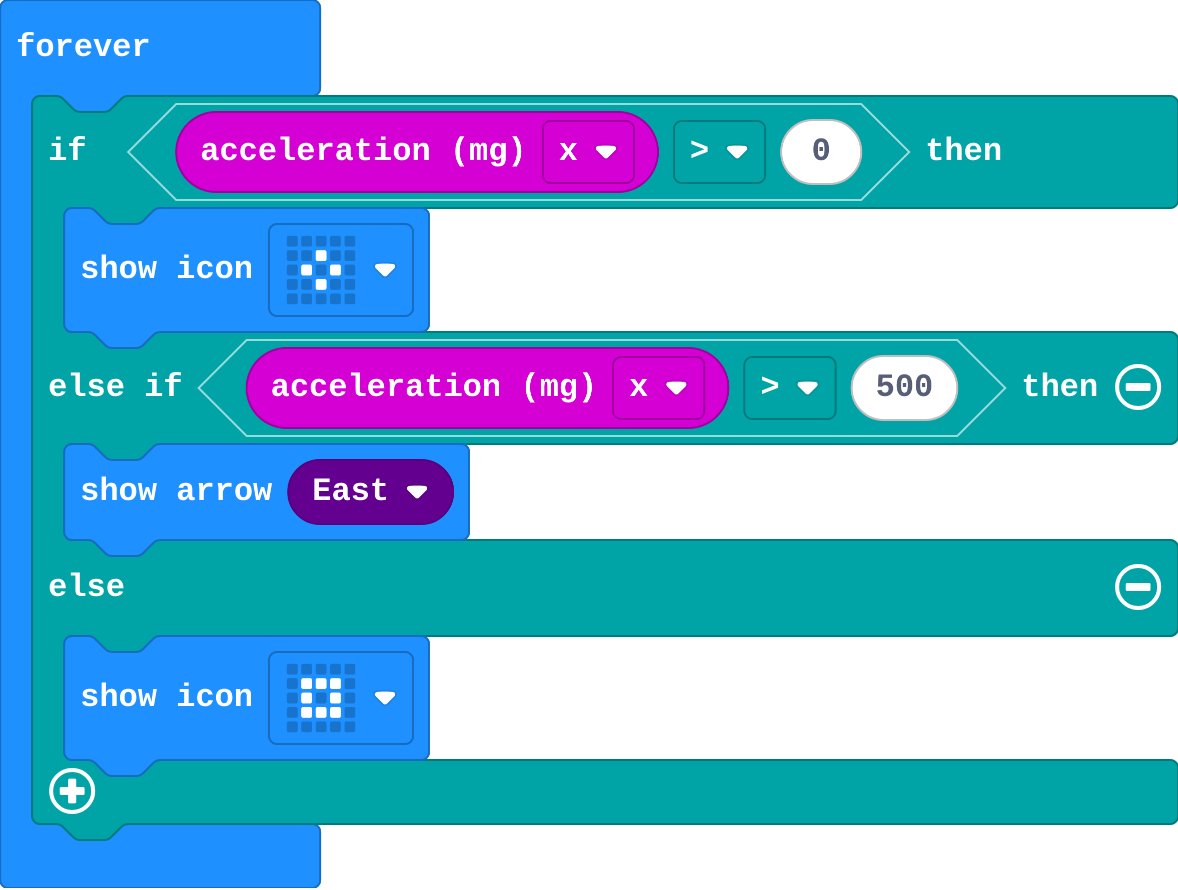
## Leo's tilt

Leo's program:

![h:360](https://studio.learningwaypoints.com/tutorials/_pictures/makecode/code/7b8ff79eef02.png?v=4a31889817558473)

**Leo wants a small tilt right to show a diamond and a big tilt right to show an arrow. The arrow never appears. Why?**

- A big tilt is also more than 0, so the first question is true and the rest are skipped
- else if only works with &lt;
- The arrow block is broken
- 500 is too big to reach

* Answer: A big tilt is also more than 0, so the first question is true and the rest are skipped

<!-- Speaker note: The questions are asked from the top, and the first true one wins. Any tilt over 500 is also over 0, so the diamond shows. Ask the bigger question first: > 500, then > 0. -->

<style scoped>pre, marp-pre { font-size: 0.5em; line-height: 1.25; } section { font-size: 21px; }</style>

---

<span style="background:#fef3c7; color:#1a1a1a; border:1.5px solid #f59e0b; padding:6px 18px; border-radius:8px; font-size:1em; font-weight:500;">✍️ Activity</span>

## Sorting hat <span style="font-size:.6em;color:#64748b">(4 min)</span>

The teacher reads three questions in order ("born in summer?", "in autumn?", else). Each student stands at the first sign that is true for them and stops there.

<!-- Speaker note: Then swap the order of two questions. Does anyone change sign? Why? -->

---

<span style="background:#fef3c7; color:#1a1a1a; border:1.5px solid #f59e0b; padding:6px 18px; border-radius:8px; font-size:1em; font-weight:500;">✍️ Activity</span>

## Modify


- **Fix Leo's tilt:** Leo's program is in the editor. Swap the questions so both parts can be reached.
- **Left as well:** Add another **else if** for a big tilt **left**.

[Open this step](https://studio.learningwaypoints.com/tutorials/code/microbit/microbit-ranges/?full=step-4#step-4)

<!-- Speaker note: What this step is for: Each else if adds one range. Asking the wider question last keeps the narrower ones reachable. Hints, in order: Swap the two questions: > 500 first, then > 0. / Drag the arrow into the first part and the diamond into the else if part. / Click + to add another else if, above the else. / Use < -500 for a big tilt left, and show a left arrow. For students who need more support: Give students the if … else if … else already in forever with the pictures in, and ask them only to fill in the two questions. For early finishers: Make the comfort meter show five ranges (freezing, cold, right, warm, hot) with four questions. The hard part, on purpose: Seeing that only the first true question counts. Ask them to read the questions from the top with one value and stop at the first yes. When students get stuck: One picture never appears. Ask: Is there a value that makes its question true, and no question above it true? Fix: Put the narrower question first (> 500 before > 0). / The comfort meter shows hot for 20 degrees. Ask: Read your questions from the top with 20. Which is true first? Fix: Check the < and >, and the order: < 15, then < 25, then else. / There is no else if. Ask: Where is the + on the if block? Fix: Click the + twice: the first adds else, the next adds else if. -->

<!-- Speaker note: Teacher: students fix Leo's program in the editor, then add a fourth range. -->

---

<span style="background:#dbeafe; color:#1a1a1a; border:1.5px solid #3b82f6; padding:6px 18px; border-radius:8px; font-size:1em; font-weight:500;">💬 Discussion</span>

## Investigate: Mix it up

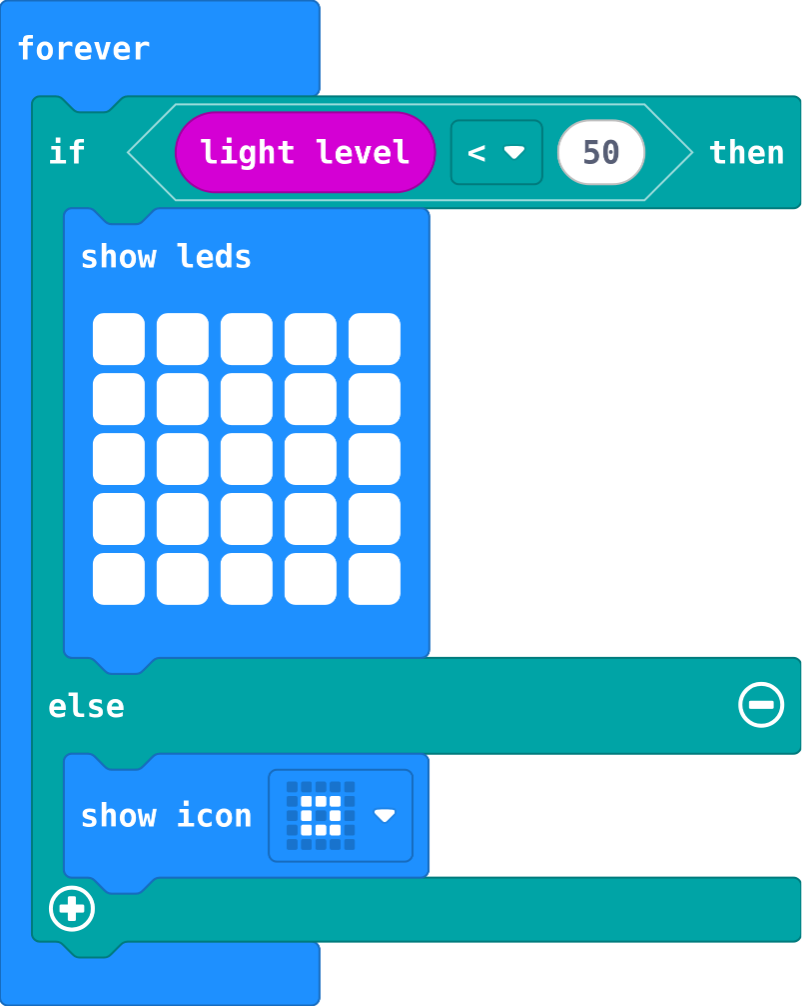
![h:360](https://studio.learningwaypoints.com/tutorials/_pictures/makecode/code/3e2c51354c7e.png?v=15f0c3366e54b20a)

<!-- Speaker note: What this step is for: if … else runs exactly one part, decided by one sensor reading. -->

---

<span style="background:#dcfce7; color:#1a1a1a; border:1.5px solid #22c55e; padding:6px 18px; border-radius:8px; font-size:1em; font-weight:500;">✅ Check</span>

## Mix it up

**This is last lesson's bike light. What does it show at each light level?**

| light level | shows |
|---|---|
| 30 | ? |
| 200 | ? |

* Answer: all the LEDs, small square

<!-- Speaker note: 30 is less than 50, so the first part runs: all the LEDs. 200 is not, so the else part runs: the small square. What this step is for: if … else runs exactly one part, decided by one sensor reading. -->

---

<span style="background:#fef3c7; color:#1a1a1a; border:1.5px solid #f59e0b; padding:6px 18px; border-radius:8px; font-size:1em; font-weight:500;">✍️ Activity</span>

## Make

Make a **comfort meter** for a classroom, in **one** if block with three parts:

- Below **15**: cold (draw it).
- From **15** to **24**: just right (a happy face).
- **25** and above: hot (draw it).

You need only two questions. The order does the rest.

[Open this step](https://studio.learningwaypoints.com/tutorials/code/microbit/microbit-ranges/?full=step-6#step-6)

<!-- Speaker note: Hints, in order: One if block with an else if and an else. You need only two questions. / Ask < 15 first, then < 25. Anything under 15 was already caught by the first question. -->

<!-- Speaker note: Teacher: two questions make three ranges. Ask students to explain why the middle needs no 'and'. -->

---

<span style="background:#fef3c7; color:#1a1a1a; border:1.5px solid #f59e0b; padding:6px 18px; border-radius:8px; font-size:1em; font-weight:500;">✍️ Activity</span>

## Change a spirit level

This spirit level points the way to tilt back to flat, and shows a tick when it is level. Make it fussier (a smaller tilt counts as not level), then make it check **forward and back** as well.

[Open this step](https://studio.learningwaypoints.com/tutorials/code/microbit/microbit-ranges/?full=step-7#step-7)

---

<span style="background:#fef3c7; color:#1a1a1a; border:1.5px solid #f59e0b; padding:6px 18px; border-radius:8px; font-size:1em; font-weight:500;">✍️ Activity</span>

## Call the range <span style="font-size:.6em;color:#64748b">(3 min)</span>

Show your comfort meter to the next pair. They drag the slider and call out the range before it shows.

---

<span style="background:#dcfce7; color:#1a1a1a; border:1.5px solid #22c55e; padding:6px 18px; border-radius:8px; font-size:1em; font-weight:500;">✅ Check</span>

## Exit ticket

**if temperature &gt; 0 … else if temperature &gt; 30 … What shows at 35 degrees, and why?**

* The first part. 35 is more than 0, so the first question is true and the rest are skipped. Ask &gt; 30 first.

<!-- Speaker note: Students answer on paper or a mini whiteboard before the reveal. Anyone who cannot answer needs the main idea again next lesson. Where this leads: Next unit: lists, which keep many values under one name. Class ideas: a tilt game where players hold the micro:bit level for ten seconds; a comfort meter by each classroom window with real micro:bits. -->