---
marp: true
theme: default
html: true
---

# Lists

micro:bit Foundations · Lists

<!-- Speaker note: Students keep many values in one list and take one out by its place, counted from 0. About 40 minutes (Predict and Run 7 min · Investigate 10 min · Modify 8 min · Mix it up 3 min · Make 9 min · Lunch menu 3 min). -->

---

## Today

**We are learning to** keep many values in one list, and pick one by its place, counted from 0.

- I can make a list and get an item by its place.
- I can say why the first item is at place 0.
- I can step through a list with a variable.

<!-- Speaker note: Before class: A **list** (MakeCode calls it an **array**, in **Advanced › Arrays**) holds many values in order under one name. Each item has a **place** (an **index**), counted from **0**: in Yes, No, Maybe, Yes is at place 0. So a list of 3 has places 0, 1 and 2, and the last place is one less than the number of items. **get value at** takes out the item at a place. Picking at random is next lesson. Teacher: Mix it up: a tilt meter from the Decide unit, read from the top. -->

---

## Why it matters

> A playlist, a lunch menu, a class roll: each is a list of things in order, and you pick one by its place.

<!-- Speaker note: A variable holds one value. A **list** holds many, in order, under one name, such as `answers`. Each item has a **place number** (an **index**), and the micro:bit counts places from **0**. You find list blocks in **Advanced › Arrays** (an array is another name for a list). -->

---

<span style="background:#dbeafe; color:#1a1a1a; border:1.5px solid #3b82f6; padding:6px 18px; border-radius:8px; font-size:1em; font-weight:500;">💬 Discussion</span>

## Predict

![h:309](https://studio.learningwaypoints.com/tutorials/_pictures/makecode/code/c77213580e4c.png?v=77508cf81b1361a2)

**You press A. What does the micro:bit show?**

- Nothing
- Yes
- No
- Maybe

<!-- Speaker note: What happens: No. The places are counted from 0: Yes is at 0, No is at 1, Maybe is at 2. Place 1 is No. Take two or three predictions before anyone runs it. -->

<!-- Speaker note: Teacher: most students say Yes. Ask: which place does the micro:bit start counting from? Or: where does a ruler start? -->

---

<span style="background:#dcfce7; color:#1a1a1a; border:1.5px solid #22c55e; padding:6px 18px; border-radius:8px; font-size:1em; font-weight:500;">✅ Check</span>

## What happened?

* No. The places are counted from 0: Yes is at 0, No is at 1, Maybe is at 2. Place 1 is No.

<!-- Speaker note: Reveal after running. Ask who predicted it, and what made them think so. -->

---

<span style="background:#fef3c7; color:#1a1a1a; border:1.5px solid #f59e0b; padding:6px 18px; border-radius:8px; font-size:1em; font-weight:500;">✍️ Activity</span>

## Run it

Open the lesson at this step and try it together.

[studio.learningwaypoints.com/tutorials/code/microbit/microbit-lists/?full=step-2#step-2](https://studio.learningwaypoints.com/tutorials/code/microbit/microbit-lists/?full=step-2#step-2)

<!-- Speaker note: Press **A** and read the word as it scrolls. Students should be able to say: I pressed A and compared the word with my prediction. -->

<!-- Speaker note: Teacher: No. Say it plainly: lists count from 0, like a ruler starts at 0. -->

---

<span style="background:#dbeafe; color:#1a1a1a; border:1.5px solid #3b82f6; padding:6px 18px; border-radius:8px; font-size:1em; font-weight:500;">💬 Discussion</span>

## Investigate

![h:309](https://studio.learningwaypoints.com/tutorials/_pictures/makecode/code/c77213580e4c.png?v=77508cf81b1361a2)

<!-- Speaker note: What this step is for: A list keeps items in order, counted from 0, so the first item is at place 0 and the last place is one less than the number of items. -->

<!-- Speaker note: Teacher: the last-place question is where counting from 0 bites. -->

---

<span style="background:#dcfce7; color:#1a1a1a; border:1.5px solid #22c55e; padding:6px 18px; border-radius:8px; font-size:1em; font-weight:500;">✅ Check</span>

## Places

**The list is Yes, No, Maybe. What is at each place?**

| place | item |
|---|---|
| 0 | ? |
| 1 | ? |
| 2 | ? |

* Answer: Yes, No, Maybe

<!-- Speaker note: The first item is at place 0. Three items use places 0, 1 and 2. -->

---

<span style="background:#dcfce7; color:#1a1a1a; border:1.5px solid #22c55e; padding:6px 18px; border-radius:8px; font-size:1em; font-weight:500;">✅ Check</span>

## The last place

**A list has 5 items. What is the place number of the last one?**

* Answer: 4

<!-- Speaker note: Places start at 0, so 5 items use places 0, 1, 2, 3 and 4. The last place is one less than the number of items. -->

---

<span style="background:#dcfce7; color:#1a1a1a; border:1.5px solid #22c55e; padding:6px 18px; border-radius:8px; font-size:1em; font-weight:500;">✅ Check</span>

## Jo's first word

**Jo wants A to show the first word, Yes. She uses get value at 1. What does A show?**

- No
- Yes
- Nothing
- An error

* Answer: No

<!-- Speaker note: Place 1 is the second item, No. The first item is at place 0. -->

---

<span style="background:#fef3c7; color:#1a1a1a; border:1.5px solid #f59e0b; padding:6px 18px; border-radius:8px; font-size:1em; font-weight:500;">✍️ Activity</span>

## Line up from 0 <span style="font-size:.6em;color:#64748b">(3 min)</span>

Five students stand in a row holding cards 0 to 4. The class calls a place; that student steps forward.

<!-- Speaker note: Ask for place 5. Nobody steps forward: five items stop at place 4. -->

---

<span style="background:#fef3c7; color:#1a1a1a; border:1.5px solid #f59e0b; padding:6px 18px; border-radius:8px; font-size:1em; font-weight:500;">✍️ Activity</span>

## Modify


- **One more word:** Add a fourth word, **Later**. Which place is it at? Make **B** show it.
- **The first word:** Make **A+B** show the first word.

[Open this step](https://studio.learningwaypoints.com/tutorials/code/microbit/microbit-lists/?full=step-4#step-4)

<!-- Speaker note: What this step is for: Every item has a place, and get value at takes out any one of them. Hints, in order: Click + on the list block to add a place, and type Later. / Drag in on button B pressed, with show string get value at 3. / Drag in on button A+B pressed. The first word is at place 0. For students who need more support: Give students the A event with change and show already in, and ask them only to add the if that goes back to 0. For early finishers: Make B step backwards through the moods, going round to the last one after the first. The hard part, on purpose: Counting places from 0. Ask them to point at each item and count aloud from zero. When students get stuck: The list block has only one or two places. Ask: Where is the + on the list block? Fix: Click + on the list block to add places. / The chooser shows nothing after the third press. Ask: What is choice after three presses, and is there a place with that number? Fix: There is no place 3. When choice reaches 3, set it back to 0. / A number shows instead of the word. Ask: Is it show string or show number? Fix: Words need show string, from Basic. -->

<!-- Speaker note: Teacher: adding Later and asking for place 3 makes students count. -->

---

<span style="background:#dbeafe; color:#1a1a1a; border:1.5px solid #3b82f6; padding:6px 18px; border-radius:8px; font-size:1em; font-weight:500;">💬 Discussion</span>

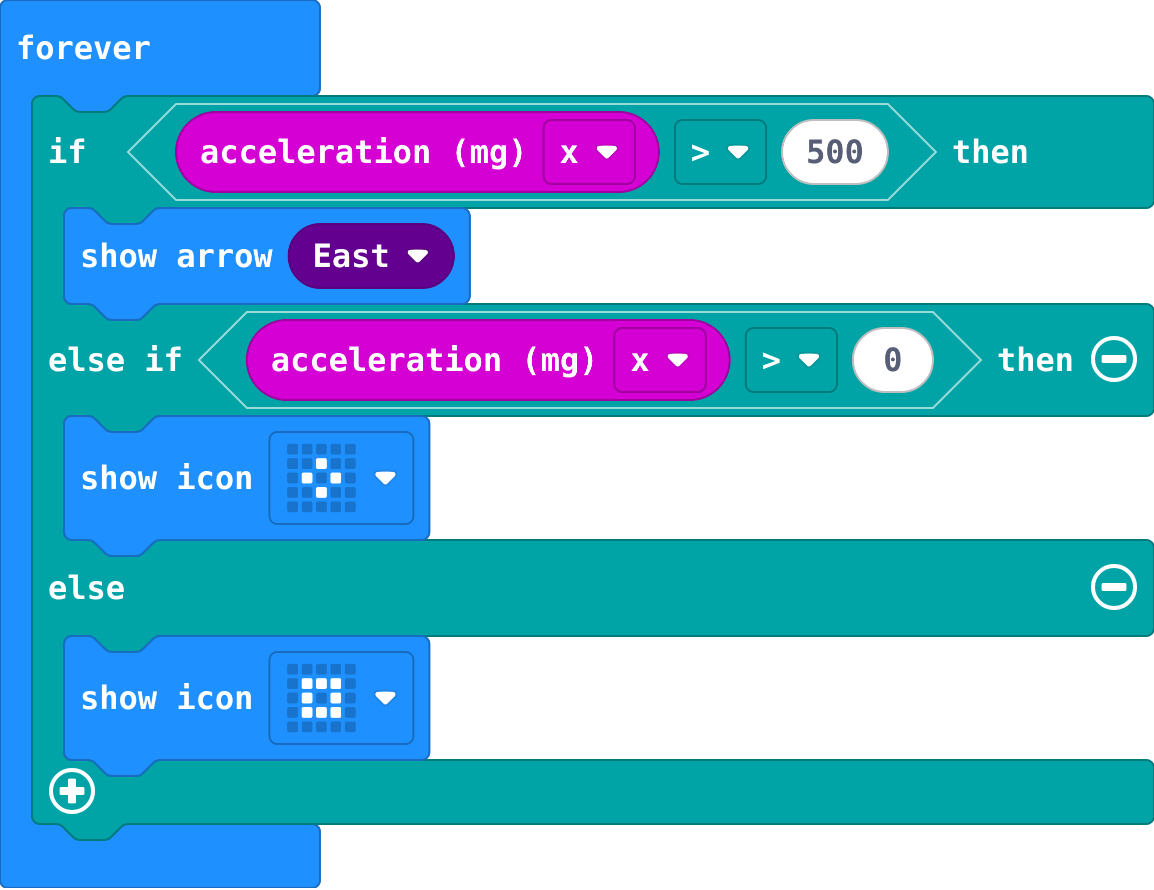
## Investigate: Mix it up

![h:360](https://studio.learningwaypoints.com/tutorials/_pictures/makecode/code/5065e0f4986b.png?v=04ffdf77ea86e278)

<!-- Speaker note: A tilt meter from the Decide unit. What this step is for: The first true question wins, so the bigger tilt is asked about first. -->

---

<span style="background:#dcfce7; color:#1a1a1a; border:1.5px solid #22c55e; padding:6px 18px; border-radius:8px; font-size:1em; font-weight:500;">✅ Check</span>

## Mix it up

**A tilt meter: what shows for each value of acceleration x?**

| acceleration x | shows |
|---|---|
| 600 | ? |
| 200 | ? |
| -50 | ? |

* Answer: right arrow, small diamond, small square

<!-- Speaker note: 600 is more than 500, so the first part runs. 200 is not, but it is more than 0. -50 is neither, so else runs. What this step is for: The first true question wins, so the bigger tilt is asked about first. -->

---

<span style="background:#fef3c7; color:#1a1a1a; border:1.5px solid #f59e0b; padding:6px 18px; border-radius:8px; font-size:1em; font-weight:500;">✍️ Activity</span>

## Make

Make a **mood chooser**. The list of moods and the variable `choice` are made for you. Each press of **A** shows the next mood: Happy, then Tired, then Hungry, then back to Happy.

[Open this step](https://studio.learningwaypoints.com/tutorials/code/microbit/microbit-lists/?full=step-6#step-6)

<!-- Speaker note: Hints, in order: In on button A pressed: change choice by 1, then show string get value at choice. / There are only places 0, 1 and 2. If choice is 3, set it back to 0, before you show the word. -->

<!-- Speaker note: Teacher: the chooser uses a variable as the place, and an if to go back to 0. -->

---

<span style="background:#fef3c7; color:#1a1a1a; border:1.5px solid #f59e0b; padding:6px 18px; border-radius:8px; font-size:1em; font-weight:500;">✍️ Activity</span>

## Change a lunch menu

This menu has a lunch for each school day, Monday first. **A** shows Monday's. Put in your canteen's lunches, then make **B** show Friday's.

[Open this step](https://studio.learningwaypoints.com/tutorials/code/microbit/microbit-lists/?full=step-7#step-7)

---

<span style="background:#fef3c7; color:#1a1a1a; border:1.5px solid #f59e0b; padding:6px 18px; border-radius:8px; font-size:1em; font-weight:500;">✍️ Activity</span>

## Round the list <span style="font-size:.6em;color:#64748b">(3 min)</span>

Swap mood choosers with the next pair. Press A until it goes round.

---

<span style="background:#dcfce7; color:#1a1a1a; border:1.5px solid #22c55e; padding:6px 18px; border-radius:8px; font-size:1em; font-weight:500;">✅ Check</span>

## Exit ticket

**A list has Red, Green, Blue. What is at place 2, and what is at place 3?**

* Blue is at place 2. There is no place 3: three items use places 0, 1 and 2.

<!-- Speaker note: Students answer on paper or a mini whiteboard before the reveal. Anyone who cannot answer needs the main idea again next lesson. Where this leads: Next lesson: pick an item at random, however long the list is. Class idea: a list of the week's homework, one item per day. -->