---
marp: true
theme: default
html: true
---

# Capture the flag

Secret messages · Defend the system

<!-- Speaker note: Students solve three capture-the-flag puzzles (Caesar, XOR, checksum), typing flags that the page checks without storing the answers, then write a puzzle for a partner. About 45 minutes (Predict and Run 8 min · Puzzles 22 min · Make 15 min). -->

---

## Today

**We are learning to** solve three puzzles that use the ciphers and checks you have built. Each answer is a flag you type in to prove you solved it.

- I can use a Caesar tool, an XOR key and a checksum to solve puzzles.
- I can explain what a flag is.
- I can write a cipher puzzle for someone else.

<!-- Speaker note: Before class: **What this is:** a puzzle session that revisits the course's three tools. Students decrypt messages written for them, as in a puzzle book or a CTF contest. No one is breaking into anything. **How flags work:** the page stores only a SHA-256 fingerprint (a hash) of each right answer, so reading the page source does not give the answer away. Answers are checked after trimming spaces and ignoring capitals. Because this repository is public, the flags are also written here for you: - Puzzle 1: **WP{never send keys}** (Caesar key 4) - Puzzle 2: **WP{secret}** (XOR key 9, then A is 1) - Puzzle 3: **WP{key}** (KEY adds to 38, so its checksum is 8) **Pacing:** puzzles can be done in any order. Pairs can race; the flag checks give instant feedback so nobody has to wait for you. Teacher: Puzzle 2 is the slowest because of the second step (numbers to letters). Hint: A is 1. Teacher: Puzzle 3: ask which message's own checksum disagrees with the number it came with. -->

---

## Why it matters

> Capture-the-flag contests are a favourite way for people to learn security: puzzle after puzzle, each hiding a flag. Solving them is how you get a feel for what makes a code strong or weak.

<!-- Speaker note: A **flag** is a secret answer, in the form `WP{...}`, that proves you solved a puzzle. Each puzzle uses something you built in this course. The page keeps only a scrambled fingerprint of each right answer, so you have to solve them. -->

---

<span style="background:#dbeafe; color:#1a1a1a; border:1.5px solid #3b82f6; padding:6px 18px; border-radius:8px; font-size:1em; font-weight:500;">💬 Discussion</span>

## Predict

![h:360](https://studio.learningwaypoints.com/tutorials/_pictures/makecode/code/d5ce8c2207bb.png?v=b6f5226e62a9191c)

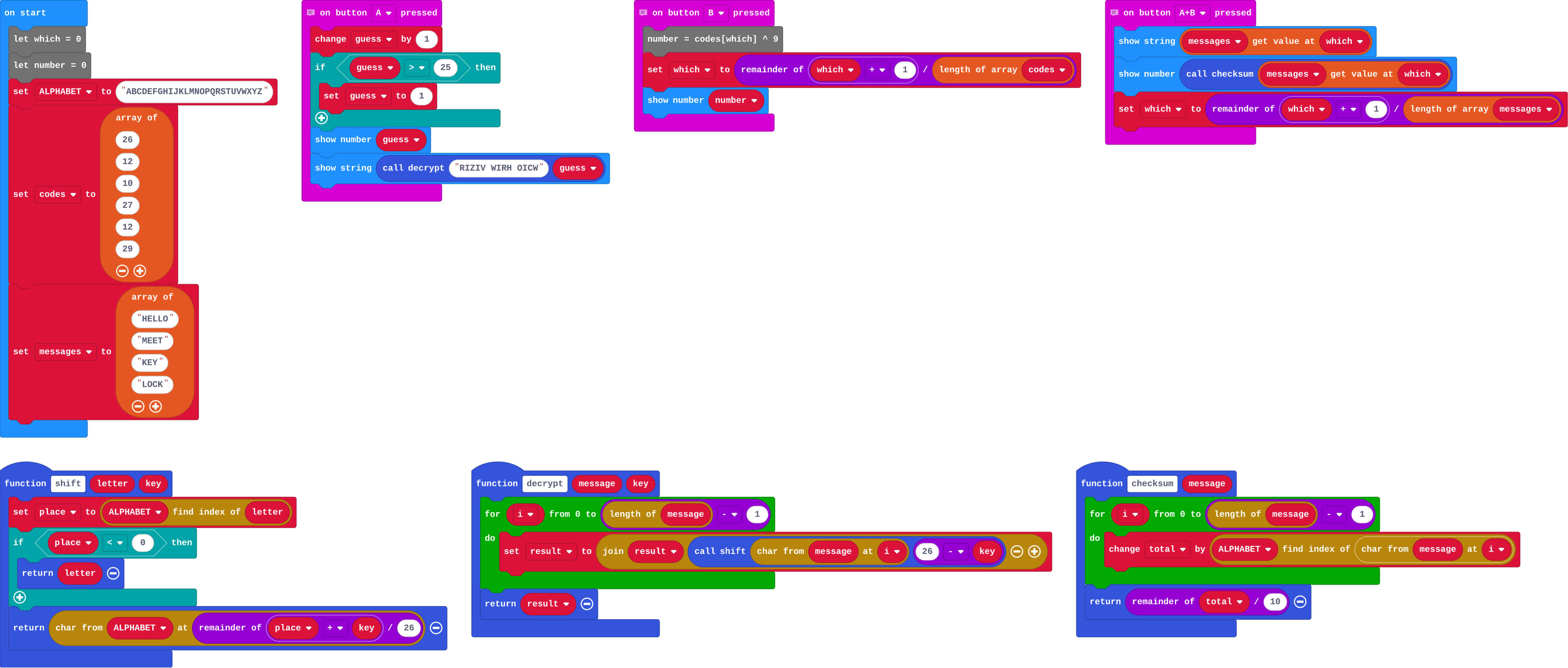
**The toolkit's checksum adds each letter's place (A is 0) and keeps the last digit. Press A+B on the first message, HELLO. What checksum does it show?**

- 4
- 7
- 11
- 47

<!-- Speaker note: What happens: 7. H (7) + E (4) + L (11) + L (11) + O (14) = 47, and the last digit is 7. Take two or three predictions before anyone runs it. -->

<style scoped>pre, marp-pre { font-size: 0.5em; line-height: 1.25; } section { font-size: 27px; }</style>

---

<span style="background:#dcfce7; color:#1a1a1a; border:1.5px solid #22c55e; padding:6px 18px; border-radius:8px; font-size:1em; font-weight:500;">✅ Check</span>

## What happened?

* 7. H (7) + E (4) + L (11) + L (11) + O (14) = 47, and the last digit is 7.

<!-- Speaker note: Reveal after running. Ask who predicted it, and what made them think so. -->

---

<span style="background:#fef3c7; color:#1a1a1a; border:1.5px solid #f59e0b; padding:6px 18px; border-radius:8px; font-size:1em; font-weight:500;">✍️ Activity</span>

## Run it

Open the lesson at this step and try it together.

[studio.learningwaypoints.com/tutorials/code/microbit-security/ctf-puzzles/?full=step-2#step-2](https://studio.learningwaypoints.com/tutorials/code/microbit-security/ctf-puzzles/?full=step-2#step-2)

<!-- Speaker note: The toolkit has a tool for each puzzle: **A** tries the next Caesar key on puzzle 1; **B** shows the next puzzle 2 number after XOR with a key; **A+B** shows the checksum of the next puzzle 3 message. Students should be able to say: I tried all three buttons and saw what each one does. -->

---

<span style="background:#dbeafe; color:#1a1a1a; border:1.5px solid #3b82f6; padding:6px 18px; border-radius:8px; font-size:1em; font-weight:500;">💬 Discussion</span>

## Investigate

![h:360](https://studio.learningwaypoints.com/tutorials/_pictures/makecode/code/d5ce8c2207bb.png?v=b6f5226e62a9191c)

<!-- Speaker note: What this step is for: Each tool from the course breaks one weakness: Caesar by trying keys, XOR once the key is known, a checksum by recomputing it. -->

---

<span style="background:#dcfce7; color:#1a1a1a; border:1.5px solid #22c55e; padding:6px 18px; border-radius:8px; font-size:1em; font-weight:500;">✅ Check</span>

## Puzzle 1: Caesar

**Puzzle 1. A Caesar cipher: RIZIV WIRH OICW. Find the message. The flag is WP{ then the message in lower case, then }.**

* Answer: A flag (the exact answer is in the teacher notes)

<!-- Speaker note: Key 4. The tool tries every key and one of them reads as English. -->

---

<span style="background:#dcfce7; color:#1a1a1a; border:1.5px solid #22c55e; padding:6px 18px; border-radius:8px; font-size:1em; font-weight:500;">✅ Check</span>

## Puzzle 2: XOR

**Puzzle 2. These numbers were each locked with XOR and the key 9: 26, 12, 10, 27, 12, 29. Unlock them (B does this). Then turn each number into a letter, where 1 is A, 2 is B and so on. The flag is WP{ then the word in lower case, then }.**

* Answer: A flag (the exact answer is in the teacher notes)

<!-- Speaker note: XOR with 9 gives 19, 5, 3, 18, 5, 20: S E C R E T. -->

---

<span style="background:#dcfce7; color:#1a1a1a; border:1.5px solid #22c55e; padding:6px 18px; border-radius:8px; font-size:1em; font-weight:500;">✅ Check</span>

## Puzzle 3: checksum

**Puzzle 3. Four messages arrived with their checksums: HELLO 7, MEET 9, KEY 3, LOCK 7. One was damaged on the way. Which? The flag is WP{ then that word in lower case, then }.**

* Answer: A flag (the exact answer is in the teacher notes)

<!-- Speaker note: KEY adds to 38, so its checksum should be 8, not 3. The other three match. -->

---

<span style="background:#fef3c7; color:#1a1a1a; border:1.5px solid #f59e0b; padding:6px 18px; border-radius:8px; font-size:1em; font-weight:500;">✍️ Activity</span>

## Make

Make a puzzle for a partner: **A** shows a secret message that you encrypted with a Caesar key. Keep the key to yourself. Then solve your partner's.

[Open this step](https://studio.learningwaypoints.com/tutorials/code/microbit-security/ctf-puzzles/?full=step-4#step-4)

<!-- Speaker note: Hints, in order: Use encrypt with a key you choose, and show the cipher text with basic.showString. Make sure your puzzle has a clear answer. For students who need more support: Share puzzle 1 as a class, then let pairs do the others. For early finishers: Write a longer puzzle that uses two steps (Caesar, then XOR). The hard part, on purpose: Choosing the right tool for each puzzle. Ask which weakness the puzzle shows before they reach for code. When students get stuck: The flag is refused. Ask: Is it WP{ then lower-case letters then }? Are spaces where they should be? Fix: Copy the form exactly; spaces count (the Caesar message has spaces). / Puzzle 2 gives numbers above 26. Ask: Did you use the right XOR key? Fix: The key is 9. Press B once for each number. -->

---

<span style="background:#dcfce7; color:#1a1a1a; border:1.5px solid #22c55e; padding:6px 18px; border-radius:8px; font-size:1em; font-weight:500;">✅ Check</span>

## Exit ticket

**What is a flag in a capture-the-flag puzzle?**

* A secret answer in a fixed form that proves you solved the puzzle.

<!-- Speaker note: Students answer on paper or a mini whiteboard before the reveal. Anyone who cannot answer needs the main idea again next lesson. Where this leads: Next: defend a system against all three weaknesses. -->