---
marp: true
theme: default
html: true
---

# Has the message changed?

Secret messages · Trust

<!-- Speaker note: Students send messages with a checksum, see the receiver reject a changed one, and learn why a keyed checksum is needed against deliberate changes. About 45 minutes (Predict and Run 8 min · Investigate 10 min · Modify 7 min · Make 17 min). -->

---

## Today

**We are learning to** a checksum is a small number worked out from a message and sent with it. If the number the receiver works out is different, the message was damaged or changed on the way.

- I can work out a checksum and use it to check a message.
- I can explain what a checksum does and does not protect against.
- I can say why a secret key makes a checksum harder to forge.

<!-- Speaker note: Before class: **The idea:** privacy (encryption) and integrity (nobody changed it) are different jobs. A **checksum** is a small number worked out from the message and sent with it; a mismatch means the message changed. **Everyday picture:** counting the cards when you hand over a pack. Say there are 52; if the receiver counts 51, something is missing. Where it breaks: if someone swaps a card for another, the count is still 52. **Honest limits:** this checksum is deliberately simple. It ignores the order of letters (Investigate task 2), only has ten values (a changed message matches by chance one time in ten), and when the method is public anyone can make a matching one (task 3). Real systems use hash functions and a keyed checksum called a MAC. **Code:** `radio.sendValue(name, value)` sends text and a number together, so the message and its checksum travel in one packet. The name is limited to 8 characters. Teacher: Ask: how would you make the check number more sensitive to order? (Multiply each place by its position.) -->

---

## Why it matters

> A bar code, a bank card number and a downloaded file all carry a small check number. If one digit is wrong, the scanner or the browser notices and refuses to trust it.

<!-- Speaker note: Radio can garble a message (a bit flips in the air), and a message can be changed on purpose. Encryption keeps a message **private**; it does not tell you it is **unchanged**. A **checksum** is the tool for that. The sender works out a small number from the message (here: add up each letter's place in the alphabet, keep the last digit) and sends it with the message. The receiver works it out again. If the two differ, something changed. **send value** sends a name and a number together (Agreeing a key in the open). Here the name is the message itself and the number is its checksum, so each message can be **8 characters at most**: a longer one is cut short on the way and fails its own checksum. -->

---

<span style="background:#dbeafe; color:#1a1a1a; border:1.5px solid #3b82f6; padding:6px 18px; border-radius:8px; font-size:1em; font-weight:500;">💬 Discussion</span>

## Predict

![h:360](https://studio.learningwaypoints.com/tutorials/_pictures/makecode/code/68c7d4d60553.png?v=a7dbd972e609c20c)

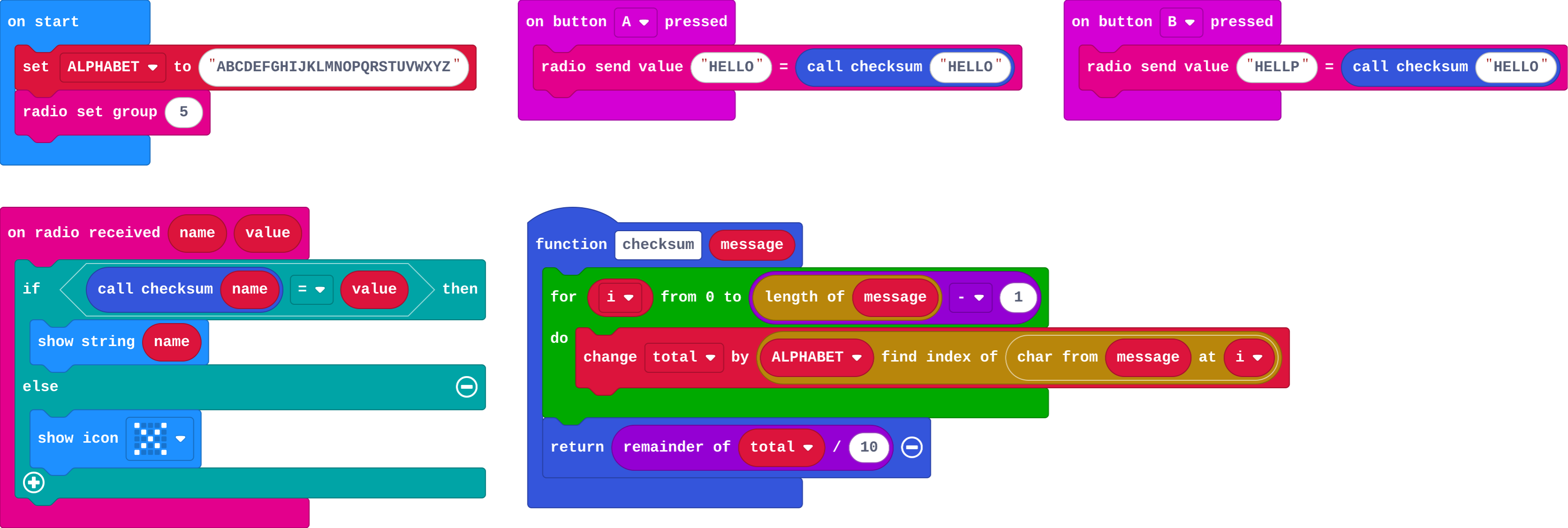
**The receiver gets A's message, then B's message (HELLP with HELLO's checksum). What does it show?**

- HELLP, then HELLO
- HELLO, then HELLP
- A cross, then HELLO
- HELLO, then a cross

<!-- Speaker note: What happens: HELLO, then a cross. The first matches its checksum (HELLO adds up to 7). HELLP adds up to 8, so it doesn't match the 7 that arrived. Take two or three predictions before anyone runs it. -->

---

<span style="background:#dcfce7; color:#1a1a1a; border:1.5px solid #22c55e; padding:6px 18px; border-radius:8px; font-size:1em; font-weight:500;">✅ Check</span>

## What happened?

* HELLO, then a cross. The first matches its checksum (HELLO adds up to 7). HELLP adds up to 8, so it doesn't match the 7 that arrived.

<!-- Speaker note: Reveal after running. Ask who predicted it, and what made them think so. -->

---

<span style="background:#fef3c7; color:#1a1a1a; border:1.5px solid #f59e0b; padding:6px 18px; border-radius:8px; font-size:1em; font-weight:500;">✍️ Activity</span>

## Run it

Open the lesson at this step and try it together.

[studio.learningwaypoints.com/tutorials/code/microbit-security/checksum/?full=step-2#step-2](https://studio.learningwaypoints.com/tutorials/code/microbit-security/checksum/?full=step-2#step-2)

<!-- Speaker note: **B** pretends the message was damaged on the way: the text changed but the checksum is still the old one. Students should be able to say: I pressed A and B and saw that B's changed message was rejected. -->

---

<span style="background:#dbeafe; color:#1a1a1a; border:1.5px solid #3b82f6; padding:6px 18px; border-radius:8px; font-size:1em; font-weight:500;">💬 Discussion</span>

## Investigate

![h:360](https://studio.learningwaypoints.com/tutorials/_pictures/makecode/code/68c7d4d60553.png?v=a7dbd972e609c20c)

<!-- Speaker note: What this step is for: A checksum notices accidents. Because anyone can work out the same number from the public method, it does not notice a deliberate change; a secret key mixed into the checksum does. -->

<!-- Speaker note: Teacher: have two students swap letters and check the sum by hand. -->

---

<span style="background:#dcfce7; color:#1a1a1a; border:1.5px solid #22c55e; padding:6px 18px; border-radius:8px; font-size:1em; font-weight:500;">✅ Check</span>

## Working it out

**What is the checksum of KEY? (K is 10, E is 4, Y is 24. Add them and keep the last digit.)**

* Answer: 8

<!-- Speaker note: 10 + 4 + 24 = 38, and the last digit is 8. -->

---

<span style="background:#dcfce7; color:#1a1a1a; border:1.5px solid #22c55e; padding:6px 18px; border-radius:8px; font-size:1em; font-weight:500;">✅ Check</span>

## Swapped letters

**A message HELLO changes to EHLLO (two letters swap). Does this checksum notice?**

- Yes, always
- No: the letters add to the same total
- Yes, because the order changed
- Only for short messages

* Answer: No: the letters add to the same total

<!-- Speaker note: Addition ignores order, so swapped letters give the same checksum. That is a weakness of this simple checksum. Real checksums are sensitive to order. -->

---

<span style="background:#dcfce7; color:#1a1a1a; border:1.5px solid #22c55e; padding:6px 18px; border-radius:8px; font-size:1em; font-weight:500;">✅ Check</span>

## A deliberate change

**Someone changes the message in the air and also works out the new checksum with the same public method. What does the receiver think?**

- It spots the change
- Nothing wrong: the checksum matches the changed message
- It asks for the key
- It shows an error

* Answer: Nothing wrong: the checksum matches the changed message

<!-- Speaker note: A public checksum protects against accidents, not against a person who deliberately changes the message. If the checksum also needs a secret key, nobody without the key can produce a matching one. -->

<style scoped>pre, marp-pre { font-size: 0.5em; line-height: 1.25; } section { font-size: 25px; }</style>

---

<span style="background:#fef3c7; color:#1a1a1a; border:1.5px solid #f59e0b; padding:6px 18px; border-radius:8px; font-size:1em; font-weight:500;">✍️ Activity</span>

## Modify

Mix a **secret key** into the checksum. Both micro:bits know it, and nobody else does, so only they can work out a matching number.

[Open this step](https://studio.learningwaypoints.com/tutorials/code/microbit-security/checksum/?full=step-4#step-4)

<!-- Speaker note: What this step is for: Starting the total from a secret number makes the checksum depend on a key that only the two ends know. Hints, in order: Make a variable secretKey = 7, and start total from secretKey instead of 0. For students who need more support: Give the receiving checker complete and ask students to write only the sender. For early finishers: Make the checksum depend on order: add the letter's place times its position in the message. The hard part, on purpose: A plain checksum catches accidents but not deliberate changes. Ask what an attacker would need to make a changed message pass. When students get stuck: Every message is rejected. Ask: Do the sender and receiver use the same secretKey? Fix: Use one secretKey value on both micro:bits. / A name longer than 8 letters is cut short. Ask: How long is the message? Fix: radio.sendValue names are limited to 8 characters. Use shorter messages. -->

---

<span style="background:#fef3c7; color:#1a1a1a; border:1.5px solid #f59e0b; padding:6px 18px; border-radius:8px; font-size:1em; font-weight:500;">✍️ Activity</span>

## Make

Make a **message checker**: the receiver shows a tick for a good message and a cross for a bad one, and **A+B** shows how many bad messages have arrived.

[Open this step](https://studio.learningwaypoints.com/tutorials/code/microbit-security/checksum/?full=step-5#step-5)

<!-- Speaker note: Hints, in order: A sends MEET with its checksum; B sends a damaged MEAT with MEET's checksum. / On receiving, show a tick when the checksum matches; otherwise add one to bad and show a cross. A+B shows bad. -->

---

<span style="background:#dcfce7; color:#1a1a1a; border:1.5px solid #22c55e; padding:6px 18px; border-radius:8px; font-size:1em; font-weight:500;">✅ Check</span>

## Exit ticket

**What does a checksum let a receiver notice?**

* That the message was damaged or changed after the checksum was worked out. A keyed checksum also stops someone making a matching one without the key.

<!-- Speaker note: Students answer on paper or a mini whiteboard before the reveal. Anyone who cannot answer needs the main idea again next lesson. Where this leads: Next: prove who is sending, not just that the message is whole. -->