---
marp: true
theme: default
html: true
---

# The Caesar cipher

Secret messages · Secret codes

<!-- Speaker note: Students build the Caesar cipher, decrypt with it, and send encrypted messages by radio with a shared key. About 50 minutes (Predict and Run 8 min · Investigate 10 min · Modify 10 min · Make 18 min). -->

---

## Today

**We are learning to** shift every letter along the alphabet by a secret number. The method is public; the number is the key.

- I can explain what the key of a Caesar cipher is.
- I can encrypt and decrypt a message with the same key.
- I can explain why a receiver with the wrong key shows nonsense.

<!-- Speaker note: Before class: **The idea:** every letter moves along the alphabet by the key. The method (shift) is public; the key (the number) is the secret. Both people need the same key. **New code:** `ALPHABET.indexOf(letter)` is the letter's place in the alphabet (A is 0, and −1 if it is not found, which is why spaces pass through). `% 26` wraps: 28 % 26 = 2. Treat these as recipes; the Investigate step makes the wrap visible. **A pattern worth naming:** decrypting is encrypting with the rest of the circle, 26 − key. Students often expect a separate "undo" method. **Honesty about strength:** this code is easy to break, as the next lesson shows. Say so now; the lesson after turns it into the point. -->

---

## Why it matters

> Julius Caesar is said to have shifted each letter of his orders three places along the alphabet. Anyone who did not know the shift saw nonsense.

<!-- Speaker note: The **Caesar cipher** shifts every letter along the alphabet by the **key**. With key 3, A becomes D, B becomes E, and Z wraps round to C. The function **shift** moves one letter; **encrypt** shifts every letter of a message. Spaces and numbers pass through unchanged. Two things are new: `ALPHABET.indexOf(letter)` finds a letter's place in the alphabet (A is 0), and `% 26` ("remainder after dividing by 26") wraps the end of the alphabet back to the start. -->

---

<span style="background:#dbeafe; color:#1a1a1a; border:1.5px solid #3b82f6; padding:6px 18px; border-radius:8px; font-size:1em; font-weight:500;">💬 Discussion</span>

## Predict

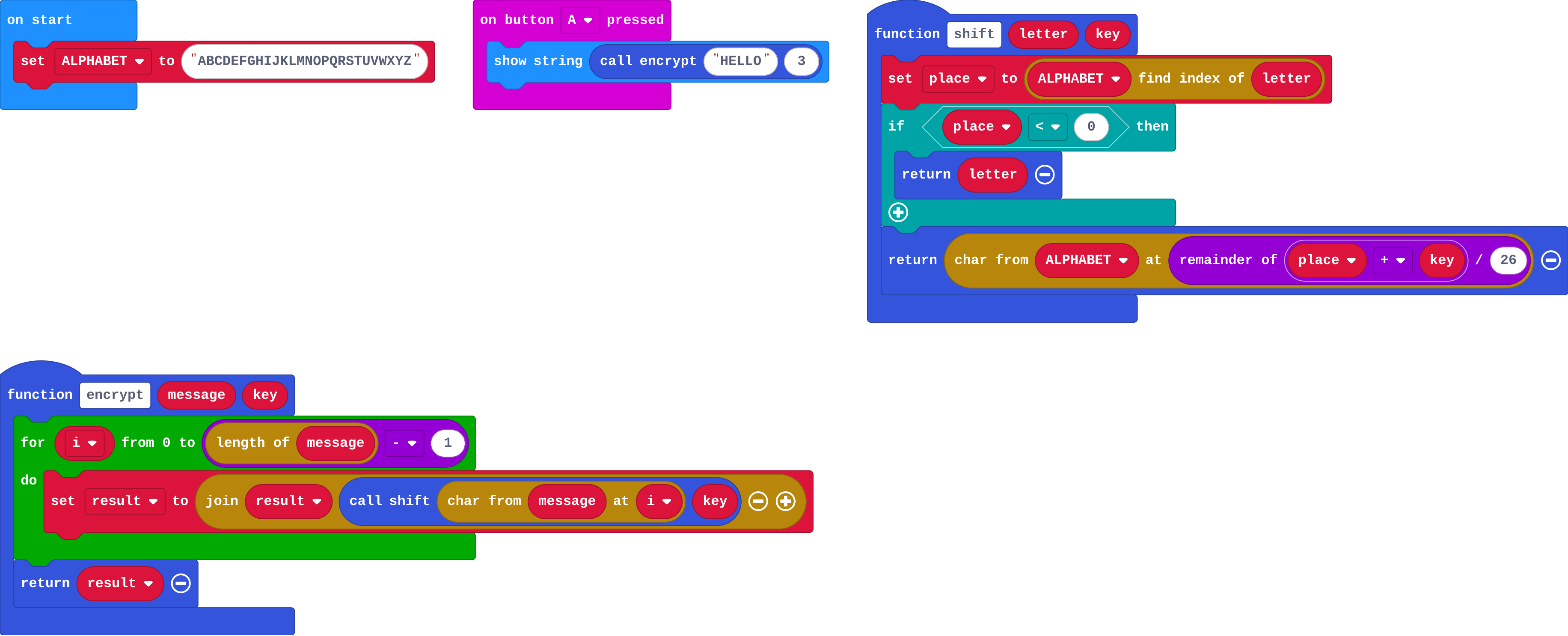
![h:360](https://studio.learningwaypoints.com/tutorials/_pictures/makecode/code/dcaf0a75dc73.png?v=4f1df03690944a6b)

**A is pressed. What does the micro:bit show?**

- DHOOR
- KHOOR
- HELLO
- EBIIL

<!-- Speaker note: What happens: KHOOR. H→K, E→H, L→O, L→O, O→R: each letter moves three places along. Take two or three predictions before anyone runs it. -->

---

<span style="background:#dcfce7; color:#1a1a1a; border:1.5px solid #22c55e; padding:6px 18px; border-radius:8px; font-size:1em; font-weight:500;">✅ Check</span>

## What happened?

* KHOOR. H→K, E→H, L→O, L→O, O→R: each letter moves three places along.

<!-- Speaker note: Reveal after running. Ask who predicted it, and what made them think so. -->

---

<span style="background:#fef3c7; color:#1a1a1a; border:1.5px solid #f59e0b; padding:6px 18px; border-radius:8px; font-size:1em; font-weight:500;">✍️ Activity</span>

## Run it

Open the lesson at this step and try it together.

[studio.learningwaypoints.com/tutorials/code/microbit-security/caesar/?full=step-2#step-2](https://studio.learningwaypoints.com/tutorials/code/microbit-security/caesar/?full=step-2#step-2)

<!-- Speaker note: Students should be able to say: I pressed A and compared what scrolled with my prediction. -->

---

<span style="background:#dbeafe; color:#1a1a1a; border:1.5px solid #3b82f6; padding:6px 18px; border-radius:8px; font-size:1em; font-weight:500;">💬 Discussion</span>

## Investigate

![h:360](https://studio.learningwaypoints.com/tutorials/_pictures/makecode/code/dcaf0a75dc73.png?v=4f1df03690944a6b)

<!-- Speaker note: What this step is for: The key is the number of places to shift; % 26 wraps the end of the alphabet; to undo a shift you shift the rest of the way round. -->

<!-- Speaker note: Teacher: the Z → C question is the whole idea. Give time to do it by hand. -->

---

<span style="background:#dcfce7; color:#1a1a1a; border:1.5px solid #22c55e; padding:6px 18px; border-radius:8px; font-size:1em; font-weight:500;">✅ Check</span>

## Z wraps round

**With key 3, which place does Z (place 25) move to? (A is 0.)**

* Answer: 2

<!-- Speaker note: 25 + 3 = 28, and 28 % 26 = 2: place 2 is C. Without % 26 it would run off the end of the alphabet. -->

---

<span style="background:#dcfce7; color:#1a1a1a; border:1.5px solid #22c55e; padding:6px 18px; border-radius:8px; font-size:1em; font-weight:500;">✅ Check</span>

## Key zero

**What does encrypt do with the key 0?**

- Every letter becomes A
- Nothing is changed
- Every letter moves one place
- It stops with an error

* Answer: Nothing is changed

<!-- Speaker note: A shift of 0 leaves each letter where it is. Key 26 does the same, because 26 % 26 is 0. A key of 0 or 26 would be no secret at all. -->

---

<span style="background:#dcfce7; color:#1a1a1a; border:1.5px solid #22c55e; padding:6px 18px; border-radius:8px; font-size:1em; font-weight:500;">✅ Check</span>

## Going back

**Ana encrypted a message with key 5. To decrypt it, which key should she use with the same encrypt function?**

- 10
- 26
- −5, or 21 (26 − 5)
- 5 again

* Answer: −5, or 21 (26 − 5)

<!-- Speaker note: Shifting by 5 and then by 21 is 26 places in all: the full circle back to the start. So decrypt(message, key) is encrypt(message, 26 − key). -->

---

<span style="background:#fef3c7; color:#1a1a1a; border:1.5px solid #f59e0b; padding:6px 18px; border-radius:8px; font-size:1em; font-weight:500;">✍️ Activity</span>

## Modify

Add a **decrypt** function and test it by encrypting and decrypting **HELLO**.

[Open this step](https://studio.learningwaypoints.com/tutorials/code/microbit-security/caesar/?full=step-4#step-4)

<!-- Speaker note: What this step is for: Decrypting is encrypting with the rest of the circle. Hints, in order: Make a function decrypt(message, key) that returns encrypt(message, 26 − key). Then show decrypt(encrypt("HELLO", 3), 3). For students who need more support: Give encrypt and decrypt complete; students wire up the buttons and radio. For early finishers: Add a numeric key menu: B counts up and A sends, and the key resets to 1 after 25. The hard part, on purpose: Wrapping round the alphabet with % 26, and undoing a shift. Ask them to shift one letter by hand, including one near Z, before testing. When students get stuck: Spaces or numbers come out as letters. Ask: What does indexOf return for a space? Fix: indexOf gives −1 for a character that is not a letter; shift returns it unchanged. / decrypt does not give back the message. Ask: How far round the alphabet is encrypt plus decrypt? Fix: The two keys must add to 26: decrypt uses 26 − key. -->

---

<span style="background:#fef3c7; color:#1a1a1a; border:1.5px solid #f59e0b; padding:6px 18px; border-radius:8px; font-size:1em; font-weight:500;">✍️ Activity</span>

## Make

Make a **secret messenger**. **A** sends an encrypted message by radio and the receiver decrypts it with the same key; **B** adds one to the key on this micro:bit. Try it with both micro:bits using the same key, then with different keys. What does the receiver show?

[Open this step](https://studio.learningwaypoints.com/tutorials/code/microbit-security/caesar/?full=step-5#step-5)

<!-- Speaker note: Hints, in order: A variable key starts at 3. B adds one to key and shows it. / A sends encrypt(MEET AT 3, key) by radio; the receiver shows decrypt(received string, key). -->

<!-- Speaker note: Teacher: when keys differ, the receiver shows plausible-looking nonsense. Ask: does the receiver know it is wrong? -->

---

<span style="background:#dcfce7; color:#1a1a1a; border:1.5px solid #22c55e; padding:6px 18px; border-radius:8px; font-size:1em; font-weight:500;">✅ Check</span>

## Exit ticket

**What is the key in a Caesar cipher?**

* The number of places each letter shifts. Sender and receiver must use the same number.

<!-- Speaker note: Students answer on paper or a mini whiteboard before the reveal. Anyone who cannot answer needs the main idea again next lesson. Where this leads: Next: how long does it take to break this? -->