---
marp: true
theme: default
html: true
---

# Reaction timer

micro:bit: talk and play · Final challenge: Reaction duel

<!-- Speaker note: Students build a reaction game from an almost empty starter in three milestones, using a random wait, running time, a true/false variable, decisions and a best score. About 55 minutes (Predict, Run, Investigate 12 min · Milestone 1 12 min · Milestone 2 12 min · Milestone 3 14 min · Why random 5 min). -->

---

## Today

**We are learning to** build a reaction game from scratch, using everything so far. Wait for the heart, press A as fast as you can, and beat your best.

- I can build a timing game from blocks I know.
- I can use a true/false variable to stop early presses.
- I can keep a best score with an if.

<!-- Speaker note: Before class: This challenge adds nothing new: every part was taught earlier in the course. Time between gave the timing (store running time in `start`, then *running time − start*); True or false gave `waiting`, the flag that catches early presses. The milestones fade the help: Milestone 1 lists the steps, Milestone 2 gives only the goal, Milestone 3 only goals. Play it yourself first; good times are 200 to 400 ms, and the simulator adds a little delay. Teacher: Milestone 1: if times look huge, start was never set. Teacher: Milestone 2: waiting is true only while the heart shows. Read the A event aloud: 'if we are waiting for a press, time it; else, too early'. Teacher: Milestone 3: starting best at 99999 means any first time beats it. Teacher: Why random: a fixed wait can be counted, so it stops measuring reactions. -->

---

## Why it matters

> Sprinters, racing drivers and goalkeepers train their reactions with timers like this. You already know every idea it needs.

<!-- Speaker note: Press **B** to start. After a random wait, a heart appears: press **A** as fast as you can, and the micro:bit shows how many milliseconds you took. You have met every part of this game. Now you build it from almost nothing, in three milestones, with less help each time. -->

---

<span style="background:#dbeafe; color:#1a1a1a; border:1.5px solid #3b82f6; padding:6px 18px; border-radius:8px; font-size:1em; font-weight:500;">💬 Discussion</span>

## Predict

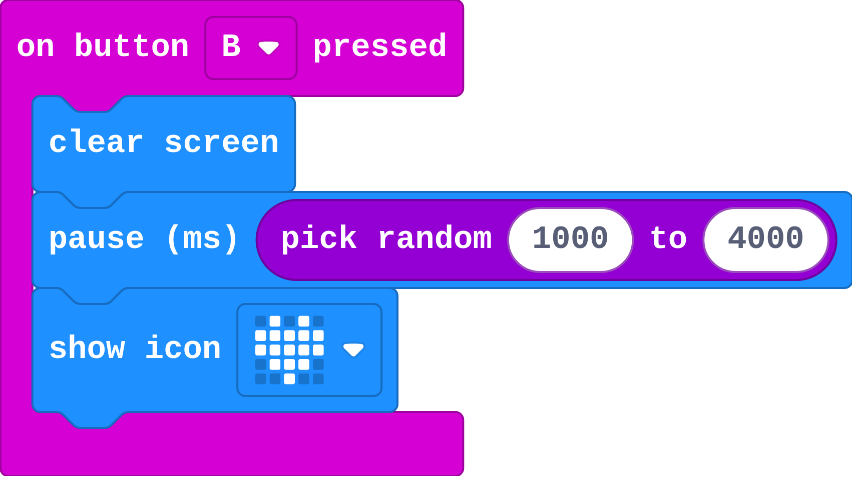
![h:238](https://studio.learningwaypoints.com/tutorials/_pictures/makecode/code/5e8186bfa90d.png?v=3fc5950b8803389b)

**You press B three times, waiting for the heart each time. Does the heart take the same time to appear each time?**

- A different time each time, between 1 and 4 seconds
- It appears straight away
- It never appears
- The same time every time

<!-- Speaker note: What happens: A different time each time. pick random chooses a new wait from 1000 to 4000 ms on every press. Take two or three predictions before anyone runs it. -->

<!-- Speaker note: Teacher: the random wait is what makes it a reaction game. Let students try to guess and fail. -->

---

<span style="background:#dbeafe; color:#1a1a1a; border:1.5px solid #3b82f6; padding:6px 18px; border-radius:8px; font-size:1em; font-weight:500;">💬 Discussion</span>

## Can you guess it? <span style="font-size:.6em;color:#64748b">(2 min)</span>

One student presses B on the projector; the class claps when they think the heart will come.

<!-- Speaker note: Nobody can time it. That is the point of the random wait. -->

---

<span style="background:#dcfce7; color:#1a1a1a; border:1.5px solid #22c55e; padding:6px 18px; border-radius:8px; font-size:1em; font-weight:500;">✅ Check</span>

## What happened?

* A different time each time. pick random chooses a new wait from 1000 to 4000 ms on every press.

<!-- Speaker note: Reveal after running. Ask who predicted it, and what made them think so. -->

---

<span style="background:#fef3c7; color:#1a1a1a; border:1.5px solid #f59e0b; padding:6px 18px; border-radius:8px; font-size:1em; font-weight:500;">✍️ Activity</span>

## Run it

Open the lesson at this step and try it together.

[studio.learningwaypoints.com/tutorials/code/microbit-play/microbit-reaction/?full=step-2#step-2](https://studio.learningwaypoints.com/tutorials/code/microbit-play/microbit-reaction/?full=step-2#step-2)

<!-- Speaker note: Press **B** a few times. Can you guess when the heart will appear? Students should be able to say: I pressed B several times and could not guess when the heart would come. -->

---

<span style="background:#dbeafe; color:#1a1a1a; border:1.5px solid #3b82f6; padding:6px 18px; border-radius:8px; font-size:1em; font-weight:500;">💬 Discussion</span>

## Investigate

![h:360](https://studio.learningwaypoints.com/tutorials/_pictures/makecode/code/36095f35e2e3.png?v=4aeb2fd9acfcafe3)

<!-- Speaker note: Read the finished game before you build your own. What this step is for: Each job of the game has its own home: the random wait and start in B, the timing and the early-press check in A, the best time in a variable. -->

<!-- Speaker note: Teacher: matching jobs to blocks is the plan for the milestones. -->

---

<span style="background:#dcfce7; color:#1a1a1a; border:1.5px solid #22c55e; padding:6px 18px; border-radius:8px; font-size:1em; font-weight:500;">✅ Check</span>

## Jobs and blocks

**This is the finished game. Match each job with the blocks that do it.**

| | |
|---|---|
| `wait an unguessable time` | A. running time − start |
| `measure the reaction` | B. if reaction &lt; best, set best to reaction |
| `catch an early press` | C. if waiting … else |
| `keep the fastest time` | D. pause pick random 1000 to 4000 |

* Answer: wait an unguessable time → D. pause pick random 1000 to 4000; measure the reaction → A. running time − start; catch an early press → C. if waiting … else; keep the fastest time → B. if reaction &lt; best, set best to reaction

<!-- Speaker note:  -->

<style scoped>pre, marp-pre { font-size: 0.5em; line-height: 1.25; } section { font-size: 20px; }</style>

---

<span style="background:#dcfce7; color:#1a1a1a; border:1.5px solid #22c55e; padding:6px 18px; border-radius:8px; font-size:1em; font-weight:500;">✅ Check</span>

## Trace the times

**start is set when the heart appears. Fill in the number shown when A is pressed.**

| start (heart appears) | running time when A is pressed | number shown |
|---|---|---|
| 5200 | 5450 | ? |
| 8000 | 8320 | ? |

* Answer: 250, 320

<!-- Speaker note: The number shown is running time minus start: how many milliseconds passed between the heart and the press. -->

---

<span style="background:#dcfce7; color:#1a1a1a; border:1.5px solid #22c55e; padding:6px 18px; border-radius:8px; font-size:1em; font-weight:500;">✅ Check</span>

## The best time

**best starts at 99999. Your first reaction is 400. What is best after it?**

- 0
- 400
- 99599
- 99999

* Answer: 400

<!-- Speaker note: 400 is less than 99999, so best becomes 400. Starting best very high means any first time beats it. -->

---

<span style="background:#fef3c7; color:#1a1a1a; border:1.5px solid #f59e0b; padding:6px 18px; border-radius:8px; font-size:1em; font-weight:500;">✍️ Activity</span>

## Plan the game <span style="font-size:.6em;color:#64748b">(4 min)</span>

On the board, list the game's jobs. Next to each, write the event that does it: B or A.

<!-- Speaker note: This list is the plan for Milestones 1 and 2. -->

---

<span style="background:#fef3c7; color:#1a1a1a; border:1.5px solid #f59e0b; padding:6px 18px; border-radius:8px; font-size:1em; font-weight:500;">✍️ Activity</span>

## Milestone 1: time the press

The variable `start` is made for you, and **B** clears the screen. Build the rest:

1. **B**: wait a random time, show the heart, and store the time in `start`.
2. **A**: show how long it took.

[Open this step](https://studio.learningwaypoints.com/tutorials/code/microbit-play/microbit-reaction/?full=step-4#step-4)

<!-- Speaker note: What this step is for: Timing is two readings of running time: one stored when the heart appears, one taken at the press. Hints, in order: In B: pause pick random 1000 to 4000, show the heart, then set start to running time. / In A: show number running time − start. For students who need more support: Give students last lesson's no-cheating program as their Milestone 1 starter, and focus on Milestone 3. For early finishers: Show a rating after each time: under 250 a happy face, under 400 a meh face, otherwise a sad face (if, else if, else). The hard part, on purpose: Putting the parts in the right events. Ask which event each job belongs in: B or A. When students get stuck: The time shown is huge, like 15000. Ask: When is start set? Fix: Set start to running time straight after the heart is shown. / Every press shows a cross. Ask: Where is waiting set to true? Fix: Set waiting to true after the heart appears (after start is set). / The best time never changes, or is always the latest time. Ask: What is best at the start, and which way round is your comparison? Fix: Start best at 99999, and use if reaction < best. -->

---

<span style="background:#fef3c7; color:#1a1a1a; border:1.5px solid #f59e0b; padding:6px 18px; border-radius:8px; font-size:1em; font-weight:500;">✍️ Activity</span>

## Milestone 2: no cheating

Make an early press show a cross, using the variable `waiting`. Set it, ask about it, and set it back.

[Open this step](https://studio.learningwaypoints.com/tutorials/code/microbit-play/microbit-reaction/?full=step-5#step-5)

<!-- Speaker note: What this step is for: A true/false variable remembers whether the heart is showing, so each event can check it. -->

---

<span style="background:#fef3c7; color:#1a1a1a; border:1.5px solid #f59e0b; padding:6px 18px; border-radius:8px; font-size:1em; font-weight:500;">✍️ Activity</span>

## Make: Milestone 3: beat your best

Keep a **best time**:

- A new variable `best` remembers your fastest time.
- When you beat it, the micro:bit celebrates.
- **A+B** shows your best.

[Open this step](https://studio.learningwaypoints.com/tutorials/code/microbit-play/microbit-reaction/?full=step-6#step-6)

<!-- Speaker note: What this step is for: Combining a variable, a comparison and an event into a rule shows whether a student can put the course's ideas together. -->

---

<span style="background:#fef3c7; color:#1a1a1a; border:1.5px solid #f59e0b; padding:6px 18px; border-radius:8px; font-size:1em; font-weight:500;">✍️ Activity</span>

## Why random?

Play this version a few times. What do you notice?

[Open this step](https://studio.learningwaypoints.com/tutorials/code/microbit-play/microbit-reaction/?full=step-7#step-7)

---

<span style="background:#fef3c7; color:#1a1a1a; border:1.5px solid #f59e0b; padding:6px 18px; border-radius:8px; font-size:1em; font-weight:500;">✍️ Activity</span>

## Leaderboard <span style="font-size:.6em;color:#64748b">(4 min)</span>

Write your best time on the board. Who is fastest in the class?

---

<span style="background:#dcfce7; color:#1a1a1a; border:1.5px solid #22c55e; padding:6px 18px; border-radius:8px; font-size:1em; font-weight:500;">✅ Check</span>

## Exit ticket

**Why does the game need waiting? What would happen without it?**

* Without it, pressing A before the heart still shows a number, so players could cheat by pressing early.

<!-- Speaker note: Students answer on paper or a mini whiteboard before the reveal. Anyone who cannot answer needs the main idea again next lesson. Where this leads: Next: Radio duel, the same game for two players over radio. Class ideas: a class reaction leaderboard on the board; does reaction time change after exercise? (a quick science investigation with real micro:bits). -->