---
marp: true
theme: default
html: true
---

# Radio duel

micro:bit: talk and play · Final challenge: Reaction duel

<!-- Speaker note: Students turn the reaction game into a two-player race over radio, using a shared message code, a function to remove copied blocks, a true/false variable and a score. About 60 minutes (Predict, Run, Investigate 12 min · Milestone 1 10 min · Milestone 2 15 min · Milestone 3 15 min · Fair play 5 min). -->

---

## Today

**We are learning to** turn the reaction timer into a two-player race over radio. First to press after the heart wins.

- I can keep two micro:bits in step with an agreed code of messages.
- I can replace copied blocks with a function.
- I can make only the first press count, using a true/false variable.

<!-- Speaker note: Before class: Both micro:bits run the **same** program. The players agree a **code**: 0 = get ready, 1 = go, 2 = I pressed first (and 3 = I won the match, in Milestone 3). Whoever presses B sends 0, waits, sends 1 and shows its own heart; the other shows its heart when 1 arrives. `racing` is true only while a round is on, so only the first press counts, and a late press after receiving 2 does nothing. Milestone 1 is a **refactor**: the starter shows the heart and sets racing in two places (a design fault: copies must be kept the same by hand), and students fold them into one function. In the simulator, two micro:bits appear; one student can play both sides to test. Teacher: Milestone 1: defs 1 and calls 2 is the check. Ask: if you change the heart now, how many places change? Teacher: Milestone 2: read the A event aloud: 'if we are racing, stop, tell the other player, celebrate'. Teacher: Milestone 3: a score variable and message 3. Give pairs real micro:bits for this if you have them: it is far more fun. Teacher: Fair play: in a room of micro:bits, each pair needs its own group. -->

---

## Why it matters

> Quiz shows use buzzers that lock out everyone else the moment one player presses. That is a few radio messages and a true/false variable.

<!-- Speaker note: Two players, two micro:bits. Either player presses **B** to start a round. After a random wait, the heart appears on both; the first to press **A** wins the round. Both micro:bits run the **same** program, and they agree on a code: **0** means get ready, **1** means go, **2** means I pressed first. In the simulator, the second micro:bit appears because the program uses radio. Press B on one, then race yourself by pressing A on either. -->

---

<span style="background:#dbeafe; color:#1a1a1a; border:1.5px solid #3b82f6; padding:6px 18px; border-radius:8px; font-size:1em; font-weight:500;">💬 Discussion</span>

## Predict

![h:360](https://studio.learningwaypoints.com/tutorials/_pictures/makecode/code/4b5a0ce2a28b.png?v=2990d1eee81e0f89)

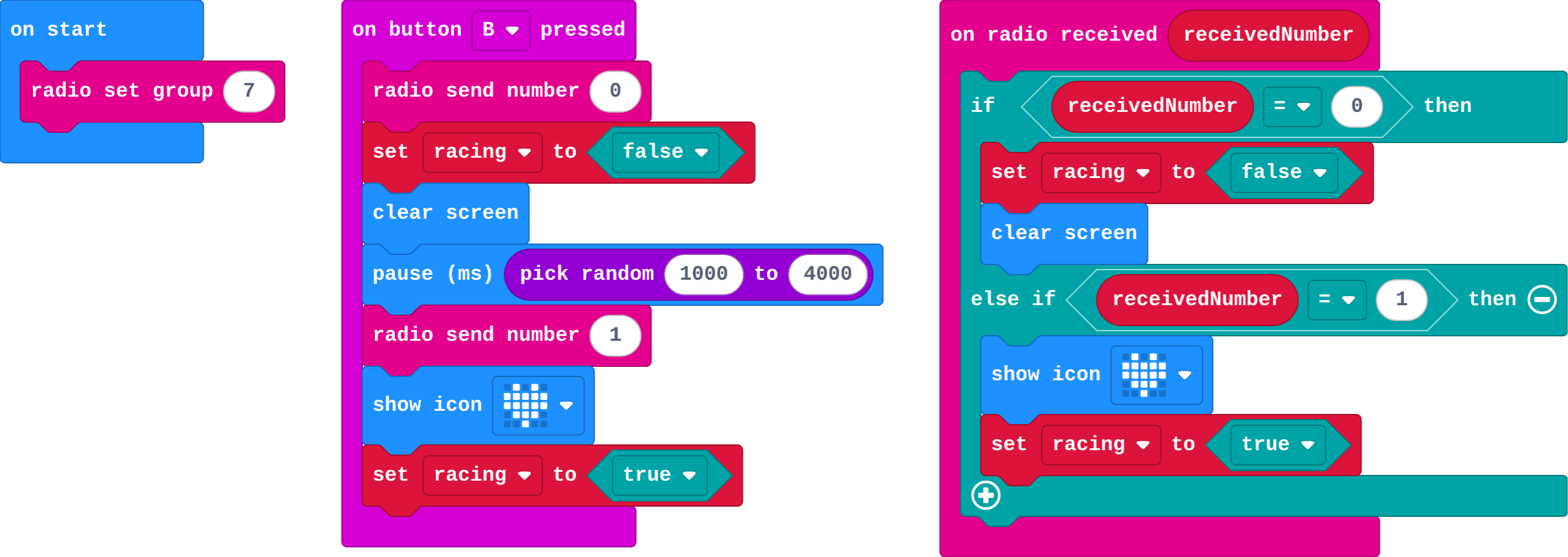
**Player 1 presses B. When the heart appears, where does it show?**

- Only on player 1's micro:bit
- On both, at almost the same moment
- Only on player 2's micro:bit
- Nowhere until A is pressed

<!-- Speaker note: What happens: On both. Player 1's micro:bit sends 1 and shows its own heart; player 2's shows its heart when the 1 arrives. Take two or three predictions before anyone runs it. -->

<!-- Speaker note: Teacher: the heart shows on both. Ask how the second micro:bit knows when (message 1). -->

---

<span style="background:#dcfce7; color:#1a1a1a; border:1.5px solid #22c55e; padding:6px 18px; border-radius:8px; font-size:1em; font-weight:500;">✅ Check</span>

## What happened?

* On both. Player 1's micro:bit sends 1 and shows its own heart; player 2's shows its heart when the 1 arrives.

<!-- Speaker note: Reveal after running. Ask who predicted it, and what made them think so. -->

---

<span style="background:#fef3c7; color:#1a1a1a; border:1.5px solid #f59e0b; padding:6px 18px; border-radius:8px; font-size:1em; font-weight:500;">✍️ Activity</span>

## Run it

Open the lesson at this step and try it together.

[studio.learningwaypoints.com/tutorials/code/microbit-play/microbit-duel/?full=step-2#step-2](https://studio.learningwaypoints.com/tutorials/code/microbit-play/microbit-duel/?full=step-2#step-2)

<!-- Speaker note: Press **B** on either micro:bit and watch both. Students should be able to say: I pressed B on one micro:bit and saw the heart appear on both. -->

---

<span style="background:#dbeafe; color:#1a1a1a; border:1.5px solid #3b82f6; padding:6px 18px; border-radius:8px; font-size:1em; font-weight:500;">💬 Discussion</span>

## Investigate

![h:360](https://studio.learningwaypoints.com/tutorials/_pictures/makecode/code/4b5a0ce2a28b.png?v=2990d1eee81e0f89)

<!-- Speaker note: What this step is for: Two micro:bits stay in step by agreeing on a code of messages. The same blocks written twice must be kept the same by hand, which is a reason for a function. -->

<!-- Speaker note: Teacher: the match names the code. The two-copies question is why Milestone 1 exists. -->

---

<span style="background:#dcfce7; color:#1a1a1a; border:1.5px solid #22c55e; padding:6px 18px; border-radius:8px; font-size:1em; font-weight:500;">✅ Check</span>

## The code

**Match each message with what it means in the duel.**

| | |
|---|---|
| `0` | A. I pressed first: you lose this round |
| `1` | B. go: show the heart and start racing |
| `2` | C. get ready: clear the screen, no racing yet |

* Answer: 0 → C. get ready: clear the screen, no racing yet; 1 → B. go: show the heart and start racing; 2 → A. I pressed first: you lose this round

<!-- Speaker note:  -->

<style scoped>pre, marp-pre { font-size: 0.5em; line-height: 1.25; } section { font-size: 22px; }</style>

---

<span style="background:#dcfce7; color:#1a1a1a; border:1.5px solid #22c55e; padding:6px 18px; border-radius:8px; font-size:1em; font-weight:500;">✅ Check</span>

## Two copies

**The blocks 'show heart, set racing to true' appear in two places. You change the heart to a diamond in one place only. What goes wrong?**

- The player who pressed B sees a different signal from the other player
- Both see the diamond
- Nothing
- The radio stops working

* Answer: The player who pressed B sees a different signal from the other player

<!-- Speaker note: Copied blocks have to be changed in every copy. Forget one and the two players see different signals: an unfair race. A function keeps one copy. -->

<style scoped>pre, marp-pre { font-size: 0.5em; line-height: 1.25; } section { font-size: 24px; }</style>

---

<span style="background:#dcfce7; color:#1a1a1a; border:1.5px solid #22c55e; padding:6px 18px; border-radius:8px; font-size:1em; font-weight:500;">✅ Check</span>

## In Python

```python
def on_received_number(receivedNumber):
    global racing
    if receivedNumber == 0:
        racing = False
        basic.clear_screen()
    elif receivedNumber == 1:
        basic.show_icon(IconNames.HEART)
        racing = True
radio.on_received_number(on_received_number)
```

`elif` is Python's short way to write *else if*.

**The receiving part in Python. Match each line with what it does.**

| | |
|---|---|
| `if receivedNumber == 0:` | A. checks for get ready |
| `elif receivedNumber == 1:` | B. otherwise, checks for go |
| `racing = True` | C. remembers that a round is on |

* Answer: if receivedNumber == 0: → A. checks for get ready; elif receivedNumber == 1: → B. otherwise, checks for go; racing = True → C. remembers that a round is on

<!-- Speaker note:  -->

<style scoped>pre, marp-pre { font-size: 0.5em; line-height: 1.25; } section { font-size: 19px; }</style>

---

<span style="background:#fef3c7; color:#1a1a1a; border:1.5px solid #f59e0b; padding:6px 18px; border-radius:8px; font-size:1em; font-weight:500;">✍️ Activity</span>

## Milestone 1: one go function

Make a function **go** that shows the heart and sets `racing` to true. Call it in **both** places, so there is one copy to change.

[Open this step](https://studio.learningwaypoints.com/tutorials/code/microbit-play/microbit-duel/?full=step-4#step-4)

<!-- Speaker note: What this step is for: A function removes the copy: both places call one job, so a change happens everywhere at once. Hints, in order: Make a Function called go, and drag show heart and set racing to true into it. / Put call go in both places where those blocks were. For students who need more support: Run Milestone 3 in pairs: one student builds the winner side (counting and sending 3), the other the loser side (receiving 3). For early finishers: Add an early-press penalty: pressing A before the heart sends 4, and the other player wins the round. The hard part, on purpose: Keeping two micro:bits in step with a code of messages. Ask them to trace one round on paper: who sends what, and who checks it. When students get stuck: The heart only shows on one micro:bit. Ask: Is message 1 sent, and does the receiver check for 1? Fix: Send 1 before calling go, and in on radio received call go when receivedNumber = 1. / Both players see a happy face. Ask: Do you check racing before counting a press? Fix: In A, only act if racing; set racing to false straight away. / The check for Milestone 1 does not tick. Ask: How many call go blocks are there? Fix: Call go in both places: after sending 1, and when 1 arrives. -->

---

<span style="background:#fef3c7; color:#1a1a1a; border:1.5px solid #f59e0b; padding:6px 18px; border-radius:8px; font-size:1em; font-weight:500;">✍️ Activity</span>

## Milestone 2: first press wins

- When **A** is pressed while racing: stop racing, send **2**, show a happy face.
- When **2** arrives while racing: stop racing, show a sad face.

[Open this step](https://studio.learningwaypoints.com/tutorials/code/microbit-play/microbit-duel/?full=step-5#step-5)

<!-- Speaker note: What this step is for: One message tells the other player the result, and racing makes sure only the first press counts. Hints, in order: In A: if racing, set racing to false, send 2 and show a happy face. / In on radio received, add else if receivedNumber = 2: if racing, set racing to false and show a sad face. -->

---

<span style="background:#fef3c7; color:#1a1a1a; border:1.5px solid #f59e0b; padding:6px 18px; border-radius:8px; font-size:1em; font-weight:500;">✍️ Activity</span>

## Make: Milestone 3: first to three

Make it a **match**: the first player to win **three** rounds wins.

- Count your round wins; **A+B** shows them.
- At three wins, send **3** and show a trophy.
- When **3** arrives, show game over.

[Open this step](https://studio.learningwaypoints.com/tutorials/code/microbit-play/microbit-duel/?full=step-6#step-6)

<!-- Speaker note: What this step is for: A match adds a score variable and one more agreed message, without changing how a round works. Hints, in order: A variable wins goes up by 1 each time you win a round. A+B shows it. / When wins reaches 3, send 3 and show a trophy (a picture). When 3 arrives, the other player shows game over. -->

---

<span style="background:#fef3c7; color:#1a1a1a; border:1.5px solid #f59e0b; padding:6px 18px; border-radius:8px; font-size:1em; font-weight:500;">✍️ Activity</span>

## Fair play

Play a match against a partner. Agree a group number of your own before you start.

---

<span style="background:#dcfce7; color:#1a1a1a; border:1.5px solid #22c55e; padding:6px 18px; border-radius:8px; font-size:1em; font-weight:500;">✅ Check</span>

## Exit ticket

**In a duel, the first micro:bit radios 1 just before it shows a heart, and the second shows a heart when 1 arrives. Why do the two hearts appear at almost the same time?**

* The first sends message 1 just before showing its heart, and the second shows its heart as soon as 1 arrives.

<!-- Speaker note: Students answer on paper or a mini whiteboard before the reveal. Anyone who cannot answer needs the main idea again next lesson. Where this leads: Two optional lessons go further: Fake-outs and levels (one player, harder rules) and Tournament (a scoreboard list and a round function). Class ideas: a class knockout tournament; a quiz buzzer for real class quizzes. -->