---
marp: true
theme: default
html: true
---

# Timers

Arcade Foundations · Collide and score

<!-- Speaker note: Students use a timer event to make a new enemy every second, from a random height, and see that both the timer and pick random run again each time. About 45 minutes (Predict and Run 7 min · Investigate 10 min · Modify 8 min · Mix it up 3 min · Make 13 min · Rain dodger 4 min). -->

---

## Today

**We are learning to** use a timer to make a new enemy every second, from a random place, for as long as the game lasts.

- I can use a timer to make a new enemy again and again.
- I can choose how often a timer runs.
- I can give each new sprite a random place.

<!-- Speaker note: Before class: **on game update every 1000 ms** (Game) is a **timer event**: it runs its blocks again every so many milliseconds (1000 ms = 1 second) for as long as the game lasts. Here it makes a new enemy each time, at x 160 (the right edge), with a **negative vx** so it flies left. **pick random** (Math) gives a new whole number each time it runs, so inside the timer each rock gets its own height. **start countdown** (Info) ends the game after so many seconds. Try the Make yourself: about 15 blocks. Teacher: Mix it up: lives, from last lesson. -->

---

## Why it matters

> Enemies that keep on coming, raindrops that never stop: a game that runs for minutes is made by a few blocks that run again and again.

<!-- Speaker note: Last lesson three rocks flew in, and then the game ran out of rocks. A **timer** fixes that. **on game update every 1000 ms** (in **Game**) is an event that runs its blocks again every so many **milliseconds** (1000 ms is one second), for as long as the game lasts. -->

---

<span style="background:#dbeafe; color:#1a1a1a; border:1.5px solid #3b82f6; padding:6px 18px; border-radius:8px; font-size:1em; font-weight:500;">💬 Discussion</span>

## Predict

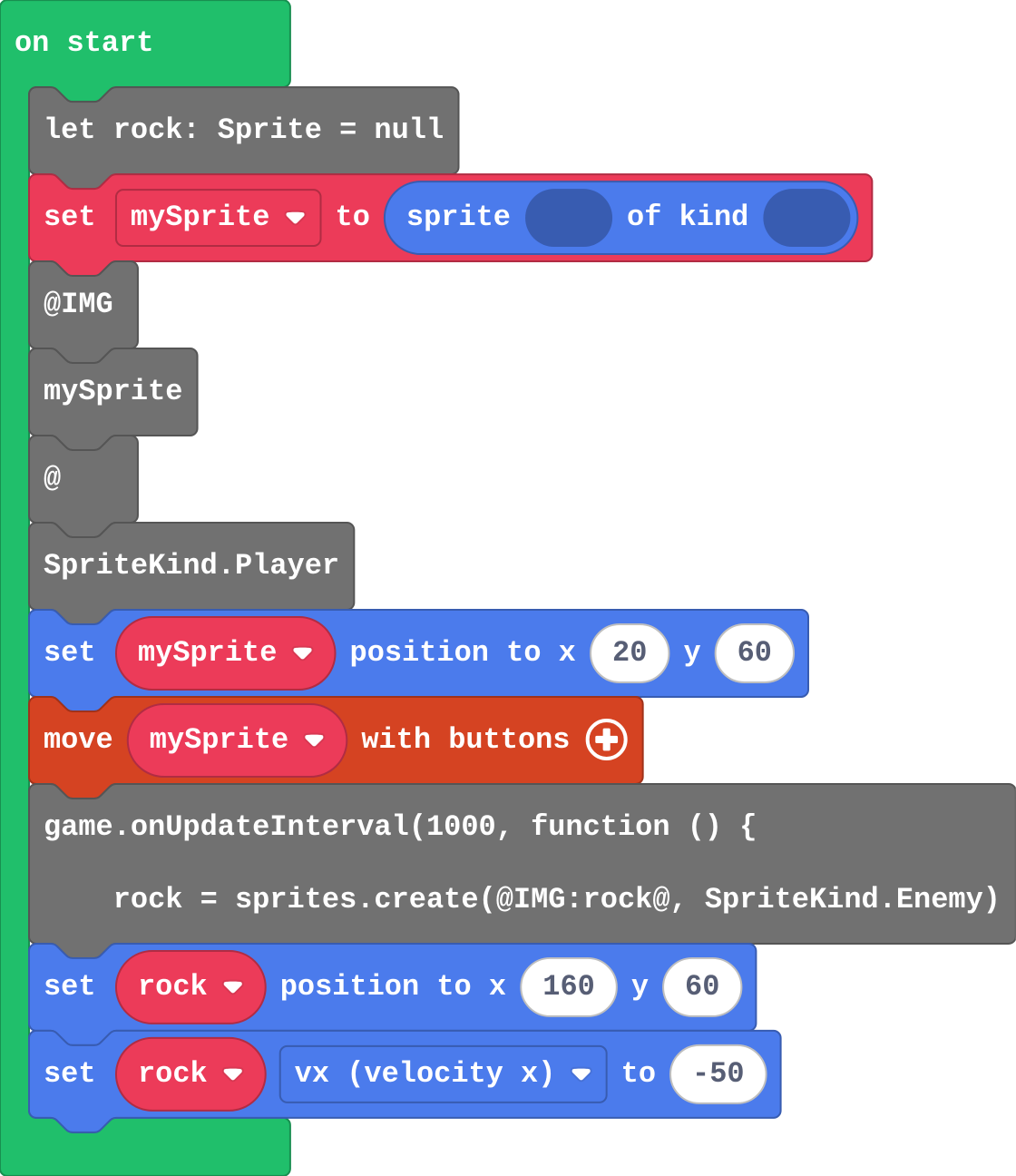
![h:360](https://studio.learningwaypoints.com/tutorials/_pictures/makecode/code/3aefa7e7c5f5.png?v=bae0808342973c21)

**The timer runs every 1000 ms and makes a rock each time. You watch for 5 seconds. How many rocks have appeared?**

- 0
- 1
- 5
- 1000

<!-- Speaker note: What happens: 5. The timer runs once every second, and each time it makes a new rock: 5 seconds, 5 rocks. Take two or three predictions before anyone runs it. -->

<!-- Speaker note: Teacher: some students expect one rock, because the create block appears once. It runs once per timer run. Ask the '1' group how often the timer runs. -->

---

<span style="background:#dcfce7; color:#1a1a1a; border:1.5px solid #22c55e; padding:6px 18px; border-radius:8px; font-size:1em; font-weight:500;">✅ Check</span>

## What happened?

* 5. The timer runs once every second, and each time it makes a new rock: 5 seconds, 5 rocks.

<!-- Speaker note: Reveal after running. Ask who predicted it, and what made them think so. -->

---

<span style="background:#fef3c7; color:#1a1a1a; border:1.5px solid #f59e0b; padding:6px 18px; border-radius:8px; font-size:1em; font-weight:500;">✍️ Activity</span>

## Run it

Open the lesson at this step and try it together.

[studio.learningwaypoints.com/tutorials/code/arcade/arcade-timers/?full=step-2#step-2](https://studio.learningwaypoints.com/tutorials/code/arcade/arcade-timers/?full=step-2#step-2)

<!-- Speaker note: Count the rocks as they come. Students should be able to say: I counted the rocks for five seconds and compared with my prediction. -->

---

<span style="background:#dbeafe; color:#1a1a1a; border:1.5px solid #3b82f6; padding:6px 18px; border-radius:8px; font-size:1em; font-weight:500;">💬 Discussion</span>

## Investigate

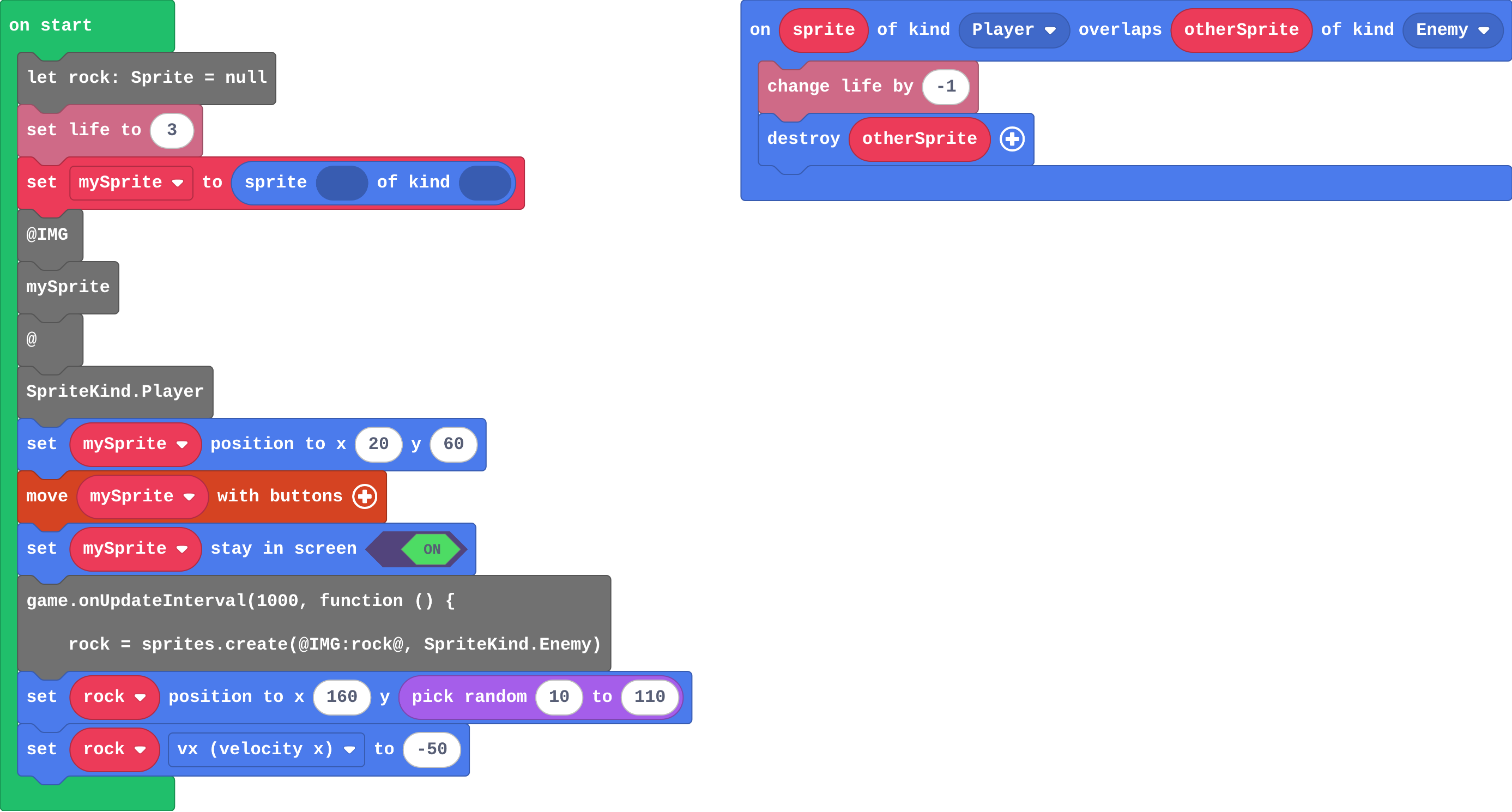
![h:360](https://studio.learningwaypoints.com/tutorials/_pictures/makecode/code/70ebc25ef707.png?v=91fa947c076ae343)

<!-- Speaker note: Dodge the rocks with the arrow keys. What this step is for: A timer event runs its blocks every so many milliseconds, so each run can make a new sprite. pick random runs again each time too, so each rock gets its own height. -->

<!-- Speaker note: Teacher: Ava's rocks are the random-once mistake: a random number picked once is just a number. -->

---

<span style="background:#dcfce7; color:#1a1a1a; border:1.5px solid #22c55e; padding:6px 18px; border-radius:8px; font-size:1em; font-weight:500;">✅ Check</span>

## How many?

**The timer runs every 500 ms. How many rocks has it made after 10 seconds?**

* Answer: 20

<!-- Speaker note: 500 ms is half a second, so the timer runs twice a second: 20 times in 10 seconds. -->

---

<span style="background:#dcfce7; color:#1a1a1a; border:1.5px solid #22c55e; padding:6px 18px; border-radius:8px; font-size:1em; font-weight:500;">✅ Check</span>

## Ava's rocks

Ava's program:

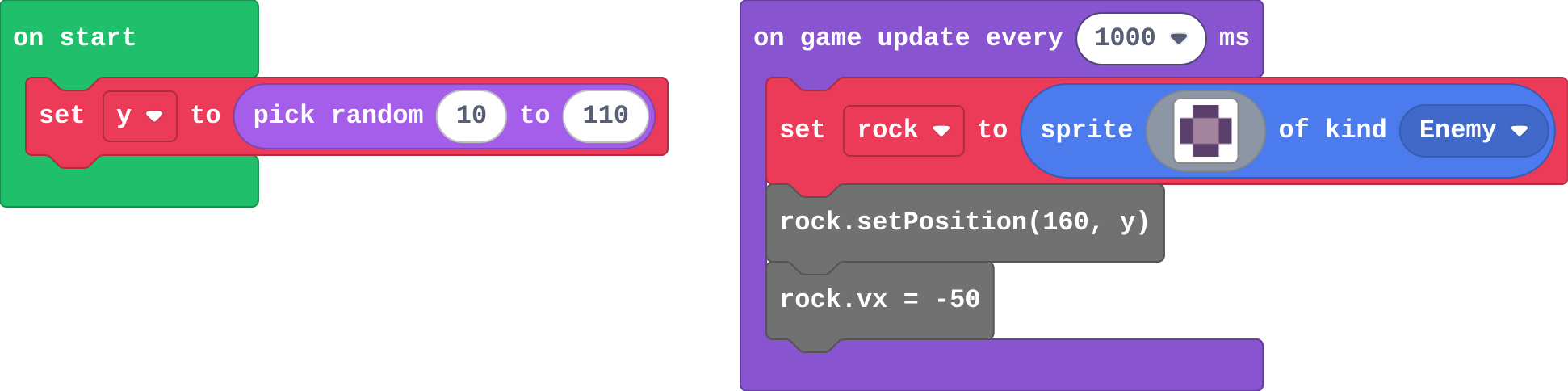
![h:242](https://studio.learningwaypoints.com/tutorials/_pictures/makecode/code/7c1d15693fd6.png?v=adae39729f1270d7)

**Ava picks a random height once, in on start, and stores it in y. Every rock in her timer uses y. What does she see?**

- Rocks at every height at once
- No rocks
- Each rock comes at a different height
- Every rock comes at the same height

* Answer: Every rock comes at the same height

<!-- Speaker note: pick random ran once, in on start, so y never changes. Put pick random inside the timer, so each new rock gets a new number. -->

<style scoped>pre, marp-pre { font-size: 0.5em; line-height: 1.25; } section { font-size: 24px; }</style>

---

<span style="background:#dcfce7; color:#1a1a1a; border:1.5px solid #22c55e; padding:6px 18px; border-radius:8px; font-size:1em; font-weight:500;">✅ Check</span>

## How often?

**Match each timer with how often it runs.**

| | |
|---|---|
| `every 1000 ms` | A. once a second |
| `every 500 ms` | B. twice a second |
| `every 2000 ms` | C. once every two seconds |

* Answer: every 1000 ms → A. once a second; every 500 ms → B. twice a second; every 2000 ms → C. once every two seconds

<!-- Speaker note:  -->

---

<span style="background:#fef3c7; color:#1a1a1a; border:1.5px solid #f59e0b; padding:6px 18px; border-radius:8px; font-size:1em; font-weight:500;">✍️ Activity</span>

## Clap the timer <span style="font-size:.6em;color:#64748b">(3 min)</span>

The class claps once a second. On each clap, one student rolls a dice and calls out a height.

<!-- Speaker note: A new roll every clap: that is pick random inside the timer. Rolling once at the start is Ava's bug. -->

---

<span style="background:#fef3c7; color:#1a1a1a; border:1.5px solid #f59e0b; padding:6px 18px; border-radius:8px; font-size:1em; font-weight:500;">✍️ Activity</span>

## Modify


- **Faster rocks:** Make a rock come every **half a second**.
- **Random heights:** Give each rock a **random** height, so they don't all come through the middle.

[Open this step](https://studio.learningwaypoints.com/tutorials/code/arcade/arcade-timers/?full=step-4#step-4)

<!-- Speaker note: What this step is for: The number in the timer sets how often it runs: a smaller number means more often. pick random inside the timer gives each new sprite a new number. Hints, in order: Change 1000 in on game update every. Half a second is 500 ms. / pick random is in Math. / Drag it into the y of set rock position, inside the timer: pick random 10 to 110. For students who need more support: Give students the timer block with the enemy already inside, and ask them to add lives, the countdown and the overlap event. For early finishers: Make the game a win if you survive: add on countdown end (Info) with game over (win). The hard part, on purpose: Seeing that the blocks inside a timer run again and again. Ask how many times the create block has run after five seconds. When students get stuck: Only one enemy ever appears. Ask: Is the create block inside the timer, or in on start? Fix: Move it into on game update every 1000 ms, so a new one is made each second. / No enemies appear. Ask: Where does each enemy start, and which way does it move? Fix: Start at x 160 and give a negative vx. With a positive vx it leaves the screen to the right at once. / Every rock comes at the same height. Ask: Where is pick random? Fix: Put it inside the timer, in the set position block, so it runs for every rock. -->

<!-- Speaker note: Teacher: a smaller timer number means more often. -->

---

<span style="background:#dbeafe; color:#1a1a1a; border:1.5px solid #3b82f6; padding:6px 18px; border-radius:8px; font-size:1em; font-weight:500;">💬 Discussion</span>

## Investigate: Mix it up

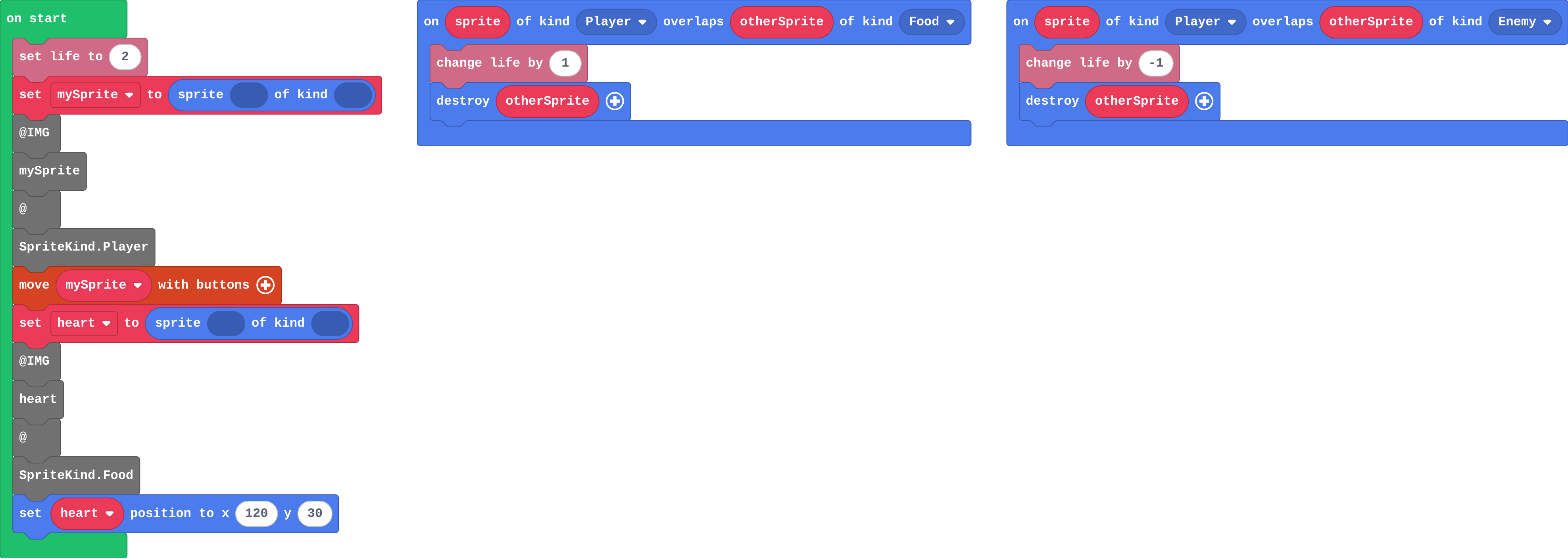
![h:360](https://studio.learningwaypoints.com/tutorials/_pictures/makecode/code/a349e1d91e6d.png?v=80c822d339b35d6c)

<!-- Speaker note: What this step is for: The engine ends the game when the lives reach 0; each overlap changes the lives once if the sprite is destroyed. -->

---

<span style="background:#dcfce7; color:#1a1a1a; border:1.5px solid #22c55e; padding:6px 18px; border-radius:8px; font-size:1em; font-weight:500;">✅ Check</span>

## Mix it up

**The player starts with 2 lives. Fill in the lives after each thing happens.**

| what happens | lives after |
|---|---|
| (start) | 2 |
| collects a heart | ? |
| a rock hits | ? |
| a rock hits | ? |

* Answer: 3, 2, 1

<!-- Speaker note: The heart's Player–Food event adds one life; each rock that hits takes one and is destroyed. What this step is for: The engine ends the game when the lives reach 0; each overlap changes the lives once if the sprite is destroyed. -->

<style scoped>pre, marp-pre { font-size: 0.5em; line-height: 1.25; } section { font-size: 24px; }</style>

---

<span style="background:#fef3c7; color:#1a1a1a; border:1.5px solid #f59e0b; padding:6px 18px; border-radius:8px; font-size:1em; font-weight:500;">✍️ Activity</span>

## Make

Make a **30-second dodge game** (bats in a cave, asteroids, traffic):

- the player starts with **3 lives**
- a **countdown** of 30 seconds (**start countdown**, in Info): survive it to finish
- every second, a new **enemy** flies in from the **right edge** at a **random height**
- each touch takes **one** life

[Open this step](https://studio.learningwaypoints.com/tutorials/code/arcade/arcade-timers/?full=step-6#step-6)

<!-- Speaker note: Hints, in order: In on start: set life to 3 and start countdown 30 (both in Info). / Timer: on game update every 1000 ms (Game). Inside, create an Enemy, set its position to x 160 and y pick random 10 to 110, and set its vx to a negative number. / Overlap Player with Enemy: change life by -1, and destroy otherSprite so one touch takes only one life. -->

<!-- Speaker note: Teacher: x 160 is the right edge, negative vx flies left. Students who forget destroy lose all three lives at once. -->

<style scoped>pre, marp-pre { font-size: 0.5em; line-height: 1.25; } section { font-size: 27px; }</style>

---

<span style="background:#fef3c7; color:#1a1a1a; border:1.5px solid #f59e0b; padding:6px 18px; border-radius:8px; font-size:1em; font-weight:500;">✍️ Activity</span>

## Change a rain dodger

Someone is walking home in the rain without an umbrella. Make the rain heavier (more drops, falling faster), then give the walker 5 lives and a 40-second walk home.

[Open this step](https://studio.learningwaypoints.com/tutorials/code/arcade/arcade-timers/?full=step-7#step-7)

---

<span style="background:#dcfce7; color:#1a1a1a; border:1.5px solid #22c55e; padding:6px 18px; border-radius:8px; font-size:1em; font-weight:500;">✅ Check</span>

## Exit ticket

**A timer runs every 2000 ms and makes one enemy each time. How many enemies after 10 seconds?**

* 5. It runs once every two seconds.

<!-- Speaker note: Students answer on paper or a mini whiteboard before the reveal. Anyone who cannot answer needs the main idea again next lesson. Where this leads: Next unit the game decides things every frame: if a sprite leaves the screen, wrap it round. Class idea: vote on the fairest number of lives and timer speed. -->