---
marp: true
theme: default
html: true
---

# Score and lives

Arcade Foundations · Collide and score

<!-- Speaker note: Students give the player lives, make a hit cost one life, and see that the engine ends the game at 0 lives and that an overlap runs every frame while sprites touch. About 40 minutes (Predict and Run 7 min · Investigate 10 min · Modify 7 min · Mix it up 3 min · Make 9 min · Dodgeball 4 min). -->

---

## Today

**We are learning to** give the player lives, make a hit cost one, and let the engine end the game.

- I can give the player lives and let the game end by itself.
- I can make a hit cost exactly one life.
- I can explain why an enemy must be destroyed (or moved) when it hits the player.

<!-- Speaker note: Before class: **Info** blocks keep a **score** and **lives** (hearts) at the top of the screen. When the lives reach **0**, Arcade ends the game by itself. One important fact: an **overlap event runs every frame** (about 30 times a second) **while the two sprites still touch**. If the enemy is not destroyed, one touch takes life after life, and the game ends at once. Timers (a new enemy every second) are next lesson; here the rocks are made at the start and flown in with a velocity. Teacher: Mix it up: kinds and velocity, from earlier lessons. -->

---

## Why it matters

> Three hearts in the corner and a game that can end: that is what turns moving sprites into a game you can win or lose.

<!-- Speaker note: Last lesson the score went up and down, but the game never ended. Arcade's **Info** blocks keep a score and **lives** (hearts) at the top of the screen, and they end the game by themselves. -->

---

<span style="background:#dbeafe; color:#1a1a1a; border:1.5px solid #3b82f6; padding:6px 18px; border-radius:8px; font-size:1em; font-weight:500;">💬 Discussion</span>

## Predict

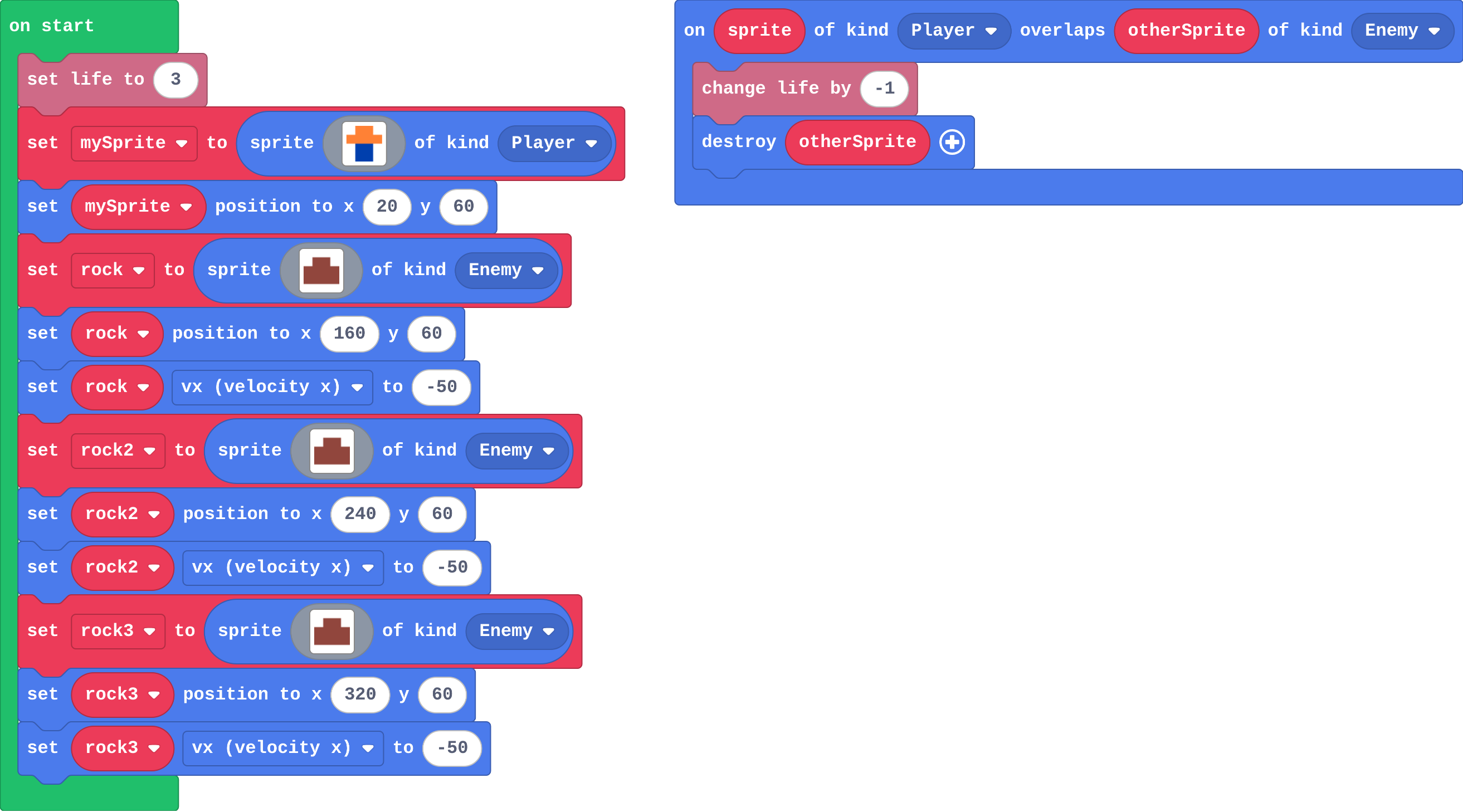
![h:360](https://studio.learningwaypoints.com/tutorials/_pictures/makecode/code/979edd6e59db.png?v=fdefe0f42b67a68d)

**The player has 3 lives and cannot move. Three rocks fly at it. What happens?**

- Nothing ends the game, because there is no game over block
- The first rock takes all 3 lives
- The player loses all 3 lives, then the game ends by itself
- The lives go to 0, then -1, -2, and the game keeps going

<!-- Speaker note: What happens: Each rock that hits takes a life and is destroyed. After three hits the lives reach 0, and Arcade shows GAME OVER by itself: you never need a game over block for running out of lives. Take two or three predictions before anyone runs it. -->

<!-- Speaker note: Teacher: many students expect lives to go below 0, or that a game over block is needed. The engine does it. Ask the 'no game over block' group to run it and watch. -->

---

<span style="background:#dcfce7; color:#1a1a1a; border:1.5px solid #22c55e; padding:6px 18px; border-radius:8px; font-size:1em; font-weight:500;">✅ Check</span>

## What happened?

* Each rock that hits takes a life and is destroyed. After three hits the lives reach 0, and Arcade shows GAME OVER by itself: you never need a game over block for running out of lives.

<!-- Speaker note: Reveal after running. Ask who predicted it, and what made them think so. -->

---

<span style="background:#fef3c7; color:#1a1a1a; border:1.5px solid #f59e0b; padding:6px 18px; border-radius:8px; font-size:1em; font-weight:500;">✍️ Activity</span>

## Run it

Open the lesson at this step and try it together.

[studio.learningwaypoints.com/tutorials/code/arcade/arcade-score-lives/?full=step-2#step-2](https://studio.learningwaypoints.com/tutorials/code/arcade/arcade-score-lives/?full=step-2#step-2)

<!-- Speaker note: Watch the hearts at the top of the screen. Use the restart button under the simulator to play again. Students should be able to say: I watched the rocks and the hearts, and compared what happened with my prediction. -->

<!-- Speaker note: Teacher: count the hearts aloud as they go. -->

---

<span style="background:#dbeafe; color:#1a1a1a; border:1.5px solid #3b82f6; padding:6px 18px; border-radius:8px; font-size:1em; font-weight:500;">💬 Discussion</span>

## Investigate

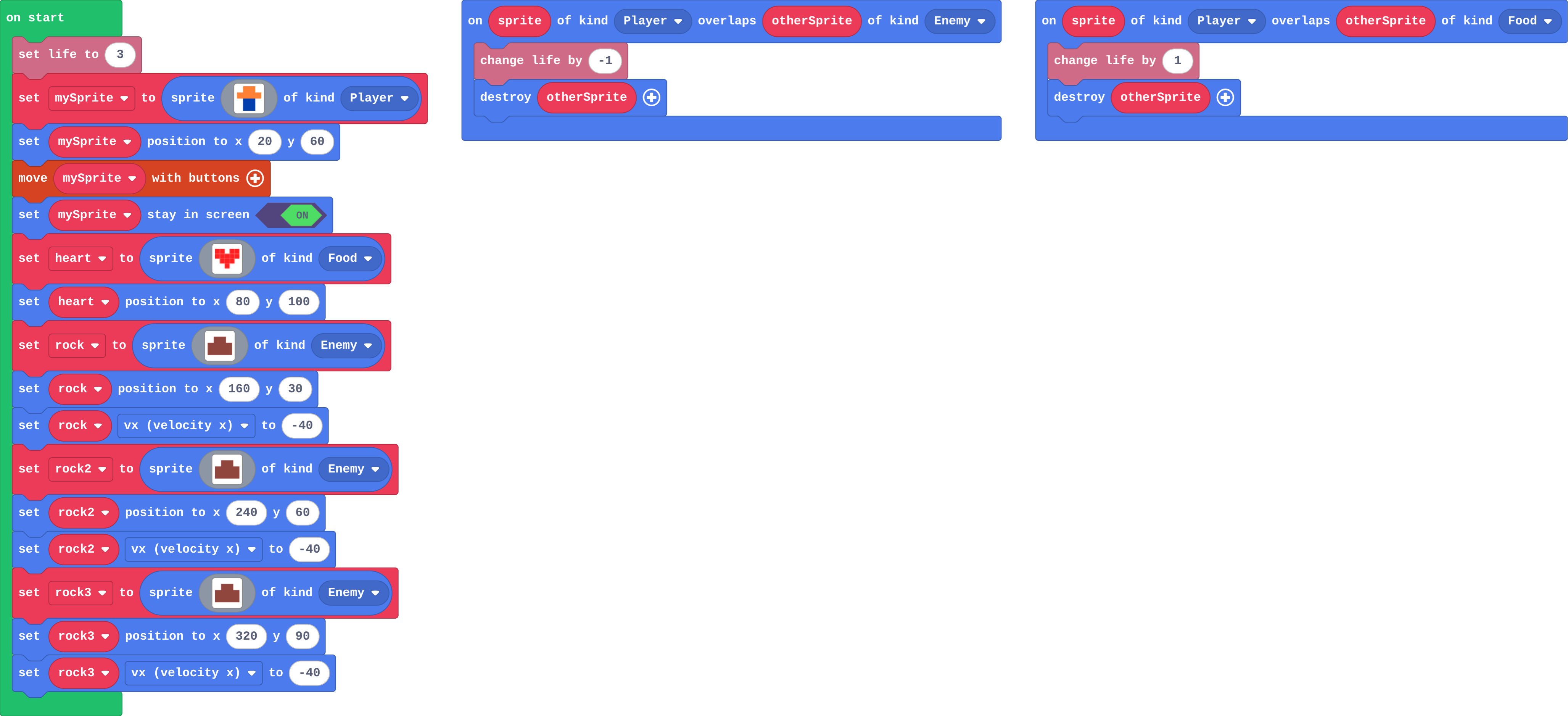
![h:360](https://studio.learningwaypoints.com/tutorials/_pictures/makecode/code/a0ed127385b9.png?v=c9d0bb0e7f57ef46)

<!-- Speaker note: Dodge the rocks with the arrow keys and collect the heart. Lose on purpose once, too. What this step is for: Info keeps lives and ends the game at 0. An overlap runs every frame while two sprites touch, so destroying the enemy makes one touch cost one life. -->

<!-- Speaker note: Teacher: Sam's dodger is the lesson's key bug: an overlap runs every frame while sprites touch. -->

---

<span style="background:#dcfce7; color:#1a1a1a; border:1.5px solid #22c55e; padding:6px 18px; border-radius:8px; font-size:1em; font-weight:500;">✅ Check</span>

## Count the lives

**Play this game in your head. Fill in the lives after each thing happens.**

| what happens | lives after |
|---|---|
| (start) | 3 |
| a rock hits the player | ? |
| a rock flies past | ? |
| the player collects the heart | ? |
| a rock hits the player | ? |

* Answer: 2, 2, 3, 2

<!-- Speaker note: Only a touch runs an overlap event, so a rock that flies past changes nothing. The heart's Player–Food event adds one. -->

<style scoped>pre, marp-pre { font-size: 0.5em; line-height: 1.25; } section { font-size: 22px; }</style>

---

<span style="background:#dcfce7; color:#1a1a1a; border:1.5px solid #22c55e; padding:6px 18px; border-radius:8px; font-size:1em; font-weight:500;">✅ Check</span>

## Sam's dodger

Sam's overlap event:

![h:136](https://studio.learningwaypoints.com/tutorials/_pictures/makecode/code/4157f57f428e.png?v=ed56f0b2eaaa871f)

**Sam's player touches one rock and the game is over straight away, though he started with 3 lives. Why?**

- Rocks always end the game
- The rock is not destroyed, so the overlap event runs again every frame while they touch
- changeLifeBy(-1) takes away all the lives
- setLife(3) only gives one life

* Answer: The rock is not destroyed, so the overlap event runs again every frame while they touch

<!-- Speaker note: An overlap event runs every frame (about 30 times a second) while the two sprites still touch. The rock is still touching after the first life is gone, so the next frame takes another. Destroy the rock (or move it away) in the event. -->

<style scoped>pre, marp-pre { font-size: 0.5em; line-height: 1.25; } section { font-size: 21px; }</style>

---

<span style="background:#dcfce7; color:#1a1a1a; border:1.5px solid #22c55e; padding:6px 18px; border-radius:8px; font-size:1em; font-weight:500;">✅ Check</span>

## Kai's ending

**Kai wants his game to end when the lives run out. What does he need to add?**

- A game over block in on start
- A game over block in the overlap event
- Nothing: the engine ends the game at 0 lives
- A countdown

* Answer: Nothing: the engine ends the game at 0 lives

<!-- Speaker note: Arcade ends the game by itself when the lives reach 0. -->

---

<span style="background:#fef3c7; color:#1a1a1a; border:1.5px solid #f59e0b; padding:6px 18px; border-radius:8px; font-size:1em; font-weight:500;">✍️ Activity</span>

## Tag, every frame <span style="font-size:.6em;color:#64748b">(3 min)</span>

A student who is tagged loses a 'life' card for every second the tagger keeps touching them.

<!-- Speaker note: Ten seconds of touching takes ten cards. The tagger must let go: that is destroy. -->

---

<span style="background:#fef3c7; color:#1a1a1a; border:1.5px solid #f59e0b; padding:6px 18px; border-radius:8px; font-size:1em; font-weight:500;">✍️ Activity</span>

## Modify


- **More hearts:** Start the player with **5** lives.
- **A point too:** Make the heart give a **point** as well as a life.

[Open this step](https://studio.learningwaypoints.com/tutorials/code/arcade/arcade-score-lives/?full=step-4#step-4)

<!-- Speaker note: What this step is for: set life sets how many hearts the player starts with, and each kind of touch needs its own overlap event. Hints, in order: Change the 3 in set life. / Inside the Player–Food event, add change score by 1 (Info) next to change life by 1. For students who need more support: Give students the overlap event already placed, and ask them to fill in the two blocks inside. For early finishers: Add a coin worth points, so there is something to chase as well as dodge. The hard part, on purpose: An overlap runs every frame while sprites touch, so one hit takes every life. Ask what happens to the enemy after it touches the player. When students get stuck: One touch ends the game. Ask: What happens to the enemy after it touches the player? Fix: Nothing, so the overlap runs again next frame. Add destroy otherSprite inside the overlap event. / No hearts at the top of the screen. Ask: Is there a set life block in on start? Fix: Add set life to 3 (Info). Lives appear only once they are set. / Touching a rock does nothing. Ask: What kind are the rocks, and what kinds does the overlap name? Fix: The rocks are Enemy; the event must be Player with Enemy. -->

---

<span style="background:#dbeafe; color:#1a1a1a; border:1.5px solid #3b82f6; padding:6px 18px; border-radius:8px; font-size:1em; font-weight:500;">💬 Discussion</span>

## Investigate: Mix it up

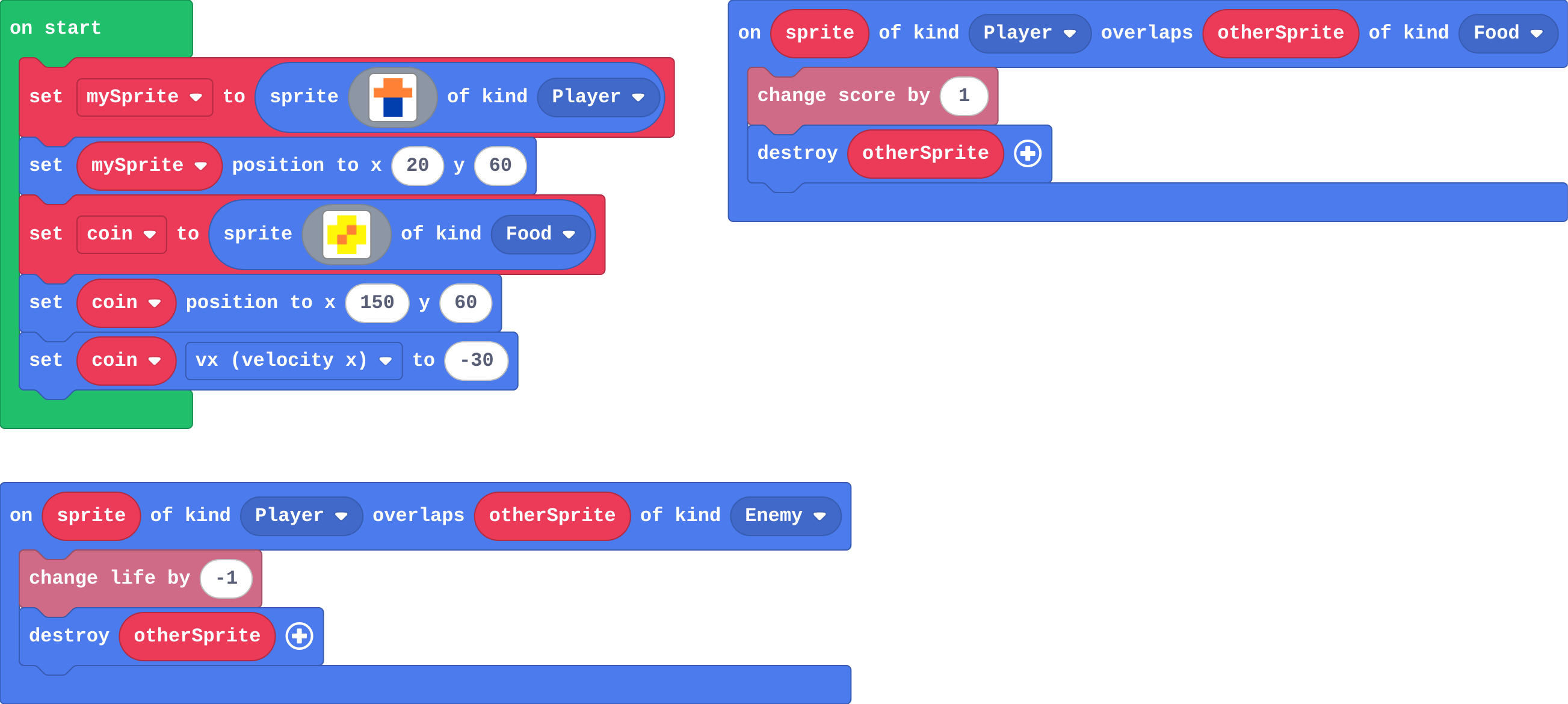
![h:360](https://studio.learningwaypoints.com/tutorials/_pictures/makecode/code/0fd4dd1aafd4.png?v=9c4c86b45bec3221)

<!-- Speaker note: What this step is for: The engine moves a sprite with a velocity; its kind decides which overlap runs when it arrives. -->

---

<span style="background:#dcfce7; color:#1a1a1a; border:1.5px solid #22c55e; padding:6px 18px; border-radius:8px; font-size:1em; font-weight:500;">✅ Check</span>

## Mix it up

**A coin of kind Food moves left towards the player at vx -30. When it reaches the player, which event runs?**

- Neither: moving sprites cannot overlap
- The Player–Enemy overlap
- The Player–Food overlap
- Both

* Answer: The Player–Food overlap

<!-- Speaker note: The engine carries the coin to the player. It is Food, so the Player–Food event runs. What this step is for: The engine moves a sprite with a velocity; its kind decides which overlap runs when it arrives. -->

---

<span style="background:#fef3c7; color:#1a1a1a; border:1.5px solid #f59e0b; padding:6px 18px; border-radius:8px; font-size:1em; font-weight:500;">✍️ Activity</span>

## Make

The rocks fly already. Make it a game:

- the player starts with **3 lives**
- each rock that hits takes **one** life, and is destroyed

[Open this step](https://studio.learningwaypoints.com/tutorials/code/arcade/arcade-score-lives/?full=step-6#step-6)

<!-- Speaker note: Hints, in order: In on start: set life to 3 (Info). / Add an on overlap for Player and Enemy. Inside: change life by -1, then destroy otherSprite. -->

<!-- Speaker note: Teacher: students who forget destroy lose all three lives at once: let them find it. -->

---

<span style="background:#fef3c7; color:#1a1a1a; border:1.5px solid #f59e0b; padding:6px 18px; border-radius:8px; font-size:1em; font-weight:500;">✍️ Activity</span>

## Change a dodgeball game

Balls bounce around the court; each hit costs a life. Add a fourth ball, give the player 5 lives, and make the balls a little faster.

[Open this step](https://studio.learningwaypoints.com/tutorials/code/arcade/arcade-score-lives/?full=step-7#step-7)

---

<span style="background:#fef3c7; color:#1a1a1a; border:1.5px solid #f59e0b; padding:6px 18px; border-radius:8px; font-size:1em; font-weight:500;">✍️ Activity</span>

## One hit, one heart <span style="font-size:.6em;color:#64748b">(3 min)</span>

Swap dodge games with the next pair. Does one hit cost exactly one heart?

---

<span style="background:#dcfce7; color:#1a1a1a; border:1.5px solid #22c55e; padding:6px 18px; border-radius:8px; font-size:1em; font-weight:500;">✅ Check</span>

## Exit ticket

**In a dodge game one touch takes all three lives. What one block is missing, and why does it matter?**

* destroy otherSprite in the Player–Enemy overlap. The overlap runs every frame while the sprites touch, so without it the same enemy takes a life each frame.

<!-- Speaker note: Students answer on paper or a mini whiteboard before the reveal. Anyone who cannot answer needs the main idea again next lesson. Where this leads: Next lesson: a timer that sends a new rock every second, for as long as the game lasts. -->