---
marp: true
theme: default
html: true
---

# Projectiles

Arcade Foundations · Fire

<!-- Speaker note: Students fire projectiles with A and find that a projectile is its own kind, so a hit needs a Projectile–Enemy overlap. About 40 minutes (Predict and Run 7 min · Investigate 10 min · Modify 9 min · Mix it up 3 min · Make 8 min · Fireworks 3 min). -->

---

## Today

**We are learning to** fire a projectile with the A button. It is its own kind, so a hit is an overlap of Projectile and Enemy.

- I can fire a projectile from a sprite with the A button.
- I can explain why a hit needs a Projectile–Enemy overlap, not Player–Enemy.
- I can make a crash and a hit do different things.

<!-- Speaker note: Before class: A **projectile** is a sprite fired from another sprite, with a speed across (vx) and down (vy); vy -100 goes straight up. It is a sprite of its **own kind**, **Projectile**, not part of the ship, and the engine removes it when it leaves the screen. So a hit needs an overlap event between **Projectile** and **Enemy**. Students often pick Player, because "the player shoots": that is the planted misconception (Ben's shots pass straight through). In an overlap event, **sprite** is the sprite of the first kind (the shot) and **otherSprite** the second (the alien). The keyboard: A is space (or Z), B is enter (or X). Teacher: Mix it up: the chaser from last lesson, worked by hand. -->

---

## Why it matters

> Space Invaders, Galaga and every 'shoot 'em up' since: you fire, and the game has to notice when a shot hits.

<!-- Speaker note: A **projectile** (in **Sprites**) is a sprite fired from another sprite, with its own speed: **projectile from ship with vx 0, vy -100** goes straight up. It is its **own kind**: **Projectile**, not part of the ship. The engine removes it when it leaves the screen. -->

---

<span style="background:#dbeafe; color:#1a1a1a; border:1.5px solid #3b82f6; padding:6px 18px; border-radius:8px; font-size:1em; font-weight:500;">💬 Discussion</span>

## Predict

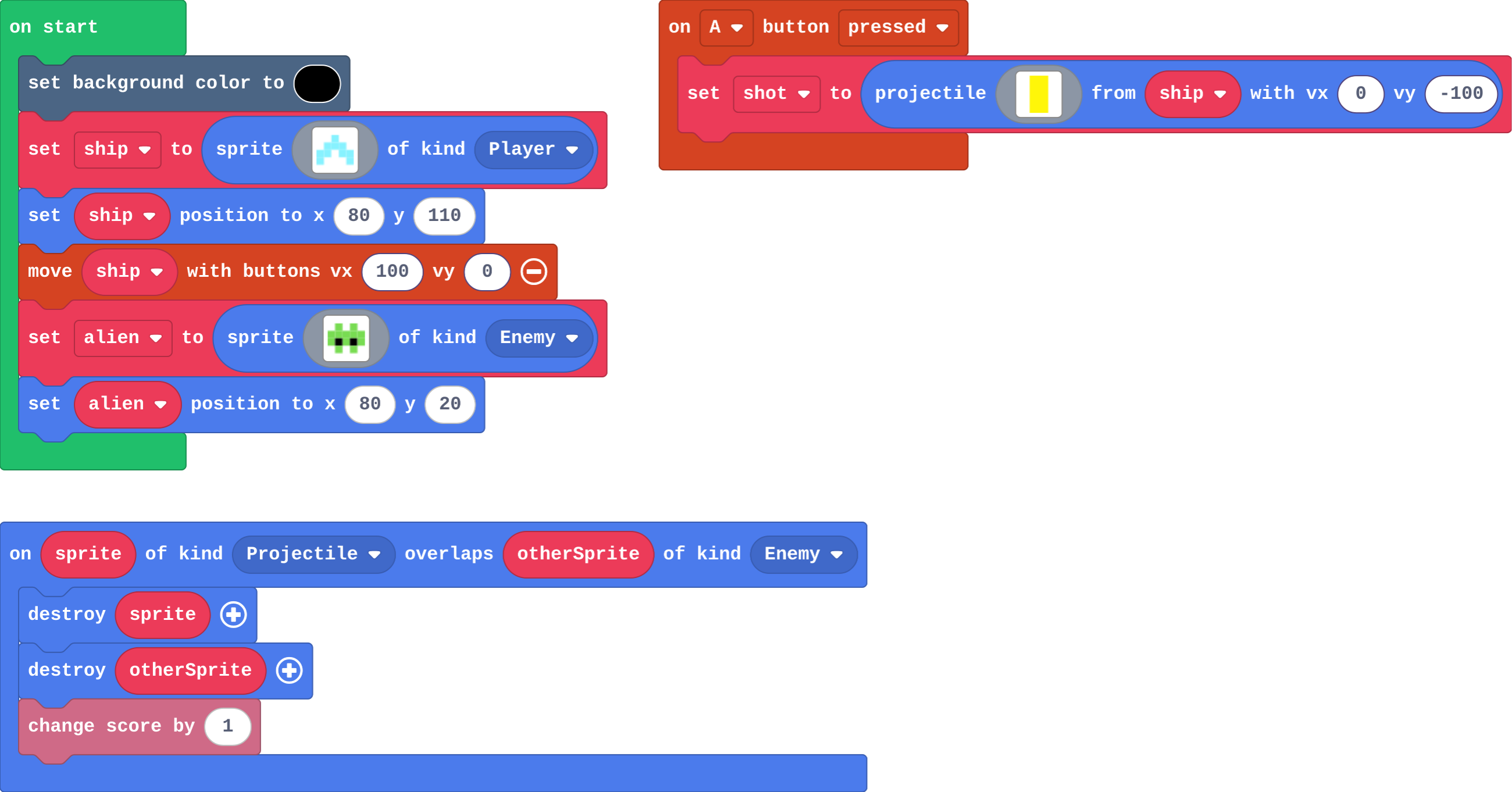
![h:360](https://studio.learningwaypoints.com/tutorials/_pictures/makecode/code/01f0f80665ac.png?v=ecb699160bda9997)

**You press A (space on the keyboard) once, with the ship right under the alien. What happens?**

- Only the alien disappears
- The shot goes through the alien
- The shot and the alien both disappear, and the score goes up by 1
- The ship disappears

<!-- Speaker note: What happens: The shot and the alien both disappear, and the score goes up by 1. The shot is a Projectile, the alien an Enemy, so the Projectile–Enemy overlap runs: sprite is the shot, otherSprite the alien. Take two or three predictions before anyone runs it. -->

<!-- Speaker note: Teacher: most get this right. Ask: which kind is the shot? (Projectile.) -->

<style scoped>pre, marp-pre { font-size: 0.5em; line-height: 1.25; } section { font-size: 27px; }</style>

---

<span style="background:#dcfce7; color:#1a1a1a; border:1.5px solid #22c55e; padding:6px 18px; border-radius:8px; font-size:1em; font-weight:500;">✅ Check</span>

## What happened?

* The shot and the alien both disappear, and the score goes up by 1. The shot is a Projectile, the alien an Enemy, so the Projectile–Enemy overlap runs: sprite is the shot, otherSprite the alien.

<!-- Speaker note: Reveal after running. Ask who predicted it, and what made them think so. -->

---

<span style="background:#fef3c7; color:#1a1a1a; border:1.5px solid #f59e0b; padding:6px 18px; border-radius:8px; font-size:1em; font-weight:500;">✍️ Activity</span>

## Run it

Open the lesson at this step and try it together.

[studio.learningwaypoints.com/tutorials/code/arcade/arcade-projectiles/?full=step-2#step-2](https://studio.learningwaypoints.com/tutorials/code/arcade/arcade-projectiles/?full=step-2#step-2)

<!-- Speaker note: Press the **A** button (space on the keyboard). Then move the ship to one side and fire again: where does the shot go? Students should be able to say: I fired at the alien and compared what happened with my prediction. -->

<!-- Speaker note: Teacher: shots go straight up wherever the ship is: the projectile starts at the ship's position. -->

---

<span style="background:#dbeafe; color:#1a1a1a; border:1.5px solid #3b82f6; padding:6px 18px; border-radius:8px; font-size:1em; font-weight:500;">💬 Discussion</span>

## Investigate

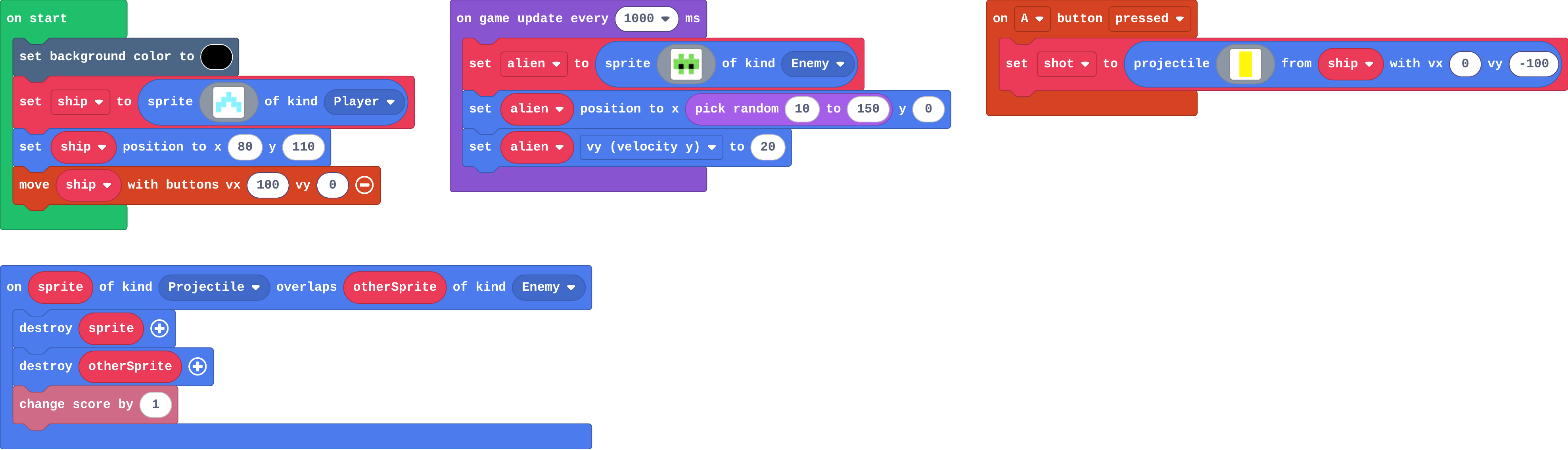
![h:360](https://studio.learningwaypoints.com/tutorials/_pictures/makecode/code/ec0b8ec8c734.png?v=4c1018ab2e9791d0)

<!-- Speaker note: What this step is for: A projectile is its own kind (Projectile), so the overlap that catches a hit names Projectile, not Player, and the engine removes a shot that leaves the screen. -->

<!-- Speaker note: Teacher: Ben's shots: read the kinds aloud. -->

---

<span style="background:#dcfce7; color:#1a1a1a; border:1.5px solid #22c55e; padding:6px 18px; border-radius:8px; font-size:1em; font-weight:500;">✅ Check</span>

## What does each part do?

**Match each part of this game with what it does.**

| | |
|---|---|
| `projectile from ship with vx 0, vy -100` | A. runs when any shot touches any alien |
| `on game update every 1000 ms` | B. makes a new alien each second |
| `on Projectile overlaps Enemy` | C. the alien that was hit |
| `sprite (in the overlap)` | D. the shot that hit |
| `otherSprite (in the overlap)` | E. fires a shot straight up from the ship |

* Answer: projectile from ship with vx 0, vy -100 → E. fires a shot straight up from the ship; on game update every 1000 ms → B. makes a new alien each second; on Projectile overlaps Enemy → A. runs when any shot touches any alien; sprite (in the overlap) → D. the shot that hit; otherSprite (in the overlap) → C. the alien that was hit

<!-- Speaker note:  -->

<style scoped>pre, marp-pre { font-size: 0.5em; line-height: 1.25; } section { font-size: 17px; }</style>

---

<span style="background:#dcfce7; color:#1a1a1a; border:1.5px solid #22c55e; padding:6px 18px; border-radius:8px; font-size:1em; font-weight:500;">✅ Check</span>

## A missed shot

**A shot misses every alien and flies off the top of the screen. What happens to it?**

- It keeps flying for ever, off the screen
- The engine removes it
- It comes back at the bottom
- It turns into an alien

* Answer: The engine removes it

<!-- Speaker note: A projectile is removed by the engine as soon as it leaves the screen, so missed shots do not pile up. -->

---

<span style="background:#dcfce7; color:#1a1a1a; border:1.5px solid #22c55e; padding:6px 18px; border-radius:8px; font-size:1em; font-weight:500;">✅ Check</span>

## Ben's shots

Ben's hit event:

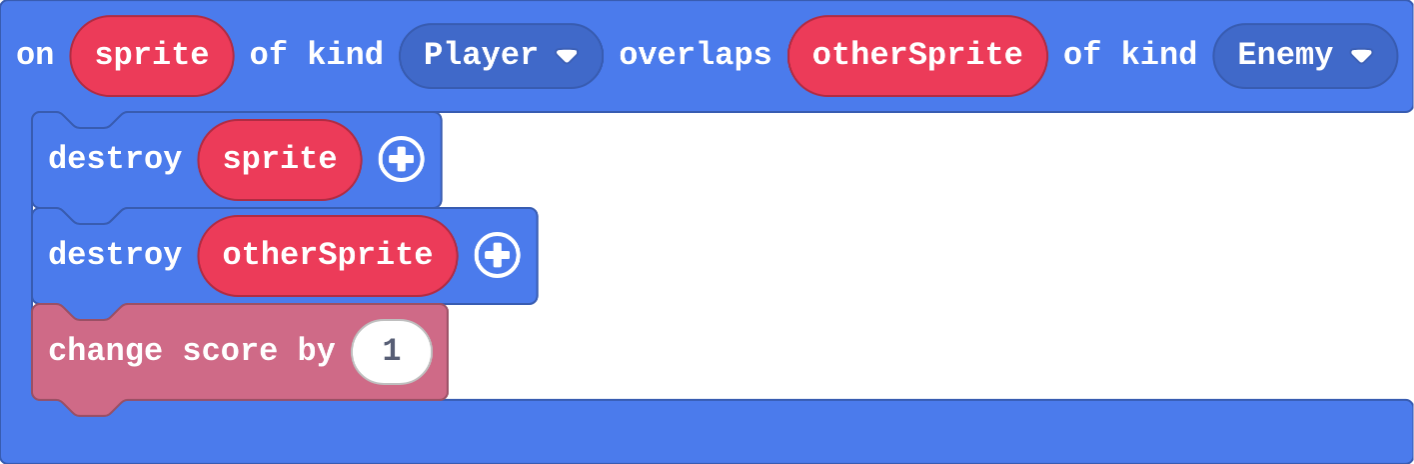
![h:232](https://studio.learningwaypoints.com/tutorials/_pictures/makecode/code/5133dae914b2.png?v=405c63bd4ba12d99)

**Ben wrote his own hit event (below). He fires at the aliens, but every shot passes straight through. Why?**

- The overlap needs to be inside on A pressed
- A projectile is its own kind, Projectile, so a Player–Enemy overlap never notices a shot
- destroy only works on the player
- The shot is too fast to hit anything

* Answer: A projectile is its own kind, Projectile, so a Player–Enemy overlap never notices a shot

<!-- Speaker note: The shot is made by the ship, but it is not the ship: it is a sprite of kind Projectile. Ben's event waits for a Player to touch an Enemy, which only happens if the ship itself crashes into an alien. The first kind should be Projectile. -->

<style scoped>pre, marp-pre { font-size: 0.5em; line-height: 1.25; } section { font-size: 21px; }</style>

---

<span style="background:#fef3c7; color:#1a1a1a; border:1.5px solid #f59e0b; padding:6px 18px; border-radius:8px; font-size:1em; font-weight:500;">✍️ Activity</span>

## Whose kind? <span style="font-size:.6em;color:#64748b">(3 min)</span>

A student is the ship and throws a paper ball (the shot) at another (the alien). The class says which two kinds touched.

<!-- Speaker note: The ball touched the alien, not the ship: Projectile and Enemy. -->

---

<span style="background:#fef3c7; color:#1a1a1a; border:1.5px solid #f59e0b; padding:6px 18px; border-radius:8px; font-size:1em; font-weight:500;">✍️ Activity</span>

## Modify


- **Make the shots work:** The shots in this game pass through everything. Add the overlap that turns a shot into a hit.
- **Crash!:** Now the aliens can reach the ship without anything happening. Make a crash cost a life.

[Open this step](https://studio.learningwaypoints.com/tutorials/code/arcade/arcade-projectiles/?full=step-4#step-4)

<!-- Speaker note: What this step is for: Each pair of kinds has its own overlap event: Projectile–Enemy is a hit, Player–Enemy is a crash. Hints, in order: on overlap is in Sprites › Overlaps. Choose the kinds Projectile and Enemy. / Inside: destroy sprite, destroy otherSprite, change score by 1. / Add a second on overlap, with the kinds Player and Enemy. / Destroy the alien (otherSprite), and change life by -1. For students who need more support: Give students the on A pressed block with the projectile in it, and ask them only to build the hit event. For early finishers: Make B fire two shots at a slant, one left and one right. The hard part, on purpose: The overlap must name Projectile. Ask which two kinds touch when a shot hits. When students get stuck: Shots pass straight through the aliens. Ask: Which two kinds does your overlap event name? Fix: The shot is a Projectile. Change the first kind to Projectile. / The ship disappears when it shoots. Ask: In the overlap event, which sprite is destroyed? Fix: The event is probably Player–Enemy and destroys sprite (the ship). Use Projectile–Enemy. / Shots go down, not up. Ask: Which way does a negative vy go? Fix: y counts down, so up is a negative vy: -100. -->

<!-- Speaker note: Teacher: the first task is the hit event; the second is a separate Player–Enemy event. Two pairs of kinds, two events. -->

---

<span style="background:#dbeafe; color:#1a1a1a; border:1.5px solid #3b82f6; padding:6px 18px; border-radius:8px; font-size:1em; font-weight:500;">💬 Discussion</span>

## Investigate: Mix it up

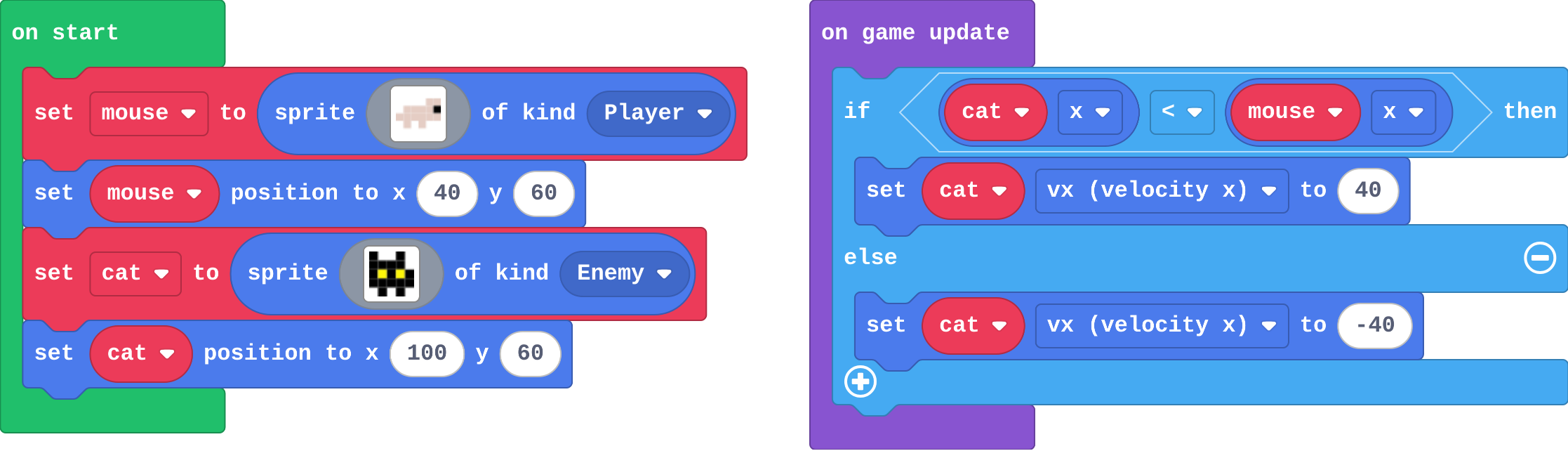
![h:320](https://studio.learningwaypoints.com/tutorials/_pictures/makecode/code/6132064a0c4f.png?v=03c6438ef2599423)

<!-- Speaker note: What this step is for: Comparing two positions with if … else sets exactly one direction every frame. -->

---

<span style="background:#dcfce7; color:#1a1a1a; border:1.5px solid #22c55e; padding:6px 18px; border-radius:8px; font-size:1em; font-weight:500;">✅ Check</span>

## Mix it up

**The cat is at x 100 and the mouse at x 40. Which way does the cat go?**

- Both ways at once
- It stops
- Left (vx is set to -40)
- Right (vx is set to 40)

* Answer: Left (vx is set to -40)

<!-- Speaker note: Is cat x (100) less than mouse x (40)? No, so the else part runs: vx -40, to the left, towards the mouse. What this step is for: Comparing two positions with if … else sets exactly one direction every frame. -->

---

<span style="background:#fef3c7; color:#1a1a1a; border:1.5px solid #f59e0b; padding:6px 18px; border-radius:8px; font-size:1em; font-weight:500;">✍️ Activity</span>

## Make

The aliens fall already. Make it a **shooter**:

- **A** fires a shot straight **up** from the ship
- a shot that hits an alien destroys **both** and scores **1**

[Open this step](https://studio.learningwaypoints.com/tutorials/code/arcade/arcade-projectiles/?full=step-6#step-6)

<!-- Speaker note: Hints, in order: on A button pressed (Controller): projectile from ship with vx 0 and vy -100 (Sprites). / on overlap (Sprites › Overlaps) with the kinds Projectile and Enemy. Inside: destroy sprite, destroy otherSprite, change score by 1. -->

<!-- Speaker note: Teacher: fire in A, hit in the Projectile–Enemy overlap. -->

---

<span style="background:#fef3c7; color:#1a1a1a; border:1.5px solid #f59e0b; padding:6px 18px; border-radius:8px; font-size:1em; font-weight:500;">✍️ Activity</span>

## Change a firework show

**A** launches a rocket into the night sky. Make the rockets launch faster, then make **B** launch a rocket that goes up at a slant.

[Open this step](https://studio.learningwaypoints.com/tutorials/code/arcade/arcade-projectiles/?full=step-7#step-7)

---

<span style="background:#dcfce7; color:#1a1a1a; border:1.5px solid #22c55e; padding:6px 18px; border-radius:8px; font-size:1em; font-weight:500;">✅ Check</span>

## Exit ticket

**A shot hits an alien, but the game has only a Player–Enemy overlap event. What happens, and why?**

* Nothing. The shot is of kind Projectile, so a Player–Enemy event never runs for it.

<!-- Speaker note: Students answer on paper or a mini whiteboard before the reveal. Anyone who cannot answer needs the main idea again next lesson. Where this leads: Next lesson: read a whole game and find the blocks for each job, before the final challenge. Class idea: a two-way shooter (shots left and right with a second button). -->