---
marp: true
theme: default
html: true
---

# Overlaps and kinds

Arcade Foundations · Collide and score

<!-- Speaker note: Students make overlap events that run when two sprites touch, and see that the kinds named in the event decide which event runs. About 40 minutes (Predict and Run 7 min · Investigate 10 min · Modify 8 min · Mix it up 3 min · Make 9 min · Fruit stall 3 min). -->

---

## Today

**We are learning to** make something happen when two sprites touch, and use kinds to decide which event runs.

- I can make something happen when two sprites touch.
- I can choose a sprite's kind, and say which overlap event a touch will run.
- I can keep a score.

<!-- Speaker note: Before class: An **overlap** is two sprites touching. **on sprite of kind Player overlaps otherSprite of kind Food** (Sprites › Overlaps) is an **event**: it runs when a sprite of the **first kind** touches a sprite of the **second kind**, and never for any other pair. Inside it, **sprite** is the first one (the player) and **otherSprite** the second (the coin that was touched). Every sprite has a **kind**: Player, Food, Enemy or Projectile. The create block starts with **of kind Player**, so a forgotten kind is the most common bug: a coin made as a Player is never collected. **change score by** (Info) shows a score at the top of the screen. Teacher: Mix it up: move with buttons speeds, from lesson 2. -->

---

## Why it matters

> Pac-Man eats a dot, Mario grabs a coin, a ghost catches you: every game is full of things touching, and each touch means something different.

<!-- Speaker note: Last lesson sprites moved, but flew straight through each other. Now they notice. When two sprites touch, they **overlap**, and an **on overlap** event (in **Sprites › Overlaps**) can run. Every sprite has a **kind**: Player, Food, Enemy or Projectile. Until now every sprite said **of kind Player**. This lesson the kind matters: it is how the game tells a coin from a monster. Click the simulator, then steer with the arrow keys. -->

---

<span style="background:#dbeafe; color:#1a1a1a; border:1.5px solid #3b82f6; padding:6px 18px; border-radius:8px; font-size:1em; font-weight:500;">💬 Discussion</span>

## Predict

![h:308](https://studio.learningwaypoints.com/tutorials/_pictures/makecode/code/4b1949b54a2f.png?v=b2353d1f3291c27e)

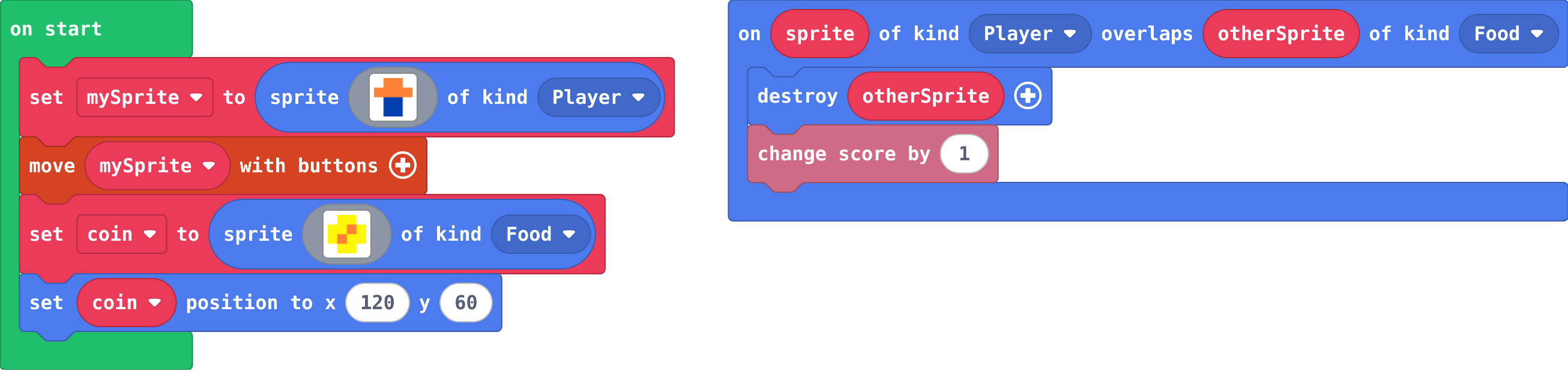
**You steer the player onto the coin. What happens?**

- Nothing: they pass through each other
- The coin vanishes and the score goes up by 1
- The player stops at the coin, like a wall
- The player vanishes

<!-- Speaker note: What happens: The coin vanishes and a score of 1 appears at the top of the screen. The player is of kind Player and the coin of kind Food, so the Player–Food overlap event runs. Take two or three predictions before anyone runs it. -->

<!-- Speaker note: Teacher: most students expect the coin to vanish. The real point is why: ask which two kinds the event names. -->

---

<span style="background:#dcfce7; color:#1a1a1a; border:1.5px solid #22c55e; padding:6px 18px; border-radius:8px; font-size:1em; font-weight:500;">✅ Check</span>

## What happened?

* The coin vanishes and a score of 1 appears at the top of the screen. The player is of kind Player and the coin of kind Food, so the Player–Food overlap event runs.

<!-- Speaker note: Reveal after running. Ask who predicted it, and what made them think so. -->

---

<span style="background:#fef3c7; color:#1a1a1a; border:1.5px solid #f59e0b; padding:6px 18px; border-radius:8px; font-size:1em; font-weight:500;">✍️ Activity</span>

## Run it

Open the lesson at this step and try it together.

[studio.learningwaypoints.com/tutorials/code/arcade/arcade-overlaps/?full=step-2#step-2](https://studio.learningwaypoints.com/tutorials/code/arcade/arcade-overlaps/?full=step-2#step-2)

<!-- Speaker note: Steer onto the coin. Watch the top of the screen. Students should be able to say: I steered onto the coin and compared what happened with my prediction. -->

---

<span style="background:#dbeafe; color:#1a1a1a; border:1.5px solid #3b82f6; padding:6px 18px; border-radius:8px; font-size:1em; font-weight:500;">💬 Discussion</span>

## Investigate

![h:360](https://studio.learningwaypoints.com/tutorials/_pictures/makecode/code/0a45cb6129d8.png?v=4d7fabade459e932)

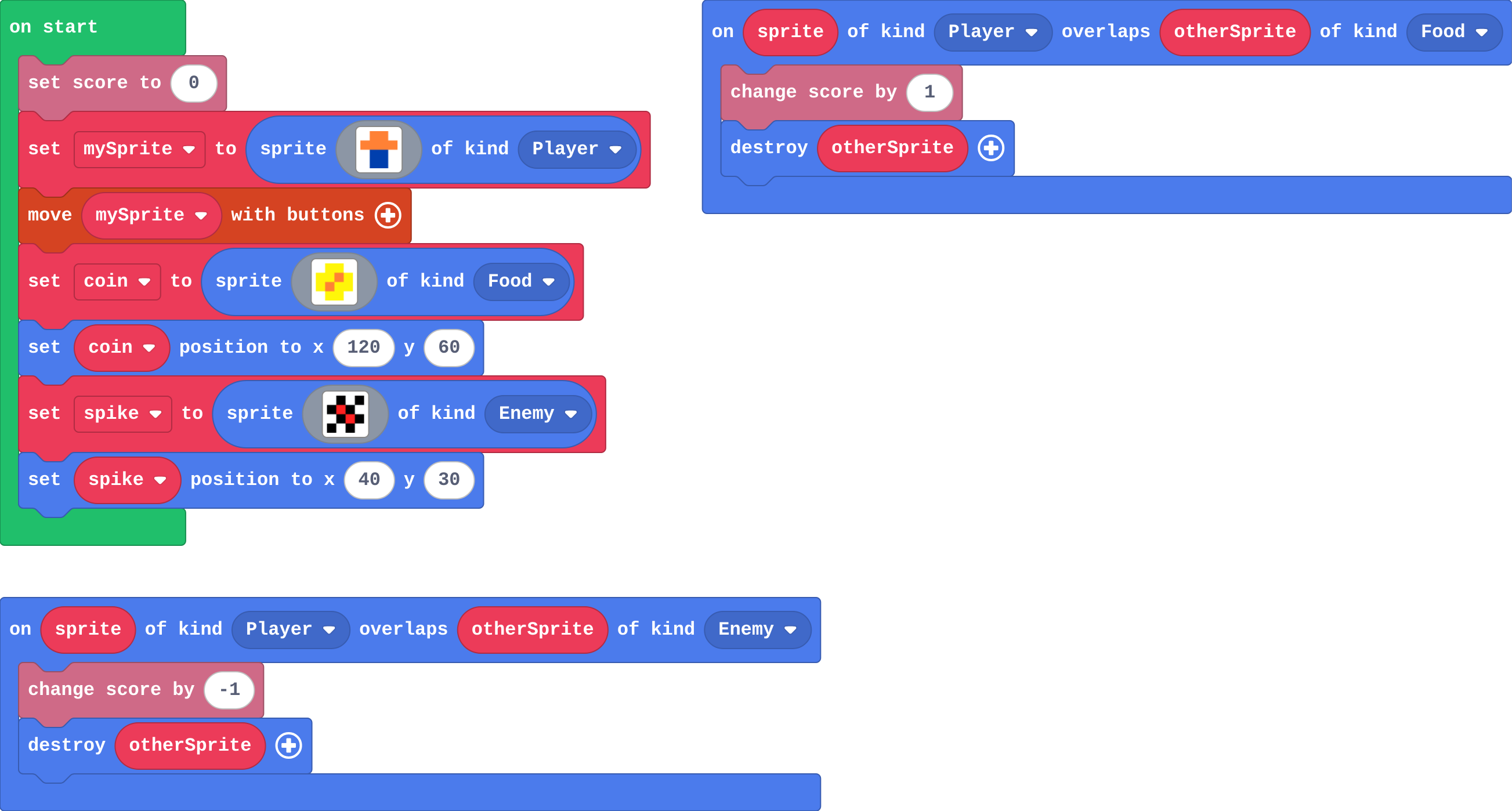
<!-- Speaker note: Collect the coin, then touch the spike. What this step is for: An overlap event runs when a sprite of the first kind touches a sprite of the second kind. The kinds decide which event runs: sprite is the first one, otherSprite the second. -->

<!-- Speaker note: Teacher: the match shows that a pair no event names (Food and Enemy) does nothing. Ava's star is the default kind left as Player. -->

---

<span style="background:#dcfce7; color:#1a1a1a; border:1.5px solid #22c55e; padding:6px 18px; border-radius:8px; font-size:1em; font-weight:500;">✅ Check</span>

## Who touches whom?

**Match what touches with what happens in this game.**

| | |
|---|---|
| `the player touches the coin (Food)` | A. nothing: no event names Food and Enemy |
| `the player touches the spike (Enemy)` | B. the score goes down 1 and the spike is destroyed |
| `the coin and the spike touch` | C. the score goes up 1 and the coin vanishes |

* Answer: the player touches the coin (Food) → C. the score goes up 1 and the coin vanishes; the player touches the spike (Enemy) → B. the score goes down 1 and the spike is destroyed; the coin and the spike touch → A. nothing: no event names Food and Enemy

<!-- Speaker note:  -->

<style scoped>pre, marp-pre { font-size: 0.5em; line-height: 1.25; } section { font-size: 20px; }</style>

---

<span style="background:#dcfce7; color:#1a1a1a; border:1.5px solid #22c55e; padding:6px 18px; border-radius:8px; font-size:1em; font-weight:500;">✅ Check</span>

## Which sprite?

**In the Player–Food event, which sprite is otherSprite?**

- The coin it touched
- Every Food sprite in the game
- The player
- The spike

* Answer: The coin it touched

<!-- Speaker note: The event hands over both sprites: sprite is the one of the first kind (Player), otherSprite the one of the second kind (Food). So destroy otherSprite removes the coin that was touched. -->

---

<span style="background:#dcfce7; color:#1a1a1a; border:1.5px solid #22c55e; padding:6px 18px; border-radius:8px; font-size:1em; font-weight:500;">✅ Check</span>

## Ava's star

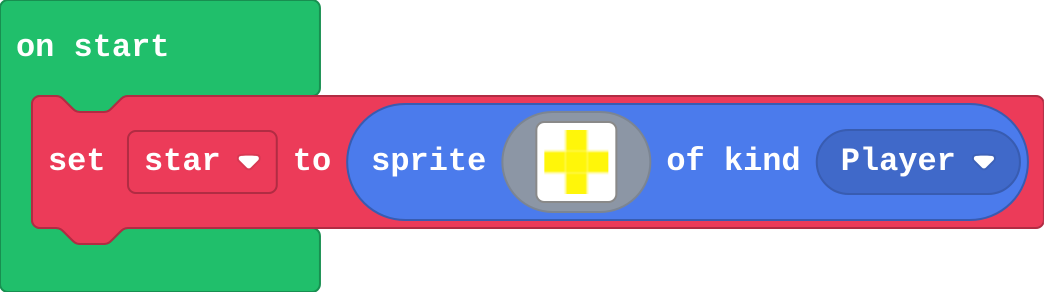
Ava's overlap event is the same as this game's. She made her star like this:
![h:146](https://studio.learningwaypoints.com/tutorials/_pictures/makecode/code/97c7643a8b43.png?v=767b7c370bc6069e)

**Ava added a star to her game and steers onto it. Nothing happens: no score, the star stays. Why?**

- Stars cannot be destroyed
- The star was made of kind Player, so no Player–Food event runs
- The overlap event needs to be inside on start
- The score only counts coins

* Answer: The star was made of kind Player, so no Player–Food event runs

<!-- Speaker note: The create block starts with of kind Player, and Ava did not change it. Her overlap event is for Player touching Food, so a Player touching a Player runs nothing. Choose Food in the star's kind dropdown. -->

<style scoped>pre, marp-pre { font-size: 0.5em; line-height: 1.25; } section { font-size: 20px; }</style>

---

<span style="background:#fef3c7; color:#1a1a1a; border:1.5px solid #f59e0b; padding:6px 18px; border-radius:8px; font-size:1em; font-weight:500;">✍️ Activity</span>

## Name tags <span style="font-size:.6em;color:#64748b">(4 min)</span>

Students wear kind cards (Player, Food, Enemy). The teacher reads an event ("Player meets Food: cheer"). Pairs that meet act only if their cards match the event.

<!-- Speaker note: A Player meeting a Player does nothing: that is Ava's star. -->

---

<span style="background:#fef3c7; color:#1a1a1a; border:1.5px solid #f59e0b; padding:6px 18px; border-radius:8px; font-size:1em; font-weight:500;">✍️ Activity</span>

## Modify


- **Worth more:** Make each coin worth **5** points.
- **A second coin:** Add a second coin, of kind **Food**, somewhere else on the screen. Does it need its own overlap event?

[Open this step](https://studio.learningwaypoints.com/tutorials/code/arcade/arcade-overlaps/?full=step-4#step-4)

<!-- Speaker note: What this step is for: The blocks inside an overlap event decide what a touch means, and one event serves every sprite of its kinds. Hints, in order: Change the 1 in change score by 1. / Drag in another set … to sprite of kind block, and choose Food as its kind. / Give it its own name and its own set position. You do not need a new overlap event. For students who need more support: Give students the Food and Enemy sprites already made with the right kinds, and ask them to build only the two overlap events. For early finishers: Add a second kind of good food worth 3 points. Which kinds does its event need? The hard part, on purpose: Kinds decide which overlap runs, and sprite versus otherSprite. When a touch does nothing, ask them to read out the kinds of both sprites and the kinds the event names. When students get stuck: Touching the coin does nothing. Ask: What kind is the coin, and what kinds does the overlap event name? Fix: Make the coin of kind Food (the dropdown in its create block), to match Player–Food in the event. / The wrong sprite disappears (the player instead of the coin). Ask: Which sprite does destroy name: sprite or otherSprite? Fix: otherSprite is the one of the second kind (Food). Drag otherSprite into destroy. / The score jumps up by many points in one touch. Ask: What happens to the coin after the touch? Fix: If it stays where it is, the event runs again every frame. Destroy it (next lesson looks at this). -->

<!-- Speaker note: Teacher: a second coin needs no new event: one event serves every Food sprite. -->

---

<span style="background:#dbeafe; color:#1a1a1a; border:1.5px solid #3b82f6; padding:6px 18px; border-radius:8px; font-size:1em; font-weight:500;">💬 Discussion</span>

## Investigate: Mix it up

![h:242](https://studio.learningwaypoints.com/tutorials/_pictures/makecode/code/b1e35511c441.png?v=8e7ee1b245952275)

<!-- Speaker note: What this step is for: The two numbers in move with buttons are speeds across and down. -->

---

<span style="background:#dcfce7; color:#1a1a1a; border:1.5px solid #22c55e; padding:6px 18px; border-radius:8px; font-size:1em; font-weight:500;">✅ Check</span>

## Mix it up

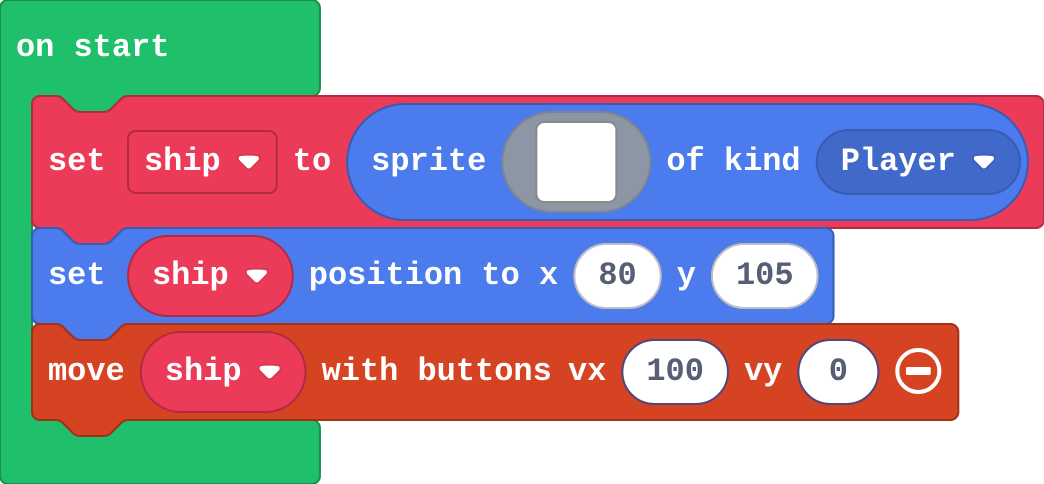
**The ship has move with buttons with speeds 100 and 0. Which arrow keys move it?**

- Left and right only
- All four
- Up and down only
- None

* Answer: Left and right only

<!-- Speaker note: The first number is the speed across (100) and the second the speed up and down (0), so only left and right do anything. What this step is for: The two numbers in move with buttons are speeds across and down. -->

---

<span style="background:#fef3c7; color:#1a1a1a; border:1.5px solid #f59e0b; padding:6px 18px; border-radius:8px; font-size:1em; font-weight:500;">✍️ Activity</span>

## Make

Make a **collector** game:

- **good food** (an apple, a gem): touching it scores **1**, and it vanishes
- a **bad item** of kind **Enemy** (a worm, a bomb): touching it takes **1** away, and it is destroyed

Check every create block: is its kind right?

[Open this step](https://studio.learningwaypoints.com/tutorials/code/arcade/arcade-overlaps/?full=step-6#step-6)

<!-- Speaker note: Hints, in order: Two new sprites: one of kind Food, one of kind Enemy. Click the kind in each create block. / Two on overlap blocks (Sprites › Overlaps): Player with Food, and Player with Enemy. / Food: change score by 1, then destroy otherSprite. Enemy: change score by -1, then destroy otherSprite. -->

<!-- Speaker note: Teacher: check every create block's kind before testing. Two overlap events, one per kind. -->

---

<span style="background:#fef3c7; color:#1a1a1a; border:1.5px solid #f59e0b; padding:6px 18px; border-radius:8px; font-size:1em; font-weight:500;">✍️ Activity</span>

## Change a fruit stall game

Bananas fall into a basket at a market stall. Make them fall faster, then add a rotten tomato of kind **Enemy** that falls too and takes 2 points when caught.

[Open this step](https://studio.learningwaypoints.com/tutorials/code/arcade/arcade-overlaps/?full=step-7#step-7)

---

<span style="background:#fef3c7; color:#1a1a1a; border:1.5px solid #f59e0b; padding:6px 18px; border-radius:8px; font-size:1em; font-weight:500;">✍️ Activity</span>

## Kinds first <span style="font-size:.6em;color:#64748b">(3 min)</span>

Swap collectors with the next pair. Read out each sprite's kind before you play.

---

<span style="background:#dcfce7; color:#1a1a1a; border:1.5px solid #22c55e; padding:6px 18px; border-radius:8px; font-size:1em; font-weight:500;">✅ Check</span>

## Exit ticket

**A coin is made of kind Player. The game has a Player–Food overlap event. Will touching the coin score? Why?**

* No. The event only runs when a Player touches a Food sprite. The coin is a Player, so no event runs. Change its kind to Food.

<!-- Speaker note: Students answer on paper or a mini whiteboard before the reveal. Anyone who cannot answer needs the main idea again next lesson. Where this leads: Next lesson adds lives and a game that ends. Class ideas: a recycling sorter (paper is Food, plastic is Enemy); design a game where the kinds are swapped: what changes? -->