---
marp: true
theme: default
html: true
---

# Run out

Arcade advanced skills · Power-ups

<!-- Speaker note: Students limit a blaster with a number that counts down, check it first so it never goes below zero, refill it with a star, and make a shield run out after 5 seconds. About 45 minutes (Predict and Run 7 min · Investigate 10 min · Modify 8 min · Mix it up 3 min · Make 12 min · Sprint 5 min). -->

---

## Today

**We are learning to** a number that counts down limits a power-up, and the event checks it first, so it never goes below zero.

- I can limit an action with a number that counts down.
- I can check the number first, so it never goes below zero.
- I can make a power-up last a set time with a timer.

<!-- Speaker note: Before class: A power-up that runs out is a **number** counting down. For ammo, the A event asks *if ammo > 0* first, then fires and changes ammo by -1. Without the check, ammo goes below zero and the shots never stop (the misconception). With ≥ 0 there is one shot too many. For time, a timer every 1000 ms counts `shieldTime` down while the shield is on, and at 0 sets the shield back to false: an if inside an if. Set (refill to 5) and change (add 3) are different, which Modify brings out. Teacher: Mix it up: true or false from last lesson. -->

---

## Why it matters

> Ammo, fuel, a shield that flickers out: the best power-ups run out. Behind each one is a number counting down.

<!-- Speaker note: A power-up that runs out needs a **number**: shots left, seconds left. Each use takes 1 away. The ship says how many shots are left after each one. -->

---

<span style="background:#dbeafe; color:#1a1a1a; border:1.5px solid #3b82f6; padding:6px 18px; border-radius:8px; font-size:1em; font-weight:500;">💬 Discussion</span>

## Predict

![h:360](https://studio.learningwaypoints.com/tutorials/_pictures/makecode/code/302db759e7bf.png?v=f2075003e1aeb11c)

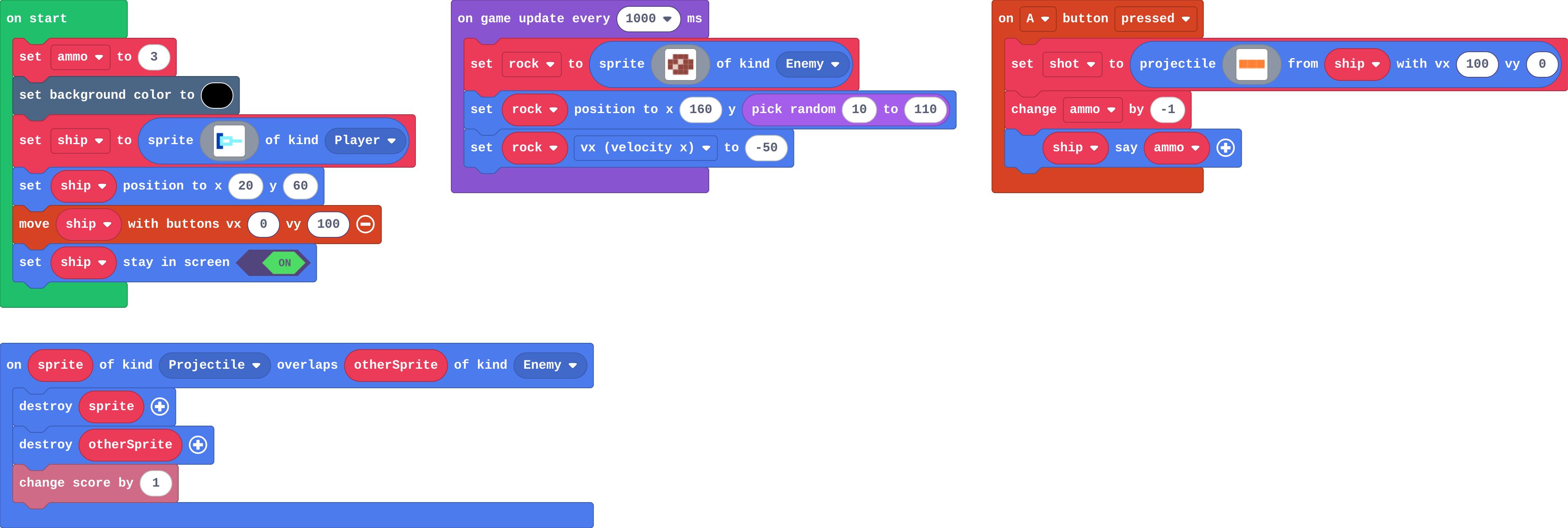
**ammo starts at 3. You press A five times. What happens?**

- 5 shots fly, and the ship says -2
- 5 shots fly, and the ship says 3
- 3 shots fly, then the game ends
- 3 shots fly, then A does nothing

<!-- Speaker note: What happens: 5 shots fly and ammo goes 2, 1, 0, -1, -2. Nothing checks there is ammo left, so the count goes below zero. Take two or three predictions before anyone runs it. -->

<!-- Speaker note: Teacher: let students find the -2 in the Run. -->

---

<span style="background:#dcfce7; color:#1a1a1a; border:1.5px solid #22c55e; padding:6px 18px; border-radius:8px; font-size:1em; font-weight:500;">✅ Check</span>

## What happened?

* 5 shots fly and ammo goes 2, 1, 0, -1, -2. Nothing checks there is ammo left, so the count goes below zero.

<!-- Speaker note: Reveal after running. Ask who predicted it, and what made them think so. -->

---

<span style="background:#fef3c7; color:#1a1a1a; border:1.5px solid #f59e0b; padding:6px 18px; border-radius:8px; font-size:1em; font-weight:500;">✍️ Activity</span>

## Run it

Open the lesson at this step and try it together.

[studio.learningwaypoints.com/tutorials/code/arcade-advanced/arcade-run-out/?full=step-2#step-2](https://studio.learningwaypoints.com/tutorials/code/arcade-advanced/arcade-run-out/?full=step-2#step-2)

<!-- Speaker note: Press **A** (space) again and again. Watch what the ship says. Students should be able to say: I pressed A more than three times and compared with my prediction. -->

---

<span style="background:#dbeafe; color:#1a1a1a; border:1.5px solid #3b82f6; padding:6px 18px; border-radius:8px; font-size:1em; font-weight:500;">💬 Discussion</span>

## Investigate

![h:360](https://studio.learningwaypoints.com/tutorials/_pictures/makecode/code/1546b460e0d4.png?v=5860bcf7cfc41c0c)

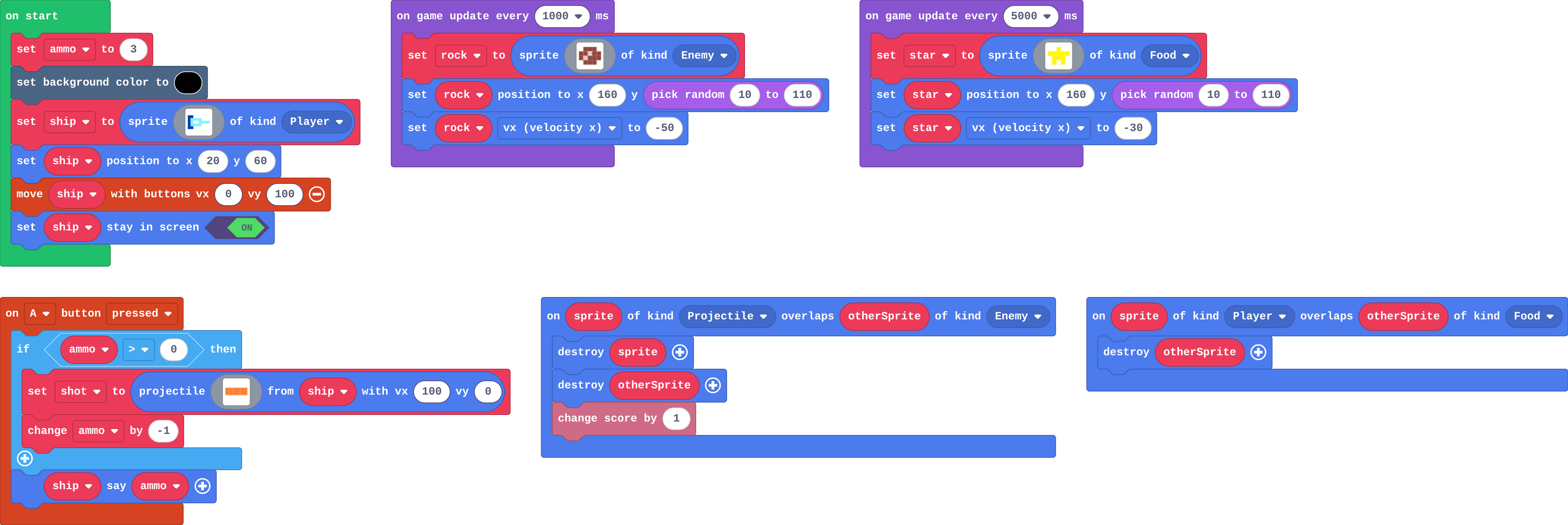
<!-- Speaker note: This version checks first. Try to fire a fourth shot. What this step is for: A number that counts down limits an action: the event asks it first, and only then uses one up. -->

<!-- Speaker note: Teacher: the trace shows the if saying no at 0. Lily's blaster checks the wrong block. -->

---

<span style="background:#dcfce7; color:#1a1a1a; border:1.5px solid #22c55e; padding:6px 18px; border-radius:8px; font-size:1em; font-weight:500;">✅ Check</span>

## Shots left

**This version fires only if ammo &gt; 0. Fill in each press of A.**

| ammo before | a shot? | ammo after |
|---|---|---|
| 3 | yes | 2 |
| 1 | ? | ? |
| 0 | ? | ? |

* Answer: yes, 0, no, 0

<!-- Speaker note: At 0 the question ammo > 0 is false, so nothing fires and nothing is taken away. -->

---

<span style="background:#dcfce7; color:#1a1a1a; border:1.5px solid #22c55e; padding:6px 18px; border-radius:8px; font-size:1em; font-weight:500;">✅ Check</span>

## Why > 0?

**Why ammo &gt; 0, and not ammo ≥ 0?**

- There is no difference
- ≥ is not allowed in Arcade
- &gt; 0 makes it fire faster
- With ≥ 0, a shot fires at 0 and ammo goes to -1: one shot too many

* Answer: With ≥ 0, a shot fires at 0 and ammo goes to -1: one shot too many

<!-- Speaker note: ≥ 0 is still true at 0, so the last press fires a fourth shot and the count goes below zero. -->

<style scoped>pre, marp-pre { font-size: 0.5em; line-height: 1.25; } section { font-size: 27px; }</style>

---

<span style="background:#dcfce7; color:#1a1a1a; border:1.5px solid #22c55e; padding:6px 18px; border-radius:8px; font-size:1em; font-weight:500;">✅ Check</span>

## Lily's blaster

**Lily put the if around change ammo by -1 only, not around the shot. What happens after 3 shots?**

- A does nothing
- Shots keep firing, though ammo stays at 0
- The game ends
- Ammo goes below zero

* Answer: Shots keep firing, though ammo stays at 0

<!-- Speaker note: Only the count is checked. The shot is outside the if, so it fires on every press. -->

---

<span style="background:#fef3c7; color:#1a1a1a; border:1.5px solid #f59e0b; padding:6px 18px; border-radius:8px; font-size:1em; font-weight:500;">✍️ Activity</span>

## Three sweets <span style="font-size:.6em;color:#64748b">(3 min)</span>

A student has three counters. Each "fire" hands one over, but only if they still have one.

<!-- Speaker note: Nobody can hand over a counter they do not have. The game can, unless it checks. -->

---

<span style="background:#fef3c7; color:#1a1a1a; border:1.5px solid #f59e0b; padding:6px 18px; border-radius:8px; font-size:1em; font-weight:500;">✍️ Activity</span>

## Modify


- **Refill:** A star **refills** the ammo to 5.
- **Top up:** Now a star **adds 3** to what you have. Which is better for a player with 4 shots left?

[Open this step](https://studio.learningwaypoints.com/tutorials/code/arcade-advanced/arcade-run-out/?full=step-4#step-4)

<!-- Speaker note: What this step is for: Set throws away what is left; change by adds to it. Hints, in order: A star floats past every 5 seconds. Its overlap only destroys it. / Add set ammo to 5 in the Player–Food overlap. / Use change ammo by 3 in place of set. For students who need more support: Give students the if shield in the timer, so they add only the countdown and the switch-off. For early finishers: Show the shield time with the ship's say block, every second. The hard part, on purpose: Checking before using. When the count goes below zero, ask what the event asks first. When students get stuck: Shots never run out. Ask: Is the shot inside the if? Fix: Put both the shot and change ammo by -1 inside if ammo > 0. / The shield switches off straight away, or never. Ask: Where is the countdown, and when does that block run? Fix: In the 1000 ms timer, inside if shield; set it to false only inside if shieldTime = 0. / The countdown goes 5, 3, 1, -1. Ask: How many timers count it down? Fix: One: remove the second change. -->

<!-- Speaker note: Teacher: ask which refill is kinder to a player with 4 shots. -->

---

<span style="background:#dcfce7; color:#1a1a1a; border:1.5px solid #22c55e; padding:6px 18px; border-radius:8px; font-size:1em; font-weight:500;">✅ Check</span>

## Mix it up

**hunting is true. The player touches a ghost, and the overlap scores 5 and sets hunting to false. A second ghost touches a moment later. What happens?**

- hunting turns true again
- It scores 5 too
- Nothing happens
- It costs a life: hunting is now false

* Answer: It costs a life: hunting is now false

<!-- Speaker note: The first touch set hunting to false, so the if takes the else for the second ghost. What this step is for: A true or false variable stays as it is until a block sets it back. -->

<style scoped>pre, marp-pre { font-size: 0.5em; line-height: 1.25; } section { font-size: 27px; }</style>

---

<span style="background:#fef3c7; color:#1a1a1a; border:1.5px solid #f59e0b; padding:6px 18px; border-radius:8px; font-size:1em; font-weight:500;">✍️ Activity</span>

## Make

The shield from last lesson. A new variable, `shieldTime`, is set to **5** when you catch a star.

1. Every second while the shield is on, take 1 off `shieldTime`.
2. When `shieldTime` reaches **0**, set `shield` to **false** and put the black background back.

[Open this step](https://studio.learningwaypoints.com/tutorials/code/arcade-advanced/arcade-run-out/?full=step-6#step-6)

<!-- Speaker note: Hints, in order: Catching a star already sets shieldTime to 5. In the timer that runs every 1000 ms, add: if shield, change shieldTime by -1. / Inside that if, add another: if shieldTime = 0, set shield to false and set the background back to 15 (black). -->

<!-- Speaker note: Teacher: read it aloud: every second, if the shield is on, count down; if it reached zero, switch it off. -->

---

<span style="background:#fef3c7; color:#1a1a1a; border:1.5px solid #f59e0b; padding:6px 18px; border-radius:8px; font-size:1em; font-weight:500;">✍️ Activity</span>

## Change a sprint boost

A runner with a sprint boost on **B** (enter on the keyboard): 3 seconds of extra speed, then back to normal. Make it fair: only **3 boosts** for the whole game, counted down.

[Open this step](https://studio.learningwaypoints.com/tutorials/code/arcade-advanced/arcade-run-out/?full=step-7#step-7)

---

<span style="background:#fef3c7; color:#1a1a1a; border:1.5px solid #f59e0b; padding:6px 18px; border-radius:8px; font-size:1em; font-weight:500;">✍️ Activity</span>

## Fair or not? <span style="font-size:.6em;color:#64748b">(4 min)</span>

Play the next pair's sprint boost. Is three boosts fair?

---

<span style="background:#dcfce7; color:#1a1a1a; border:1.5px solid #22c55e; padding:6px 18px; border-radius:8px; font-size:1em; font-weight:500;">✅ Check</span>

## Exit ticket

**Why does the A event ask ammo &gt; 0 before it fires?**

* So it only fires while there are shots left. Without the check, ammo goes below zero and the shots never run out.

<!-- Speaker note: Students answer on paper or a mini whiteboard before the reveal. Anyone who cannot answer needs the main idea again next lesson. Where this leads: Next: the Power-ups challenge, with less help. Skillmap: Save the Galaxy (arcade.makecode.com/skillmaps). -->