---
marp: true
theme: default
html: true
---

# Functions

Arcade advanced skills · Many sprites

<!-- Speaker note: Students name a job (making an enemy) as a function, call it from several places, and see in Python that every event block is a function the game calls. About 40 minutes (Predict and Run 7 min · Investigate 10 min · Modify 8 min · Mix it up 3 min · Make 9 min · Snow globe 3 min). -->

---

## Today

**We are learning to** name a job once as a function, call it wherever it is needed, and see that every event block is a function too.

- I can make a function and call it from more than one place.
- I can change a job in one place, for every call.
- I can explain that an event block is a function the game calls for me.

<!-- Speaker note: Before class: A **function** is a named job: some blocks with a name, made once in **Functions** (under Advanced in the toolbox). Making it does **not** run it. It runs when a **call** block calls it, once per call. One copy serves every call, so a change to the function changes every place that calls it. The **Python** button at the top of the editor shows the same program as text: every event block (*on game update every*, *on overlap*, *on A pressed*) becomes a `def`, handed to the game, which calls it. MakeCode adds a `global bug` line inside the function: it means "use the bug variable from outside". Parameters (inputs) are next lesson. Teacher: Mix it up: the for element loop, from last lesson. -->

---

## Why it matters

> A game makes enemies at the start, on a timer and when a level begins. Writing the same blocks three times is how bugs creep in: name the job once instead.

<!-- Speaker note: Making an enemy takes several blocks: create it, place it, set its speed. When a game needs that job in several places, you can **name** the blocks once as a **function**, then **call** the function by name wherever you need it. Make one in **Functions › Make a Function** (in the toolbox, under Advanced). Its **call** block then appears in the same place. -->

---

<span style="background:#dbeafe; color:#1a1a1a; border:1.5px solid #3b82f6; padding:6px 18px; border-radius:8px; font-size:1em; font-weight:500;">💬 Discussion</span>

## Predict

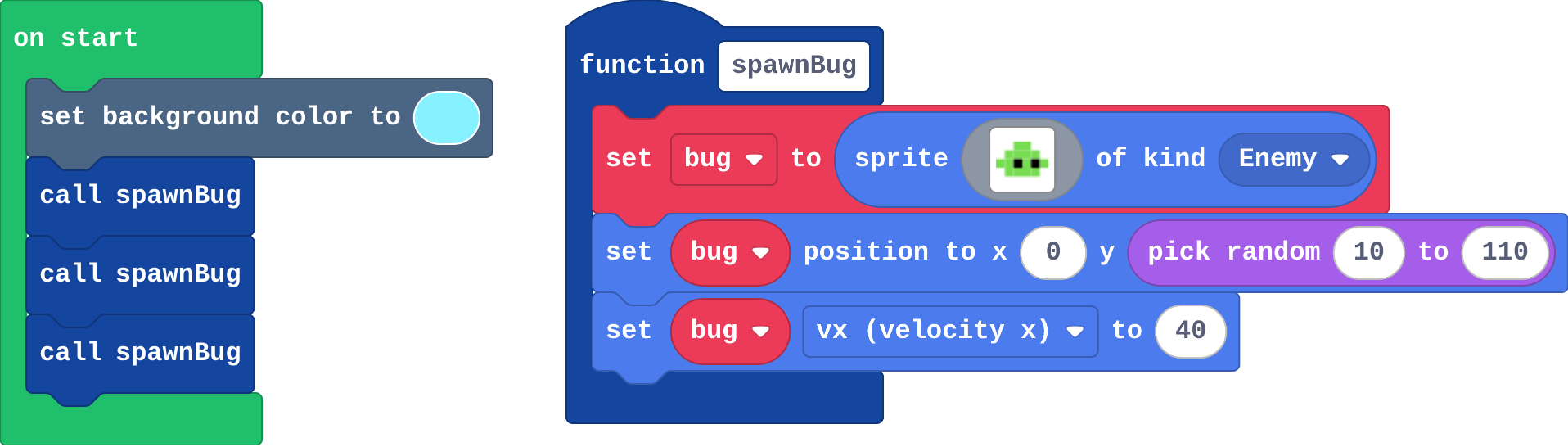
![h:272](https://studio.learningwaypoints.com/tutorials/_pictures/makecode/code/80aa436d158f.png?v=0c57515859c38524)

**on start calls spawnBug three times. What do you see?**

- Three bugs, all at the same height
- Nothing: a function only runs in a timer
- Three bugs flying right
- One bug

<!-- Speaker note: What happens: Three bugs flying right. Each call runs the function's blocks once, and each run picks its own random height. Take two or three predictions before anyone runs it. -->

<!-- Speaker note: Teacher: some students expect nothing, because the function is not an event. Each call runs it. Count the call blocks together. -->

---

<span style="background:#dcfce7; color:#1a1a1a; border:1.5px solid #22c55e; padding:6px 18px; border-radius:8px; font-size:1em; font-weight:500;">✅ Check</span>

## What happened?

* Three bugs flying right. Each call runs the function's blocks once, and each run picks its own random height.

<!-- Speaker note: Reveal after running. Ask who predicted it, and what made them think so. -->

---

<span style="background:#fef3c7; color:#1a1a1a; border:1.5px solid #f59e0b; padding:6px 18px; border-radius:8px; font-size:1em; font-weight:500;">✍️ Activity</span>

## Run it

Open the lesson at this step and try it together.

[studio.learningwaypoints.com/tutorials/code/arcade-advanced/arcade-functions/?full=step-2#step-2](https://studio.learningwaypoints.com/tutorials/code/arcade-advanced/arcade-functions/?full=step-2#step-2)

<!-- Speaker note: Count the bugs. Press the restart button under the simulator to watch again (the heights are random). Students should be able to say: I counted the bugs and compared with my prediction. -->

---

<span style="background:#dbeafe; color:#1a1a1a; border:1.5px solid #3b82f6; padding:6px 18px; border-radius:8px; font-size:1em; font-weight:500;">💬 Discussion</span>

## Investigate

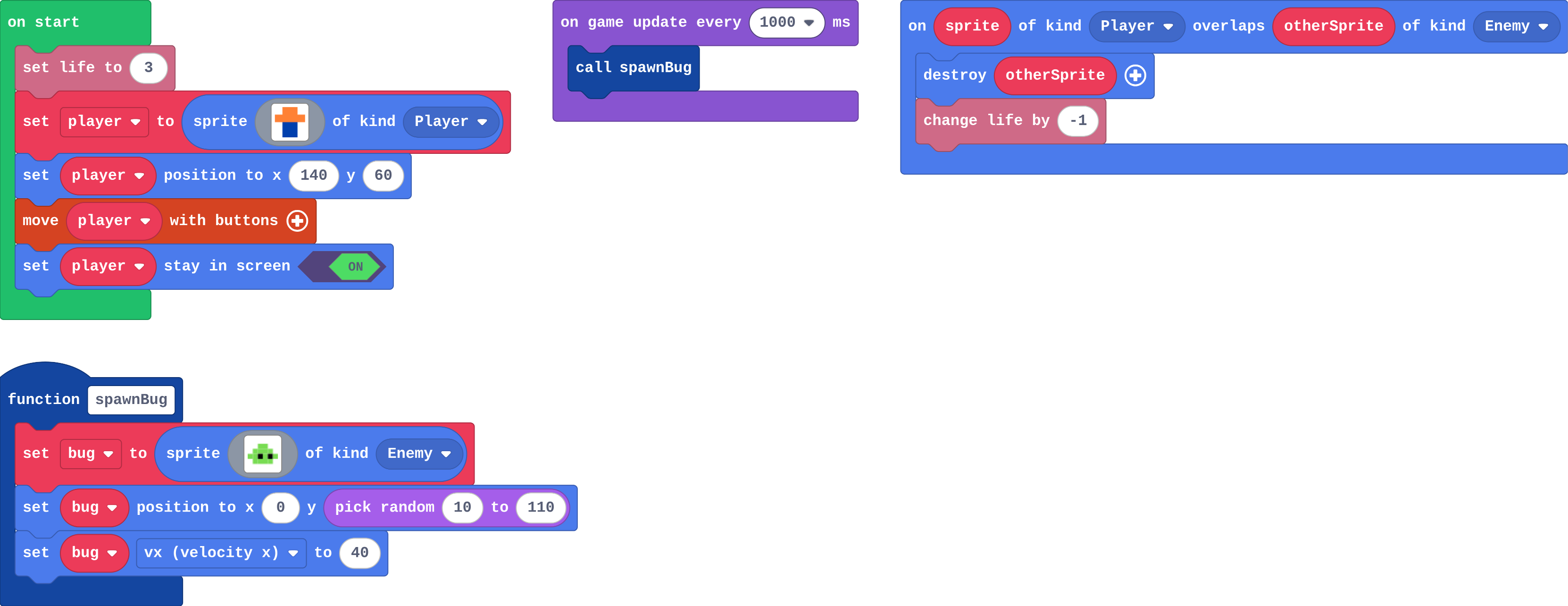
![h:360](https://studio.learningwaypoints.com/tutorials/_pictures/makecode/code/c6a748a6c078.png?v=eb3861394d132a48)

<!-- Speaker note: The game: a bug flies in from the left every second. Dodge them. What this step is for: A function names a job once; its blocks run only when it is called, once per call. Every event block is a function too: in Python you can see the blocks handed to the game to call. -->

<!-- Speaker note: Teacher: Ava's empty timer is this lesson's misconception. Then switch the editor to Python together before the match. -->

---

<span style="background:#dcfce7; color:#1a1a1a; border:1.5px solid #22c55e; padding:6px 18px; border-radius:8px; font-size:1em; font-weight:500;">✅ Check</span>

## Ava's bugs

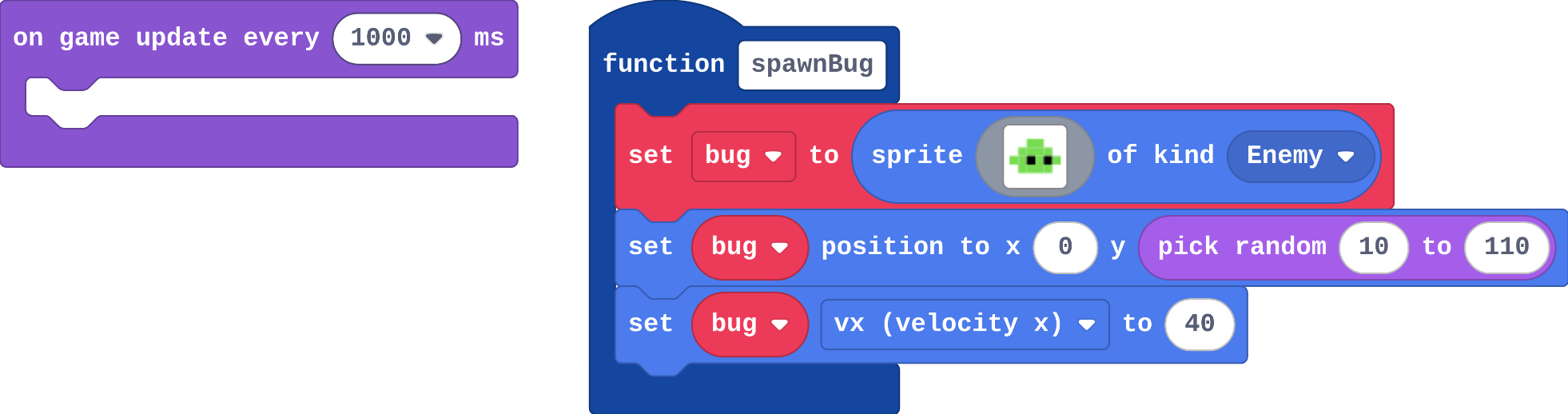
Ava's program:

![h:259](https://studio.learningwaypoints.com/tutorials/_pictures/makecode/code/8ea0fd0ef7e6.png?v=4f9e59bff220724f)

**Ava made the spawnBug function and an empty timer (below). She runs the game and no bugs ever appear. Why?**

- The timer is too slow
- The bugs are invisible
- Nothing calls spawnBug: making a function does not run it
- Functions only work in on start

* Answer: Nothing calls spawnBug: making a function does not run it

<!-- Speaker note: Making a function only names the job. Its blocks run when a call block runs them. Ava's timer is empty, so the job is never done. -->

<style scoped>pre, marp-pre { font-size: 0.5em; line-height: 1.25; } section { font-size: 22px; }</style>

---

<span style="background:#dcfce7; color:#1a1a1a; border:1.5px solid #22c55e; padding:6px 18px; border-radius:8px; font-size:1em; font-weight:500;">✅ Check</span>

## How many bugs?

**The game runs for 10 seconds. The timer calls spawnBug every 1000 ms. How many times do the blocks inside spawnBug run?**

* Answer: 10

<!-- Speaker note: Once per call, and the timer calls it once a second: about 10 times in 10 seconds. -->

---

<span style="background:#dbeafe; color:#1a1a1a; border:1.5px solid #3b82f6; padding:6px 18px; border-radius:8px; font-size:1em; font-weight:500;">💬 Discussion</span>

## The same game in Python

```python
def spawn_bug():
    global bug
    bug = sprites.create(img("""..."""), SpriteKind.enemy)
    bug.set_position(0, randint(10, 110))
    bug.vx = 40
def on_update_interval():
    spawn_bug()
game.on_update_interval(1000, on_update_interval)
```

Look at what Python did with **on game update every**: it is a `def`, a function, and the line after it **hands** that function to the game. Every event block you have used is a function the game calls for you.

<style scoped>pre, marp-pre { font-size: 0.62em; line-height: 1.25; }</style>

---

<span style="background:#dcfce7; color:#1a1a1a; border:1.5px solid #22c55e; padding:6px 18px; border-radius:8px; font-size:1em; font-weight:500;">✅ Check</span>

## The same game in Python

**This is the game in Python (press Python at the top of the editor). Match each Python line with what it does.**

| | |
|---|---|
| `def spawn_bug():` | A. calls it: runs its blocks once |
| `spawn_bug()` | B. makes the function spawn_bug |
| `def on_update_interval():` | C. makes a function from the blocks inside on game update every |
| `game.on_update_interval(1000, on_update_interval)` | D. hands that function to the game to call every second |

* Answer: def spawn_bug(): → B. makes the function spawn_bug; spawn_bug() → A. calls it: runs its blocks once; def on_update_interval(): → C. makes a function from the blocks inside on game update every; game.on_update_interval(1000, on_update_interval) → D. hands that function to the game to call every second

<!-- Speaker note:  -->

<style scoped>pre, marp-pre { font-size: 0.5em; line-height: 1.25; } section { font-size: 17px; }</style>

---

<span style="background:#fef3c7; color:#1a1a1a; border:1.5px solid #f59e0b; padding:6px 18px; border-radius:8px; font-size:1em; font-weight:500;">✍️ Activity</span>

## Recipe cards <span style="font-size:.6em;color:#64748b">(3 min)</span>

One student holds a recipe card ("make a bug: stand at the door, walk across"). Nothing happens until the teacher calls "make a bug!", and then it happens each time.

<!-- Speaker note: Writing the card is making the function; calling its name runs it. -->

---

<span style="background:#fef3c7; color:#1a1a1a; border:1.5px solid #f59e0b; padding:6px 18px; border-radius:8px; font-size:1em; font-weight:500;">✍️ Activity</span>

## Modify


- **A point per bug:** Score a point for **every bug** that is made: a survival score. Change the **function**, so every call scores.
- **An extra bug:** Make **A** call spawnBug too. Does the extra bug score a point?

[Open this step](https://studio.learningwaypoints.com/tutorials/code/arcade-advanced/arcade-functions/?full=step-4#step-4)

<!-- Speaker note: What this step is for: Changing the function once changes every call, and any event can call it. Hints, in order: Put the block inside the function, not inside the timer. / change score by 1 (Info) goes at the end of spawnBug. / Drag in on A button pressed, and put call spawnBug inside it. For students who need more support: Give students the makeCoin function already made, and ask them to add the four calls. For early finishers: Make a second function, makeSpike, that adds an Enemy at a random place, and call it every 3 seconds. The hard part, on purpose: Making a function does nothing until it is called. When nothing appears, ask which block calls the function. When students get stuck: No bugs appear. Ask: Which block calls your function? Fix: Add a call block (from Functions) inside the timer or on start. / The call block is missing from the toolbox. Ask: Have you made the function yet? Fix: Make the function first; its call block then appears under Functions. / Only one coin ever comes back. Ask: Where is the call to makeCoin in the overlap? Fix: Call it after destroy, inside the Player–Food overlap. -->

<!-- Speaker note: Teacher: the score goes inside the function, so every call scores, wherever it is called from. -->

---

<span style="background:#dbeafe; color:#1a1a1a; border:1.5px solid #3b82f6; padding:6px 18px; border-radius:8px; font-size:1em; font-weight:500;">💬 Discussion</span>

## Investigate: Mix it up

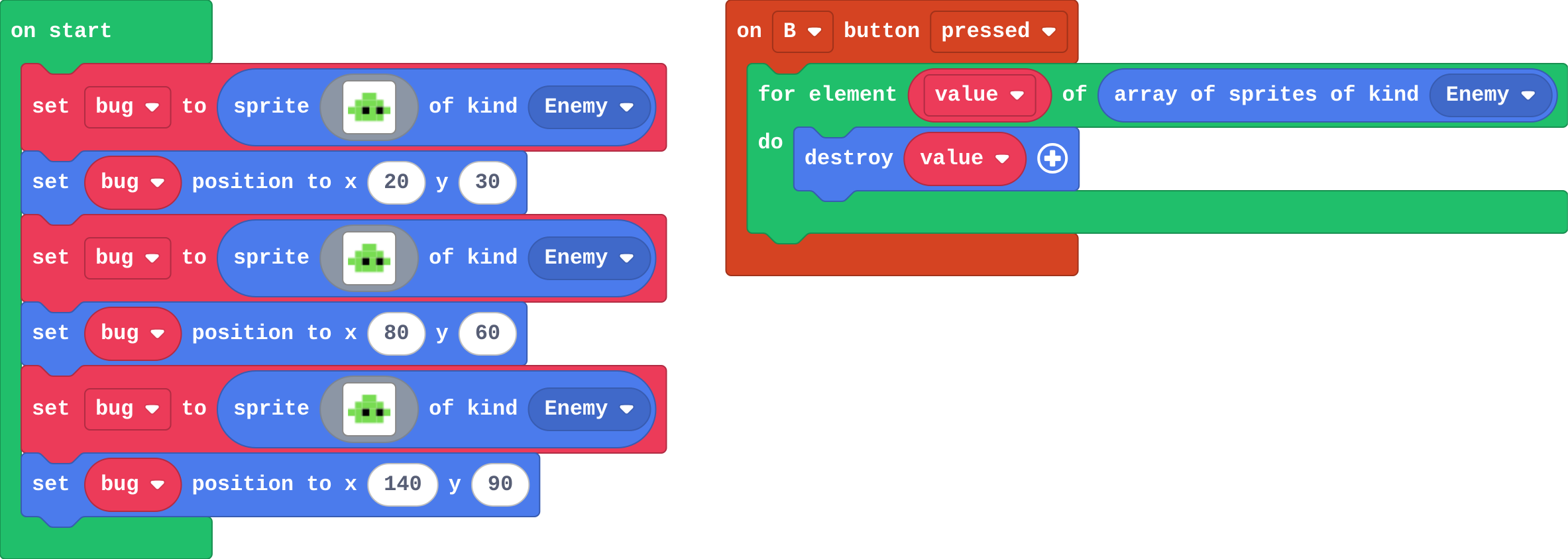
![h:360](https://studio.learningwaypoints.com/tutorials/_pictures/makecode/code/63f8d21596c6.png?v=e9752f35eac1a975)

<!-- Speaker note: What this step is for: A for element loop runs its blocks once for each sprite in the list. -->

---

<span style="background:#dcfce7; color:#1a1a1a; border:1.5px solid #22c55e; padding:6px 18px; border-radius:8px; font-size:1em; font-weight:500;">✅ Check</span>

## Mix it up

**There are 3 bugs on the screen. You press B. How many bugs are destroyed?**

* Answer: 3

<!-- Speaker note: array of sprites of kind Enemy lists all 3, and the loop destroys each one. What this step is for: A for element loop runs its blocks once for each sprite in the list. -->

---

<span style="background:#fef3c7; color:#1a1a1a; border:1.5px solid #f59e0b; padding:6px 18px; border-radius:8px; font-size:1em; font-weight:500;">✍️ Activity</span>

## Make

Make a **coin collector** that never runs out of coins:

- a function **makeCoin** makes one coin (kind **Food**) at a random place,
- **on start** calls it three times, so there are three coins,
- every time a coin is collected, the overlap calls it again, so there are always three.

[Open this step](https://studio.learningwaypoints.com/tutorials/code/arcade-advanced/arcade-functions/?full=step-6#step-6)

<!-- Speaker note: Hints, in order: Make a Function called makeCoin. Inside: set coin to sprite of kind Food, then set its position to random x and y. / Call makeCoin three times in on start. / In the overlap, after destroy and change score, call makeCoin once more. -->

<!-- Speaker note: Teacher: makeCoin is called four times in the code: three in on start, one in the overlap. -->

---

<span style="background:#fef3c7; color:#1a1a1a; border:1.5px solid #f59e0b; padding:6px 18px; border-radius:8px; font-size:1em; font-weight:500;">✍️ Activity</span>

## Change a snow globe

Snow falls in this globe: a function **addFlake** makes one flake, and a timer calls it. Make every flake fall faster (one change, in the function), then make **A** shake the globe: five extra flakes at once.

[Open this step](https://studio.learningwaypoints.com/tutorials/code/arcade-advanced/arcade-functions/?full=step-7#step-7)

---

<span style="background:#fef3c7; color:#1a1a1a; border:1.5px solid #f59e0b; padding:6px 18px; border-radius:8px; font-size:1em; font-weight:500;">✍️ Activity</span>

## Coin test <span style="font-size:.6em;color:#64748b">(3 min)</span>

Show your coin collector to the next pair. Collect a coin: does a new one appear?

---

<span style="background:#dcfce7; color:#1a1a1a; border:1.5px solid #22c55e; padding:6px 18px; border-radius:8px; font-size:1em; font-weight:500;">✅ Check</span>

## Exit ticket

**You make a function, but never call it. What happens when the game runs?**

* Nothing from that function: its blocks only run when something calls it.

<!-- Speaker note: Students answer on paper or a mini whiteboard before the reveal. Anyone who cannot answer needs the main idea again next lesson. Where this leads: Next lesson: a parameter, so one function can make a slow bug and a fast bug. Skillmap: the Game Maker Guide (arcade.makecode.com/skillmaps) builds bigger games from named jobs like these. -->